Cisco Unified Communications Manager (Call Manager) vs. GoTo Room

Overview
ProductRatingMost Used ByProduct SummaryStarting Price
Cisco Unified Communications Manager (Call Manager)
Score 8.7 out of 10
N/A
Call Manager is a unified call control center from Cisco that supports enterprise collaboration functions across the spectrum of IP telephony, video & web conferencing, and messaging. Features include call forwarding, call back, call transfer, ad hoc conferencing, and call park.N/A
GoTo Room
Score 10.0 out of 10
N/A
GoTo (formerly LogMeIn) offers GoToRoom, a video conferencing room solution available as a bundle with Dolby and Poly equipment.N/A
Pricing
Cisco Unified Communications Manager (Call Manager)GoTo Room
Editions & Modules
No answers on this topic
Offerings
Pricing Offerings
Cisco Unified Communications Manager (Call Manager)GoTo Room
Free Trial
NoNo
Free/Freemium Version
NoNo
Premium Consulting/Integration Services
NoNo
Entry-level Setup FeeNo setup feeOptional
Additional DetailsMust contact sales team for pricing
More Pricing Information
Community Pulse
Cisco Unified Communications Manager (Call Manager)GoTo Room
Features
Cisco Unified Communications Manager (Call Manager)GoTo Room
Cloud PBX
Comparison of Cloud PBX features of Product A and Product B
Cisco Unified Communications Manager (Call Manager)
7.3
Ratings
9% below category average
GoTo Room
-
Ratings
Hosted PBX9.00 Ratings00 Ratings
Multi-level Interactive Voice Response (IVR)5.20 Ratings00 Ratings
User templates7.10 Ratings00 Ratings
Call reports6.80 Ratings00 Ratings
Directory of employee names8.60 Ratings00 Ratings
Call Management
Comparison of Call Management features of Product A and Product B
Cisco Unified Communications Manager (Call Manager)
8.2
Ratings
2% below category average
GoTo Room
-
Ratings
Answering rules9.00 Ratings00 Ratings
Call recording7.00 Ratings00 Ratings
Call park9.00 Ratings00 Ratings
Call screening8.10 Ratings00 Ratings
Message alerts8.10 Ratings00 Ratings
VoIP system collaboration
Comparison of VoIP system collaboration features of Product A and Product B
Cisco Unified Communications Manager (Call Manager)
8.3
Ratings
4% above category average
GoTo Room
-
Ratings
Video conferencing8.60 Ratings00 Ratings
Audio conferencing8.60 Ratings00 Ratings
Video screen sharing7.00 Ratings00 Ratings
Instant messaging9.00 Ratings00 Ratings
Mobile apps
Comparison of Mobile apps features of Product A and Product B
Cisco Unified Communications Manager (Call Manager)
8.0
Ratings
1% above category average
GoTo Room
-
Ratings
Mobile app for iOS8.00 Ratings00 Ratings
Mobile app for Android8.00 Ratings00 Ratings
User Ratings
Cisco Unified Communications Manager (Call Manager)GoTo Room
Likelihood to Recommend
8.5
(0 ratings)
5.0
(0 ratings)
Likelihood to Renew
10.0
(0 ratings)
-
(0 ratings)
Usability
9.0
(0 ratings)
-
(0 ratings)
Support Rating
8.0
(0 ratings)
5.0
(0 ratings)
Implementation Rating
10.0
(0 ratings)
-
(0 ratings)
User Testimonials
Cisco Unified Communications Manager (Call Manager)GoTo Room
Likelihood to Recommend
The Cisco Unified Communications Manager platform would be most suited for the below scenarios. 1. An organization with very restricted policies and compliance where can't move to cloud-based solutions for data security. They can install the CUCM on-premises. 2. An organization that is still on a legacy phone system could adopt CUCM to save costs and have better services.
Read full review
It works really well in a one on one settings when teachers are coordinating with individual trainers or workshops. It can be helpful as well during a team setting Q&A for follow up training. However, it is a struggle to use in large group settings when one presenter is speaking to a large group of people for trainings.
Read full review
Pros
  • Customizability - The program allows for a lot of specific features and ways to use the program.
  • Traditional - The system is a very traditional phone system, with everything you would expect and need from an enterprise phone system.
  • Expandable - The system allows from a small amount of users to a large amount, with no upper limit.
Read full review
  • Video conferencing is clear and precise
  • Scheduling is emailed and easy to access.
  • The ease of getting used to the program is quick for all of our teachers.
Read full review
Cons
  • CUCM is overly complex and requires a very capable engineer to maintain it. Similarly, implementing anything new requires a great deal of specialized knowledge of CUCM.
  • CUCM is difficult to troubleshoot because of it's complexity.
  • CUCM is expensive licensing and they nickel and dime you with a plethora of tiny little license charges for every little feature. They have the most convoluted licensing models, ever, for their CU products in general.
Read full review
  • Learning how to work through multiple documents or presentations in a call can be tricky.
  • Our rural setting does not allow for consistent internet connection, video is not always clear.
  • Audio can be limited to a large room setting in workshops.
Read full review
Likelihood to Renew
We have been using this product for 20+ years and will continue too. This is a great product and new features are always coming out.
Read full review
No answers on this topic
Usability
Although it's very easy to use, once you understand the concepts of IP telephony, as I said before, I think Cisco could have improved the management interface of the platform, adding modern technologies and the design language of the other platforms like DNA Center, etc. This interface hasn't had a substantial improvement for about 10 years
Read full review
No answers on this topic
Support Rating
CUCM is supported by most third-party vendors for related products, so it makes finding solutions to specific needs easy. Also Cisco TAC is very knowledgeable, and we have never run into a problem they have not been able to resolve. Usually they are resolved without the need to escalate tickers either.
Read full review
Haven’t had a chance to need to connect with the service staff as we haven’t had to deal with any large issues beyond internet bandwidth restrictions. However, we feel like support would be very quick and efficient if we were to need it. The observations of setting up our doc cams and getting connected with workshop presenters has been smooth so far.
Read full review
Implementation Rating
This was the first phone system we implemented that could span multiple locations. We were very satisfied once fully implemented
Read full review
No answers on this topic
Alternatives Considered
The Cisco Call Manager application has been around for much longer than many of the competitors. As such, they have had plenty of time to resolve bugs and increase the feature set that comes natively with this solution. One of the biggest factors for us was the professional services/support that comes along with using any Cisco product.
Read full review
GoToRoom does a great job of video conferencing with multiple users, similar to Zoom, but has easier access to documents similar to Google Classroom or Google Hangouts. It’s a nice blend of these three pieces of software.
Read full review
Return on Investment
  • Return on Investment as one shot investment was made then only licensing contract renewing is needed.
  • Virtualized environment and centralized administration tools.
  • Money saving as a result on using features like TEHO.
  • Business continuity assured on environments with SRST and Multi site Deployment with Distributed Call Processing.
Read full review
  • It has been helpful for us to connect with professional development consultants that are out of our region.
  • It has provided opportunities for teachers to get training that otherwise would not have had an opportunity without driving long distances.
Read full review
ScreenShots

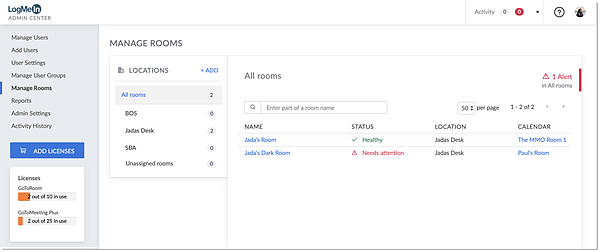
GoTo Room Screenshots

Screenshot of