Google Voice is a free IP telephony service that provides users with one phone number that can be forwarded to multiple phones or devices. It includes features such as call forwarding, voicemail translation, text messaging, and voice calls. Fees may apply for international calling.
$10
per month
Ooma Office
Score9.2 out of 10
N/A
For businesses of all sizes, Ooma provides advanced voice and collaboration features which they describe as flexible and scalable. With plans starting at $19.95 per user per month, Ooma Office is available without contracts or long-term commitments so as to make it easy for a small business to scale its office phone system with Ooma as its business grows. Ooma Office features include: Unlimited Calling in U.S., Canada, Mexico and Puerto Rico Free Local…
$9.95
per month
Pricing
Google Voice
Ooma Office
Editions & Modules
Starter
$10
per user/per month
Standard
$20
per user/per month
Premier
$30
per user/per month
Local Phone Number
$9.95
per month
Toll Free Number
$9.95
per month
Toll Free Calling Plan
$15.00
per month
Base Price
$19.95
per month
User Extension
$19.95
per month
Pro
$24.95
per month
Ooma Linx
$49.99
per month
Ooma Wireless Adapter
$49.99
per month
Ooma DP1 Desk Phone
$89.99
per month
Expansion Base Station
$99.99
per month
Yealink IP Phones
$99.99
per month
Cisco IP Phones
$109.99
per month
Yealink Conference IP Phones
$399.99
per month
Conference Bridge
Free
Ring Groups
Free
Virtual Receptionist
Free
Number Porting
Free
Offerings
Pricing Offerings
Google Voice
Ooma Office
Free Trial
No
No
Free/Freemium Version
No
No
Premium Consulting/Integration Services
No
No
Entry-level Setup Fee
No setup fee
$19.95 per user/month
Additional Details
—
Ooma Office offers plans starting at $19.95 per user/month with no contracts, ever.
A de minimis incentive was given to thank the reviewer for their time. The incentive was not used to bias or drive a particular response, nor was the incentive contingent on a positive endorsement. More Info
In the past, I would have happily recommended this for small business use cases. Due to its affordability, versatility, and low barrier to entry as well as its simplicity to use. Google Voice was integrated into the Chrome Browser, it was easily accessed from Gmail, and integrated into Gmail and could even be leveraged in such a way to when phone numbers were clicked on, Google Voice was the tool used. However over the past few years and more, in the past couple of years from 2021 to current, this tool seems to have lost favor with the Alphabet suite of tools. With the lack of integrations, it's becoming less stable, and people are just opting more for Google Meet Voice. The biggest area where this is less appropriate and where opportunity has opened for others is its lack of features, like virtual attendants, call recording, call transcription, SMS, MMS, CRM integration, and other key features even 1 or 2 person business really needs in this day and age
A de minimis incentive was given to thank the reviewer for their time. The incentive was not used to bias or drive a particular response, nor was the incentive contingent on a positive endorsement. More Info
We use Ooma Office for everyone in the company including mobile users. It has allowed us to eliminate the spam callers as well give our mobile and remote users the ability to make business calls - from any device, from anywhere, at any time - without having to worry about any long distance charges, or without giving up their personal telephone numbers (at home or cellular).
A de minimis incentive was given to thank the reviewer for their time. The incentive was not used to bias or drive a particular response, nor was the incentive contingent on a positive endorsement. More Info
A de minimis incentive was given to thank the reviewer for their time. The incentive was not used to bias or drive a particular response, nor was the incentive contingent on a positive endorsement. More Info
A de minimis incentive was given to thank the reviewer for their time. The incentive was not used to bias or drive a particular response, nor was the incentive contingent on a positive endorsement. More Info
A de minimis incentive was given to thank the reviewer for their time. The incentive was not used to bias or drive a particular response, nor was the incentive contingent on a positive endorsement. More Info
It's user friendly, how to use it is self explanatory, they support all their own options while someone like Phone Booth uses a third party. I can cancel Google Voice anytime and I choose how much I spend with Google Voice
We have found it very easy to configure, manage, and expand our phone operations with Ooma Office. We needed a reliable phone network as this is the first means of communication for our customers - Ooma has made it a lot easier for us to manage. Their support is also available 24x7 so that's a huge plus.
I haven't had problems with dropped calls, bad reception, lost recordings - everything works the way it should. The iOS app is easy to use, and the process is easy to explain to other people. It's also the cheapest way I've found to call internationally - I've used it to interview people from London and Austraila.
A de minimis incentive was given to thank the reviewer for their time. The incentive was not used to bias or drive a particular response, nor was the incentive contingent on a positive endorsement. More Info
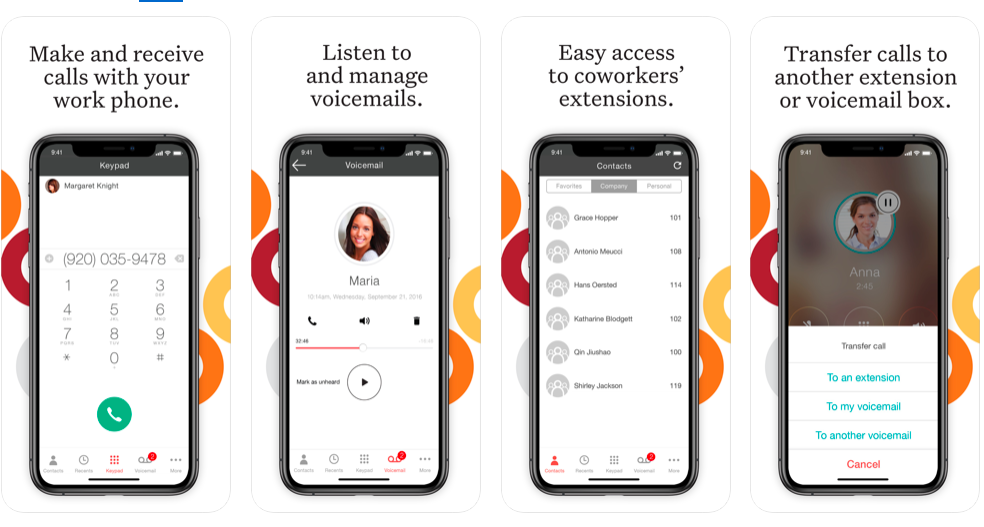
Ooma has helped us make better use of our phones and given us many more capabilities than our previous service. The mobile app has provided an excellent connection and quality. Its integration with the cellular phone app and contacts makes it a breeze to use. Emailed recordings of voicemails are very helpful for both receiving messages and allowing us to archive them. It has also saved us a significant amount of money and provided us with a more capable and reliable system all at once.
A de minimis incentive was given to thank the reviewer for their time. The incentive was not used to bias or drive a particular response, nor was the incentive contingent on a positive endorsement. More Info
They do not offer support unless you have the Business account for Google Voice under G Suite. This is tough, because Google doesn't really have a customer support team for this service, so when it gets shut down for a few hours, we have no choice but to wait it out. But this doesn't happen that often, which is great.
A de minimis incentive was given to thank the reviewer for their time. The incentive was not used to bias or drive a particular response, nor was the incentive contingent on a positive endorsement. More Info
Ooma Office support is always available. I've never been on the phone with them for longer than 5 minutes. They are knowledgable, have great active listening skills, are able to make recommendations on how to make Ooma Office work even better for you, and wait times to speak with an agent are reasonable and typically less than 1 minute.
A de minimis incentive was given to thank the reviewer for their time. The incentive was not used to bias or drive a particular response, nor was the incentive contingent on a positive endorsement. More Info
It is a pretty seamless program to transfer to, even for people who either have little experience with these programs or people who were stuck on Skype
A de minimis incentive was given to thank the reviewer for their time. The incentive was not used to bias or drive a particular response, nor was the incentive contingent on a positive endorsement. More Info
Have a plan in place before you start the implementation, open communication with the staff on the changes being made, prepare a reference guide on the system and how to navigate the new setup. Budget and allocate time for helping staff learn the new system. Consolidate and coordinate all the questions internally before reaching out to support.
The integrations of Google Voice with all our devices are flawless, Android, iOS, Windows, Linux and Mac. Also, the call performance is far superior on wifi as well as on mobile data. With Skype, we had several problems with personal accounts, performance issues, and in general, it felt awkward to use it.
A de minimis incentive was given to thank the reviewer for their time. The incentive was not used to bias or drive a particular response, nor was the incentive contingent on a positive endorsement. More Info
We went over to Ooma [Office] after having had Intermedia for several years. Intermedia was good, but they were due for an update on many of their systems, which they did after we left. With Ooma [Office], we have our hold music and other basic, easy to use options that fit well for our small business.
A de minimis incentive was given to thank the reviewer for their time. The incentive was not used to bias or drive a particular response, nor was the incentive contingent on a positive endorsement. More Info
Google Voice should be also be use to those who have difficulty in speaking English. So the contract term will need to be a little strict as Google Voice is used in navigations as the part of GPRS navigation is personal. The private data need to be in control much more securely and safely.
It help to connect with the products that we use as a part. We need to get in touch with our professional world. It is like a tool that helps us to get in touch with everything from A to Z in our professional careers. So we need to be in touch with everything as linearly as the jpb can be done.
Cost for Google Voice is stellar, starting at $10/mo per user.
While it doesn't offer a new Audio/Video conferencing solution it does integrate with GSuite so it makes use of Google Calendar and Hangouts/ Google Meet.
Gets the employee's to use their company phone numbers more as texting is easy and deployment is simple.
The cell phone app is reliable and easy to deploy.
A de minimis incentive was given to thank the reviewer for their time. The incentive was not used to bias or drive a particular response, nor was the incentive contingent on a positive endorsement. More Info
System made it one-stop shopping for fax lines and phones numbers and equipment which was convenient.
It was a shock to see that $39.98 of service manages to result in about $18 of additional “fees” every month. Makes the service significantly less of a bargain than is advertised.