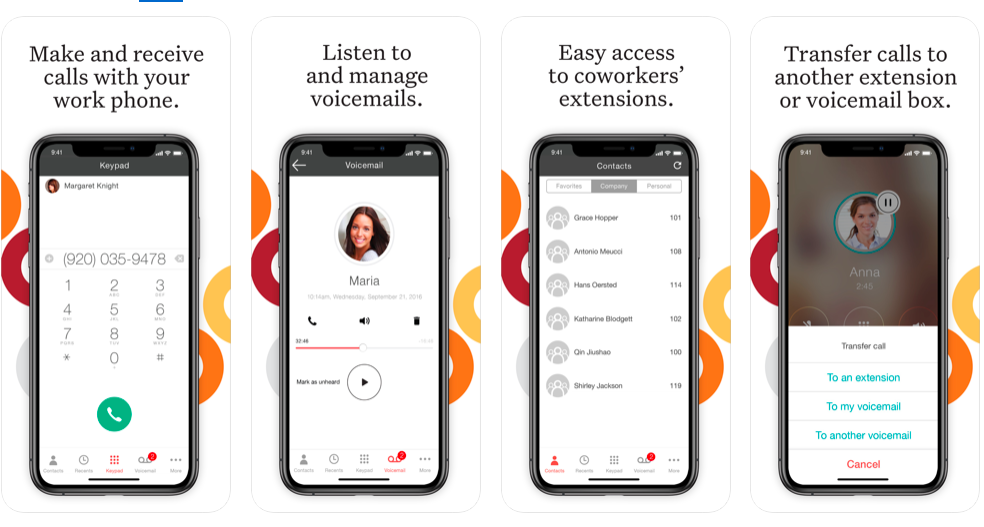
Genesys Cloud CX (formerly PureCloud, Genesys Cloud) is a contact center application optimized for automatic call distribution, interactive voice response, email, social media, chat, and text/SMS. It is also a VoIP interconnect service provider.
$75
per month (billed annually) per user
Ooma Office
Score9.2 out of 10
N/A
For businesses of all sizes, Ooma provides advanced voice and collaboration features which they describe as flexible and scalable. With plans starting at $19.95 per user per month, Ooma Office is available without contracts or long-term commitments so as to make it easy for a small business to scale its office phone system with Ooma as its business grows. Ooma Office features include: Unlimited Calling in U.S., Canada, Mexico and Puerto Rico Free Local…
$9.95
per month
Pricing
Genesys Cloud CX
Ooma Office
Editions & Modules
Genesys Cloud CX 1 - Voice
$75
per month (billed annually) per user
Genesys Cloud CX 2 - Digital
$95
per month (billed annually) per user
Genesys Cloud CX 2 - Digital + Voice
$115
per month (billed annually) per user
Genesys Cloud CX 3 - Digital + WEM
$135
per month (billed annually) per user
Genesys Cloud CX 3 Digital + WEM + Voice
$155
per month (billed annually) per user
Local Phone Number
$9.95
per month
Toll Free Number
$9.95
per month
Toll Free Calling Plan
$15.00
per month
Base Price
$19.95
per month
User Extension
$19.95
per month
Pro
$24.95
per month
Ooma Linx
$49.99
per month
Ooma Wireless Adapter
$49.99
per month
Ooma DP1 Desk Phone
$89.99
per month
Expansion Base Station
$99.99
per month
Yealink IP Phones
$99.99
per month
Cisco IP Phones
$109.99
per month
Yealink Conference IP Phones
$399.99
per month
Conference Bridge
Free
Ring Groups
Free
Virtual Receptionist
Free
Number Porting
Free
Offerings
Pricing Offerings
Genesys Cloud CX
Ooma Office
Free Trial
Yes
No
Free/Freemium Version
No
No
Premium Consulting/Integration Services
No
No
Entry-level Setup Fee
No setup fee
$19.95 per user/month
Additional Details
Pricing plans can also be billed hourly.
Ooma Office offers plans starting at $19.95 per user/month with no contracts, ever.
Great for large centers with multiple sites, particularly if you are leveraging Genesys Cloud Voice and let them "be the carrier". Handles queues and campaigns well. Powerful when fully optimised but can be built over time. If you want to be able to build a third-party application to suit your business requirements, Genesys has a lot of API endpoints to allow this. Less suited to smaller orgs or orgs that only need simple flows - as the per agent cost can be expensive, and some features require additional licenses (and expense) on top.
A de minimis incentive was given to thank the reviewer for their time. The incentive was not used to bias or drive a particular response, nor was the incentive contingent on a positive endorsement. More Info
We use Ooma Office for everyone in the company including mobile users. It has allowed us to eliminate the spam callers as well give our mobile and remote users the ability to make business calls - from any device, from anywhere, at any time - without having to worry about any long distance charges, or without giving up their personal telephone numbers (at home or cellular).
A de minimis incentive was given to thank the reviewer for their time. The incentive was not used to bias or drive a particular response, nor was the incentive contingent on a positive endorsement. More Info
A de minimis incentive was given to thank the reviewer for their time. The incentive was not used to bias or drive a particular response, nor was the incentive contingent on a positive endorsement. TR verified that a representative sample of customers was invited. More Info
A de minimis incentive was given to thank the reviewer for their time. The incentive was not used to bias or drive a particular response, nor was the incentive contingent on a positive endorsement. More Info
A de minimis incentive was given to thank the reviewer for their time. The incentive was not used to bias or drive a particular response, nor was the incentive contingent on a positive endorsement. More Info
The upcoming upgrades working with Genesys Cloud and Salesforce are very exciting. Even though we don't use Genesys Cloud to the fullest extent it can be used (we just migrated a year ago), when these upgrades roll out, I am very excited to see what it can do to for our agents. I think they are going to be very impressed
A de minimis incentive was given to thank the reviewer for their time. The incentive was not used to bias or drive a particular response, nor was the incentive contingent on a positive endorsement. More Info
We have found it very easy to configure, manage, and expand our phone operations with Ooma Office. We needed a reliable phone network as this is the first means of communication for our customers - Ooma has made it a lot easier for us to manage. Their support is also available 24x7 so that's a huge plus.
Everything is very good. It is very useful, friendly to users and it makes our work easier than what we expected. I think that I don't need any help from someone on how to use Genesys coz basically they will directly feed it to you without any hassle on using it.
A de minimis incentive was given to thank the reviewer for their time. The incentive was not used to bias or drive a particular response, nor was the incentive contingent on a positive endorsement. More Info
Ooma has helped us make better use of our phones and given us many more capabilities than our previous service. The mobile app has provided an excellent connection and quality. Its integration with the cellular phone app and contacts makes it a breeze to use. Emailed recordings of voicemails are very helpful for both receiving messages and allowing us to archive them. It has also saved us a significant amount of money and provided us with a more capable and reliable system all at once.
A de minimis incentive was given to thank the reviewer for their time. The incentive was not used to bias or drive a particular response, nor was the incentive contingent on a positive endorsement. More Info
The platform is highly reliable, with minimal downtime or outages, and is generally available when needed. Over the course of using it, unplanned outages or application errors have been rare, and any issues that did arise were quickly resolved. Genesys provides robust support and maintenance, ensuring the system remains operational during critical business hours. However, like any cloud-based platform, there have been occasional disruptions, though these were infrequent and quickly addressed. Overall, its availability has been excellent, supporting smooth daily operations.
Overall, the platform performs well, with pages loading quickly and reports typically completing in a reasonable time, even with complex data. The interface is responsive, and most day-to-day tasks are executed efficiently. However, in some instances, especially during peak usage times or when running very detailed, large-scale reports, there can be slight delays. While these are rare, they occasionally affect workflow. Additionally, the platform generally integrates smoothly with other systems, though some integrations can slow down slightly, particularly when pulling large datasets or interacting with older, legacy systems. Nonetheless, the performance is strong and reliable for most use cases.
Support does indeed resolve the issue but they seem to be really slow and I have to stay on them to get my ticket handled. Everyone I have interacted with is very professional and pleasant. Other than being slow its been a good experience
A de minimis incentive was given to thank the reviewer for their time. The incentive was not used to bias or drive a particular response, nor was the incentive contingent on a positive endorsement. More Info
Ooma Office support is always available. I've never been on the phone with them for longer than 5 minutes. They are knowledgable, have great active listening skills, are able to make recommendations on how to make Ooma Office work even better for you, and wait times to speak with an agent are reasonable and typically less than 1 minute.
A de minimis incentive was given to thank the reviewer for their time. The incentive was not used to bias or drive a particular response, nor was the incentive contingent on a positive endorsement. More Info
Genesys team that provide trainings are friendly and professional. They helped us to understand well the product and the functionalities. The training was detailed with use cases. At the end, we got a task to develop that ended with success and we got some Genesys rewards. It was amazing experience
A de minimis incentive was given to thank the reviewer for their time. The incentive was not used to bias or drive a particular response, nor was the incentive contingent on a positive endorsement. More Info
In general, it gives a description and can help to understand what to do and how. but: Sometimes, it does not keep up with changes in the system (for example, in the GUI changes, additional features and so on). Sometimes, much easier and helpful to read the documentation (https://help.mypurecloud.com/) that gives the "better" explanations and takes less time.
A de minimis incentive was given to thank the reviewer for their time. The incentive was not used to bias or drive a particular response, nor was the incentive contingent on a positive endorsement. More Info
My Team was involved in the discussion before implementing the application. We had a whole walkthrough of this product and during the demo itself we were very impressed with type of service we were getting. The integration of the product into our system was very quick and seamless.
A de minimis incentive was given to thank the reviewer for their time. The incentive was not used to bias or drive a particular response, nor was the incentive contingent on a positive endorsement. More Info
Have a plan in place before you start the implementation, open communication with the staff on the changes being made, prepare a reference guide on the system and how to navigate the new setup. Budget and allocate time for helping staff learn the new system. Consolidate and coordinate all the questions internally before reaching out to support.
We previously utilized Genesys Engage. The analytics and reporting in Genesys Engage cannot even compare to what we are seeing in Genesys Cloud CX. Genesys Cloud CX provides a very "hands on" experience for supervisors as well as analytics teams. Call recordings and analytics in Genesys Cloud CX provided a full view of the conversation and allow for a better understanding of the customer journey.
A de minimis incentive was given to thank the reviewer for their time. The incentive was not used to bias or drive a particular response, nor was the incentive contingent on a positive endorsement. More Info
We went over to Ooma [Office] after having had Intermedia for several years. Intermedia was good, but they were due for an update on many of their systems, which they did after we left. With Ooma [Office], we have our hold music and other basic, easy to use options that fit well for our small business.
A de minimis incentive was given to thank the reviewer for their time. The incentive was not used to bias or drive a particular response, nor was the incentive contingent on a positive endorsement. More Info
Genesys provides Licensing in 3 tier subscription types of licenses on top based on any business requirements then any sort of feature/functionality inclusion (or removal) is discussed openly. There are 2 types of billing models available which are "Named" and "Concurrent" based on the type of roles users will perform in Genesys Cloud CX environment (eg. Agent, Supervisor, Administrator, and Business Users) Also, the billing period/frequency starts on the actual day the platform is delivered.
A de minimis incentive was given to thank the reviewer for their time. The incentive was not used to bias or drive a particular response, nor was the incentive contingent on a positive endorsement. More Info
I give Genesys a rating of 10 for scalability because of its ability to adapt seamlessly to growing business needs, whether expanding across multiple departments, locations, or regions. Its cloud-based infrastructure allows for easy scaling without the need for costly hardware upgrades or lengthy implementation times. As our organisation grew, we were able to add new agents, channels, and features without disrupting operations, which significantly enhanced our flexibility. The platform's design supports both small-scale and enterprise-level operations, making it ideal for evolving businesses. Additionally, its capacity to handle increased interaction volumes without compromising performance ensures that customer service quality remains high, even during peak times. This flexibility and ease of scaling, combined with real-time analytics and automation capabilities, make it highly effective for growing organisations.
Professional services are definitely much more experienced than the support teams, and the price for their services is very fair. I wish that the support team could help answer simple questions about work that the PSS team does, however, so that we do not have to use our SOW for simple Q&A emails.
A de minimis incentive was given to thank the reviewer for their time. The incentive was not used to bias or drive a particular response, nor was the incentive contingent on a positive endorsement. More Info
System made it one-stop shopping for fax lines and phones numbers and equipment which was convenient.
It was a shock to see that $39.98 of service manages to result in about $18 of additional “fees” every month. Makes the service significantly less of a bargain than is advertised.