TrustRadius: an HG Insights company

FortiMonitor vs. SolarWinds Server & Application Monitor

Save this comparison

Save this comparison

Add Product

Recommended Comparisons

    Overview
    ProductRatingMost Used ByProduct SummaryStarting Price

    FortiMonitor

    Score8 out of 10
    N/AFortiMonitor is a comprehensive, SaaS-based digital experience monitoring (DEM) platform that helps organizations modernize their performance-monitoring tools. It provides visibility into endpoint application performance and digital experience—no matter where the user resides or where the application is hosted. It is based on Panopta, which was acquired by Fortinet in late 2020.N/A

    SolarWinds Server & Application Monitor

    Score6.9 out of 10
    N/ASolarWinds Server & Application Monitor (SAM) delivers application and server monitoring capabilities. SAM allows for self-service for easy setup, 1200+ monitoring templates, and customization options, as well as integrate with other SolarWinds products.N/A
    Pricing
    FortiMonitorSolarWinds Server & Application Monitor
    Editions & Modules
    No answers on this topic
    No answers on this topic
    Offerings
    Pricing Offerings
    FortiMonitorSolarWinds Server & Application Monitor
    Free Trial
    YesYes
    Free/Freemium Version
    NoNo
    Premium Consulting/Integration Services
    YesNo
    Entry-level Setup FeeNo setup feeNo setup fee
    Additional DetailsOur simple, usage-based pricing model is ideal whether you have five servers, or 500 hundred. You’ll be charged monthly per the number of instances monitored, and any additional features you’re using, such as CounterMeasures and synthetic checks. Standard Instances - $6/Instance Network Devices - $9/Device Containers - $2/ContainerSAM pricing starts at $2,995.
    More Pricing Information
    Community Pulse
    FortiMonitorSolarWinds Server & Application Monitor
    Considered Both Products
    Fortinet
    No answer on this topic
    SolarWinds
    No answer on this topic
    Key User Insights
    Would buy again
    No answers on this topic
    100%
    Would buy again
    33 Answers
    Delivers good value for the price
    No answers on this topic
    100%
    Delivers good value for the price
    31 Answers
    Happy with the feature set
    No answers on this topic
    100%
    Happy with the feature set
    33 Answers
    Lived up to sales and marketing promises
    No answers on this topic
    100%
    Lived up to sales and marketing promises
    26 Answers
    Implementation went as expected
    No answers on this topic
    93%
    Implementation went as expected
    28 Answers
    Features
    FortiMonitorSolarWinds Server & Application Monitor
    Application Performance Management
    Comparison of Application Performance Management features of FortiMonitor and SolarWinds Server & Application Monitor
    Feature
    FortiMonitor
    -
    Ratings
    SolarWinds Server & Application Monitor
    8.6
    276 Ratings
    12% above category average
    Application monitoring00 Ratings8.9266 Ratings
    Database monitoring00 Ratings8.4230 Ratings
    Threshold alerts00 Ratings8.9271 Ratings
    Predictive capabilities00 Ratings8.2215 Ratings
    Application performance management console00 Ratings8.2239 Ratings
    Collaboration tools00 Ratings7.7148 Ratings
    Out-of-the box templates to monitor applications00 Ratings7.8256 Ratings
    Application dependency mapping and thresholding00 Ratings8.5216 Ratings
    Virtualization monitoring00 Ratings8.8234 Ratings
    Server availability and performance monitoring00 Ratings9.8269 Ratings
    Server usage monitoring and capacity forecasting00 Ratings9.1250 Ratings
    IT Asset Discovery00 Ratings9.0199 Ratings
    Best Alternatives
    FortiMonitorSolarWinds Server & Application Monitor
    Small Businesses
    SolarWinds Pingdom
    Score9.8 out of 10
    No answers on this topic
    Medium-sized Companies
    Catchpoint
    Score9.2 out of 10
    SolarWinds AppOptics
    Score8.1 out of 10
    Enterprises
    Nexthink
    Score7 out of 10
    Splunk AppDynamics
    Score8.2 out of 10
    All AlternativesView all alternativesView all alternatives
    User Ratings
    FortiMonitorSolarWinds Server & Application Monitor
    Likelihood to Recommend
    8.0
    (1 ratings)
    8.8
    (278 ratings)
    Likelihood to Renew
    -
    (0 ratings)
    8.9
    (10 ratings)
    Usability
    -
    (0 ratings)
    8.6
    (29 ratings)
    Availability
    -
    (0 ratings)
    9.9
    (3 ratings)
    Performance
    -
    (0 ratings)
    6.0
    (3 ratings)
    Support Rating
    -
    (0 ratings)
    9.0
    (21 ratings)
    Online Training
    -
    (0 ratings)
    4.5
    (1 ratings)
    Implementation Rating
    -
    (0 ratings)
    4.5
    (3 ratings)
    Configurability
    -
    (0 ratings)
    1.0
    (2 ratings)
    Ease of integration
    -
    (0 ratings)
    4.5
    (2 ratings)
    Product Scalability
    -
    (0 ratings)
    9.9
    (3 ratings)
    Vendor post-sale
    -
    (0 ratings)
    4.5
    (2 ratings)
    Vendor pre-sale
    -
    (0 ratings)
    4.5
    (2 ratings)
    User Testimonials
    FortiMonitorSolarWinds Server & Application Monitor
    Likelihood to Recommend
    Fortinet
    It is great for monitoring internet connections.
    The agent installed on Windows works efficiently and takes up little resources. The method of settling costs is not very clear.
    There should also be a table with the current list of costs visible.
    Incentivized
    Read full review
    SolarWinds
    For monitoring applications that run on Windows hosts on VMware or HyperV virtualization, SolarWindows offers a nice, vertical view of both the loads and the resources. In such an environment, this makes life really good! But if you have something else -- for example, Linux hosts -- you're on your own to some extent. That is, the things it does well, it does very well -- but everything else is much less polished.
    Incentivized
    Read full review
    Pros
    Fortinet
    • Monitoring from several locations
    • Fast notification
    • Push notifications, SMS and calling
    Incentivized
    Read full review
    SolarWinds
    • Monitor Azure Cloud Severs- We use SolarWinds SAM to monitor Active Directory and DNS on Several DCs published on Azure Cloud.
    • Monitor Hyper V and VMware - SolarWinds SAM monitors applications on both Hyper V and VMware, while also monitoring the physical host machines.
    • It also helps us monitor Warranty expiration for physical servers.
    Incentivized
    Read full review
    Cons
    Fortinet
    • Simplifying the interface
    • Simplification of the process, e.g. notifications to Slack
    • Dark mode for panel and dashboard
    • Push notification - should contain more detailed information
    • A nicer looking dashboard
    Incentivized
    Read full review
    SolarWinds
    • Provides basic monitoring/visibility. Visibility into detailed/fine-grained issues best suited for more specialized/expensive solutions.
    • Licensing per monitored application rapidly uses up purchased license count.
    • More out-of-the-box templates or easier setup of monitoring less-common applications would make the solution more appealing given the target audience of the product.
    Incentivized
    Read full review
    Likelihood to Renew
    Fortinet
    No answers on this topic
    SolarWinds
    We are heavily invested in Solarwinds products for a reason. They are generally easy to setup and run with, requiring only some interfacing with support or help articles on rare occasions. They do what we bought them to do and we can't ask for more.
    Incentivized
    Read full review
    Usability
    Fortinet
    No answers on this topic
    SolarWinds
    SolarWinds Server & Application Monitor is quite easy to use and super versatile. It allows you to do just about anything you can through premade templates or through scripting. You can use an agent on the servers if you want to, or you can monitor through WMI or SNMP credentials. You can customize thresholds for alerting quickly, and you can configure alerts to be as complex or as simple as you want.
    Incentivized
    Read full review
    Reliability and Availability
    Fortinet
    No answers on this topic
    SolarWinds
    The tool works and monitors items 24x7, it only requires maintenance a little more frequently due to security fixes in the Windows operating system.
    Incentivized
    Read full review
    Performance
    Fortinet
    No answers on this topic
    SolarWinds
    The graphical interface and the performance of the database leave a little to be desired, they could be better explored.Some functionality and screens do not work well depending on the browser used. The integrations never had any problems or caused crashes in other systems.
    Incentivized
    Read full review
    Support Rating
    Fortinet
    No answers on this topic
    SolarWinds
    I think there was only a couple times I had to open a support case for SAM and one time they got multiple engineers on the phone to get a better idea what I was trying to monitor and was able to point me in the best direction to monitor that system.
    Incentivized
    Read full review
    Online Training
    Fortinet
    No answers on this topic
    SolarWinds
    It was sufficient to read their documentation and watch videos.
    Incentivized
    Read full review
    Implementation Rating
    Fortinet
    No answers on this topic
    SolarWinds
    Make sure SNMP and WMI are configured ahead of time
    Incentivized
    Read full review
    Alternatives Considered
    Fortinet
    Panopta management from the cloud (remote panel).
    Easy work on installation.
    To monitor servers, it is enough for the server to have contact only with the Internet.

    Multiple channels for sending notifications.
    Incentivized
    Read full review
    SolarWinds
    It has been a while since we first purchased SolarWinds, but I looked over several other products that I can't remember now. Many other products tried to scan the network to find computers but given that our computers are located in various places across campus with other computers in our buildings that are not ours that type of network scanning was not what we needed. Other services have extra services that we had no need of and I liked the ability to add custom fields in SolarWinds so we can track the information on each computer that we need to know.
    Read full review
    Scalability
    Fortinet
    No answers on this topic
    SolarWinds
    It is hard to find the recommended SQL setup and convince others that is the way you should configure the server when you set it up
    Incentivized
    Read full review
    Return on Investment
    Fortinet
    • Provides high availability of services
    Incentivized
    Read full review
    SolarWinds
    • Less time spent investigating causes of issues. We are alerted straight away and can find the root cause of the issue in less time.
    • We have been able to ditch all our previous individual monitoring solutions, none of which integrated with each other for a single solution which fully integrates with each of the different modules to provide a single portal for monitoring and alerting.
    Incentivized
    Read full review
    ScreenShots

    FortiMonitor Screenshots

    Screenshot of Customizable dashboards offer a wide variety of widgets so you can easily adjust them to your workflow and track the health and performance of your deployments.Screenshot of Automate diagnostics and remediation. Whether it’s running a complex synthetic test or automatically restarting a system so that it will come back online, leave those tasks to us while your team gets back to what matters.Screenshot of Incidents include metrics and meta-data so engineers can begin working on the incident as soon as they’ve received an alert.

Integrating your alerting and and incident management creates a seamless, easy-to-use experience.  

Engineers can quickly acknowledge alerts, both from Panopta and the mobile app, making it easy for their teammates to see which incidents still need to be addressed. 

With customizable alerting workflows, creating alert policies which suit your team is simple and intuitiveScreenshot of Alert Timelines automatically escalate incidents if they remain open.

Assign leads to incidents, making delegation and keeping team members in the loop easy.

By running diagnostics using CounterMeasures, teams can quickly determine whether an admin is necessary to resolve the issue
Review and approve CounterMeasures to enrich incidents with more context.Screenshot of Know which incidents are being worked on at-a-glance.

Engineers can easily escalate an incident if they need a senior team member to resolve the issue.

Integrates with popular communication and ticketing tools like Slack and JIRA.

Stay connected with your team using the mobile app, or take quick actions like acknowledging, scheduling maintenance, or approve a CounterMeasure so your team knows you’re on it.Screenshot of Incidents are enriched with diagnostics and metrics, and include streamlined views of all related events that make it easier to diagnose and resolve incidents.

Engineers are able to see the full context of an incident before logging into any systems.

CounterMeasures provide an automated way to diagnose and resolve incidents, allowing engineers to focus on more valuable activities.

Metrics and data from incidents can be elevated to the incident summary, providing an easy way for teams to reference what they’d done to fix similar problems in the past.

    SolarWinds Server & Application Monitor Screenshots
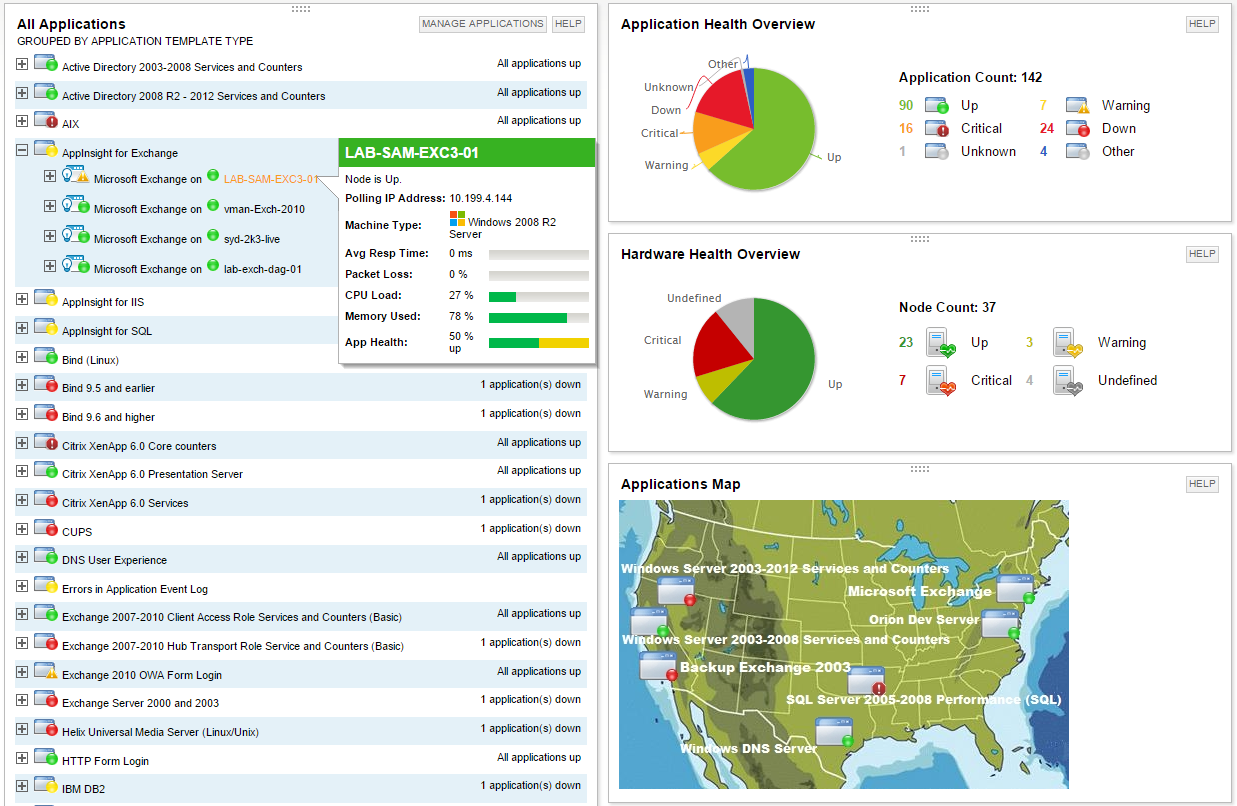
    Screenshot of Multi-vendor application performance monitoringScreenshot of Multi-vendor server monitoringScreenshot of Application dependency mapping with AppStack™ dashboardScreenshot of Microsoft Exchange performance monitoring with AppInsight™ templateScreenshot of Microsoft IIS performance monitoring with AppInsight™ templateScreenshot of Server hardware health monitoring
