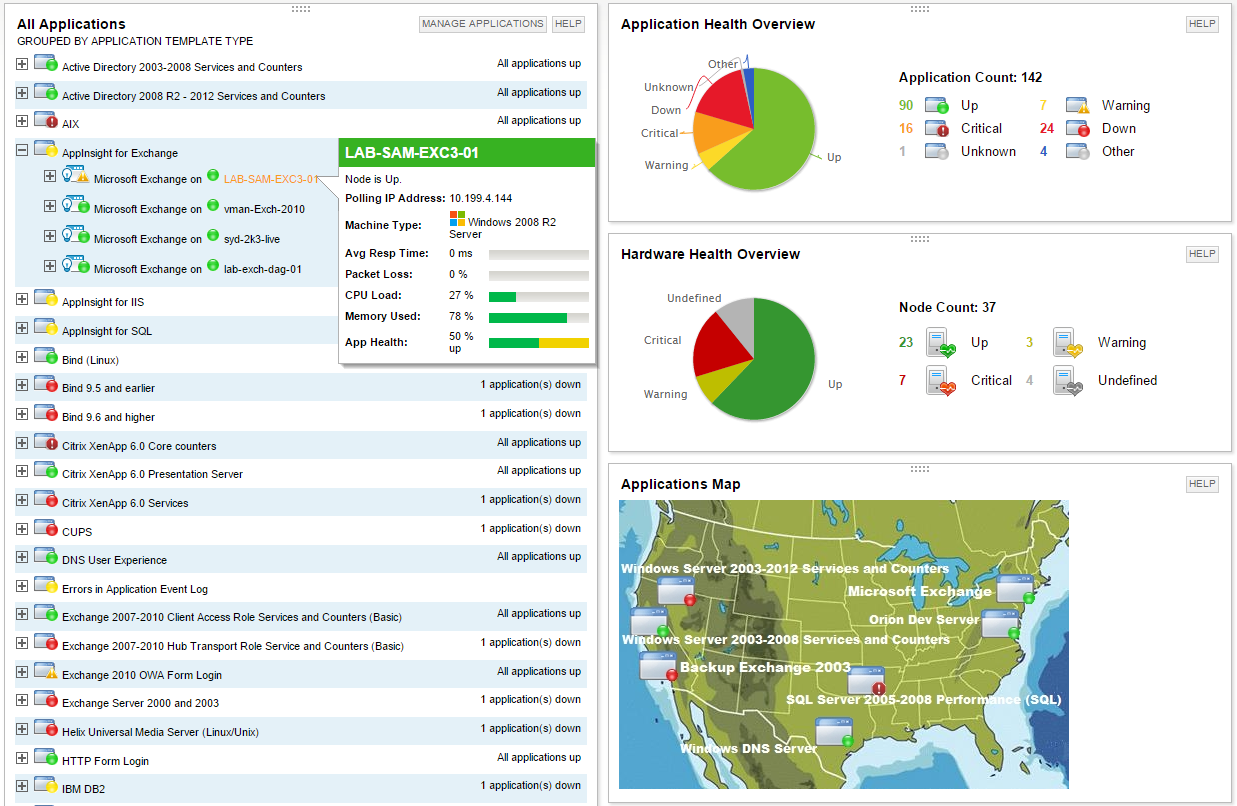
SolarWinds Server & Application Monitor (SAM) delivers application and server monitoring capabilities. SAM allows for self-service for easy setup, 1200+ monitoring templates, and customization options, as well as integrate with other SolarWinds products.
Unix Team Manager in Information Technology at Johnson & Wales University (Higher Education, 1001-5000 employees)
Chose SolarWinds Server & Application Monitor
Nagios requires far more manual work to configure than SolarWinds does, though that also encourages customization and perfect-fit solutions. Nagios also requires far, far fewer resources to run than SolarWinds: SolarWinds wants great gobs of memory and disk, while Nagios is …
A de minimis incentive was given to thank the reviewer for their time. The incentive was not used to bias or drive a particular response, nor was the incentive contingent on a positive endorsement. More Info
Senior IT Technologist II & Desktop Support Supervisor at University of Tennessee (Higher Education, 1001-5000 employees)
Chose SolarWinds Server & Application Monitor
It has been a while since we first purchased SolarWinds, but I looked over several other products that I can't remember now. Many other products tried to scan the network to find computers but given that our computers are located in various places across campus with other …
A de minimis incentive was given to thank the reviewer for their time. The incentive was not used to bias or drive a particular response, nor was the incentive contingent on a positive endorsement. More Info
Senior Director, Infrastructure Architecture & Standards in Information Technology at Cision (Public Relations & Communications, 1001-5000 employees)
Chose SolarWinds Server & Application Monitor
SolarWinds Server & Application Monitor is able to provide 90% of the functionality my business requires. SolarWinds is able to scale out functionality by purchasing additional modules to meet the individual needs of its customers. While this functionality provides …
A de minimis incentive was given to thank the reviewer for their time. The incentive was not used to bias or drive a particular response, nor was the incentive contingent on a positive endorsement. More Info
A de minimis incentive was given to thank the reviewer for their time. The incentive was not used to bias or drive a particular response, nor was the incentive contingent on a positive endorsement. TR verified that a representative sample of customers was invited. More Info
Monitoring Specialist in Information Technology at Fleetcor (Financial Services, 10,001+ employees)
Chose SolarWinds Server & Application Monitor
SolarWinds is cost-effective, we have a great solution provider that helps us with tool integrations and maintenance, the integration capability and extensive documentation also help a lot in the ability to use it in various monitoring models and scripts.
A de minimis incentive was given to thank the reviewer for their time. The incentive was not used to bias or drive a particular response, nor was the incentive contingent on a positive endorsement. TR verified that a representative sample of customers was invited. More Info
Verified User
Chose SolarWinds Server & Application Monitor
We also evaluated Nagios Core as a free alternative but being free it could not be trusted to be secure, and it was very difficult to add and manage devices.
A de minimis incentive was given to thank the reviewer for their time. The incentive was not used to bias or drive a particular response, nor was the incentive contingent on a positive endorsement. TR verified that a representative sample of customers was invited. More Info
Verified User
Chose SolarWinds Server & Application Monitor
Solarwinds Server & Application Monitor is a great comprehensive monitoring solution. It covers all aspects of monitoring your infrastructure via a modular approach. While other applications can be slightly better at asset management or monitoring one specific application or …
A de minimis incentive was given to thank the reviewer for their time. The incentive was not used to bias or drive a particular response, nor was the incentive contingent on a positive endorsement. TR verified that a representative sample of customers was invited. More Info
Verified User
Chose SolarWinds Server & Application Monitor
PRGT Network Monitor seems to be very good, initially, but, in our experience, when we reached close to 100 devices, the system kept crashing and behaving erratic. Prometheus was missing many features and required some CLI scripting and the GUI was years behind SolarWinds. The …
A de minimis incentive was given to thank the reviewer for their time. The incentive was not used to bias or drive a particular response, nor was the incentive contingent on a positive endorsement. TR verified that a representative sample of customers was invited. More Info
Verified User
Chose SolarWinds Server & Application Monitor
SolarWinds Pingdom and AppOptics [are] full-fledged Application Performance Management Tools. [SolarWinds] SAM provides Server and Application Monitoring using [SolarWinds] SAM templates, [but] it does miss out on APM capabilities which other APM solutions offer.
A de minimis incentive was given to thank the reviewer for their time. The incentive was not used to bias or drive a particular response, nor was the incentive contingent on a positive endorsement. TR verified that a representative sample of customers was invited. More Info
Verified User
Chose SolarWinds Server & Application Monitor
In comparison to Spiceworks [Connectivity Dashboard,] SolarWinds [has] way [more] features and [an] easy-to-use system. ManageEngine [Application Control Plus] also provides a good look [at the] dashboard but needs a lot more enhancements when it comes to real-time monitoring. P…
A de minimis incentive was given to thank the reviewer for their time. The incentive was not used to bias or drive a particular response, nor was the incentive contingent on a positive endorsement. TR verified that a representative sample of customers was invited. More Info
Verified User
Chose SolarWinds Server & Application Monitor
This is the best look into our system as compared to others. It also allows much more in-depth looks into our system.
A de minimis incentive was given to thank the reviewer for their time. The incentive was not used to bias or drive a particular response, nor was the incentive contingent on a positive endorsement. TR verified that a representative sample of customers was invited. More Info
Verified User
Chose SolarWinds Server & Application Monitor
Very user friendly console, very powerful products, ease configuration
A de minimis incentive was given to thank the reviewer for their time. The incentive was not used to bias or drive a particular response, nor was the incentive contingent on a positive endorsement. TR verified that a representative sample of customers was invited. More Info
A de minimis incentive was given to thank the reviewer for their time. The incentive was not used to bias or drive a particular response, nor was the incentive contingent on a positive endorsement. More Info
A de minimis incentive was given to thank the reviewer for their time. The incentive was not used to bias or drive a particular response, nor was the incentive contingent on a positive endorsement. More Info
Verified User
Chose SolarWinds Server & Application Monitor
In the past, we had tested other monitoring products yet none compared to the features that one fines in Server & Application Monitor (SAM).
A de minimis incentive was given to thank the reviewer for their time. The incentive was not used to bias or drive a particular response, nor was the incentive contingent on a positive endorsement. TR verified that a representative sample of customers was invited. More Info
Sr Mgr Cloud Infrastructure in Information Technology at Allstream (Telecommunications, 501-1000 employees)
Chose SolarWinds Server & Application Monitor
I have used WhatsUp, Nagios, and Zabbix. Very similar in ease of use to WhatsUp, but missing some features of the Zabbix and Nagios XI on the nix side of the house.
A de minimis incentive was given to thank the reviewer for their time. The incentive was not used to bias or drive a particular response, nor was the incentive contingent on a positive endorsement. TR verified that a representative sample of customers was invited. More Info
A de minimis incentive was given to thank the reviewer for their time. The incentive was not used to bias or drive a particular response, nor was the incentive contingent on a positive endorsement. TR verified that a representative sample of customers was invited. More Info
Verified User
Chose SolarWinds Server & Application Monitor
because of the easy and fast implementation, and easy administration
A de minimis incentive was given to thank the reviewer for their time. The incentive was not used to bias or drive a particular response, nor was the incentive contingent on a positive endorsement. TR verified that a representative sample of customers was invited. More Info
A de minimis incentive was given to thank the reviewer for their time. The incentive was not used to bias or drive a particular response, nor was the incentive contingent on a positive endorsement. TR verified that a representative sample of customers was invited. More Info
A de minimis incentive was given to thank the reviewer for their time. The incentive was not used to bias or drive a particular response, nor was the incentive contingent on a positive endorsement. TR verified that a representative sample of customers was invited. More Info
Verified User
Chose SolarWinds Server & Application Monitor
I can safely say SolarWinds comes up on top versus the individual products we used in the past. SolarWinds was selected because of its ease of use, its visual layout which allows you to easily and quickly browse through the information its currently providing for a monitored …
A de minimis incentive was given to thank the reviewer for their time. The incentive was not used to bias or drive a particular response, nor was the incentive contingent on a positive endorsement. More Info
Verified User
Chose SolarWinds Server & Application Monitor
Event Sentry was the previous product we relied on for monitoring and alerts. SolarWinds Server & Application Monitor simply has more features, is more comprehensive, has a better use interface, [and] has better support and knowledge base behind it while not being cost …
A de minimis incentive was given to thank the reviewer for their time. The incentive was not used to bias or drive a particular response, nor was the incentive contingent on a positive endorsement. More Info
Verified User
Chose SolarWinds Server & Application Monitor
Being from the same company it is possible all these modules are compatible with each other
A de minimis incentive was given to thank the reviewer for their time. The incentive was not used to bias or drive a particular response, nor was the incentive contingent on a positive endorsement. More Info
Verified User
Chose SolarWinds Server & Application Monitor
I have tried and researched many products including Cacti, Zabbix, Dynatrace, as far as I have read the best crafted product among them is SolarWinds. [Already], SolarWinds company is the most successful company that has proven itself in issues such as monitoring and logging.
A de minimis incentive was given to thank the reviewer for their time. The incentive was not used to bias or drive a particular response, nor was the incentive contingent on a positive endorsement. More Info
Associate Consultant in Engineering at HCL Technologies (Information Technology & Services, 10,001+ employees)
Chose SolarWinds Server & Application Monitor
Solarwinds Server and Application monitor is my first choice of tools preferred for server and application infrastructure monitoring because of the following reasons - 1. Single product to offer on-prem, hosted, cloud monitoring 2. Single Product to offer Server, Database and …
A de minimis incentive was given to thank the reviewer for their time. The incentive was not used to bias or drive a particular response, nor was the incentive contingent on a positive endorsement. More Info
For monitoring applications that run on Windows hosts on VMware or HyperV virtualization, SolarWindows offers a nice, vertical view of both the loads and the resources. In such an environment, this makes life really good! But if you have something else -- for example, Linux hosts -- you're on your own to some extent. That is, the things it does well, it does very well -- but everything else is much less polished.
A de minimis incentive was given to thank the reviewer for their time. The incentive was not used to bias or drive a particular response, nor was the incentive contingent on a positive endorsement. More Info
A de minimis incentive was given to thank the reviewer for their time. The incentive was not used to bias or drive a particular response, nor was the incentive contingent on a positive endorsement. TR verified that a representative sample of customers was invited. More Info
Provides basic monitoring/visibility. Visibility into detailed/fine-grained issues best suited for more specialized/expensive solutions.
Licensing per monitored application rapidly uses up purchased license count.
More out-of-the-box templates or easier setup of monitoring less-common applications would make the solution more appealing given the target audience of the product.
A de minimis incentive was given to thank the reviewer for their time. The incentive was not used to bias or drive a particular response, nor was the incentive contingent on a positive endorsement. More Info
We are heavily invested in Solarwinds products for a reason. They are generally easy to setup and run with, requiring only some interfacing with support or help articles on rare occasions. They do what we bought them to do and we can't ask for more.
A de minimis incentive was given to thank the reviewer for their time. The incentive was not used to bias or drive a particular response, nor was the incentive contingent on a positive endorsement. More Info
SolarWinds Server & Application Monitor is quite easy to use and super versatile. It allows you to do just about anything you can through premade templates or through scripting. You can use an agent on the servers if you want to, or you can monitor through WMI or SNMP credentials. You can customize thresholds for alerting quickly, and you can configure alerts to be as complex or as simple as you want.
A de minimis incentive was given to thank the reviewer for their time. The incentive was not used to bias or drive a particular response, nor was the incentive contingent on a positive endorsement. More Info
A de minimis incentive was given to thank the reviewer for their time. The incentive was not used to bias or drive a particular response, nor was the incentive contingent on a positive endorsement. TR verified that a representative sample of customers was invited. More Info
The graphical interface and the performance of the database leave a little to be desired, they could be better explored.Some functionality and screens do not work well depending on the browser used. The integrations never had any problems or caused crashes in other systems.
A de minimis incentive was given to thank the reviewer for their time. The incentive was not used to bias or drive a particular response, nor was the incentive contingent on a positive endorsement. TR verified that a representative sample of customers was invited. More Info
I think there was only a couple times I had to open a support case for SAM and one time they got multiple engineers on the phone to get a better idea what I was trying to monitor and was able to point me in the best direction to monitor that system.
A de minimis incentive was given to thank the reviewer for their time. The incentive was not used to bias or drive a particular response, nor was the incentive contingent on a positive endorsement. More Info
A de minimis incentive was given to thank the reviewer for their time. The incentive was not used to bias or drive a particular response, nor was the incentive contingent on a positive endorsement. More Info
A de minimis incentive was given to thank the reviewer for their time. The incentive was not used to bias or drive a particular response, nor was the incentive contingent on a positive endorsement. More Info
It has been a while since we first purchased SolarWinds, but I looked over several other products that I can't remember now. Many other products tried to scan the network to find computers but given that our computers are located in various places across campus with other computers in our buildings that are not ours that type of network scanning was not what we needed. Other services have extra services that we had no need of and I liked the ability to add custom fields in SolarWinds so we can track the information on each computer that we need to know.
A de minimis incentive was given to thank the reviewer for their time. The incentive was not used to bias or drive a particular response, nor was the incentive contingent on a positive endorsement. More Info
Less time spent investigating causes of issues. We are alerted straight away and can find the root cause of the issue in less time.
We have been able to ditch all our previous individual monitoring solutions, none of which integrated with each other for a single solution which fully integrates with each of the different modules to provide a single portal for monitoring and alerting.
A de minimis incentive was given to thank the reviewer for their time. The incentive was not used to bias or drive a particular response, nor was the incentive contingent on a positive endorsement. More Info