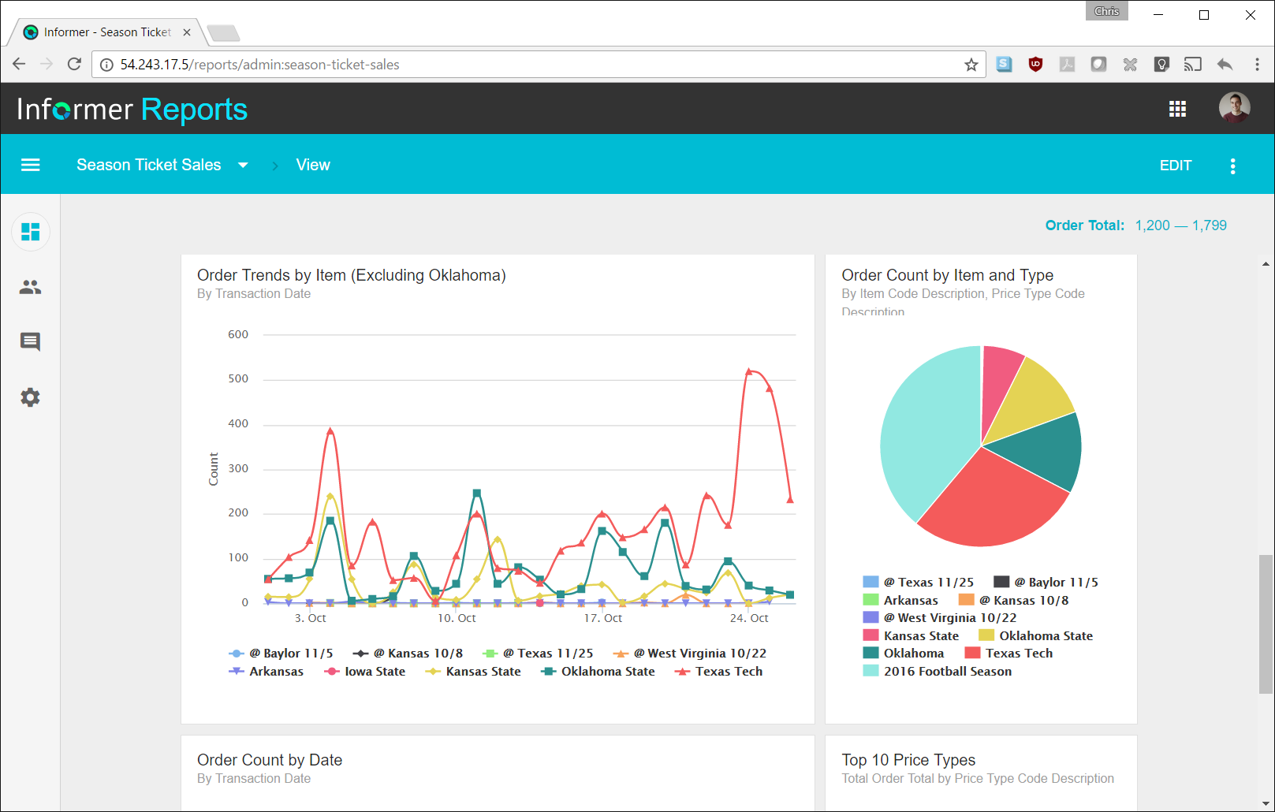
Entrinsik Informer is a web-based reporting and business intelligence application popular in the higher education vertical market. It helps organizations transform real-time data into actionable information by delivering ad-hoc reporting, data analysis, and interactive dashboards.
N/A
Middesk
Score8.9 out of 10
N/A
Middesk is a business intelligence (BI) software used to onboarded clients working in three primary verticals — Fintech, Credit Reporting, and Business Marketplaces.
$1,000
per month
Pricing
Entrinsik Informer
Middesk
Editions & Modules
No answers on this topic
No answers on this topic
Offerings
Pricing Offerings
Entrinsik Informer
Middesk
Free Trial
Yes
No
Free/Freemium Version
No
Yes
Premium Consulting/Integration Services
Yes
No
Entry-level Setup Fee
No setup fee
No setup fee
Additional Details
—
Users may also pay per use if they are expecting a lower volume of usage.
More Pricing Information
Features
Entrinsik Informer
Middesk
BI Standard Reporting
Comparison of BI Standard Reporting features of Entrinsik Informer and Middesk
Feature
Entrinsik Informer
7.3
8 Ratings
11% below category average
Middesk
7.7
1 Ratings
6% below category average
Pixel Perfect reports
5.51 Ratings
8.01 Ratings
Customizable dashboards
9.17 Ratings
7.01 Ratings
Report Formatting Templates
7.57 Ratings
8.01 Ratings
Ad-hoc Reporting
Comparison of Ad-hoc Reporting features of Entrinsik Informer and Middesk
Feature
Entrinsik Informer
8.6
11 Ratings
7% above category average
Middesk
8.0
1 Ratings
1% below category average
Drill-down analysis
9.19 Ratings
8.01 Ratings
Formatting capabilities
8.210 Ratings
8.01 Ratings
Integration with R or other statistical packages
8.21 Ratings
8.01 Ratings
Report sharing and collaboration
9.110 Ratings
8.01 Ratings
Report Output and Scheduling
Comparison of Report Output and Scheduling features of Entrinsik Informer and Middesk
Feature
Entrinsik Informer
9.1
11 Ratings
9% above category average
Middesk
6.4
1 Ratings
26% below category average
Publish to Web
9.14 Ratings
7.01 Ratings
Publish to PDF
9.19 Ratings
5.01 Ratings
Report Versioning
9.13 Ratings
5.01 Ratings
Report Delivery Scheduling
9.17 Ratings
8.01 Ratings
Delivery to Remote Servers
9.11 Ratings
7.01 Ratings
Data Discovery and Visualization
Comparison of Data Discovery and Visualization features of Entrinsik Informer and Middesk
It makes creating queries very easy for end users so not only research or technicians can do it. The availability for creating Live reports that are accessible via Excel on the network has given many of our users the ability to get the information they need in a format they can use without needing someone to translate the raw data
A de minimis incentive was given to thank the reviewer for their time. The incentive was not used to bias or drive a particular response, nor was the incentive contingent on a positive endorsement. More Info
Middesk majorly provides us with real-time access to the data and documents which are required for automating KYB and CIP regulatory compliance, mitigating front and backend risk. In addition, it is the easiest way for financial services companies to verify and monitor their business customers. It for us very much makes the process of onboarding customers very easy.
A de minimis incentive was given to thank the reviewer for their time. The incentive was not used to bias or drive a particular response, nor was the incentive contingent on a positive endorsement. More Info
Simple user-interface: Informer is relatively easy to learn and end users can begin running reports and creating new reports quickly.
Email "burst" functionality: This feature allows emails to be sent out based on data in the report. So for example, a report could be scheduled that would email all student employment managers listing out the specific employees that report to them that haven't submitted their time sheets. Each manager would only see the rows that correspond to their email address.
Analytics and grouping: Users can quickly drag columns to group and sub-total, and can use the analytics tab to get deeper insights into the data.
A de minimis incentive was given to thank the reviewer for their time. The incentive was not used to bias or drive a particular response, nor was the incentive contingent on a positive endorsement. More Info
A de minimis incentive was given to thank the reviewer for their time. The incentive was not used to bias or drive a particular response, nor was the incentive contingent on a positive endorsement. More Info
There are a lot of reports that we have in Informer that say they have never been run, even though I know they have been run. So that makes it really difficult to determine which reports can be deleted to keep a tidy report list.
The only other complaint I have about Informer is that there doesn't seem to be a properly detailed error code/message when the student information system can't be accessed. For example, I am currently trying to move Informer to its own standalone server and I get an error message saying that our license isn't valid. Informer Support sent a new license, which prompted the same message, and the only explanation they have given me is that Informer can't reach the student information system. I would think that if that were the case, the error message would say that instead of an invalid license.
A de minimis incentive was given to thank the reviewer for their time. The incentive was not used to bias or drive a particular response, nor was the incentive contingent on a positive endorsement. More Info
A de minimis incentive was given to thank the reviewer for their time. The incentive was not used to bias or drive a particular response, nor was the incentive contingent on a positive endorsement. More Info
Informer has been handily meeting most of our reporting needs, and we've created a library of hundreds of reports that are used every day. They have a terrific support service to help when you have questions, and I've found them to be great at listening to what customers would like and adding new features. They are a small company that really listens and really cares, and I've been very pleased over the past few years getting to know them.
From the perspective of the new user and a seasoned user I would say eight would represent both parties. It presents a 'familiar' interface and easy to navigate display. Tagging is quite nice and allows for organization of reports based on those tags. These have to be monitored like anything else to keep them consistent but provides a better than average means of organizing reports.
UI is not as intuitive as other systems we use. For states that require income tax withholding, some of them require registration with multiple agencies - the UI doesn't easily tell you which login credentials are tied to which agency.
A de minimis incentive was given to thank the reviewer for their time. The incentive was not used to bias or drive a particular response, nor was the incentive contingent on a positive endorsement. More Info
Always able to get acceptable solutions in reasonable time from friendly support staff. Initial contact is always with knowledgeable person - not someone reading from a script trying to screen calls. Thanks Entrinsik for being in tune with my needs.
A de minimis incentive was given to thank the reviewer for their time. The incentive was not used to bias or drive a particular response, nor was the incentive contingent on a positive endorsement. More Info
The user experience of this tool must be rearchitected. I am able to observe a lot of lag in the process when initiated. There are sometimes when the tool's navigation becomes difficult. The time taken at times is large to process a request and this can also be highly improved in the future.
A de minimis incentive was given to thank the reviewer for their time. The incentive was not used to bias or drive a particular response, nor was the incentive contingent on a positive endorsement. More Info
We bought the product on a Thursday morning, and we were writing reports on Friday afternoon. We did take about a month to manage the Mapping, Linking and Security to allow us to open it up across campus. We are now mapping from as many third-party vendors as we can to enable the creation of more ad-hoc reporting.
I have experience with Advizor AnalystX, and it was just awful. It is advertised as an interactive reporting tool, in which you can use your mouse to select and segment constituents by where they live (by clicking on a map), how much they've given to your institution, when they last gave, etc. In practice, their map feature was unusable; it's a static map image (imagine a paper map hung on your wall), rather than draggable and zoomable Google Maps, and it required hours of work to configure one map region. As far as computing constituents' giving statistics, it required way too much back-end work to build simple giving totals.
A de minimis incentive was given to thank the reviewer for their time. The incentive was not used to bias or drive a particular response, nor was the incentive contingent on a positive endorsement. More Info
ADP Workforce Now offers a module to handle payroll tax registrations. The interface is confusing and the information is hard to find. The service and support are awful - nobody ever knows who can answer tax account questions, they escalate to a different department and promise a callback but they never call back.
A de minimis incentive was given to thank the reviewer for their time. The incentive was not used to bias or drive a particular response, nor was the incentive contingent on a positive endorsement. More Info
We have definitely improved customer service due to better reporting using Informer. All departments are better empowered to help our students in a more timely and accurate manner.
Using Informer has given us the ability to eliminate functionality within our ERP system and offload reporting to a data store instead of the transactional system. This has resulted in successfully upgrading our core systems and improved response times.
A de minimis incentive was given to thank the reviewer for their time. The incentive was not used to bias or drive a particular response, nor was the incentive contingent on a positive endorsement. More Info