
Email to PDF for Outlook vs. SysTools PDF Tools
| Product | Rating | Most Used By | Product Summary | Starting Price |
|---|---|---|---|---|
 Email to PDF for Outlook | Score8.1 out of 10 | N/A | N/A | $29 one-time fee |
 SysTools PDF Tools | N/A | N/A | Systools PDF Tools, including Split & Merge Software allows users to perform split and merge operations on multiple PDF files. The tool offers various PDF split options to divide a single PDF file into multiple PDF files such as split PDF by page, range, even pages, and odd pages. Split by page function offers to split the PDF file selected with a particular page limit while split by range extracts the pages from a PDF file with the provided page range. The split by odd pages feature splits… | N/A |
| Email to PDF for Outlook | SysTools PDF Tools | |||||||||||||||
|---|---|---|---|---|---|---|---|---|---|---|---|---|---|---|---|---|
| Editions & Modules |
| No answers on this topic | ||||||||||||||
| Offerings |
| |||||||||||||||
| Entry-level Setup Fee | No setup fee | No setup fee | ||||||||||||||
| Additional Details | — | — | ||||||||||||||
| More Pricing Information | ||||||||||||||||
| Email to PDF for Outlook | SysTools PDF Tools | ||||||||||||||||||||||||||||||||||
|---|---|---|---|---|---|---|---|---|---|---|---|---|---|---|---|---|---|---|---|---|---|---|---|---|---|---|---|---|---|---|---|---|---|---|---|
| PDF Editors |
| ||||||||||||||||||||||||||||||||||
| Email to PDF for Outlook | SysTools PDF Tools | |
|---|---|---|
| Small Businesses |  Foxit PDF Editor Score8.7 out of 10 | Foxit PDF Editor Score8.7 out of 10 |
| Medium-sized Companies |  Adobe Acrobat Reader Score8.7 out of 10 | Adobe Acrobat Reader Score8.7 out of 10 |
| Enterprises | Adobe Acrobat Reader Score8.7 out of 10 | Adobe Acrobat Reader Score8.7 out of 10 |
| All Alternatives | View all alternatives | View all alternatives |
| Email to PDF for Outlook | SysTools PDF Tools | |
|---|---|---|
| Likelihood to Recommend | 8.5 | - |
| Likelihood to Renew | 5.0 | - |
| Usability | 8.0 | - |
| Implementation Rating | 5.0 | - |
| Email to PDF for Outlook | SysTools PDF Tools | |
|---|---|---|
| Likelihood to Recommend |
| No answers on this topic |
| Pros |
| No answers on this topic |
| Cons |
| No answers on this topic |
| Likelihood to Renew |
| No answers on this topic |
| Usability |
| No answers on this topic |
| Reliability and Availability |
| No answers on this topic |
| Performance |
| No answers on this topic |
| Support Rating |
| No answers on this topic |
| Alternatives Considered |
| No answers on this topic |
| Contract Terms and Pricing Model |
| No answers on this topic |
| Scalability |
| No answers on this topic |
| Return on Investment |
| No answers on this topic |
| ScreenShots | SysTools PDF Tools Screenshots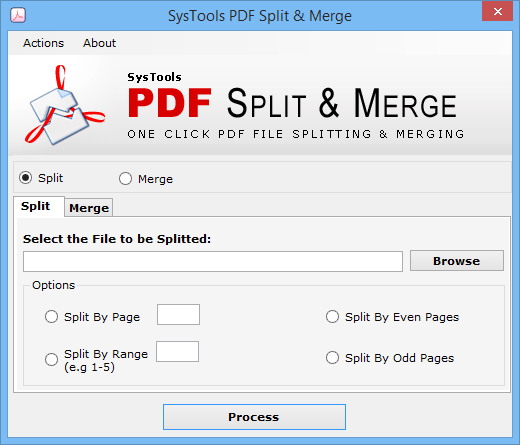    |
