
Eco4Cloud Workload Consolidation vs. SolarWinds Server & Application Monitor
Eco4Cloud Workload Consolidation vs. SolarWinds Server & Application Monitor
| Product | Rating | Most Used By | Product Summary | Starting Price |
|---|---|---|---|---|
 Eco4Cloud Workload Consolidation | Enterprise companies (1,001+ employees) | Eco4Cloud Workload Consolidation is a Virtual Infrastructure Optimization Solution designed to improve the economics of virtualized data centers with an intelligent software platform, which increases performances and decreases costs. Eco4Cloud Workload Consolidation works on top of a virtualization platform, and uses the exposed API to connect to the platform and optimize the workload placement in a virtual farm in order to make it more… | N/A | |
 SolarWinds Server & Application Monitor | N/A | SolarWinds Server & Application Monitor (SAM) delivers application and server monitoring capabilities. SAM allows for self-service for easy setup, 1200+ monitoring templates, and customization options, as well as integrate with other SolarWinds products. | N/A |
| Eco4Cloud Workload Consolidation | SolarWinds Server & Application Monitor | |||||||||||||||
|---|---|---|---|---|---|---|---|---|---|---|---|---|---|---|---|---|
| Editions & Modules | No answers on this topic | No answers on this topic | ||||||||||||||
| Offerings |
| |||||||||||||||
| Entry-level Setup Fee | Optional | No setup fee | ||||||||||||||
| Additional Details | — | SAM pricing starts at $2,995. | ||||||||||||||
| More Pricing Information | ||||||||||||||||
| Eco4Cloud Workload Consolidation | SolarWinds Server & Application Monitor |
|---|
| Eco4Cloud Workload Consolidation | SolarWinds Server & Application Monitor | |||||||||||||||||||||||||||||||||||||||
|---|---|---|---|---|---|---|---|---|---|---|---|---|---|---|---|---|---|---|---|---|---|---|---|---|---|---|---|---|---|---|---|---|---|---|---|---|---|---|---|---|
| Application Performance Management |
|
| Eco4Cloud Workload Consolidation | SolarWinds Server & Application Monitor | |
|---|---|---|
| Small Businesses |  Veeam ONE Score 8.2 out of 10 |  GitLab Score 8.7 out of 10 |
| Medium-sized Companies |  SolarWinds Virtualization Manager (VMAN) Score 10.0 out of 10 |  ManageEngine Site24x7 Score 9.8 out of 10 |
| Enterprises | SolarWinds Virtualization Manager (VMAN) Score 10.0 out of 10 | ManageEngine Site24x7 Score 9.8 out of 10 |
| All Alternatives | View all alternatives | View all alternatives |
| Eco4Cloud Workload Consolidation | SolarWinds Server & Application Monitor | |
|---|---|---|
| Likelihood to Recommend | 9.1 (1 ratings) | 8.8 (278 ratings) |
| Likelihood to Renew | - (0 ratings) | 8.9 (10 ratings) |
| Usability | - (0 ratings) | 8.6 (29 ratings) |
| Availability | - (0 ratings) | 9.9 (3 ratings) |
| Performance | - (0 ratings) | 6.0 (3 ratings) |
| Support Rating | - (0 ratings) | 9.0 (21 ratings) |
| Online Training | - (0 ratings) | 4.5 (1 ratings) |
| Implementation Rating | - (0 ratings) | 4.5 (3 ratings) |
| Configurability | - (0 ratings) | 1.0 (2 ratings) |
| Ease of integration | - (0 ratings) | 4.5 (2 ratings) |
| Product Scalability | - (0 ratings) | 9.9 (3 ratings) |
| Vendor post-sale | - (0 ratings) | 4.5 (2 ratings) |
| Vendor pre-sale | - (0 ratings) | 4.5 (2 ratings) |
| Eco4Cloud Workload Consolidation | SolarWinds Server & Application Monitor | |
|---|---|---|
| Likelihood to Recommend | Eco4Cloud
 Michele "Mike" Lorusso IT Architect | SolarWinds
|
| Pros | Eco4Cloud
Michele "Mike" Lorusso IT Architect | SolarWinds
|
| Cons | Eco4Cloud
Michele "Mike" Lorusso IT Architect | SolarWinds
|
| Likelihood to Renew | Eco4Cloud No answers on this topic | SolarWinds
 Derek Benson IT, Network Administrator |
| Usability | Eco4Cloud No answers on this topic | SolarWinds
|
| Reliability and Availability | Eco4Cloud No answers on this topic | SolarWinds
|
| Performance | Eco4Cloud No answers on this topic | SolarWinds
|
| Support Rating | Eco4Cloud No answers on this topic | SolarWinds
 Ryhlen Schoeberl System Administrator |
| Online Training | Eco4Cloud No answers on this topic | SolarWinds
 Joe Parlett Programmer Analyst |
| Implementation Rating | Eco4Cloud No answers on this topic | SolarWinds
|
| Alternatives Considered | Eco4Cloud
Michele "Mike" Lorusso IT Architect | SolarWinds
 Connie Inman Senior IT Technologist II & Desktop Support Supervisor |
| Scalability | Eco4Cloud No answers on this topic | SolarWinds
Joe Parlett Programmer Analyst |
| Return on Investment | Eco4Cloud
Michele "Mike" Lorusso IT Architect | SolarWinds
|
| ScreenShots | Eco4Cloud Workload Consolidation Screenshots | SolarWinds Server & Application Monitor Screenshots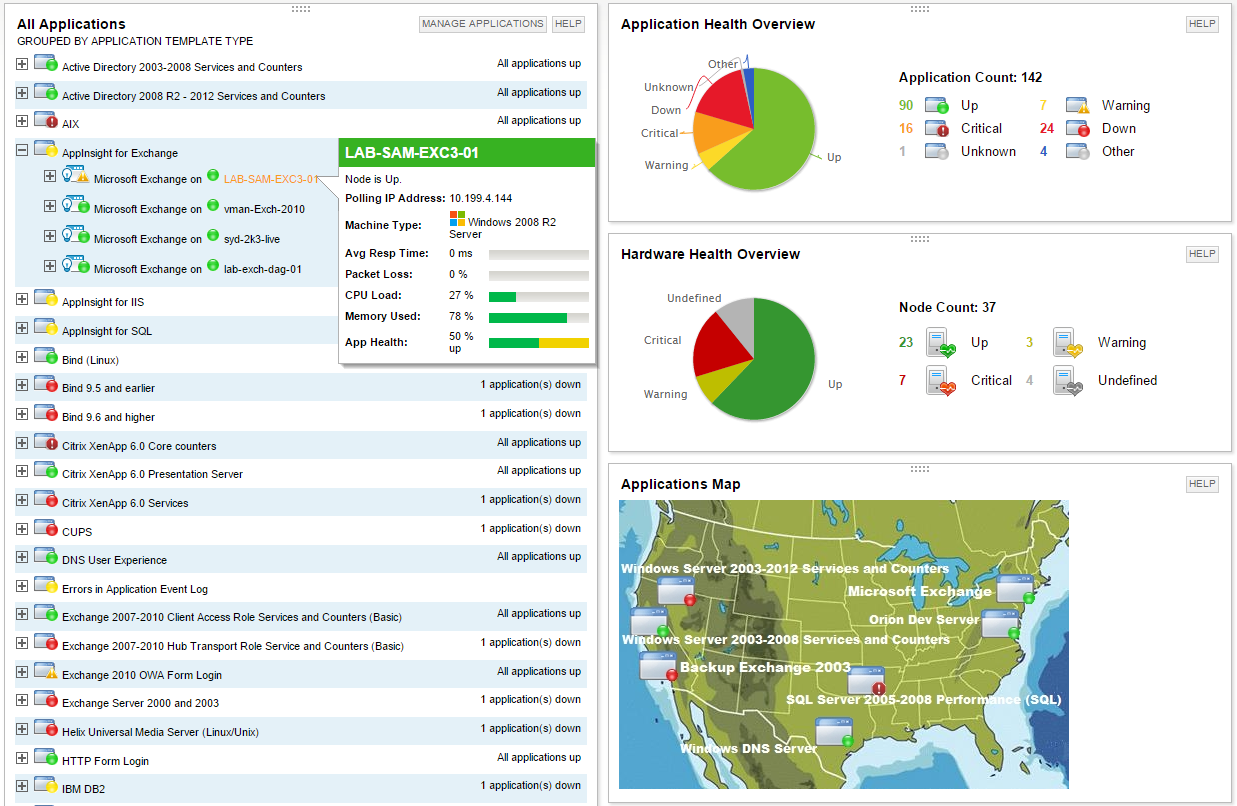      |