
Dropbox vs. UpSafe (discontinued)
Dropbox vs. UpSafe (discontinued)
| Product | Rating | Most Used By | Product Summary | Starting Price |
|---|---|---|---|---|
 Dropbox | N/A | Dropbox is a cloud storage solution, equipped with features that help users to save time, improve productivity, and collaborate with others. Users can edit PDFs, share videos, sign documents, and collaborate with stakeholders without leaving Dropbox. | $9.99 per month | |
 UpSafe (discontinued) | N/A | UpSafe was a solution for storing and backing up data stored in Gmail, Google Drive, Google Contacts, and Google Calendar, or Outlook. It has been discontinued. | N/A |
| Dropbox | UpSafe (discontinued) | |||||||||||||||
|---|---|---|---|---|---|---|---|---|---|---|---|---|---|---|---|---|
| Editions & Modules |
| No answers on this topic | ||||||||||||||
| Offerings |
| |||||||||||||||
| Entry-level Setup Fee | No setup fee | No setup fee | ||||||||||||||
| Additional Details | — | — | ||||||||||||||
| More Pricing Information | ||||||||||||||||
| Dropbox | UpSafe (discontinued) |
|---|
| Dropbox | UpSafe (discontinued) | ||||||||||||||||||||||||
|---|---|---|---|---|---|---|---|---|---|---|---|---|---|---|---|---|---|---|---|---|---|---|---|---|---|
| File Sharing & Management |
| ||||||||||||||||||||||||
| Cloud Storage Security & Administration |
| ||||||||||||||||||||||||
| Cloud Storage Platform |
|
| Dropbox | UpSafe (discontinued) | |
|---|---|---|
| Small Businesses |  SugarSync Score 5.8 out of 10 |  Cove Data Protection Score 9.9 out of 10 |
| Medium-sized Companies |  Druva Security Cloud Score 9.7 out of 10 | Druva Security Cloud Score 9.7 out of 10 |
| Enterprises | Druva Security Cloud Score 9.7 out of 10 | Druva Security Cloud Score 9.7 out of 10 |
| All Alternatives | View all alternatives | View all alternatives |
| Dropbox | UpSafe (discontinued) | |
|---|---|---|
| Likelihood to Recommend | 8.0 (0 ratings) | 8.5 (0 ratings) |
| Likelihood to Renew | 6.7 (0 ratings) | - (0 ratings) |
| Usability | 7.5 (0 ratings) | - (0 ratings) |
| Availability | 6.7 (0 ratings) | - (0 ratings) |
| Performance | 6.0 (0 ratings) | - (0 ratings) |
| Support Rating | 7.4 (0 ratings) | 8.3 (0 ratings) |
| Online Training | 8.2 (0 ratings) | - (0 ratings) |
| Implementation Rating | 7.5 (0 ratings) | - (0 ratings) |
| Configurability | 6.4 (0 ratings) | - (0 ratings) |
| Product Scalability | 6.6 (0 ratings) | - (0 ratings) |
| Dropbox | UpSafe (discontinued) | |
|---|---|---|
| Likelihood to Recommend | 
 Christina Owens Technical Writer & Editor | 
|
| Pros |
 Kara Beech, SHRM-CP Owner |
|
| Cons |
 Stephanie Crawford Realtor |
|
| Likelihood to Renew |
 Megan Coxe Communications Director | No answers on this topic |
| Usability |
| No answers on this topic |
| Performance |
| No answers on this topic |
| Support Rating |
|
 Greg Roberts Broker/Associate Realtor |
| Online Training |
| No answers on this topic |
| Implementation Rating |
 Annesa L Lacey Founder & CEO | No answers on this topic |
| Alternatives Considered |
 Joy Cobert REALTOR |
|
| Scalability |
 Dr. Meshia Miller General Manager | No answers on this topic |
| Return on Investment |
 Howard R. Berger Financial Advisor |
 Sarah Bandy Executive Director |
| ScreenShots | Dropbox Screenshots    | UpSafe (discontinued) Screenshots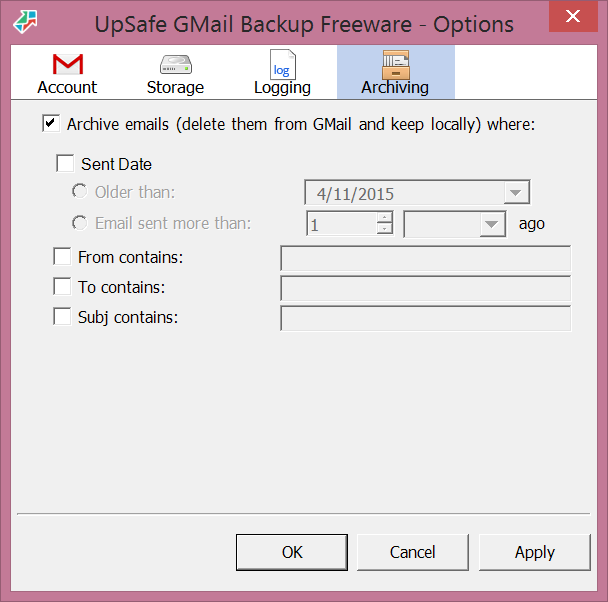  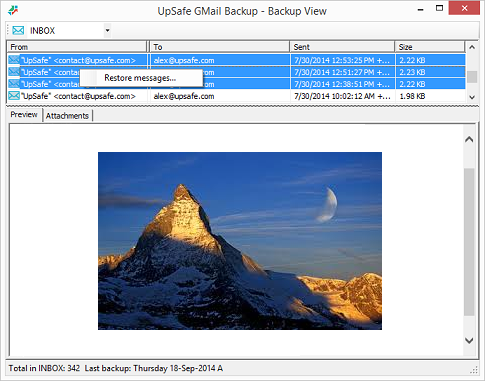  |