Dropbox Paper vs. Workflowy

Overview
ProductRatingMost Used ByProduct SummaryStarting Price
Dropbox Paper
Score 8.2 out of 10
N/A
Dropbox Paper is a web-based, co-editing tool that includes word processing, document creation and coordination features. The tool is free to use and allows multiple people to collaborate on a document.N/A
Workflowy
Score 9.6 out of 10
N/A
Workflowy is a note-taking and organizational tool designed to help users manage their tasks, notes, and projects. Its simplicity and features make it a choice for individuals and teams looking to streamline their workflow. Infinite Nesting Structure: Workflowy allows users to create lists within lists to an infinite degree, enabling a detailed and structured way to organize information Global Search: Its search function is used to search through all their…
$0
per user
Pricing
Dropbox PaperWorkflowy
Editions & Modules
No answers on this topic
Workflowy basic
$0
per user
Workflowy pro - Monthly
$8.99
per month per user
Workflowy pro - Yearly
$83.88
per year per user
Offerings
Pricing Offerings
Dropbox PaperWorkflowy
Free Trial
NoYes
Free/Freemium Version
YesYes
Premium Consulting/Integration Services
NoNo
Entry-level Setup FeeNo setup feeNo setup fee
Additional Details
More Pricing Information
Community Pulse
Dropbox PaperWorkflowy
Features
Dropbox PaperWorkflowy
Project Management
Comparison of Project Management features of Product A and Product B
Dropbox Paper
-
Ratings
Workflowy
7.3
Ratings
5% below category average
Task Management00 Ratings6.40 Ratings
Mobile Access00 Ratings6.40 Ratings
Search00 Ratings9.10 Ratings
File Sharing & Management
Comparison of File Sharing & Management features of Product A and Product B
Dropbox Paper
-
Ratings
Workflowy
7.3
Ratings
7% below category average
Video files00 Ratings7.30 Ratings
Document collaboration00 Ratings6.40 Ratings
Access control00 Ratings7.30 Ratings
Device sync00 Ratings8.20 Ratings
User Ratings
Dropbox PaperWorkflowy
Likelihood to Recommend
7.5
(0 ratings)
9.1
(0 ratings)
Usability
-
(0 ratings)
8.2
(0 ratings)
User Testimonials
Dropbox PaperWorkflowy
Likelihood to Recommend
Dropbox Paper is suited for creating very simple documents, where you are collaborating with other users. It is particularly useful in a work environment that primarily uses Dropbox as a storage and file management solution. If you need to create documents where you need more enhanced formatting features, you would need to use Google Docs, or Microsoft Word.
Read full review
It is one of the few apps I’ve ever found that handles outlining as well as the ancient program called “ThinkTank” did. It’s better in that it’s accessible anywhere I have web access. Anyway, to address the specific question: I think better if I can just pour my thoughts out onto the screen, and then worry about sorting, editing, and outlining afterwords. Before Workflowy, I was stuck trying everything else. But all the outlining programs were too complex, and all the word processors that offered outlining SUCKED at outlining. Workflowy hits that sweet spot.
Read full review
Pros
  • Develop multiple individual projects, setting milestone dates within them.
  • Easy to invite others to collaborate on projects.
  • Create to-do lists and assign due dates.
  • Create documents with multiple types of integrated media, going beyond simple text with images, audio, and video.
  • Make edits to documents in real time for all team members to see.
Read full review
  • Task management
  • Planning - Short and long-term
  • Viewing my information from different perspectives. I am visual so I can fully exploit the visual nature of Workflowy and still get granular if and when I need to
Read full review
Cons
  • Its presentation capabilities can definitely be improved, including how page-by-page presentation is to be done & how aspect ratios are maintained for different resolutions.
  • More flexibility in text editing would be a great addition to the text editing functionality, for example, additional fonts would be a nice thing to have.
  • Introducing additional to-do list software capabilities or task management functionality would enhance the software greatly as well.
Read full review
  • I think a scheduling feature would be a powerful addition. Users should be able to set points to pop up again on a schedule.
Read full review
Usability
No answers on this topic
I now have 12+ years of notes stored in Workflowy - everything from song lyrics to book outlines to classroom notes. It makes it VERY easy to find, VERY easy to sort, and VERY easy to organize.
Read full review
Alternatives Considered
Paper is a good option for those people looking for a lightweight content creation & collaboration tool & especially if you are already using dropbox. However, all the capabilities that Paper has are not so powerful in-depth of flexibility & range of functionality, for example, for to-do lists or task management there are many other better options out there.
Read full review
There is also IndiGrid and Calculist. Workflowy outshines them all with it's various layouts, which other apps do not have (except maybe Todoist). Did I mention the ability to keep my hands on the keyboard while I can think and create without interruption?
Read full review
Return on Investment
  • Dropbox Paper has allowed all of our employees to be much more productive and on track even when we can't be in the office, which from a management standpoint is a huge positive impact. They know that productivity isn't slowing or lacking when everyone isn't actually sitting in the office under their watchful eye.
  • It has had a huge impact on our turn around time and speed of getting more work and projects completed. The more work you can effectively get done in a time period means more money for the bottom line.
  • It has made the majority of our team members more accountable and reliable when they know everyone is working together on something and each person has their own checklist of items to complete. It is especially helpful that everyone can see the same checklist, so everyone knows what each other is accomplishing.
Read full review
  • Workflowy allows me to keep all of my business and personal information in one place. I can quickly organize, reorganize, link, and add information whether on my phone or on my laptop.
Read full review
ScreenShots

Workflowy Screenshots

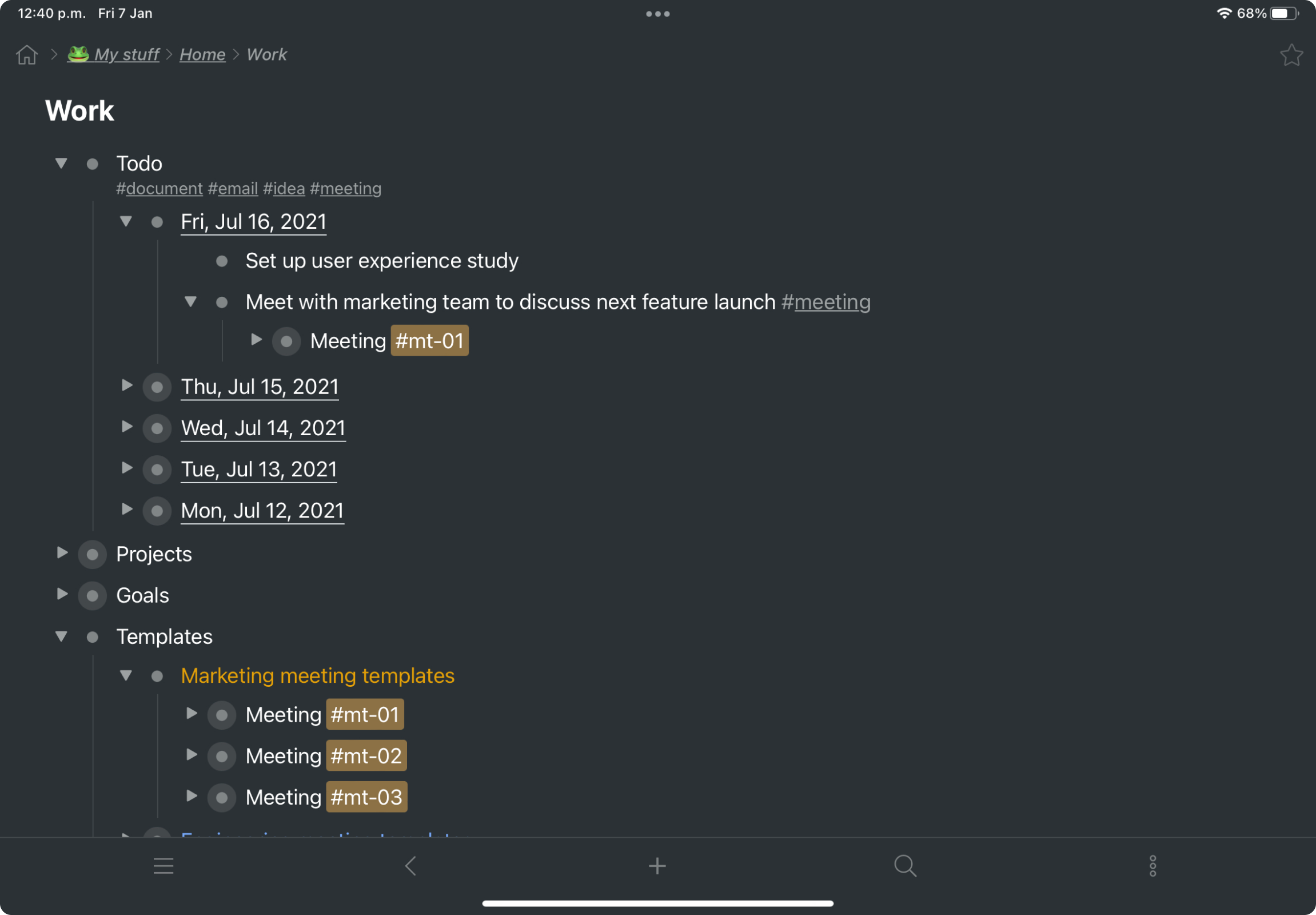
Screenshot of a kanban board in Workflowy, used to organize files and images.Screenshot of the interface to draft complex documents and artistic works while keeping everything organized.Screenshot of Workflowy's task management interface, where boards boards and lists can be managed and combined.Screenshot of item highlighting, with search by highlight color.Screenshot of tags, used to find anything in an account, no matter where it is.