Domo is a full self-service business intelligence software that combines several data analysis and reporting tools into one platform. It helps users connect to multiple data sources, create robust visual reports, manage their data, send messages in real-time, manage projects, and develop new apps.
N/A
Jaspersoft
Score 6.0 out of 10
N/A
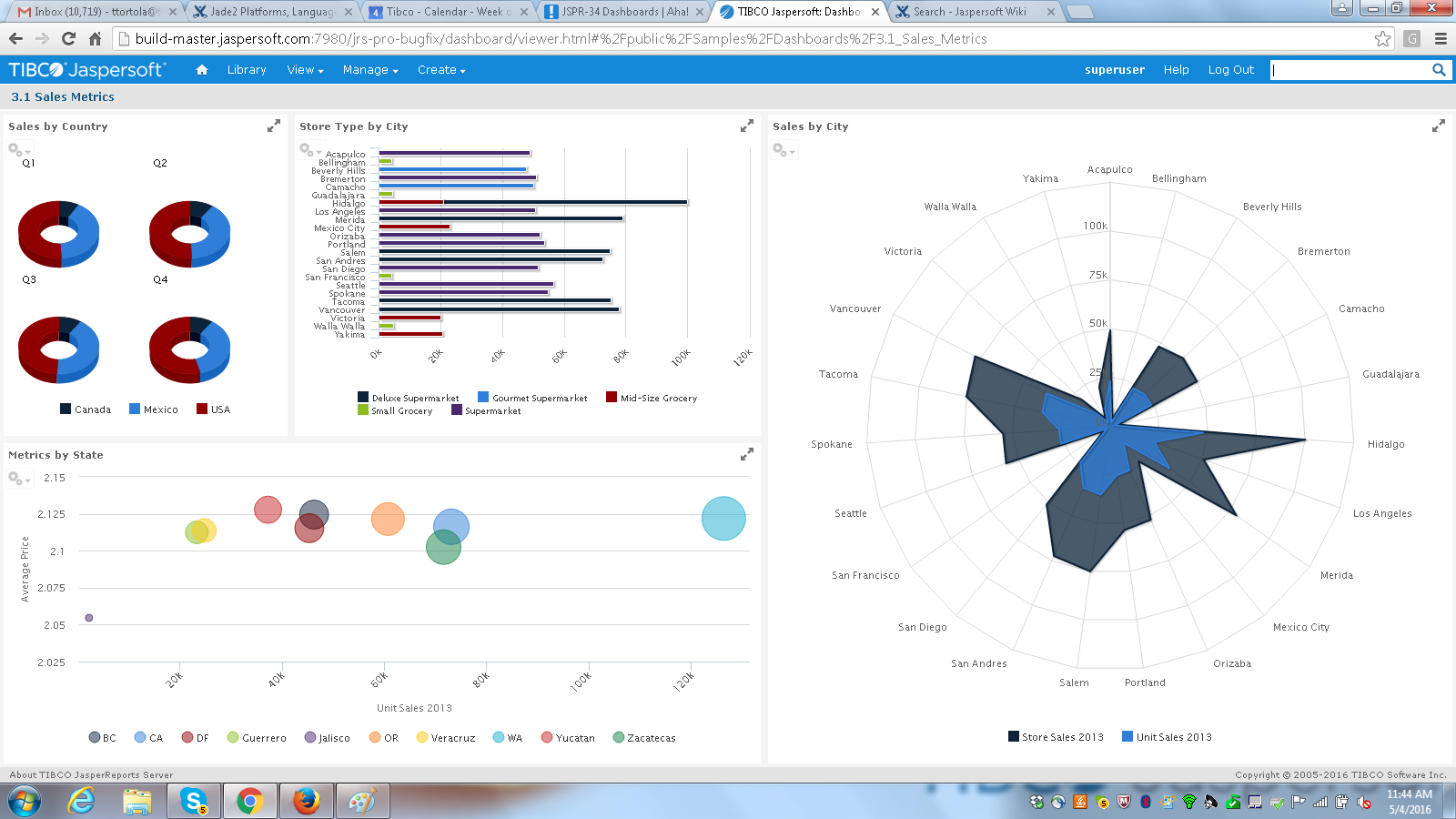
Jaspersoft commercial edition is an embedded business intelligence suite designed to be built-into SaaS products as an integrated reporting engine. It provides reports and dashboards for customer-facing applications without requiring app developers to build their own reporting engine.
N/A
Pricing
Domo
Jaspersoft
Editions & Modules
No answers on this topic
No answers on this topic
Offerings
Pricing Offerings
Domo
Jaspersoft
Free Trial
Yes
Yes
Free/Freemium Version
No
Yes
Premium Consulting/Integration Services
No
No
Entry-level Setup Fee
No setup fee
No setup fee
Additional Details
—
Jaspersoft offers flexible pricing for ISVs and SaaS per customer or by CPU core.
Because Domo has high mobile and responsive features, we prefer Domo over the others. Because other products still lack features in terms of features, it slows us down. We hope that Domo continues to innovate continuously to become even better. Thank you Domo for providing many …
Much better than the previous system Tag which was Corvu which ended up being just a shell for Rocket Software. It also brings modern capabilities such as roles and security to the systems that we have, It is also a lot easier than the old one in which we needed to hire a …
Microsoft Excel has the ability to create spreadsheets and charts however it requires very complicated formulas and macros. Domo is a little more user friendly as far learning how to use the program without needing to understand complex formulations. Excel is also very touchy, …
Domo is on the higher side when it comes to price against the competition but it warrants it. It has all the features and capabilities you will need to execute an exceptional BI program across your organization. I'm not sure I'd recommend this if this is your first BI tool just …
Domo customer service is what sets it apart. This is something that we focus on because setup time for tools and downtime often causes issues. Having the support team being so responsive and able to help is a huge bonus.
Domo is a complete end-to-end platform that provides warehouse, ETL, and visualization features as against these other platforms which are mostly visualization platforms. Though other platforms have started providing data cleaning features, they do not provide connectivity to …
Domo is one of the best software out there simply because of the functionality and capability that it has over other software. The only downside with this is that it is a bit more expensive compared to other solutions out there, but this is because of the added functionality.
I wasn't personally involved with the selection of Domo as compared to other solutions. I am aware that the close proximity of the company to us gave them opportunities to be more personal in their presentation. Tableau was probably our second choice. But the customer service …
I have used Tableau, Hyperion, Micro-strategy, Crystal, and SSRS, nothing was as easy to use as Domo. It is also not one-off. I can create a new report based off of an existing dataset in a few minutes, and so can anyone else.
Domo is by far the industry leader. Other tools/platforms have unique strengths, but from an overall perspective, Domo is the most versatile and does an exceptional job in all areas. This is critical when it comes to "scale". A BI project may start with a siloed scope, but as …
I have never used Tableau, but I've spoken with colleagues who have used it. Tableau is good and probably a better experience for the report builder, but I know my executive team is satisfied with it and it does make it easy for them see how the company is performing as a whole.
We switched from Tableau to Domo because we believe Domo is a better tool for self-service business intelligence. After switching to Domo, we saw much stronger adoption from business users compared to Tableau.
TIBCO does a better job in providing seamless data mapping and migration from one legacy system to other without any loss of traffic or compromising the security of the data. Whereas with another tool sometimes because of the integral framework there may be some questions as to …
Very cost-effective and was easy to work with. However as I’ve said before, when your data volumes grow significantly over the years it’s important to plan what your needs will be. Twice in my career, we chose Jaspersoft Enterprise Edition and both times outgrew it in under 6 …
Power BI has a more user-friendly UI and tools but is hard to integrate with our application. Qlik Sense is default vendor for our organization in some countries.
Price was a big factor. Jaspersoft is well priced compared to Tableau. We found Glow scaled badly. With Jaspersoft, we can add as much horsepower as we need.
As I believe Business Objects was no longer being supported, we moved onto using TIBCO Jaspersoft. We have used Jaspersoft to create new reports, as well as, convert existing reports from different platforms, such as BO. We selected Jaspersoft as it seemed like a good fit that …
When looking at the different features of these reporting engines, and what we were going to be using it for, the answer seemed clear. Jasper offered exactly what we were looking for, and did so for a price that we were happy with. For a scalable, feature-rich reporting engine …
It's been a long time since we have been using Jasper, so I can't really remember the details, but mainly it was about comparing how easy it was to integrate with our Java-based product, reporting capability, and datasources/platform supported.
We used Business Objects for reporting, but the licensing exceeded our budget so we had to look for other reporting server options. We used the community version of the reports server for some time with no problems, just limitations on what we could/couldn't do. We were very …
The support and chances of implementing the own branding, as we ship TIBCO Jaspersoft as a stand-alone server we did our own branding for the Jasper server with the login page and the theme, hiding the unnecessary options to the user. The ease of creating canned reports using …
More flexible than Qlik, easier to integrate and cheaper to run. Less polished and ultimately capable than Tableau, but more flexible commercially and technically. In terms of commercials and support, easier to deal with than either Qlik or Tableau.
Tibco Jaspersoft is a stronger competitor than the Microsoft Reports and ETL products. The flexibility and power of using the software, multi platform and deployment and monitoring has no comparison to what you use.
It would be interesting to integrate some features of …
Domo is great when you want to see lots of values historically or see data you can see natively in a platform. As I mentioned earlier, Domo is the only way our Marketing and Sales teams can see when their emails were opened and compare the send time - this is an example of data I can't see natively.
TIBCO Jaspersoft is well suited for users who are not too technical. These users are able to easily drag and drop domain fields from their database to create friendly table reports. Users can easily add filters to their reports which allows for reusability. On the other hand, if a user is looking to add information that has many-to-many relationships, duplicates will appear. Having duplicates in an ad-hoc view and not being able to easily remove them is a big issue for many of our clients.
Provides data acquisition, transformation and visualization all administered from one cloud-based tool. No switching between tools or cobbling different products together.
Provides GUI and MySQL interfaces for data manipulation for both entry-level and advanced users.
Huge amount of data connectors out of the box, plus you can easily create your own custom connectors.
When changing cards from one dataset to another any beast modes are not carried over, it would often make life easier if there was an easier way to copy beast mode calculations from one dataset to another.
Domo documentation, university and Dojo are extremely helpful when we run into problems. However, when support beyond that is needed their help desk seems to have a hefty backlog - the amount of time to resolve tickets is frustrating sometimes.
The UI on the report designer, Jaspersoft Studio, looks a little outdated. I think that Studio as a whole could use a facelift. Additionally, Jaspersoft Studio tends to slow down over time, requiring a restart of the program.
There is a bit of a learning curve with all of the intricacies of Jaspersoft Studio, it's kind of overwhelming when trying to learn it from nothing.
One functionality that seems to be missing, that would help our use-case, would be the ability to parameterize a JSON URL as a data source. For example, if there was a call to a set of JSON data, it has to be a static URL. But in many cases, APIs that return JSON take parameters via the URL. Jaspersoft does not support that.
Domo is a great up-and-coming product. There are many fantastic features that are extremely compelling to our end users, which makes Domo a great fit for our organization. As with many BI tools, there are items on the wish list that could make implementation, administration and usage easier, but I believe these will be addressed over time as the product matures and evolves. The overall concept and approach of this solution has definitely raised the bar in this area of expertise and I would like to see things advance in giving the enterprise tools that will make decision making easier and more robust in the future.
We've converted our library of reports to use Jaspersoft. Our clients have had a taste of Jaspersoft and we've had very positive feedback from those interactions. Our internal employees have had great success using iReports and JasperStudio to create very robust reports that better show the data our clients expect to see. Overall, our experiences with Jaspersoft have been great and it's proven to be a very good decision for the direction of our business.
A business management platform has to be flexible to provide solutions for customers from any business environment, but that flexibility has to be delivered without requiring complex business process re-engineering and massive data conversion efforts. Domo’s web-based architecture and wealth of connectivity options allow rapid setup for any business. If your marketing company is wrestling with channel return on investment or your educational organization is drowning in data, Domo has the tools and capability to use your data and turn it into something useful for you
I think it's a tool well suited for a software developer. Others with less coding skills could struggle somewhat with the tool. I find java a little unforgiving as a language for expressions and not very user friendly for the technically dis-inclined. Sometimes the numeric conversions cause issues (who knew that 0 and 0.0 would cause different things to happen). Previous experience with a reporting tool that used visual basic for its' expressions that I found much simpler to use. On the other hand, java is so widespread, you can easily google the syntax to accomplish what you need to do.
There have been a few instances where Tomcat has consumed 100% CPU, which requires a restart to resolve, but other than that reliability has been excellent.
Pretty responsive. It took a while to get a response in selecting data points for our particular cards. Might have taken about a month? I am not sure if this was something on our end or Domo's end. But haven't had any other issues yet that required additional support from Domo.
They have a great customer support ticketing system in which they always respond same-day. They offer conference calls with srcreensharing as well in order to better understand your issues.
I wish that the lower level support access came with more than just 12 cases per year though as this makes us less likely to reach out for questions on things that we then instead try to solve ourselves which results in loss of time in trying to acquire new features and or solve a problem.
It did the job of getting us to our deadline we set for ourselves for initial launch. The customer we launched the product for was also there to learn about it at the same in order to better understand the capabilities. This helped greatly so that the customer was on the same page on what was possible when using jaspersoft. I think most people would not want their customers aware the product they are using is third-party but in this case it was a new experience for us both and so as we learned more about jaspersoft, we both had better communication on what the future road map was for their business needs in BI.
Resources available in the TIBCO Knowledge Base are covering almost everything. They are well organized, and covering almost every possibility. There is always the change to get back to the TIBCO support or to the dedicated Customer Success Manager whenever something very specific or bound to a customization is not covered.
It is a true web-based application so implementation is much easier and smoother compared to other non-web based BI solutions. Also, they offered consulting services during the implementation process, which was helpful. Also, they provided lots of on-demand training courses and videos, which I liked.
Super easy to install and/or upgrade! For all the big name software out there that does some business critical things, Jasper is a pleasure to install and/or upgrade. The bundled installer is all ONE install (one shell script execution at least) that sets up everything. Vastly superior to most other software of this caliber.
Domo is by far the industry leader. Other tools/platforms have unique strengths, but from an overall perspective, Domo is the most versatile and does an exceptional job in all areas. This is critical when it comes to "scale". A BI project may start with a siloed scope, but as the project bares fruit, others begin to ask how they can participate/leverage the tool/platform for their own projects - because of this, Domo's versatility is incredibly important
TIBCO does a better job in providing seamless data mapping and migration from one legacy system to other without any loss of traffic or compromising the security of the data. Whereas with another tool sometimes because of the integral framework there may be some questions as to why the data packets were lost during mapping and migration.
Domo has allowed us to see much more clearly what is working for students on our programs, and what is not. This enables us to consolidate success and further develop where there are areas of concern.
The verbatim comments in Domo makes the reports especially attractive to staff, since they are able to engage directly with students' personal opinions and not just with rating scales.
I used the free version, so obviously the positive side is we did not have to pay
Next advantage is you can pick it up relatively fast, even though I think the UI can be much improved. Otherwise creating PDF reports by programming is quite a complicate task, to me anyway