Dialpad Sell is a phone system built for sales, with real-time coaching and CRM integrations. It features call analytics, voice intelligence with objection handling, call sentiment analysis for just-in-time coaching, and support for a range of headsets and phones.
N/A
VanillaSoft
Score 3.7 out of 10
Small Businesses (1-50 employees)
VanillaSoft is a lead optimization platform designed to assist fast-response sales teams in maximizing their conversion rates. By providing a structured and efficient approach to lead management, VanillaSoft aims to ensure that every potential customer receives the attention they deserve. This platform is beneficial for sales teams that operate in high-pressure environments where timely follow-ups can significantly impact sales outcomes. The primary audience for VanillaSoft…
N/A
Pricing
Dialpad Sell
VanillaSoft
Editions & Modules
No answers on this topic
No answers on this topic
Offerings
Pricing Offerings
Dialpad Sell
VanillaSoft
Free Trial
No
No
Free/Freemium Version
No
No
Premium Consulting/Integration Services
No
No
Entry-level Setup Fee
No setup fee
No setup fee
Additional Details
—
VanillaSoft offers several add-ons to use in conjunction with our base platforms including:
Auto Dialing
Call Recording
VoIP
SmartCaller ID
SMS
More Pricing Information
Community Pulse
Dialpad Sell
VanillaSoft
Features
Dialpad Sell
VanillaSoft
Preview Dialer
Comparison of Preview Dialer features of Product A and Product B
Dialpad Sell
8.0
Ratings
11% above category average
VanillaSoft
-
Ratings
Contact preview
8.00 Ratings
00 Ratings
Dialer-CRM integration
8.00 Ratings
00 Ratings
Call notes & tags
8.00 Ratings
00 Ratings
Automatic call logging
8.00 Ratings
00 Ratings
Core Dialer
Comparison of Core Dialer features of Product A and Product B
Dialpad Sell
8.5
Ratings
11% above category average
VanillaSoft
-
Ratings
Outbound dialing
8.00 Ratings
00 Ratings
Inbound routing
8.00 Ratings
00 Ratings
Custom caller ID
7.10 Ratings
00 Ratings
Click-to-call
9.00 Ratings
00 Ratings
Recorded voicemail drop
10.00 Ratings
00 Ratings
Dialer contact import
8.90 Ratings
00 Ratings
Campaign & list management
8.20 Ratings
00 Ratings
Call Follow-up and Quality Assurance
Comparison of Call Follow-up and Quality Assurance features of Product A and Product B
Well, There are numerous scenarios where a Dialpad can be very helpful in terms of communication tools. It allows the user to send text unlimited messages, making outbound calls, and review daily, weekly, monthly, or custom analytics. Saving n number of contact details, easy to search them on Dialpad. As of now, I did not come across any scenario where I can say Dialpad would not be suited.
VanillaSoft is well suited for the call center scenarios, it helps the representatives to keep all the leads information well organized and in one single place to speed up daily tasks efficiently and effectively. VanillaSoft is easy to set up, even someone who is new can have it up and running in minutes.
One of my favorite features is the ability to customize routing. Quite often a caller is told by a prospect to call back at a certain date and time, the caller can set that and the record will pop up in the front of the database on that date and time letting you know that you have a call to make.
We also send out information on behalf of our clients to prospects, which we do directly out of VanillaSoft. After the information is emailed the system will actually let us know when it was opened and moved that prospect record to the front of the database to be a priority in call rotation.
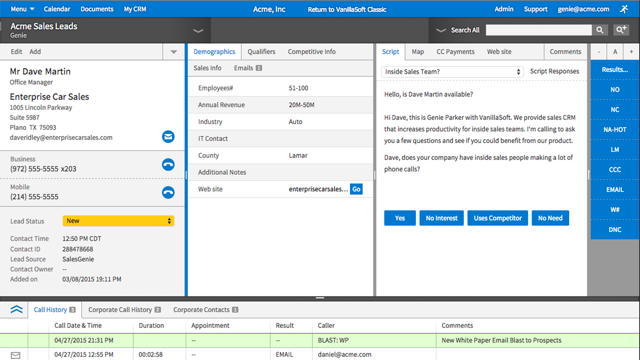
I also love that we were able to customize it so that the callers have everything they need to see right in front of them. We have a area that has the prospects information, name and address, then an area that has required information fields with questions the caller needs to ask and place answers in the appropriate fields, then we have an area with a notepad, an area to access the calendar, and an area that gives the caller all the previous activity on the record.
These are considered strengths for us as all of these examples make my job and the callers job much easier and saves us a ton of time and money.
The biggest thing for me is being able to link calls to specific objects in SalesForce. In the app, you can link a contact to an object, but I often call the same contact several times, so I have to create a report in Salesforce and manually link the call everytime that way.
We have no reason not to renew. VanillaSoft has been the best CRM (for us) that we have ever used. The value is great, we love the system, and it's easy to get assistance from VanillaSoft team when needed. Our team is so used to the calling and admin functions there is no desire to change.
Dialpad Sell is Very easy to use, whether at home or in the office dial pad has very sleek and easy to use features, all features are easy to find and are pretty self explanatory, the switch from regular phones to dial pad was a very easy and non stressful switch for our whole team
The entire system is set up so perfectly. It makes training callers much quicker, and admin tools are so easy to navigate when you get used to using it. Also, if there is ever something I cannot figure out, I can get support from VanillaSoft very quickly to resolve and get my task accomplished.
It is very rare that we have system issues. Maybe a handful of times over the years, we had to contact support about being unable to access. It was always a quick response from the VanillaSoft team, and they would clearly explain the issue and usually give time frame on fixing, or have it fixed immediately.
I work on all aspects for VanillaSoft for our company. The pages overall do load very quickly. Reports are amazing, I can get quick report, customized reports, and anything I may need to present to client in very little time. It has made my job so much simpler. As far as I know, integration goes smoothly as well.
It was very thorough. VanillaSoft team did not rush us. They explained the various functions clearly and were open to any and all questions we had as we began to learn the system. Also, once training completed, if we encountered anything we could not figure out, the support team was fantastic in helping us out.
I like Dialpad so much more than PB simply for its analytics and follow up notes. I also love how you can text clients through DP which in PB, you cannot do. The AI technology and communications with the user is something that is so beneficial to it's users and therefore, I highly recommend this product over others
VanillaSoft has very similar offerings to Outreach in terms of usability and opportunities for streamlined prospect engagement. The main differences lie with their user experience, customer service, and how information is presented through the platform in terms of knowledge base and analytics. Both are suitable tools, the differentiation comes down to preference of interface and data presentation.
VanillaSoft has been great. The flexibility of the system is wonderful. The scalable software options are impressive as well. I would strongly support VanillaSoft's capabilities in this area. You really can do just about anything to get the setup and or integrations you may desire for your company needs.
The ability to save my correspondence and notes on each interaction allowing for the appearance to the customer that I am very engaged when we are speaking.
Increased sales from the calendar setting and saving my notes.