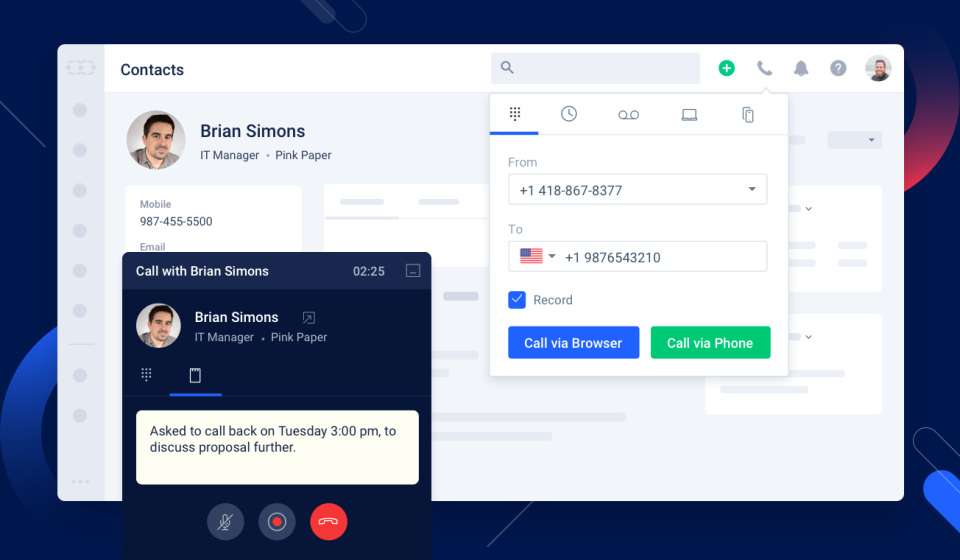
Dialpad Sell is a phone system built for sales, with real-time coaching and CRM integrations. It features call analytics, voice intelligence with objection handling, call sentiment analysis for just-in-time coaching, and support for a range of headsets and phones.
N/A
Salesmate
Score 10.0 out of 10
Mid-Size Companies (51-1,000 employees)
Salesmate is a single platform that helps create personalized experiences across marketing, sales, and service touchpoints across all channels – email, text, chat, web, calls, and eCommerce. It is designed to enable users to generate more leads, close more deals, and build lasting customer relationships. It replaces many disjointed systems to save users time and money. Salesmate offers businesses: …
$29
per month per user
Pricing
Dialpad Sell
Salesmate
Editions & Modules
No answers on this topic
Basic
$29
per month per user
Pro
$49
per month per user
Business
$79
per month per user
Enterprise
Custom
Offerings
Pricing Offerings
Dialpad Sell
Salesmate
Free Trial
No
Yes
Free/Freemium Version
No
No
Premium Consulting/Integration Services
No
No
Entry-level Setup Fee
No setup fee
Optional
Additional Details
—
We offer built-in calling:
Starting at $1.10 per month for your phone line & pay as you go credits
More Pricing Information
Community Pulse
Dialpad Sell
Salesmate
Features
Dialpad Sell
Salesmate
Preview Dialer
Comparison of Preview Dialer features of Product A and Product B
Dialpad Sell
8.0
Ratings
11% above category average
Salesmate
-
Ratings
Contact preview
8.00 Ratings
00 Ratings
Dialer-CRM integration
8.00 Ratings
00 Ratings
Call notes & tags
8.00 Ratings
00 Ratings
Automatic call logging
8.00 Ratings
00 Ratings
Core Dialer
Comparison of Core Dialer features of Product A and Product B
Dialpad Sell
8.5
Ratings
11% above category average
Salesmate
-
Ratings
Outbound dialing
8.00 Ratings
00 Ratings
Inbound routing
8.00 Ratings
00 Ratings
Custom caller ID
7.10 Ratings
00 Ratings
Click-to-call
9.00 Ratings
00 Ratings
Recorded voicemail drop
10.00 Ratings
00 Ratings
Dialer contact import
8.90 Ratings
00 Ratings
Campaign & list management
8.20 Ratings
00 Ratings
Call Follow-up and Quality Assurance
Comparison of Call Follow-up and Quality Assurance features of Product A and Product B
Dialpad Sell
8.0
Ratings
6% above category average
Salesmate
-
Ratings
Follow-up calls
8.00 Ratings
00 Ratings
Dialer reporting & analytics
7.00 Ratings
00 Ratings
Dialer compliance
9.00 Ratings
00 Ratings
Sales Force Automation
Comparison of Sales Force Automation features of Product A and Product B
Dialpad Sell
-
Ratings
Salesmate
8.1
Ratings
5% above category average
Customer data management / contact management
00 Ratings
10.00 Ratings
Workflow management
00 Ratings
9.90 Ratings
Territory management
00 Ratings
9.00 Ratings
Opportunity management
00 Ratings
9.90 Ratings
Integration with email client (e.g., Outlook or Gmail)
00 Ratings
7.30 Ratings
Contract management
00 Ratings
6.00 Ratings
Quote & order management
00 Ratings
5.60 Ratings
Interaction tracking
00 Ratings
7.80 Ratings
Channel / partner relationship management
00 Ratings
6.90 Ratings
Customer Service & Support
Comparison of Customer Service & Support features of Product A and Product B
Dialpad Sell
-
Ratings
Salesmate
7.7
Ratings
2% above category average
Case management
00 Ratings
7.40 Ratings
Call center management
00 Ratings
7.90 Ratings
Marketing Automation
Comparison of Marketing Automation features of Product A and Product B
Dialpad Sell
-
Ratings
Salesmate
6.3
Ratings
18% below category average
Lead management
00 Ratings
6.70 Ratings
Email marketing
00 Ratings
6.00 Ratings
CRM Project Management
Comparison of CRM Project Management features of Product A and Product B
Dialpad Sell
-
Ratings
Salesmate
8.4
Ratings
10% above category average
Task management
00 Ratings
8.90 Ratings
Reporting
00 Ratings
7.90 Ratings
CRM Reporting & Analytics
Comparison of CRM Reporting & Analytics features of Product A and Product B
Dialpad Sell
-
Ratings
Salesmate
7.6
Ratings
0% above category average
Forecasting
00 Ratings
7.80 Ratings
Pipeline visualization
00 Ratings
7.90 Ratings
Customizable reports
00 Ratings
7.10 Ratings
Customization
Comparison of Customization features of Product A and Product B
Dialpad Sell
-
Ratings
Salesmate
6.9
Ratings
8% below category average
Custom fields
00 Ratings
7.30 Ratings
Custom objects
00 Ratings
6.70 Ratings
Scripting environment
00 Ratings
6.50 Ratings
API for custom integration
00 Ratings
7.10 Ratings
Security
Comparison of Security features of Product A and Product B
Dialpad Sell
-
Ratings
Salesmate
8.0
Ratings
4% below category average
Single sign-on capability
00 Ratings
7.80 Ratings
Role-based user permissions
00 Ratings
8.20 Ratings
Integrations with 3rd-party Software
Comparison of Integrations with 3rd-party Software features of Product A and Product B
Dialpad Sell
-
Ratings
Salesmate
7.0
Ratings
5% below category average
Marketing automation
00 Ratings
7.00 Ratings
Platform
Comparison of Platform features of Product A and Product B
Well, There are numerous scenarios where a Dialpad can be very helpful in terms of communication tools. It allows the user to send text unlimited messages, making outbound calls, and review daily, weekly, monthly, or custom analytics. Saving n number of contact details, easy to search them on Dialpad. As of now, I did not come across any scenario where I can say Dialpad would not be suited.
Salesmate gives us everything we need as a small business, with a clear interface, and can adapt to any business. If I was being ultra picky, I would perhaps suggest the ability to remove or hide certain modules not applicable to our niche, e.g., we are a B2C business, so the company module is not really useable for us, but this is not a negative by any means.
The biggest thing for me is being able to link calls to specific objects in SalesForce. In the app, you can link a contact to an object, but I often call the same contact several times, so I have to create a report in Salesforce and manually link the call everytime that way.
The search feature can be buggy and does not allow for highlighted text to be typed on. You must clear the box or hit backspace before typing. The only app in my life that does this.
The dashboard button is pointless if it still makes you choose between legacy or classic.
Very happy with the customer service and the overall functionality of the program. With new features always being launched and discussed I'm looking fwd to growing with them
Dialpad Sell is Very easy to use, whether at home or in the office dial pad has very sleek and easy to use features, all features are easy to find and are pretty self explanatory, the switch from regular phones to dial pad was a very easy and non stressful switch for our whole team
The platform is incredibly robust while maintaining a clean appearance. This allows you to see exactly what you need at any given time without being overwhelmed. The ability to customize your dashboard easily allows you to see the information that is most relevant to your operations and needs.
Fantastic - always reply in a reasonable amount of time, usually with a simple fix. The support website is very handy, but often you will likely have 'niche' questions - to which the team are all to happy to help with. For larger issues, we have had to lodge tickets with tech, but to date, every issue we have had has been resolved. Very happy with the support and service.
I like Dialpad so much more than PB simply for its analytics and follow up notes. I also love how you can text clients through DP which in PB, you cannot do. The AI technology and communications with the user is something that is so beneficial to it's users and therefore, I highly recommend this product over others
I was using the free version of Hubspot, which was extremely limiting. If I wanted to go ahead and unlock a simple feature, which every other CRM offered, my price would shoot up to hundreds of dollars a month for no reason, as they force you to unlock “all the features” not just the ones you need. Salesmate is much better, as you can choose which features you want, and don’t want.