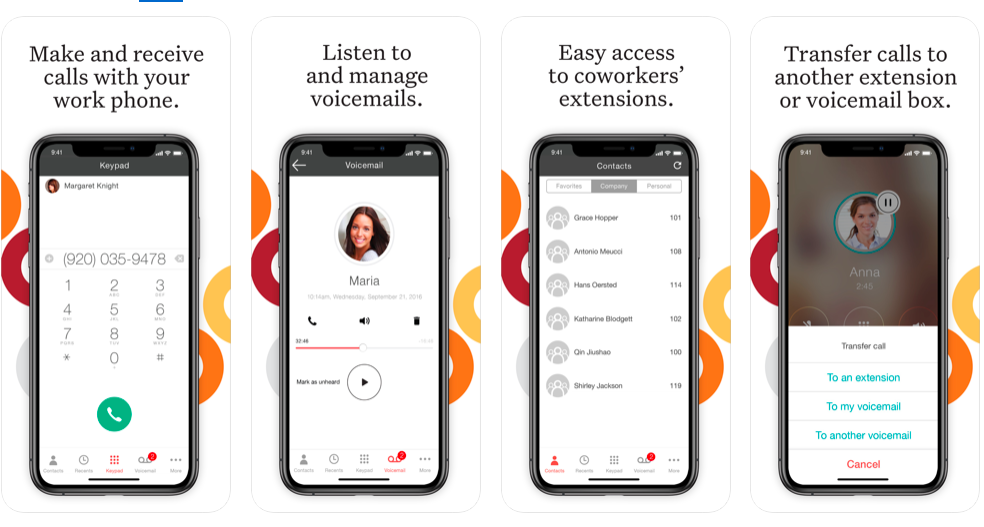
Dialpad Connect is a cloud communications UCaaS platform that provides users with integrated voice, video, and messaging capabilities from one unified interface.
$27
per month per user
Ooma Office
Score 9.2 out of 10
N/A
For businesses of all sizes, Ooma provides advanced voice and collaboration features which they describe as flexible and scalable. With plans starting at $19.95 per user per month, Ooma Office is available without contracts or long-term commitments so as to make it easy for a small business to scale its office phone system with Ooma as its business grows. Ooma Office features include: Unlimited Calling in U.S., Canada, Mexico and Puerto Rico Free Local…
$9.95
per month
Pricing
Dialpad Connect
Ooma Office
Editions & Modules
Standard
$27
per month per user
Pro
$35
per month per user
Enterprise
Contact sales team
per user/per month
Local Phone Number
$9.95
per month
Toll Free Number
$9.95
per month
Toll Free Calling Plan
$15.00
per month
Base Price
$19.95
per month
User Extension
$19.95
per month
Pro
$24.95
per month
Ooma Linx
$49.99
per month
Ooma Wireless Adapter
$49.99
per month
Ooma DP1 Desk Phone
$89.99
per month
Expansion Base Station
$99.99
per month
Yealink IP Phones
$99.99
per month
Cisco IP Phones
$109.99
per month
Yealink Conference IP Phones
$399.99
per month
Conference Bridge
Free
Ring Groups
Free
Virtual Receptionist
Free
Number Porting
Free
Offerings
Pricing Offerings
Dialpad Connect
Ooma Office
Free Trial
No
No
Free/Freemium Version
No
No
Premium Consulting/Integration Services
No
No
Entry-level Setup Fee
No setup fee
$19.95 per user/month
Additional Details
—
Ooma Office offers plans starting at $19.95 per user/month with no contracts, ever.
More Pricing Information
Community Pulse
Dialpad Connect
Ooma Office
Features
Dialpad Connect
Ooma Office
Performance & Compatibility of Online Events Software
Comparison of Performance & Compatibility of Online Events Software features of Product A and Product B
Dialpad Connect
8.3
Ratings
1% above category average
Ooma Office
-
Ratings
High quality audio
8.40 Ratings
00 Ratings
High quality video
8.20 Ratings
00 Ratings
Screen Sharing
Comparison of Screen Sharing features of Product A and Product B
Dialpad Connect
7.9
Ratings
2% below category average
Ooma Office
-
Ratings
Desktop sharing
7.90 Ratings
00 Ratings
Online Meetings / Events
Comparison of Online Meetings / Events features of Product A and Product B
Dialpad Connect
8.3
Ratings
1% above category average
Ooma Office
-
Ratings
Calendar integration
8.40 Ratings
00 Ratings
Meeting initiation
7.90 Ratings
00 Ratings
Record meetings / events
8.70 Ratings
00 Ratings
Online Events Collaboration
Comparison of Online Events Collaboration features of Product A and Product B
Dialpad Connect
8.2
Ratings
2% above category average
Ooma Office
-
Ratings
Live chat
8.20 Ratings
00 Ratings
Online Events Security
Comparison of Online Events Security features of Product A and Product B
Dialpad Connect
8.0
Ratings
4% above category average
Ooma Office
-
Ratings
User authentication
7.80 Ratings
00 Ratings
Participant roles & permissions
8.20 Ratings
00 Ratings
Cloud PBX
Comparison of Cloud PBX features of Product A and Product B
Dialpad Connect
8.2
Ratings
2% below category average
Ooma Office
8.0
Ratings
1% above category average
Hosted PBX
8.20 Ratings
8.40 Ratings
Multi-level Interactive Voice Response (IVR)
7.80 Ratings
7.80 Ratings
Directory of employee names
8.70 Ratings
8.00 Ratings
Call Management
Comparison of Call Management features of Product A and Product B
Dialpad Connect
8.3
Ratings
2% below category average
Ooma Office
8.4
Ratings
0% above category average
Answering rules
8.90 Ratings
8.50 Ratings
Call recording
7.50 Ratings
7.50 Ratings
Call park
8.40 Ratings
9.00 Ratings
Call screening
8.60 Ratings
9.00 Ratings
Message alerts
8.70 Ratings
8.00 Ratings
Business SMS/External Messaging
8.70 Ratings
00 Ratings
Online Fax
7.40 Ratings
00 Ratings
Voicemail Transcription
8.30 Ratings
00 Ratings
Mobile apps
Comparison of Mobile apps features of Product A and Product B
Dialpad Connect
7.7
Ratings
9% below category average
Ooma Office
7.5
Ratings
5% below category average
Mobile app for iOS
7.70 Ratings
7.50 Ratings
Mobile app for Android
7.70 Ratings
7.40 Ratings
Unified Communications Platform and Collaboration
Comparison of Unified Communications Platform and Collaboration features of Product A and Product B
Dialpad Connect
8.0
Ratings
0% below category average
Ooma Office
-
Ratings
Centralized communications management
8.20 Ratings
00 Ratings
Team messaging
8.10 Ratings
00 Ratings
Team document sharing
7.70 Ratings
00 Ratings
Call and meeting analytics
7.80 Ratings
00 Ratings
VoIP system collaboration
Comparison of VoIP system collaboration features of Product A and Product B
It is well-suited for basic calling functionality, but has been a poor experience for us when used for texting, as it lacks some of the features of other platforms, such as Haymarket. It is also challenging to capture good analytics, as this is neither easy nor clear for users to find.
[Ooma Office has] good customer service: this is important in our business as we have 24/7 phone service and rely on any tech issues being solved quickly. The price point is very good for small businesses. Being able to block robo / spam calls with one click is a huge plus as it saves us time on the phone and cleans up our incoming calls for the future.
As of now, the way this system allows us to call each other, text each other (inner office) as well as communicate with customers while being fully integrated with our CRM (Service Titan) has made everything so much easier for everyone. Thus far, I am super thrilled with the ease of use, integration and all the reasons we chose Dialpad Talk are working great
We have found it very easy to configure, manage, and expand our phone operations with Ooma Office. We needed a reliable phone network as this is the first means of communication for our customers - Ooma has made it a lot easier for us to manage. Their support is also available 24x7 so that's a huge plus.
Dialpad Connect is good and recommended for any organization. It is a good value. It can accomplish everything that your organization is looking for, and no one will say it is outside the budget for any 50+ person organization. The AI feature is very useful. The dashboard could be a bit easier to manage, and the integration with Salesforce could be a bit smoother.
If I had to rate Ooma Office’s overall usability on a scale from 1 to 10, I’d give it a solid 9 out of 10.From my experience, the setup was incredibly straightforward — honestly one of the easiest systems I’ve ever rolled out for a small business. The dashboard is clean, user-friendly, and doesn’t take a tech-savvy person to navigate. Within a short time, our team was up and running without needing IT support.What I really appreciate is how intuitive the call handling features are — forwarding, voicemail, virtual receptionist — it’s all laid out in a way that just makes sense. Plus, the mobile app makes it super convenient to stay connected when I’m not in the office.
There have not been any outages that I am aware of and we have had consistently good coverage since the start. There can be a slight lag from the office to the mobile app, but it is not terribly noticeable and it has not resulted in any calls being prematurely hung up
The emails of voice transcription come very quickly after a call has been completed and except for a few fairly difficult names are pretty accurate. The ability to quickly listen to the voicemail from email without having to open the app is also a bonus. I have not noticed or heard of any slowdowns
Dialpad Onboarding support was okay. I think this was because we used a 3rd party vendor. We had a lot of issues with provisioning the phones.
The Dialpad sales rep forgot to mention that Dialpad is only compatible with Polycom desk phones so we bad to purchase new phones last minute.
We were supposed to get 3 months free when we signed up with Dialpad as a courtesy but the charged us for the 3rd month. They have resolved this error but I think there was no designated point of contact on Dialpad's end to help things move more smoothly.
Ooma Office support is always available. I've never been on the phone with them for longer than 5 minutes. They are knowledgable, have great active listening skills, are able to make recommendations on how to make Ooma Office work even better for you, and wait times to speak with an agent are reasonable and typically less than 1 minute.
Simple and easy to follow, we had our branches around the country to be trained and the feedback was great. Only take if there was a desk phone training that would be great. The team provided us with video for the desk phone training
Have a plan in place before you start the implementation, open communication with the staff on the changes being made, prepare a reference guide on the system and how to navigate the new setup. Budget and allocate time for helping staff learn the new system. Consolidate and coordinate all the questions internally before reaching out to support.
Panterra is dependable and has good support. Dialpad Connect has more features and an easier interface. AT&T has a lot of features, but Dialpad Connect's interface is easier. AT&T does not do call transcription that I know of. Comcast BVE and 8x8 services are lower quality and service is not great.
We use Ooma Office for everyone in the company including mobile users. It has allowed us to eliminate the spam callers as well give our mobile and remote users the ability to make business calls - from any device, from anywhere, at any time - without having to worry about any long distance charges, or without giving up their personal telephone numbers (at home or cellular).
So far, Dialpad has been a great improvement for our organization. It allows everyone to be on the same service and the integration with the mobile app means everyone is still using the "office" numbers even when on the go which makes it easier not having to balance multiple phone numbers from people