Convert Experiences vs. Google Optimize

Overview
ProductRatingMost Used ByProduct SummaryStarting Price
Convert Experiences
Score 9.9 out of 10
Mid-Size Companies (51-1,000 employees)
Convert Experiences is an experimentation platform that offers features and support to run A/B tests across multiple growth channels. Its enterprise-ready advanced features include full stack experimentation, multi-page testing, post-segmentation, sequential testing, targeting with 40+ filters, triggering tests based on data in other apps (data sources), dynamic triggers, complex goal tracking, and a secure API. It includes 90+ out-of-the box integrations in a…
$299
per month 100k tested users per month
Google Optimize
Score 6.7 out of 10
N/A
Google offers the Optimize A/B testing tool for testing website content and versions.N/A
Pricing
Convert ExperiencesGoogle Optimize
Editions & Modules
Growth
$299
per month 100k tested users per month
Pro
$5988
per year 3M tested users available upfront
Enterprise
Pricing available on request
From 1M tested users/mo (billed annually)
Enterprise
Pricing available on request
From 1M tested users/mo (billed annually)
Google Optimize
Free
Offerings
Pricing Offerings
Convert ExperiencesGoogle Optimize
Free Trial
YesNo
Free/Freemium Version
NoYes
Premium Consulting/Integration Services
NoNo
Entry-level Setup FeeNo setup feeNo setup fee
Additional Details1. Annual contract or monthly payments available (40% discount for annual pricing). 2. Pricing is not feature dependent. Some features like integrations, goals, Live Logs are necessary to test successfully. This is why Convert caps by unique tested users - basically visitors who have been bucketed to see a variation and are unique to that variation. As a result the app tested users are always </= the site's net traffic.
More Pricing Information
Community Pulse
Convert ExperiencesGoogle Optimize
Features
Convert ExperiencesGoogle Optimize
Testing and Experimentation
Comparison of Testing and Experimentation features of Product A and Product B
Convert Experiences
9.4
Ratings
14% above category average
Google Optimize
4.9
Ratings
50% below category average
a/b experiment testing9.90 Ratings4.00 Ratings
Split URL testing10.00 Ratings2.00 Ratings
Multivariate testing9.80 Ratings4.00 Ratings
Multi-page/funnel testing9.00 Ratings1.00 Ratings
Cross-browser testing9.50 Ratings6.40 Ratings
Mobile app testing9.10 Ratings2.70 Ratings
Test significance10.00 Ratings1.00 Ratings
Visual / WYSIWYG editor9.80 Ratings3.00 Ratings
Advanced code editor9.90 Ratings2.00 Ratings
Page surveys9.10 Ratings5.00 Ratings
Visitor recordings9.10 Ratings10.00 Ratings
Preview mode10.00 Ratings3.00 Ratings
Test duration calculator7.40 Ratings9.00 Ratings
Experiment scheduler6.90 Ratings7.00 Ratings
Experiment workflow and approval9.10 Ratings8.90 Ratings
Dynamic experiment activation10.00 Ratings6.90 Ratings
Client-side tests10.00 Ratings7.00 Ratings
Server-side tests8.90 Ratings2.60 Ratings
Mutually exclusive tests10.00 Ratings8.00 Ratings
Audience Segmentation & Targeting
Comparison of Audience Segmentation & Targeting features of Product A and Product B
Convert Experiences
9.9
Ratings
15% above category average
Google Optimize
7.0
Ratings
20% below category average
Standard visitor segmentation10.00 Ratings6.00 Ratings
Behavioral visitor segmentation9.80 Ratings7.00 Ratings
Traffic allocation control10.00 Ratings8.00 Ratings
Website personalization9.80 Ratings7.00 Ratings
Results and Analysis
Comparison of Results and Analysis features of Product A and Product B
Convert Experiences
9.4
Ratings
11% above category average
Google Optimize
8.2
Ratings
2% below category average
Heatmap tool9.10 Ratings2.00 Ratings
Click analytics10.00 Ratings9.00 Ratings
Scroll maps9.10 Ratings9.00 Ratings
Form fill analysis9.10 Ratings8.00 Ratings
Conversion tracking9.00 Ratings9.00 Ratings
Goal tracking9.10 Ratings8.00 Ratings
Test reporting9.90 Ratings7.00 Ratings
Results segmentation9.80 Ratings10.00 Ratings
CSV export9.20 Ratings9.90 Ratings
Experiments results dashboard10.00 Ratings9.90 Ratings
Best Alternatives
Convert ExperiencesGoogle Optimize
Small Businesses
Google Content Experiments (discontinued)
Score 7.3 out of 10
Convert Experiences
Convert Experiences
Score 9.9 out of 10
Medium-sized Companies
Dynamic Yield
Dynamic Yield
Score 8.3 out of 10
Dynamic Yield
Dynamic Yield
Score 8.3 out of 10
Enterprises
Dynamic Yield
Dynamic Yield
Score 8.3 out of 10
Dynamic Yield
Dynamic Yield
Score 8.3 out of 10
All AlternativesView all alternativesView all alternatives
User Ratings
Convert ExperiencesGoogle Optimize
Likelihood to Recommend
9.9
(0 ratings)
5.0
(0 ratings)
Likelihood to Renew
9.1
(0 ratings)
-
(0 ratings)
Usability
8.0
(0 ratings)
10.0
(0 ratings)
Support Rating
9.8
(0 ratings)
8.7
(0 ratings)
User Testimonials
Convert ExperiencesGoogle Optimize
Likelihood to Recommend
Definitely well suited for budget conscious companies that want a solid array of functionality but without having to pay an exorbitant amount. Great for marketing and analytics team members that need the ability to get in and set up tests w/o dev assistance. But, functionality is there for developers to get in and set up more complicated tests.
Read full review
Google Optimize is well suited for testing small changes on the browser pages. You have the option of changing designs, texts, and some small features on the page. The audience can be divided using a long list of factors, so it makes it quite easy to set up the test. It is not well suited for complicated feature tests where you need to monitor the user over a long period or where the user is likely to use multiple sessions across multiple devices or browsers
Read full review
Pros
  • The platform is good value for money, comparing its features and prices to some of the bigger players.
  • The tool is very flexible and can be used for simpler tests right through to much more challenging and rewarding testing but does require a more thorough knowledge of the platform.
  • Their support team is always available and always responsive, not resting until resolutions are met.
Read full review
  • Easy test implementation. You're up and running once you've pinned down your hypothesis.
  • Goals and conversion points can be easily mapped to any test.
  • Customization of goals in case you don't have one setup.
  • Integrated with Google Analytics so you can correlate with other metrics under behavior and e-commerce data.
Read full review
Cons
  • The only thing I'm really missing is segmentation during or after testing of the results by device, new users etc., within the results page. Targeting of users based on segments is obviously possible.
  • There are a few inconsistencies in their user interface that I would have liked to see differently. This could be personal taste though.
Read full review
  • Track site performance with each test version; see if the resource timing of each test has anything to do with conversion rates.
Read full review
Likelihood to Renew
Couldn't live without this, no other tool does precisely what we need them to do
Read full review
No answers on this topic
Usability
To use the platform in the context of developing enhanced tests that stretch the platform there is as with most things a learning curve. However, if you're a casual user or have standard experiments that you wish to run you would be easily able to hit the ground running.
Read full review
Google has always been known to make easy-to-use products. The Google Optimize interface is intuitive and easy to follow for anyone.
Read full review
Support Rating
I use support only in very emergency cases. The support hasn't been very helpful and suggests the problem is on my site
Read full review
Google has well-documented resources and unlimited use cases that can be found online. Plus, their support is always helpful and available.
Read full review
Alternatives Considered
Convert was selected based on price point, feature set, and UI/UX. All three are very friendly to new testers and small to mid-market size companies. Their UI and tool workflow is the best out of all of the non-enterprise solutions that I have tried. There is some small room for improvement, but that only really affects power users or tests that require significant coding/development work to execute.
Read full review
We switched from Google Optimize to AB Tasty which is a paid platform. AB Tasty provides much better capabilities and support, although this is with a cost implication which Google Optimize didn’t have. Google Optimize was useful as an introductory platform prior to getting a full programme running but this has now sunset so is no longer available.
Read full review
Return on Investment
  • Using Convert has allowed us to make quick decisions on site edits and price changes. Seeing and sharing quick results makes our operations much more profitable.
  • Connecting the tests with Shopify has produced very valuable and timely results that we can act upon as soon as we see statistically significant results.
Read full review
  • Useful with clients on a budget who need to see ROI without another paid platform to install.
  • Setting up Google Optimize helps as an additional value add when bidding on projects.
  • Nothing negative unless a larger client needs a more robust package; then, there is always Google Optimize 360 as well as platforms from other vendors.
Read full review
ScreenShots

Convert Experiences Screenshots

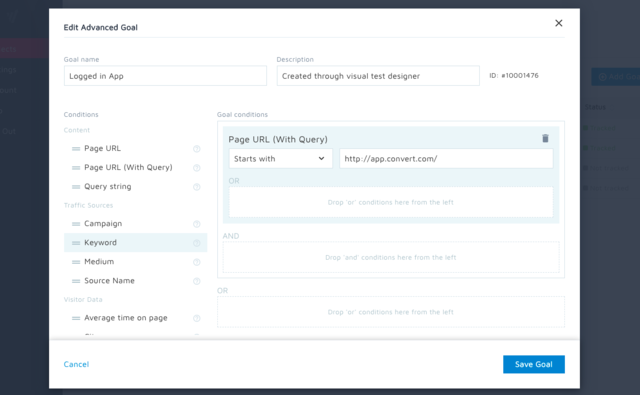
Screenshot of the conditions that can be stacked to build complex goals that can track (almost) any visitor action to determine the test outcome.Screenshot of granular targeting so only the right people view variations. 40+ conditions included.Screenshot of the API that brings Convert's capabilities to a testing ecosystem.Screenshot of experiment reports that can be shared with stakeholders and on social media.Screenshot of several advanced test types that are available, including multipage (funnel) experiments.Screenshot of full-stack experimentation that can be used to run tests anywhere that Convert code can be deployed.