Close CRM vs. LinkPoint Connect

Overview
ProductRatingMost Used ByProduct SummaryStarting Price
Close CRM
Score 9.9 out of 10
N/A
Close.io is a customer relationship management (CRM) software with call management and sales workflow automation capabilities.
$9
per month (paid annually) per user
LinkPoint Connect
Score 9.0 out of 10
N/A
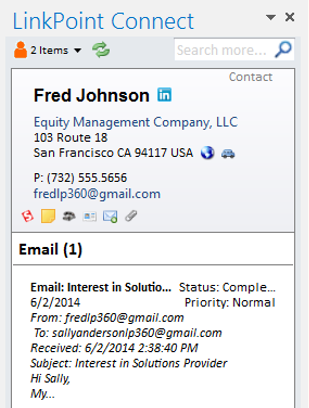
LinkPoint Connect promises to streamline data entry and access by enabling users to instantly view CRM data within their email client. This sales intelligence solution integrates Salesforce and Microsoft Dynamics CRM data in Outlook or IBM Notes. According to the vendor, key capabilities include: View real-time Salesforce data without ever leaving your email. Click on an email, and the LinkPoint Connect Side Panel instantly displays that contact’s information directly from…
$192
per user, per year
Pricing
Close CRMLinkPoint Connect
Editions & Modules
Solo
$9
per month (paid annually) per user
Essentials
$35
per month (paid annually) per user
Growth
$99
per month (paid annually) per user
Scale
$139
per month (paid annually) per user
LinkPoint Connect for Outlook + Salesforce
$192
per user, per year
LinkPoint Connect for Outlook + Microsoft Dynamics CRM
$192
per user, per year
LinkPoint Connect for IBM Notes + Salesforce
$228
per user, per year
LinkPoint Connect for IBM Notes + Microsoft Dynamics CRM
$228
per user, per year
Offerings
Pricing Offerings
Close CRMLinkPoint Connect
Free Trial
YesYes
Free/Freemium Version
NoNo
Premium Consulting/Integration Services
NoNo
Entry-level Setup FeeOptional$16 per user per year
Additional DetailsThe pricing listed here reflects up to a 35% discount for paying annually. Monthly billing is available at of $19 per user for the Solo plan (only 1 user allowed), $49 per user for the Essentials plan, $109 per user for the Growth plan, and $149 per user for the Scale plan.Subscriptions are billed annually. Discounts available for non-profits. Volume discounts available. LinkPoint Connect Solutions are available for Outlook and IBM Notes users. These include preconfigured implementations for Advologix, Apto, Apttus, FinancialForce.com, Jobscience, Navatar, Pardot, Salesforce Shield, and TaskRay.
More Pricing Information
Community Pulse
Close CRMLinkPoint Connect
Features
Close CRMLinkPoint Connect
Sales Force Automation
Comparison of Sales Force Automation features of Product A and Product B
Close CRM
8.9
Ratings
14% above category average
LinkPoint Connect
-
Ratings
Customer data management / contact management8.00 Ratings00 Ratings
Workflow management7.70 Ratings00 Ratings
Territory management8.00 Ratings00 Ratings
Opportunity management10.00 Ratings00 Ratings
Integration with email client (e.g., Outlook or Gmail)9.30 Ratings00 Ratings
Contract management10.00 Ratings00 Ratings
Interaction tracking8.30 Ratings00 Ratings
Channel / partner relationship management9.70 Ratings00 Ratings
Customer Service & Support
Comparison of Customer Service & Support features of Product A and Product B
Close CRM
8.5
Ratings
12% above category average
LinkPoint Connect
-
Ratings
Case management8.00 Ratings00 Ratings
Call center management7.40 Ratings00 Ratings
Help desk management10.00 Ratings00 Ratings
Marketing Automation
Comparison of Marketing Automation features of Product A and Product B
Close CRM
9.0
Ratings
17% above category average
LinkPoint Connect
-
Ratings
Lead management8.70 Ratings00 Ratings
Email marketing9.30 Ratings00 Ratings
CRM Project Management
Comparison of CRM Project Management features of Product A and Product B
Close CRM
7.9
Ratings
4% above category average
LinkPoint Connect
-
Ratings
Task management8.30 Ratings00 Ratings
Billing and invoicing management10.00 Ratings00 Ratings
Reporting5.40 Ratings00 Ratings
CRM Reporting & Analytics
Comparison of CRM Reporting & Analytics features of Product A and Product B
Close CRM
7.5
Ratings
1% below category average
LinkPoint Connect
-
Ratings
Forecasting10.00 Ratings00 Ratings
Pipeline visualization8.00 Ratings00 Ratings
Customizable reports4.40 Ratings00 Ratings
Customization
Comparison of Customization features of Product A and Product B
Close CRM
8.6
Ratings
14% above category average
LinkPoint Connect
-
Ratings
Custom fields10.00 Ratings00 Ratings
Custom objects10.00 Ratings00 Ratings
Scripting environment8.00 Ratings00 Ratings
API for custom integration6.40 Ratings00 Ratings
Security
Comparison of Security features of Product A and Product B
Close CRM
8.0
Ratings
4% below category average
LinkPoint Connect
-
Ratings
Single sign-on capability8.00 Ratings00 Ratings
Role-based user permissions8.00 Ratings00 Ratings
Social CRM
Comparison of Social CRM features of Product A and Product B
Close CRM
10.0
Ratings
31% above category average
LinkPoint Connect
-
Ratings
Social data10.00 Ratings00 Ratings
Social engagement10.00 Ratings00 Ratings
Integrations with 3rd-party Software
Comparison of Integrations with 3rd-party Software features of Product A and Product B
Close CRM
6.4
Ratings
14% below category average
LinkPoint Connect
-
Ratings
Marketing automation6.40 Ratings00 Ratings
Platform
Comparison of Platform features of Product A and Product B
Close CRM
10.0
Ratings
31% above category average
LinkPoint Connect
-
Ratings
Mobile access10.00 Ratings00 Ratings
Best Alternatives
Close CRMLinkPoint Connect
Small Businesses
Salesmate
Salesmate
Score 10.0 out of 10
Salesflare
Salesflare
Score 6.0 out of 10
Medium-sized Companies
Creatio
Creatio
Score 9.7 out of 10
Mailtrack
Mailtrack
Score 9.6 out of 10
Enterprises
Creatio
Creatio
Score 9.7 out of 10
Groove, a Clari company
Score 6.2 out of 10
All AlternativesView all alternativesView all alternatives
User Ratings
Close CRMLinkPoint Connect
Likelihood to Recommend
9.3
(0 ratings)
9.0
(0 ratings)
Usability
8.7
(0 ratings)
-
(0 ratings)
Support Rating
9.3
(0 ratings)
10.0
(0 ratings)
User Testimonials
Close CRMLinkPoint Connect
Likelihood to Recommend
Close is my #1 choice for sales teams, both inbound and outbound. The telephony features in Close are exceptional and they lead the Industry in features and innovation. The power dialer increases productivity by cutting down the manual time of physically dialing calls. All calls and interactions including SMS messages are automatically logged to the client's account within the CRM.
Read full review
LinkPoint is great for people who spend a lot of time working inside outlook. It allows you to update and add records directly from outlook and it has some built-in duplicate prevention which is nice if you don’t have duplicate prevention measures in place. It’s fast and stable. A lot of our users were unable to use SFO due to it crashing outlook.
Read full review
Pros
  • You can search for prospects by your activity & notes.
  • It helps automate the follow up process.
  • It ties cold emailing into a powerful CRM all in one portal.
Read full review
  • Setup is pretty seamless, at least from an end-user point of view. Essentially you open both Outlook and Salesforce, and then click on the LinkPoint Connect button in Outlook. You are then asked to sign in (provide username/password) to Salesforce. That's all--once my login information was accepted it was set up and syncing emails and calendar items from Outlook to Salesforce. Pretty painless!
  • Recording/syncing emails to client records is, from my standpoint at least, the core functionality, and LinkPoint does this pretty much flawlessly and with little to no effort or input on my part. This is incredibly important to me as it creates the documentation record I need in Salesforce to provide excellent service to my clients as well as for compliance reasons.
  • The LinkPoint interface also makes it very easy and efficient to perform additional actions in Salesforce without ever leaving Outlook. New Salesforce tasks, events, follow up reminders, etc. are all easy to set up from the LinkPoint sidebar directly in Outlook with just a few clicks of the mouse. And, in those cases where you need to go a little deeper there is a link in the sidebar that will open up the client record directly in Salesforce in a single action, bypassing the multi-step process normally required (i.e. open the program, search for the client, select and open the record, etc.). This ease of interaction between the two programs has removed barriers and has helped me be more consistent in fully utilizing what Salesforce has to offer. No longer do I move on to the next item on my to-do list with scribbled note that will hopefully remind me to update Salesforce later, when I have a chance...
Read full review
Cons
  • Minor bugs? - Sometime when I'm replying to an account it attempts to send the email as a different user. Thankfully I've only missed it when sending internal emails!
Read full review
  • Installation is a bit tricky for non tech savvy users.
  • Ability to sort/filter search results when looking for additional records.
  • The ability to mass create multiple contacts/leads from an email would be nice.
Read full review
Usability
Close is a simpler platform to use when it comes to initiating email campaigns and managing leads. It has great visibility on opportunities and can be shared with specified users or can also be kept confidential. Close is not for someone who is very new to tools of its kind.
Read full review
No answers on this topic
Support Rating
Close's support team offers a really good service, they are always willing to help with whatever is needed or arises, they investigate everything they need to find a solution and give an answer as quickly as possible, their attitude is better and their optimism really helps in times of stress, they do a great job in record time.
Read full review
Never had to use the support team, which probably means the product works well!
Read full review
Alternatives Considered
For a specific sales team, Close performs better sales tracking and email and SMS management, with a fresh and modern interface, making the team's work more comfortable, with a holistic (but not complete) tracking and reporting of the data. Helping to improve the performance of each agent and obtain better results. For all other campaigns we use the predictive dialers mentioned above, Close is better for tracking current customers and for warm leads.
Read full review
Prior to our move to LinkPoint, we used the Salesforce add-in for Outlook. This required manual syncing of email and calendar items and no easy to use interface between the two programs. It was very cumbersome for me to use, to the point where I quit using it altogether some time ago. I found it far less frustrating to just switch back and forth between Outlook and Salesforce and manually perform the requisite actions, create tasks or other items, enter the required data, etc.
Read full review
Return on Investment
  • Has allowed us to have full visibility into our pipeline
  • Has allowed us to automate lead entry and follow up, saving us tons of time and helping us to make sure we're not letting people slip through the cracks. This is done through the Zapier integration and new email sequences feature
Read full review
  • It provides transparency into your outbound communication with customers.
Read full review
ScreenShots

Close CRM Screenshots

Screenshot of the Close inboxScreenshot of a Sales Funnel Report in CloseScreenshot of the Call Assistant automatic transcription and summaryScreenshot of built-in calling in Close

LinkPoint Connect Screenshots

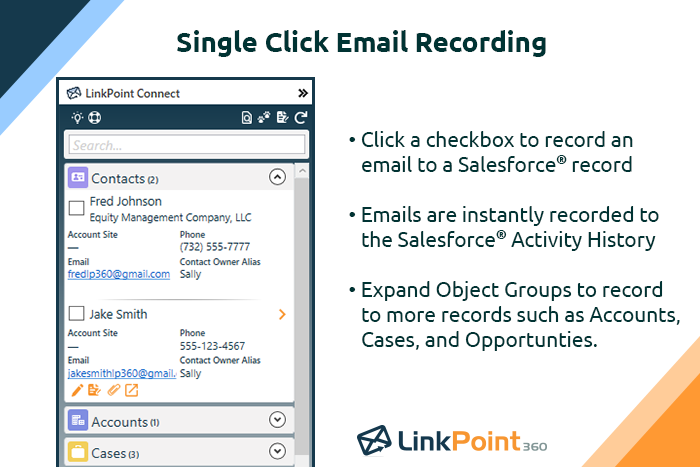
Screenshot of Record emails to your CRM when sending messages via your email application. LinkPoint Connect makes it easy to associate emails with the right contacts and opportunities with just a few clicks in your email.Screenshot of View real-time CRM data without ever leaving your email. Click on an email, and the LinkPoint Connect Side Panel instantly displays that contact’s information directly from the CRM.Screenshot of Screenshot of Screenshot of Screenshot of