ClickUp vs. Deltek WorkBook

Overview
ProductRatingMost Used ByProduct SummaryStarting Price
ClickUp
Score 8.3 out of 10
Small Businesses (1-50 employees)
ClickUp is an all-in-one productivity platform. It’s a hub where teams can come together to plan, organize, and collaborate on work using tasks, Docs, Chat, Goals, and Whiteboard. Customized with just a few clicks, ClickUp helps teams of all types and sizes deliver work more effectively, to boost productivity to new heights. ClickUp aims to make the world more productive by removing friction caused by using many different applications. The platform boasts millions…
$0
Deltek WorkBook
Score 8.3 out of 10
N/A
Now from Deltek (acquired 2017), WorkBook is a project management solution. Designed for advertising and communications agencies with 30+ employees, the vendor says WorkBook is the perfect solution for multiple locations and collaboration through integrated conversations. Additionally the vendor says it is ideal for project-driven organizations that require CRM, forecasting, project and resource management, traffic as well as integrated billing and accounting. It's a customizable solution with…N/A
Pricing
ClickUpDeltek WorkBook
Editions & Modules
Free
$0.00
Unlimited
$9.00 ($5.00)
per member per month (annual contract pricing)
Business
$19.00 ($12.00)
per member per month (annual contract pricing)
Business Plus
$29.00 ($19.00)
per member per month (annual contract pricing)
Enterprise
Contact Sales
No answers on this topic
Offerings
Pricing Offerings
ClickUpDeltek WorkBook
Free Trial
YesYes
Free/Freemium Version
YesNo
Premium Consulting/Integration Services
NoNo
Entry-level Setup FeeNo setup fee$19 per month
Additional DetailsBASIC PLAN INCLUDES TIME SHEET INCLUDES IPHONE & ANDROID APP Log your time on any job you have access to and get a reminder if you forget to submit hours. You can log your time on any job; billable, non-billable, customer jobs, and internal jobs. WorkBook also keeps track of absence entries and holiday requests. CUSTOMERS & PROJECTS Add as many customers, contacts, and projects/jobs as you like. Jobs are connected to clients and each job can be set to be billable, non-billable, internal, or a client job. COLLABORATION Collaborate with your colleagues and clients and keep track of comments, news, events, and notifications. Receive notifications whenever you need to approve anything, or a warning if something is about to go wrong. FILE SHARING Save all of your files in WorkBook and benefit from having them being kept secure in one, central location. Whenever a new customer or job is added, WorkBook will automatically create a folder structure (decided by you), allowing you to upload all of your documents and briefings to WorkBook. WorkBook will connect directly to your local file server or online storage, which means that you can save your files locally and have them be shown in WorkBook. Moreover, we have options to integrate with Google Drive or Dropbox.
More Pricing Information
Community Pulse
ClickUpDeltek WorkBook
Features
ClickUpDeltek WorkBook
Project Management
Comparison of Project Management features of Product A and Product B
ClickUp
8.0
Ratings
4% above category average
Deltek WorkBook
4.6
Ratings
50% below category average
Task Management8.90 Ratings4.00 Ratings
Resource Management7.90 Ratings6.00 Ratings
Gantt Charts7.80 Ratings4.00 Ratings
Scheduling7.80 Ratings2.00 Ratings
Workflow Automation7.90 Ratings2.00 Ratings
Team Collaboration8.80 Ratings7.00 Ratings
Support for Agile Methodology8.40 Ratings3.00 Ratings
Support for Waterfall Methodology8.30 Ratings3.00 Ratings
Document Management7.90 Ratings2.00 Ratings
Email integration7.80 Ratings3.00 Ratings
Mobile Access6.80 Ratings5.00 Ratings
Timesheet Tracking7.50 Ratings10.00 Ratings
Change request and Case Management00 Ratings4.00 Ratings
Budget and Expense Management00 Ratings10.00 Ratings
Professional Services Automation
Comparison of Professional Services Automation features of Product A and Product B
ClickUp
7.7
Ratings
2% above category average
Deltek WorkBook
9.0
Ratings
18% above category average
Project & financial reporting7.70 Ratings8.00 Ratings
Quotes/estimates00 Ratings10.00 Ratings
Invoicing00 Ratings8.00 Ratings
Integration with accounting software00 Ratings10.00 Ratings
User Ratings
ClickUpDeltek WorkBook
Likelihood to Recommend
8.3
(0 ratings)
8.0
(0 ratings)
Likelihood to Renew
7.3
(0 ratings)
-
(0 ratings)
Usability
6.7
(0 ratings)
9.0
(0 ratings)
Availability
9.5
(0 ratings)
-
(0 ratings)
Performance
8.0
(0 ratings)
-
(0 ratings)
Support Rating
9.4
(0 ratings)
9.0
(0 ratings)
Online Training
10.0
(0 ratings)
-
(0 ratings)
Implementation Rating
7.9
(0 ratings)
-
(0 ratings)
Configurability
8.0
(0 ratings)
-
(0 ratings)
Ease of integration
7.0
(0 ratings)
-
(0 ratings)
Product Scalability
8.9
(0 ratings)
-
(0 ratings)
Vendor post-sale
5.0
(0 ratings)
-
(0 ratings)
Vendor pre-sale
5.0
(0 ratings)
-
(0 ratings)
User Testimonials
ClickUpDeltek WorkBook
Likelihood to Recommend
Great for project management, reoccurring task management, building trackers and keeping track of what everyone is up to. Like all software that has great functionality, having solid governance and control over access is essential. I recommend ensuring that your admins/owners have a close eye on what is going on across the space or it can turn into an unmanageable nightmare.
Read full review
For project companies with management needs and normally companies with more than 5-10 employees. For all project companies within marketing, architecture, audit, it supports, engineers and other professional services
Read full review
Pros
  • Customization of fields in Tickets
  • Integrations with other sites such as Google, Figma, JIRA, and GitHub
  • Combining many apps into one- Ticketing, sprint tracking, form submissions, documentation, file management, and chats
  • Continual improvements. The ClickUp team is always making amazing strides to update the site and make it that much better for its users
Read full review
  • You have a lot of business critical features in one application.
  • You can work in projects and register hours.
Read full review
Cons
  • Their chat feature was nonexistent, and a revamp was rolled out recently.
  • Their whiteboard function for visual collaboration feels clunky and difficult to use smoothly.
  • Their table view/feature (which is supposed to feel like a spreadsheet) is lacking and makes it difficult to copy/move information.
Read full review
  • Lot of options - Demands training of the users before they can use if fully
Read full review
Likelihood to Renew
We're very pleased with how the system works in general. For over a year we've barely ever had any problems with ClickUp and there might have only been one or two times when it wasn't operational for us due to a global emergency. Moreover, when we had a problem once with renewing our licenses we've been contacted directly by our account manager and taken care of in a very professional way (with a due refund as well). The exceptional customer service makes us firmly believe that ClickUp is just the right tool for us.
Read full review
No answers on this topic
Usability
Far easier to use than any other PM tool. ClickUp is incredibly intuitive and had us saving time and energy within the first week of implementation. In my opinion, PM software should make it easier to focus on the deliverables - it shouldn't take all your time and energy to learn how to use the tool in the first place. ClickUp is a user-friendly tool that actually helps us focus on what's important.
Read full review
Gets the job done, just not the sexiest.
Read full review
Reliability and Availability
For over a year ClickUp was unavailable to us just twice for a couple of hours. I would say for a system this big and working globally that was a minor issue. They managed to fix all the issues within a couple hours and then it was back up and running perfectly fine.
Read full review
No answers on this topic
Performance
The speed of ClickUp is average to be honest. This is one of the biggest flaws of the system, sometimes it's also lagging a little bit but we also have a lot of documents, lists etc. on our workspace. However, with the next version of ClickUp I've seen they are planning to increase the speed by almost 500%, probably by changing the technology, so I am more than looking forward to it.
Read full review
No answers on this topic
Support Rating
Support are genuinely helpful and really nice to deal with. I had a bug on my workspace that I’d been experiencing for a while. They looked into it for me and asked some questions. Once they found the issue and resolved it, they even filmed a video detailing how they’d fixed it. That level of support is fantastic.
Read full review
Great implementation support, but haven't had many questions since.
Read full review
Online Training
There are multiple guides on literally all of the functions you can find within the system, therefore it's easy to learn anything you'd really like to use, starting from project and people management, down to Gantts, mind maps, time tracking, inviting Clients as guests to work with you on the projects and so much more.
Read full review
No answers on this topic
Implementation Rating
Start small. Don’t try to build the most elaborate plans first. Resist the urge to get into Gantt charts if no one is used to them. Just get work written, add dates and assignees, and start getting used to it. If you did not use a work management tool before, you need to be gracious with yourself about the fact that you likely do not have the muscle memory for working this way yet. But you will get there.
And leverage people who know it if possible. Look for ClickUp experts and vendors. They can really supercharge your effectiveness at building the tool out and speed up the process.
Read full review
No answers on this topic
Alternatives Considered
Every other tool I have used has been for organizing tasks and work only. There were some of the other features, but none of them had the ability to do everything we need to manage a project from start to finish
Read full review
I have no knowledge of competing software with the same options.
Read full review
Scalability
Scaling with ClickUp is superb. If you create a workflow best suited for your organization then it's all about creating new accounts and teaching the new employees the workflow you're using. It's that simple. There is no black magic when it comes to Clickup.
Read full review
No answers on this topic
Return on Investment
  • We stopped losing customers due to lack of organization and management
  • Deixamos de perder clientes pela falta de organização e gestão
  • We increased our revenue by 30% by offering CRM implementation within ClickUp
  • Aumentamos nossa receita em 30% por oferecermos implementação de CRM dentro do clickup
  • We no longer waste time using different tools to manage tasks and internal communication with the team.
  • Deixamos de perder tempo usando ferramentas diferentes para gerir tarefa e comunicação interna com o time
Read full review
  • Better understanding of financial performance
  • Job profitability tracking
Read full review
ScreenShots

ClickUp Screenshots

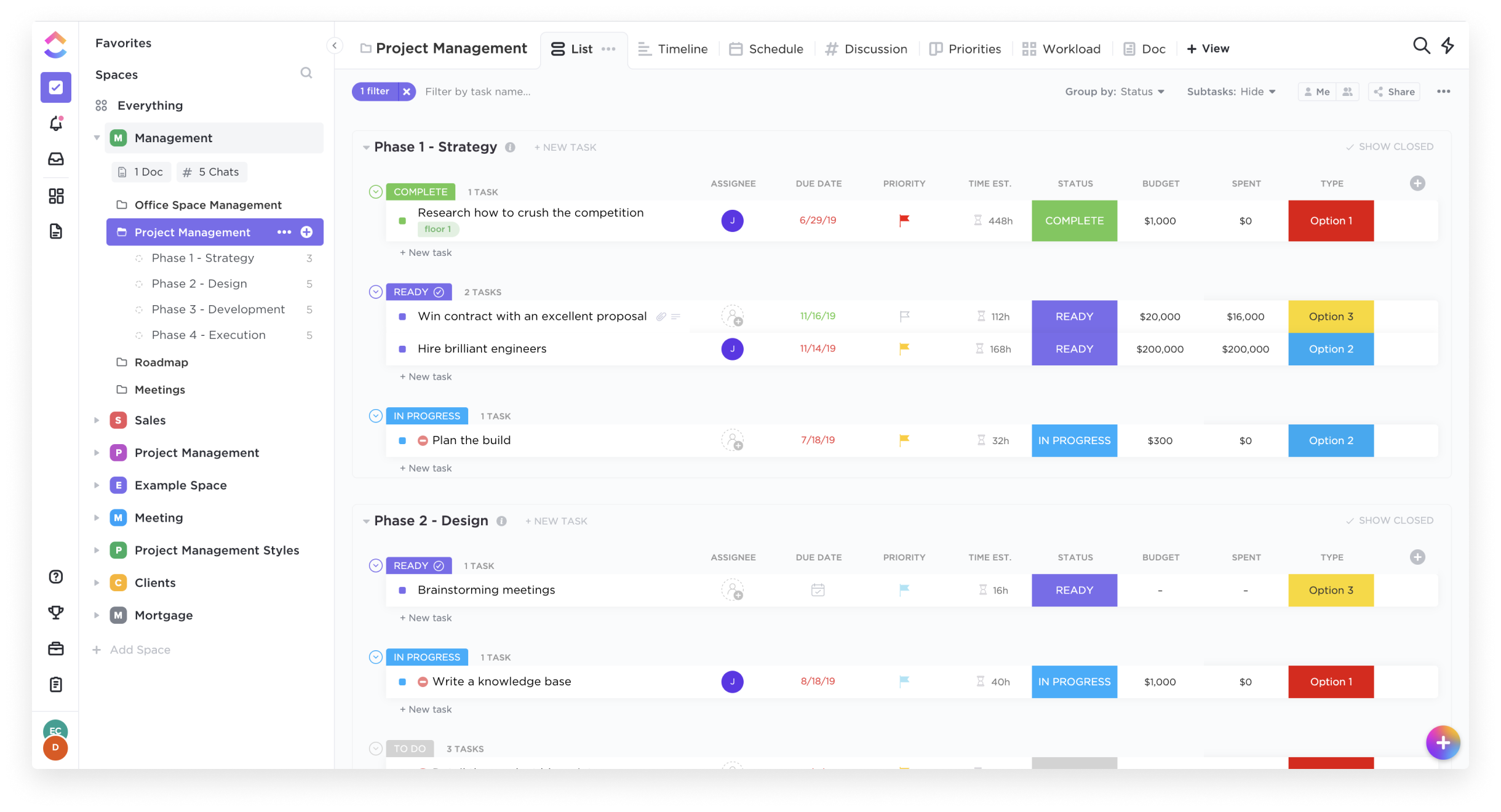
Screenshot of List ViewScreenshot of Box ViewScreenshot of Board ViewScreenshot of Calendar View

Deltek WorkBook Screenshots

Screenshot of TasksScreenshot of Weekly SchedulesScreenshot of Screenshot of Gantt Chart – Streamline project planning by converting and approved quotes into a schedule with drag ‘n drop resource allocation.Screenshot of Time Entry – Facilitate adoption and ensure accurate time data by integrating task management and time entry.Screenshot of Net Revenue Forecast – Reduce input errors and save valuable time by integrating resourcing, project management and finance to fully control AR and AP and get precise cash flow and net revenue forecasts.