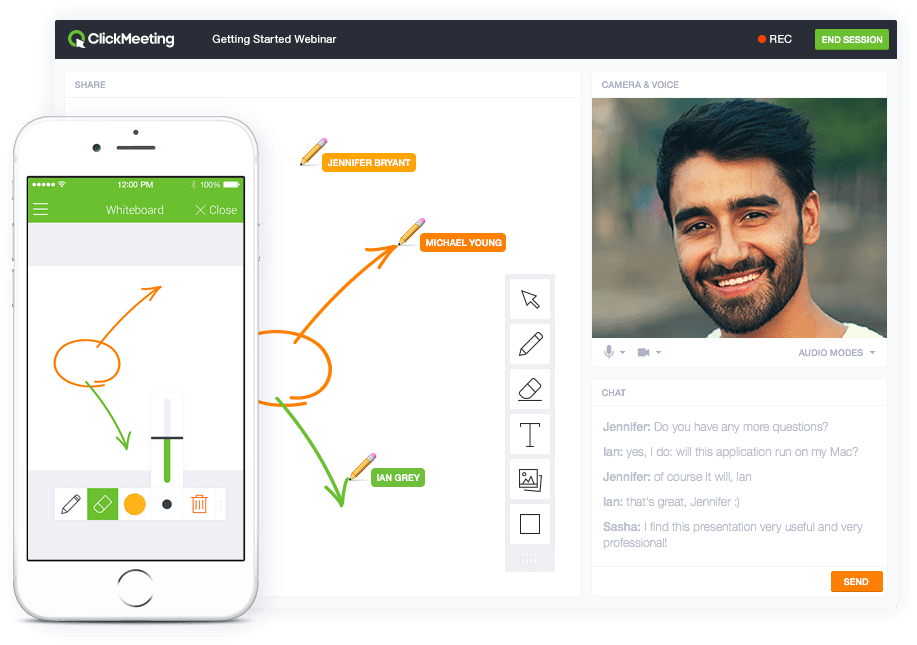
ClickMeeting is a webinar solution formerly owned by GetResponse, an email marketing software company. ClickMeeting's online meeting and collaboration tools are designed to support the sales, marketing, e-learning, and training needs of business of all sizes.
$25
per month
Skype (discontinued)
Score7.1 out of 10
N/A
Skype (the personal edition or Skype free) was a web meeting, video conferencing, and VoIP software, now superseded by Microsoft Teams' free edition and unsupported from May 2025.
Specialist in the marketing and communications department in Marketing at Polski Związek Żeglarski (Sports, 11-50 employees)
Chose ClickMeeting
Our organization considered using Skype, but it did not seem safe in terms of data security. Skype also offered fewer features than the ClickMeeting platform. Clickmeeting is a very secure platform. It offers a number of different functions. There is a possibility to conduct …
A de minimis incentive was given to thank the reviewer for their time. The incentive was not used to bias or drive a particular response, nor was the incentive contingent on a positive endorsement. More Info
Owner in Corporate at DeutschTutor (E-Learning, 1-10 employees)
Chose ClickMeeting
We chose ClickMeeting because this solution offers us the optimal basis for our language teaching. Working with the ClickMeeting platform comes in our opinion closest to the possibilities of a face-to-face language training. All classroom tools can be found on the platform, …
A de minimis incentive was given to thank the reviewer for their time. The incentive was not used to bias or drive a particular response, nor was the incentive contingent on a positive endorsement. More Info
A de minimis incentive was given to thank the reviewer for their time. The incentive was not used to bias or drive a particular response, nor was the incentive contingent on a positive endorsement. More Info
Verified User
Chose ClickMeeting
ClickMeeting is more intuitive and provides more stable connectiond during meeting. It also reduces risk of sudden disconnection or logout.
A de minimis incentive was given to thank the reviewer for their time. The incentive was not used to bias or drive a particular response, nor was the incentive contingent on a positive endorsement. More Info
School Manager at RakuGaku (E-Learning, 11-50 employees)
Chose ClickMeeting
None of the other platforms has Ukrainian language. Moreover some of the platforms we've been using, require accounts and logging in, which can be difficult for people using different devices and not very fluent in English. We also appreciate that ClickMeeting has different …
A de minimis incentive was given to thank the reviewer for their time. The incentive was not used to bias or drive a particular response, nor was the incentive contingent on a positive endorsement. More Info
A de minimis incentive was given to thank the reviewer for their time. The incentive was not used to bias or drive a particular response, nor was the incentive contingent on a positive endorsement. More Info
A de minimis incentive was given to thank the reviewer for their time. The incentive was not used to bias or drive a particular response, nor was the incentive contingent on a positive endorsement. More Info
ClickMeeting serves a dual purpose within our organization. Firstly, it acts as a reliable platform for hosting staff meetings, enabling effective communication and collaboration among team members. Whether it's for updates, discussions, or brainstorming sessions, ClickMeeting provides the necessary tools for seamless engagement.Secondly, ClickMeeting is instrumental in delivering online courses to our students. It empowers us to create interactive learning experiences regardless of geographical constraints. We can easily share course materials, conduct live or pre-recorded lectures, and facilitate interactive discussions and Q&A sessions. ClickMeeting ensures our students have access to high-quality education and a supportive learning environment.In summary, ClickMeeting is an invaluable tool for both internal staff communications and student-centered online courses. It fosters collaboration, engagement, and knowledge sharing in a flexible and accessible manner, enhancing our overall productivity and educational offerings.
Having interacted with a new replacement tool, Microsoft Teams, it is challenging to recommend Skype, as it lacks some essential features, such as being less equipped with the latest updates, and it is not platform-independent, causing issues on PCs and phones, as well as during calls that might hinder work.
A de minimis incentive was given to thank the reviewer for their time. The incentive was not used to bias or drive a particular response, nor was the incentive contingent on a positive endorsement. TR verified that a representative sample of customers was invited. More Info
ClickMeeting is user-friendly, the admin and user panel is simple, intuitive!
When conducting training, you can use default settings such as edu mode and it saves time, I don't have to worry if I'm sure I've muted everyone and if I'm the only one visible.
ClickMeeting is also integrated with the Moodle e-learning platform, so it's a great support in organizing blended-learning processes.
The instant chat function is great. Very straightforward, easy to use, easy to learn, no technical issues.
Video calls are pretty easy also, user friendly and a mostly stable connection with no issues.
Voice calls are easy also, eliminates the need for an external landline or the need to use your cell phone. Clear connections, not really any dropped calls.
A de minimis incentive was given to thank the reviewer for their time. The incentive was not used to bias or drive a particular response, nor was the incentive contingent on a positive endorsement. More Info
Individual Audio Controls. I'd love to be able to adjust the audio for each of the presenters within the platform, as the host. Not all presenters are tech savvy and sometimes don't know how to adjust this themselves.
Additional Saved Color Schemes. I'd love to be able to create/save multiple custom color schemes that I can use for various events instead of a single one.
A de minimis incentive was given to thank the reviewer for their time. The incentive was not used to bias or drive a particular response, nor was the incentive contingent on a positive endorsement. More Info
A de minimis incentive was given to thank the reviewer for their time. The incentive was not used to bias or drive a particular response, nor was the incentive contingent on a positive endorsement. More Info
ClickMeeting's overall usability is commendably excellent. Its intuitive, user-friendly interface makes it remarkably easy for users of all skill levels to navigate. The platform delivers a seamless, streamlined experience from setting up meetings to engaging with participants. Despite some advanced features having a slight learning curve, the platform remains user-friendly, efficient, and reliable.
A de minimis incentive was given to thank the reviewer for their time. The incentive was not used to bias or drive a particular response, nor was the incentive contingent on a positive endorsement. More Info
Skype is not as good as Facetime in terms of ease to glance at it and figure out how it works. I think that's a result of Skype trying to be too many things at once. A lot of the menu and UI could be streamlined, and I would jettison some of the additional functions that have been tacked on over the years to simplify. That being said, while some options are slightly hard to find, they all work flawlessly once found.
A de minimis incentive was given to thank the reviewer for their time. The incentive was not used to bias or drive a particular response, nor was the incentive contingent on a positive endorsement. More Info
It takes a bit of time to get to grips with the platform at first, but it's short and there is an online help chat available. People on the chat are very helpful and available for a long time - also on weekends, which greatly improves work. Really very good support.
I am not aware of the current support level for Skype for business, as I have never used even though I have the product. However, the support for Skype's personal paid users is not where it could be. Users who pay for Skype features do not have a clear path to reach out to support. So, rating 6, can be better as soon as I need to use Skype for business support and get a good experience. I will say that I will renew Skype for Business subscription, which is a significant inconsistency on my end. The explanation is that Skype for Business comes bundled with Office for Business, with no additional cost, so why not.
A de minimis incentive was given to thank the reviewer for their time. The incentive was not used to bias or drive a particular response, nor was the incentive contingent on a positive endorsement. More Info
A de minimis incentive was given to thank the reviewer for their time. The incentive was not used to bias or drive a particular response, nor was the incentive contingent on a positive endorsement. More Info
- does not require installation - clear interface - fast chat technical support - available in Polish language - provides a stable connection - it allows us to share presentations - we can also record the meeting - the process of creating the meeting is quick and easy also for beginners
We use Skype in combination with Grasshopper. While Grasshopper acts as a routing toll free number with extensions, if we are making calls directly, we do it through Skype. Skype's desktop and mobile apps are easier to use, and provide unlimited local calls at a flat, affordable rate. Allowing our team to use their existing mobile or desktop devices without additional hardware for business office phone calls is important, and Skype makes that possible
A de minimis incentive was given to thank the reviewer for their time. The incentive was not used to bias or drive a particular response, nor was the incentive contingent on a positive endorsement. More Info
Strengthening the image of the ITAKA Foundation as an institution that comprehensively deals with the subject of disappearances and can share knowledge in this area.
Time savings in the preparation of internal meetings (e.g. thanks to the possibility of placing an accurate schedule).
Reaching a greater number of webinar recipients (e.g. thanks to the possibility of live broadcast via social media).
A de minimis incentive was given to thank the reviewer for their time. The incentive was not used to bias or drive a particular response, nor was the incentive contingent on a positive endorsement. More Info