TrustRadius: an HG Insights company

Save this comparison

Save this comparison

Add Product

Recommended Comparisons

    Overview
    ProductRatingMost Used ByProduct SummaryStarting Price

    ClickMeeting

    Score7.7 out of 10
    N/AClickMeeting is a webinar solution formerly owned by GetResponse, an email marketing software company. ClickMeeting's online meeting and collaboration tools are designed to support the sales, marketing, e-learning, and training needs of business of all sizes.

    $25

    per month

    Google Keep

    Score9.9 out of 10
    N/AGoogle Keep is a note-taking app launched by Google in 2013 and available free, providing a tool to capture text, images, video, etc.N/A
    Pricing
    ClickMeetingGoogle Keep
    Editions & Modules
    Live 25
    $25
    up to 25 attendees
    Live 50
    $35
    up to 50 attendees
    Automated 25
    $40
    up to 25 attendees
    Automated 50
    $45
    up to 50 attendees
    Live 100
    $60
    up to 100 attendees
    Automated 100
    $75
    up to 100 attendees
    Live 200
    $119
    up to 200 attendees
    Live 500
    $139
    up to 500 attendees
    Automated 200
    $145
    up to 200 attendees
    Enterprise
    $165
    500 - 5000
    Automated 500
    $179
    up to 500 attendees
    Live 1000
    $239
    up to 1000 attendees
    Automated 1000
    $279
    up to 1000 attendees
    No answers on this topic
    Offerings
    Pricing Offerings
    ClickMeetingGoogle Keep
    Free Trial
    YesNo
    Free/Freemium Version
    NoNo
    Premium Consulting/Integration Services
    YesNo
    Entry-level Setup FeeNo setup feeNo setup fee
    Additional DetailsDetailed enterprise pricing on demand.—
    More Pricing Information
    Community Pulse
    ClickMeetingGoogle Keep
    Considered Both Products
    ClickMeeting
    No answer on this topic
    Google
    No answer on this topic
    Key User Insights
    Would buy again
    98%
    Would buy again
    46 Answers
    100%
    Would buy again
    12 Answers
    Delivers good value for the price
    96%
    Delivers good value for the price
    44 Answers
    100%
    Delivers good value for the price
    11 Answers
    Happy with the feature set
    98%
    Happy with the feature set
    46 Answers
    92%
    Happy with the feature set
    11 Answers
    Lived up to sales and marketing promises
    98%
    Lived up to sales and marketing promises
    41 Answers
    100%
    Lived up to sales and marketing promises
    8 Answers
    Implementation went as expected
    100%
    Implementation went as expected
    43 Answers
    100%
    Implementation went as expected
    10 Answers
    Features
    ClickMeetingGoogle Keep
    Performance & Compatibility of Online Events Software
    Comparison of Performance & Compatibility of Online Events Software features of ClickMeeting and Google Keep
    Feature
    ClickMeeting
    9.5
    55 Ratings
    18% above category average
    Google Keep
    -
    Ratings
    High quality audio9.855 Ratings00 Ratings
    High quality video9.455 Ratings00 Ratings
    Low bandwidth requirements9.149 Ratings00 Ratings
    Mobile support9.947 Ratings00 Ratings
    Screen Sharing
    Comparison of Screen Sharing features of ClickMeeting and Google Keep
    Feature
    ClickMeeting
    9.9
    54 Ratings
    22% above category average
    Google Keep
    -
    Ratings
    Desktop sharing9.954 Ratings00 Ratings
    Whiteboards9.848 Ratings00 Ratings
    Online Meetings / Events
    Comparison of Online Meetings / Events features of ClickMeeting and Google Keep
    Feature
    ClickMeeting
    9.8
    56 Ratings
    17% above category average
    Google Keep
    -
    Ratings
    Calendar integration9.945 Ratings00 Ratings
    Meeting initiation9.854 Ratings00 Ratings
    Integrates with social media9.942 Ratings00 Ratings
    Record meetings / events9.854 Ratings00 Ratings
    Slideshows9.452 Ratings00 Ratings
    Online Events Collaboration
    Comparison of Online Events Collaboration features of ClickMeeting and Google Keep
    Feature
    ClickMeeting
    9.3
    54 Ratings
    13% above category average
    Google Keep
    -
    Ratings
    Live chat9.453 Ratings00 Ratings
    Audience polling9.149 Ratings00 Ratings
    Q&A9.450 Ratings00 Ratings
    Online Events Security
    Comparison of Online Events Security features of ClickMeeting and Google Keep
    Feature
    ClickMeeting
    9.5
    51 Ratings
    16% above category average
    Google Keep
    -
    Ratings
    User authentication9.644 Ratings00 Ratings
    Participant roles & permissions9.151 Ratings00 Ratings
    Confidential attendee list9.946 Ratings00 Ratings
    Project Management
    Comparison of Project Management features of ClickMeeting and Google Keep
    Feature
    ClickMeeting
    -
    Ratings
    Google Keep
    8.2
    11 Ratings
    7% above category average
    Task Management00 Ratings9.37 Ratings
    Scheduling00 Ratings5.15 Ratings
    Workflow Automation00 Ratings6.01 Ratings
    Mobile Access00 Ratings10.09 Ratings
    Search00 Ratings10.09 Ratings
    Visual planning tools00 Ratings8.87 Ratings
    Communication
    Comparison of Communication features of ClickMeeting and Google Keep
    Feature
    ClickMeeting
    -
    Ratings
    Google Keep
    8.6
    11 Ratings
    9% above category average
    Notifications00 Ratings7.87 Ratings
    Discussions00 Ratings8.63 Ratings
    Internal knowledgebase00 Ratings8.15 Ratings
    Integrates with Gmail and Google Hangouts00 Ratings9.97 Ratings
    File Sharing & Management
    Comparison of File Sharing & Management features of ClickMeeting and Google Keep
    Feature
    ClickMeeting
    -
    Ratings
    Google Keep
    6.9
    10 Ratings
    12% below category average
    Versioning00 Ratings1.01 Ratings
    Audio files00 Ratings8.42 Ratings
    Document collaboration00 Ratings8.96 Ratings
    Access control00 Ratings7.66 Ratings
    Advanced security features00 Ratings2.73 Ratings
    Integrates with Google Drive00 Ratings10.04 Ratings
    Device sync00 Ratings9.97 Ratings
    Best Alternatives
    ClickMeetingGoogle Keep
    Small Businesses
    Whereby
    Score9.9 out of 10
    Flock
    Score9.1 out of 10
    Medium-sized Companies
    JioMeet
    Score10 out of 10
    Microsoft Viva Engage
    Score7.9 out of 10
    Enterprises
    Webex Meetings
    Score8.4 out of 10
    Cisco Business Edition 7000 (discontinued)
    Score9 out of 10
    All AlternativesView all alternativesView all alternatives
    User Ratings
    ClickMeetingGoogle Keep
    Likelihood to Recommend
    9.9
    (56 ratings)
    10.0
    (11 ratings)
    Likelihood to Renew
    9.1
    (1 ratings)
    10.0
    (1 ratings)
    Usability
    9.5
    (38 ratings)
    9.0
    (1 ratings)
    Support Rating
    9.8
    (36 ratings)
    7.9
    (10 ratings)
    Implementation Rating
    9.1
    (1 ratings)
    -
    (0 ratings)
    User Testimonials
    ClickMeetingGoogle Keep
    Likelihood to Recommend
    ClickMeeting
    ClickMeeting serves a dual purpose within our organization. Firstly, it acts as a reliable platform for hosting staff meetings, enabling effective communication and collaboration among team members. Whether it's for updates, discussions, or brainstorming sessions, ClickMeeting provides the necessary tools for seamless engagement.Secondly, ClickMeeting is instrumental in delivering online courses to our students. It empowers us to create interactive learning experiences regardless of geographical constraints. We can easily share course materials, conduct live or pre-recorded lectures, and facilitate interactive discussions and Q&A sessions. ClickMeeting ensures our students have access to high-quality education and a supportive learning environment.In summary, ClickMeeting is an invaluable tool for both internal staff communications and student-centered online courses. It fosters collaboration, engagement, and knowledge sharing in a flexible and accessible manner, enhancing our overall productivity and educational offerings.
    Read full review
    Google
    It is the perfect companion for storing all those little bits of information you need to do your job well, the best thing is getting it all out of your head and in to Google Keep. You can trust it to hold that information for you, and you know you can go back and use its excellent search functionality to find that information at a later date. It can also work really well for your personal life as well. I have two accounts, my work account and my personal account - I use them both in different contexts but I have always found Google Keep is great for both.
    Incentivized
    Read full review
    Pros
    ClickMeeting
    • ClickMeeting is user-friendly, the admin and user panel is simple, intuitive!
    • When conducting training, you can use default settings such as edu mode and it saves time, I don't have to worry if I'm sure I've muted everyone and if I'm the only one visible.
    • ClickMeeting is also integrated with the Moodle e-learning platform, so it's a great support in organizing blended-learning processes.
    Read full review
    Google
    • It's incredibly quick to load, it doesn't take long to pull up any note you have no matter how much information is in the note.
    • The ability to collaborate on a Google Keep note is also great! It allows for two or more of you to work on a project in one space.
    • I also love that I can color coordinate. I can make all my meeting notes one color, my personal notes another color and so on.
    • Enjoying the pinning feature that allows me to keep my important notes right at the top so I don't have to go searching for them when needed.
    Incentivized
    Read full review
    Cons
    ClickMeeting
    • Individual Audio Controls. I'd love to be able to adjust the audio for each of the presenters within the platform, as the host. Not all presenters are tech savvy and sometimes don't know how to adjust this themselves.
    • Additional Saved Color Schemes. I'd love to be able to create/save multiple custom color schemes that I can use for various events instead of a single one.
    Incentivized
    Read full review
    Google
    • Keep only offers labels, but having folders or nested tags would help in managing notes better.
    • Finding notes can be difficult, especially when there are many. Filters by date, content type, or color would help.
    • Keep notes should easily convert into Google Docs or sync better with Google Calendar tasks.
    Incentivized
    Read full review
    Likelihood to Renew
    ClickMeeting
    No answers on this topic
    Google
    It does everything I need it to do. It is easy to organize and categorize what I need and what I want to see.
    Read full review
    Usability
    ClickMeeting
    ClickMeeting's overall usability is commendably excellent. Its intuitive, user-friendly interface makes it remarkably easy for users of all skill levels to navigate. The platform delivers a seamless, streamlined experience from setting up meetings to engaging with participants. Despite some advanced features having a slight learning curve, the platform remains user-friendly, efficient, and reliable.
    Incentivized
    Read full review
    Google
    They made it simple for anyone to use. There are no complicated steps involved to create a note, edit a note, or search for a specific item located in a note. They also made it simple to share it with others, making it easy to collaborate. Google kept it basic without a thousand "bells and whistles" to overcomplicate it.
    Incentivized
    Read full review
    Support Rating
    ClickMeeting
    It takes a bit of time to get to grips with the platform at first, but it's short and there is an online help chat available. People on the chat are very helpful and available for a long time - also on weekends, which greatly improves work. Really very good support.
    Read full review
    Google
    I gave this rating based on the ease of use, the simple functionality and how well it does at keeping my attention and helping me continue to use it and stay on track. The functionality mentioned before alongside the reminder functions and how it utilizes Google's powerful machine learning tech to better its software is remarkable.
    Incentivized
    Read full review
    Implementation Rating
    ClickMeeting
    It was very simple.
    Read full review
    Google
    No answers on this topic
    Alternatives Considered
    ClickMeeting
    - does not require installation - clear interface - fast chat technical support - available in Polish language - provides a stable connection - it allows us to share presentations - we can also record the meeting - the process of creating the meeting is quick and easy also for beginners
    Read full review
    Google
    The main differential of Google Keep is its simplicity and efficiency for quick notes. I can draw on the card, put a photo, record audio if I can't write at the moment, in short, for everyday tasks, simple things, it is superior.
    Incentivized
    Read full review
    Return on Investment
    ClickMeeting
    • Strengthening the image of the ITAKA Foundation as an institution that comprehensively deals with the subject of disappearances and can share knowledge in this area.
    • Time savings in the preparation of internal meetings (e.g. thanks to the possibility of placing an accurate schedule).
    • Reaching a greater number of webinar recipients (e.g. thanks to the possibility of live broadcast via social media).
    Read full review
    Google
    • Google Keep is free, and for what I need it for I don't need to purchase another tool.
    • It's handy when it comes to taking quick notes, but so is a piece of paper. This tool won't magically improve your life.
    Incentivized
    Read full review
    ScreenShots

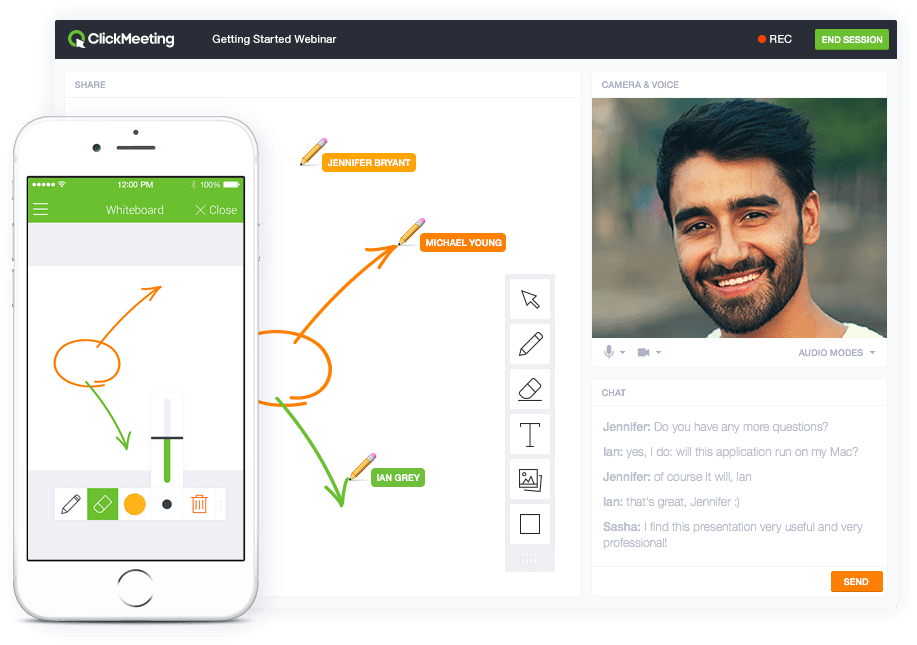
    ClickMeeting Screenshots

    Screenshot of Whiteboard featureScreenshot of Presentation featureScreenshot of Responsive designScreenshot of Webinar roomScreenshot of Webinar room 2Screenshot of Webinar room 3