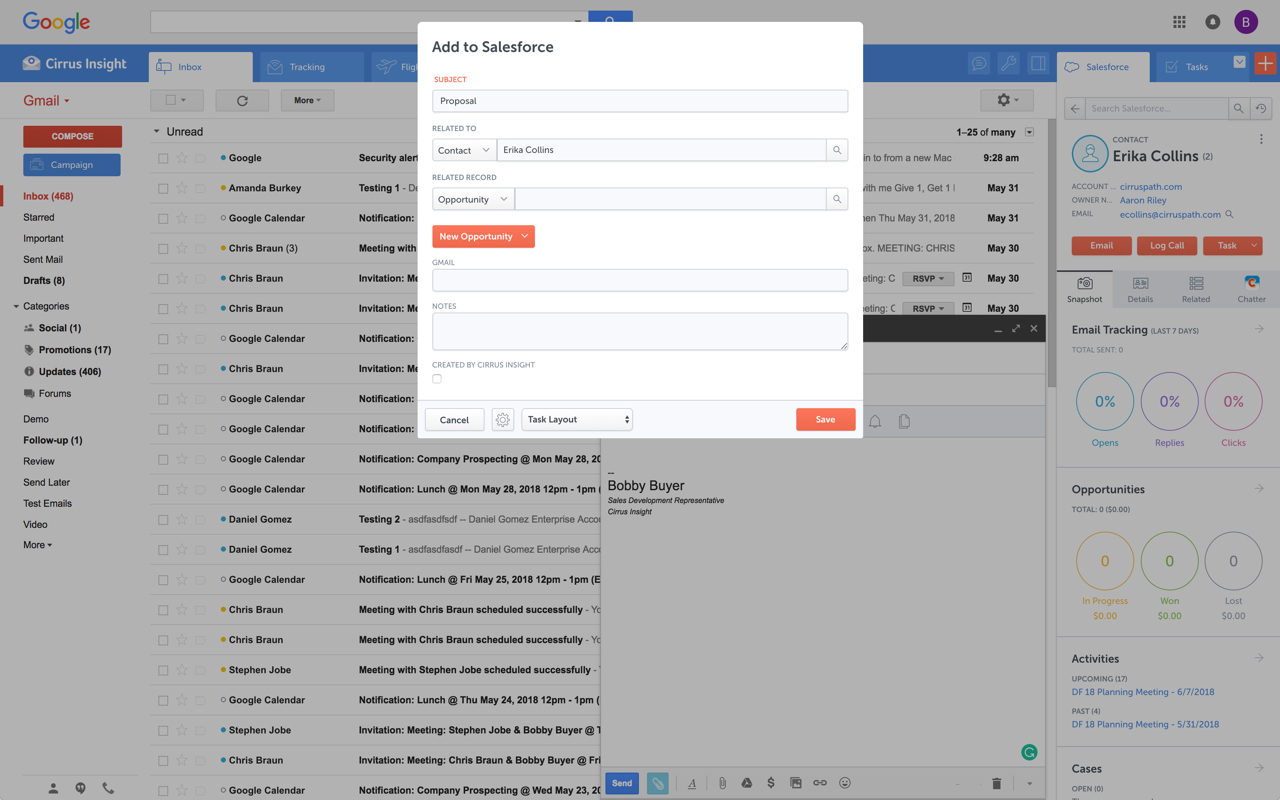
Cirrus Insight integrates Salesforce with Gmail, Google Calendar, and Google Contacts. Instantly View Contextual Salesforce Information in Your Inbox. Save Emails & Attachments to Salesforce with a Click. Sync Your Google & Salesforce Calendars. Create & Edit Salesforce Records on the Fly. Customize Your Salesforce Workflow in Gmail. Add Google Contacts to Salesforce. Salesforce Tasks Integration. Salesforce Templates Integrated with Gmail.
$27
per user/month
Mailtrack
Score 9.7 out of 10
N/A
Mailtrack is a free email tracker for Gmail, boasting over 1,5 million active users. The vendor states users will Ffollow up with more accuracy, find out the moment emails have been read, track the…
For someone who uses both Gmail and Salesforce as part of their main role, this software is an invaluable connector for them both. Some of the features are also not Salesforce specific - such as the Meeting Scheduler, which has proved invaluable to me, and I would recommend to any Gmail user who frequently set up meetings (either internally or externally).
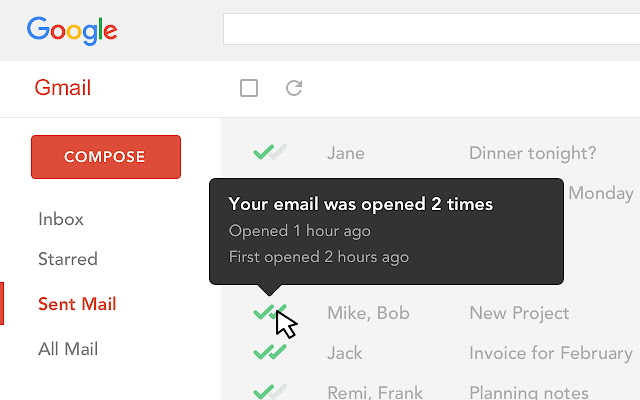
It is critical in Sales to understand if someone received and read the email you sent, and Mailtrack is perfect for this. It is not a critical tool when you are receiving emails but definitely a critical tool when sending emails and you need to know the status and to understand if they even read what you sent.
Log email to Salesforce. You click one button and it logs for you. This is easier than adding the BCC email address that Salesforce provides as a way to log email.
Track views and engagement on these emails. It's nice to know if the email was opened and if links were clicked.
Update quick fields in Salesforce directly from their inbox using Cirrus. This prevented reps from needing to click into Salesforce, wait for it to load, then update fields like the phone number or name.
If the rep did need to open Salesforce, Cirrus provides a quick button to navigate to the Lead/Contact/Opportunity page quickly.
It is the best google to salesforce integration on the market. support is incredibly responsive and very helpful. They are constantly adding new features, and the current feature set is well beyond anything else that is currently offered in the market
Very easy to use. Everything opens in a familiar interface right inside the google apps sidebar. It brings in salesforce records, so as long as you know google apps / gmail and salesforce you'll be all set. It's point and click.
I would rate Mailtrack's overall usability as a ten out of ten. The reasons for this are actually quite simple. For now, only I have been using Mailtrack. However, looking at the rather easy to use characteristics Mailtrack has to offer, I would not hesitate to recommend it to the rest of my colleagues.
This rating is fully deserved for the reasons I mentioned earlier. Namely, firstly, ease of use. Secondly, the reliability and speed of the application. Thirdly, the unobtrusiveness of its functioning. Fourth, the positive effect that the application has on the process of management communication between company employees. Fifth, the overall usability of the application due to the minimum settings.
The plugin is installed inside your internet browser as an extension/add-on. It can be found in most add on stores and is easy to install. Usually just a few clicks. It handles authorization for you once you sign in, and then takes care of all the rest. It couldn't be easier to get working right out of the box. You're up in running in less than 5 minutes.
Yesware regularly sent me alerts that my emails had been opened by someone who I hadn't sent them to, from locations they couldn't possibly have been. I also don't recall its Salesforce activity logging working as smoothly, though I last used Yesware more than 12 months ago so my memory isn't as fresh as it could be
The biggest alternatives I've tried are whole email systems - Polymail and Newton. Newton was bar none the best email handling application AND the best email tracker, however, unfortunately, they went out of business at the end of summer 2018. Mailtrack is different because it only does one thing, it tracks email. Without Newton (Polymail is also iOS only, and expensive), Mailtrack is really the only decent solution for email tracking without buying a big system like a CRM. I didn't want to pay $100+/month for user seats, I just wanted to track my own emails for some better intel. That's what Mailtrack does, and that's what Mailtrack is priced to do.
After I started using the Mailtrack, the responses to my emails increased by at least 30%.
Once I submitted/sent an important email and got the notification that the email was sent, I feel safe that my email/request has been processed/viewed without being worried that the email went to the spam box.