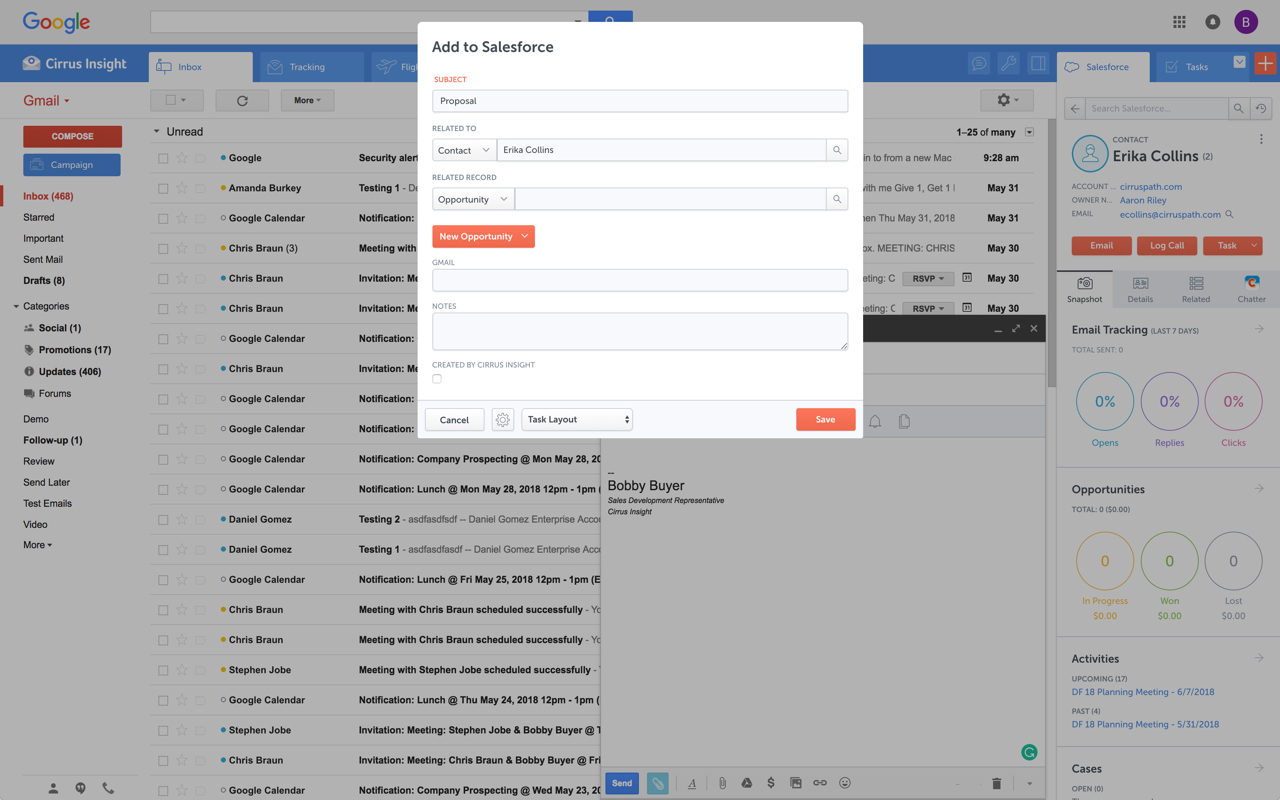
Cirrus Insight integrates Salesforce with Gmail, Google Calendar, and Google Contacts. Instantly View Contextual Salesforce Information in Your Inbox. Save Emails & Attachments to Salesforce with a Click. Sync Your Google & Salesforce Calendars. Create & Edit Salesforce Records on the Fly. Customize Your Salesforce Workflow in Gmail. Add Google Contacts to Salesforce. Salesforce Tasks Integration. Salesforce Templates Integrated with Gmail.
$27
per user/month
Close CRM
Score 9.9 out of 10
N/A
Close.io is a customer relationship management (CRM) software with call management and sales workflow automation capabilities.
$9
per month (paid annually) per user
Pricing
Cirrus Insight
Close CRM
Editions & Modules
Starter
$27
per user/month
Closer
$45
per user/month
Rainmaker
$72
per user/month
Solo
$9
per month (paid annually) per user
Essentials
$35
per month (paid annually) per user
Growth
$99
per month (paid annually) per user
Scale
$139
per month (paid annually) per user
Offerings
Pricing Offerings
Cirrus Insight
Close CRM
Free Trial
Yes
Yes
Free/Freemium Version
No
No
Premium Consulting/Integration Services
No
No
Entry-level Setup Fee
$500 per installation
Optional
Additional Details
Pricing based on annual billing.
The pricing listed here reflects up to a 35% discount for paying annually. Monthly billing is available at of $19 per user for the Solo plan (only 1 user allowed), $49 per user for the Essentials plan, $109 per user for the Growth plan, and $149 per user for the Scale plan.
More Pricing Information
Community Pulse
Cirrus Insight
Close CRM
Features
Cirrus Insight
Close CRM
Sales Force Automation
Comparison of Sales Force Automation features of Product A and Product B
Cirrus Insight
-
Ratings
Close CRM
8.9
Ratings
14% above category average
Customer data management / contact management
00 Ratings
8.00 Ratings
Workflow management
00 Ratings
7.70 Ratings
Territory management
00 Ratings
8.00 Ratings
Opportunity management
00 Ratings
10.00 Ratings
Integration with email client (e.g., Outlook or Gmail)
00 Ratings
9.30 Ratings
Contract management
00 Ratings
10.00 Ratings
Interaction tracking
00 Ratings
8.30 Ratings
Channel / partner relationship management
00 Ratings
9.70 Ratings
Customer Service & Support
Comparison of Customer Service & Support features of Product A and Product B
Cirrus Insight
-
Ratings
Close CRM
8.5
Ratings
12% above category average
Case management
00 Ratings
8.00 Ratings
Call center management
00 Ratings
7.40 Ratings
Help desk management
00 Ratings
10.00 Ratings
Marketing Automation
Comparison of Marketing Automation features of Product A and Product B
Cirrus Insight
-
Ratings
Close CRM
9.0
Ratings
17% above category average
Lead management
00 Ratings
8.70 Ratings
Email marketing
00 Ratings
9.30 Ratings
CRM Project Management
Comparison of CRM Project Management features of Product A and Product B
Cirrus Insight
-
Ratings
Close CRM
7.9
Ratings
4% above category average
Task management
00 Ratings
8.30 Ratings
Billing and invoicing management
00 Ratings
10.00 Ratings
Reporting
00 Ratings
5.40 Ratings
CRM Reporting & Analytics
Comparison of CRM Reporting & Analytics features of Product A and Product B
Cirrus Insight
-
Ratings
Close CRM
7.5
Ratings
1% below category average
Forecasting
00 Ratings
10.00 Ratings
Pipeline visualization
00 Ratings
8.00 Ratings
Customizable reports
00 Ratings
4.40 Ratings
Customization
Comparison of Customization features of Product A and Product B
Cirrus Insight
-
Ratings
Close CRM
8.6
Ratings
14% above category average
Custom fields
00 Ratings
10.00 Ratings
Custom objects
00 Ratings
10.00 Ratings
Scripting environment
00 Ratings
8.00 Ratings
API for custom integration
00 Ratings
6.40 Ratings
Security
Comparison of Security features of Product A and Product B
Cirrus Insight
-
Ratings
Close CRM
8.0
Ratings
4% below category average
Single sign-on capability
00 Ratings
8.00 Ratings
Role-based user permissions
00 Ratings
8.00 Ratings
Social CRM
Comparison of Social CRM features of Product A and Product B
Cirrus Insight
-
Ratings
Close CRM
10.0
Ratings
31% above category average
Social data
00 Ratings
10.00 Ratings
Social engagement
00 Ratings
10.00 Ratings
Integrations with 3rd-party Software
Comparison of Integrations with 3rd-party Software features of Product A and Product B
Cirrus Insight
-
Ratings
Close CRM
6.4
Ratings
14% below category average
Marketing automation
00 Ratings
6.40 Ratings
Platform
Comparison of Platform features of Product A and Product B
For someone who uses both Gmail and Salesforce as part of their main role, this software is an invaluable connector for them both. Some of the features are also not Salesforce specific - such as the Meeting Scheduler, which has proved invaluable to me, and I would recommend to any Gmail user who frequently set up meetings (either internally or externally).
Close is my #1 choice for sales teams, both inbound and outbound. The telephony features in Close are exceptional and they lead the Industry in features and innovation. The power dialer increases productivity by cutting down the manual time of physically dialing calls. All calls and interactions including SMS messages are automatically logged to the client's account within the CRM.
Log email to Salesforce. You click one button and it logs for you. This is easier than adding the BCC email address that Salesforce provides as a way to log email.
Track views and engagement on these emails. It's nice to know if the email was opened and if links were clicked.
Update quick fields in Salesforce directly from their inbox using Cirrus. This prevented reps from needing to click into Salesforce, wait for it to load, then update fields like the phone number or name.
If the rep did need to open Salesforce, Cirrus provides a quick button to navigate to the Lead/Contact/Opportunity page quickly.
Minor bugs? - Sometime when I'm replying to an account it attempts to send the email as a different user. Thankfully I've only missed it when sending internal emails!
It is the best google to salesforce integration on the market. support is incredibly responsive and very helpful. They are constantly adding new features, and the current feature set is well beyond anything else that is currently offered in the market
Very easy to use. Everything opens in a familiar interface right inside the google apps sidebar. It brings in salesforce records, so as long as you know google apps / gmail and salesforce you'll be all set. It's point and click.
Close is a simpler platform to use when it comes to initiating email campaigns and managing leads. It has great visibility on opportunities and can be shared with specified users or can also be kept confidential. Close is not for someone who is very new to tools of its kind.
Close's support team offers a really good service, they are always willing to help with whatever is needed or arises, they investigate everything they need to find a solution and give an answer as quickly as possible, their attitude is better and their optimism really helps in times of stress, they do a great job in record time.
The plugin is installed inside your internet browser as an extension/add-on. It can be found in most add on stores and is easy to install. Usually just a few clicks. It handles authorization for you once you sign in, and then takes care of all the rest. It couldn't be easier to get working right out of the box. You're up in running in less than 5 minutes.
Yesware regularly sent me alerts that my emails had been opened by someone who I hadn't sent them to, from locations they couldn't possibly have been. I also don't recall its Salesforce activity logging working as smoothly, though I last used Yesware more than 12 months ago so my memory isn't as fresh as it could be
For a specific sales team, Close performs better sales tracking and email and SMS management, with a fresh and modern interface, making the team's work more comfortable, with a holistic (but not complete) tracking and reporting of the data. Helping to improve the performance of each agent and obtain better results. For all other campaigns we use the predictive dialers mentioned above, Close is better for tracking current customers and for warm leads.
Has allowed us to have full visibility into our pipeline
Has allowed us to automate lead entry and follow up, saving us tons of time and helping us to make sure we're not letting people slip through the cracks. This is done through the Zapier integration and new email sequences feature