
Emburse Chrome River vs. SutiExpense
| Product | Rating | Most Used By | Product Summary | Starting Price |
|---|---|---|---|---|
 Emburse Chrome River | Score9.1 out of 10 | N/A | Chrome River EXPENSE is expense management software, from Chrome River Technologies in Los Angeles, California. | N/A |
 SutiExpense | Score1 out of 10 | N/A | SutiExpense is an expense / spend management platform from Sutisoft headquartered in Los Altos, California. | N/A |
| Emburse Chrome River | SutiExpense | |||||||||||||||
|---|---|---|---|---|---|---|---|---|---|---|---|---|---|---|---|---|
| Editions & Modules | No answers on this topic | No answers on this topic | ||||||||||||||
| Offerings |
| |||||||||||||||
| Entry-level Setup Fee | No setup fee | No setup fee | ||||||||||||||
| Additional Details | We offer three cost-effective, subscription-based pricing models: A transaction-based model, priced according to expense report volume A submitter-based model, priced according to an average number of monthly submitters An enterprise-level model that includes unlimited expense reports. Pricing for this model is based on total employee headcount Feel free to contact us to discuss the best one for your organization. | — | ||||||||||||||
| More Pricing Information | ||||||||||||||||
| Emburse Chrome River | SutiExpense | |
|---|---|---|
| Considered Both Products | No answer on this topic | No answer on this topic |
| Key User Insights | ||
| Would buy again | ||
95% Would buy again 18 Answers | No answers on this topic | |
| Delivers good value for the price | ||
100% Delivers good value for the price 14 Answers | No answers on this topic | |
| Happy with the feature set | ||
95% Happy with the feature set 18 Answers | No answers on this topic | |
| Lived up to sales and marketing promises | ||
82% Lived up to sales and marketing promises 9 Answers | No answers on this topic | |
| Implementation went as expected | ||
83% Implementation went as expected 10 Answers | No answers on this topic | |
| Emburse Chrome River | SutiExpense | |||||||||||||||||||||||||
|---|---|---|---|---|---|---|---|---|---|---|---|---|---|---|---|---|---|---|---|---|---|---|---|---|---|---|
| Expense Management |
| |||||||||||||||||||||||||
| Payment Management |
| |||||||||||||||||||||||||
| Emburse Chrome River | SutiExpense | |
|---|---|---|
| Small Businesses |  Dext Score9.8 out of 10 | Dext Score9.8 out of 10 |
| Medium-sized Companies |  BILL Spend & Expense Score8.9 out of 10 | BILL Spend & Expense Score8.9 out of 10 |
| Enterprises |  Webexpenses Score9.2 out of 10 | Emburse Chrome River Score9.1 out of 10 |
| All Alternatives | View all alternatives | View all alternatives |
| Emburse Chrome River | SutiExpense | |
|---|---|---|
| Likelihood to Recommend | 9.9 | 7.0 |
| Likelihood to Renew | 9.8 | - |
| Usability | 9.0 | - |
| Availability | 10.0 | - |
| Performance | 9.0 | - |
| Support Rating | 9.0 | - |
| Online Training | 9.0 | - |
| Implementation Rating | 9.8 | - |
| Configurability | 8.0 | - |
| Ease of integration | 6.0 | - |
| Product Scalability | 8.0 | - |
| Vendor post-sale | 10.0 | - |
| Vendor pre-sale | 10.0 | - |
| Emburse Chrome River | SutiExpense | |
|---|---|---|
| Likelihood to Recommend |
|
|
| Pros |
|
|
| Cons |
|
|
| Likelihood to Renew |
| No answers on this topic |
| Usability |
| No answers on this topic |
| Reliability and Availability |
| No answers on this topic |
| Performance |
| No answers on this topic |
| Support Rating |
| No answers on this topic |
| Online Training |
| No answers on this topic |
| Implementation Rating |
| No answers on this topic |
| Alternatives Considered |
|
|
| Scalability |
| No answers on this topic |
| Return on Investment |
|
|
| ScreenShots | Emburse Chrome River Screenshots  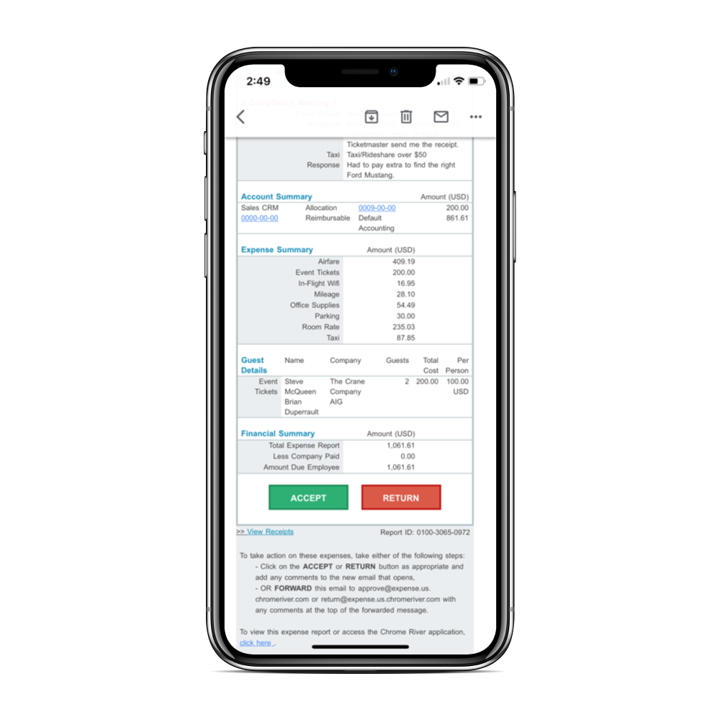 |



