
Emburse Chrome River vs. Hurdlr
Emburse Chrome River vs. Hurdlr
| Product | Rating | Most Used By | Product Summary | Starting Price |
|---|---|---|---|---|
 Emburse Chrome River | N/A | Chrome River EXPENSE is expense management software, from Chrome River Technologies in Los Angeles, California. | N/A | |
 Hurdlr | Enterprise companies (1,001+ employees) | Hurdlr automatically tracks mileage, expenses, income streams, and tax deductions in real-time. Self-employed business owners, freelancers, and solo entrepreneurs use Hurdlr to save time, save money, and stay organized while running their business. The vendor states that on average, people find over $5,600 in tax deductions. | N/A |
| Emburse Chrome River | Hurdlr | |||||||||||||||
|---|---|---|---|---|---|---|---|---|---|---|---|---|---|---|---|---|
| Editions & Modules | No answers on this topic | No answers on this topic | ||||||||||||||
| Offerings |
| |||||||||||||||
| Entry-level Setup Fee | No setup fee | No setup fee | ||||||||||||||
| Additional Details | We offer three cost-effective, subscription-based pricing models: A transaction-based model, priced according to expense report volume A submitter-based model, priced according to an average number of monthly submitters An enterprise-level model that includes unlimited expense reports. Pricing for this model is based on total employee headcount Feel free to contact us to discuss the best one for your organization. | — | ||||||||||||||
| More Pricing Information | ||||||||||||||||
| Emburse Chrome River | Hurdlr |
|---|
| Emburse Chrome River | Hurdlr | ||||||||||||||||||||||||
|---|---|---|---|---|---|---|---|---|---|---|---|---|---|---|---|---|---|---|---|---|---|---|---|---|---|
| Expense Management |
| ||||||||||||||||||||||||
| Payment Management |
|
| Emburse Chrome River | Hurdlr | |
|---|---|---|
| Small Businesses |  Dext Score 9.8 out of 10 | Dext Score 9.8 out of 10 |
| Medium-sized Companies |  Precoro Score 2.8 out of 10 | Precoro Score 2.8 out of 10 |
| Enterprises |  Webexpenses Score 9.2 out of 10 | Emburse Chrome River Score 9.1 out of 10 |
| All Alternatives | View all alternatives | View all alternatives |
| Emburse Chrome River | Hurdlr | |
|---|---|---|
| Likelihood to Recommend | 9.9 (0 ratings) | 9.0 (0 ratings) |
| Likelihood to Renew | 9.8 (0 ratings) | - (0 ratings) |
| Usability | 9.0 (0 ratings) | - (0 ratings) |
| Availability | 10.0 (0 ratings) | - (0 ratings) |
| Performance | 9.0 (0 ratings) | - (0 ratings) |
| Support Rating | 9.0 (0 ratings) | - (0 ratings) |
| Online Training | 9.0 (0 ratings) | - (0 ratings) |
| Implementation Rating | 9.8 (0 ratings) | - (0 ratings) |
| Configurability | 8.0 (0 ratings) | - (0 ratings) |
| Ease of integration | 6.0 (0 ratings) | - (0 ratings) |
| Product Scalability | 8.0 (0 ratings) | - (0 ratings) |
| Vendor post-sale | 10.0 (0 ratings) | - (0 ratings) |
| Vendor pre-sale | 10.0 (0 ratings) | - (0 ratings) |
| Emburse Chrome River | Hurdlr | |
|---|---|---|
| Likelihood to Recommend | 
| 
 Alanna Hawley SEO Consultant |
| Pros |
|
Alanna Hawley SEO Consultant |
| Cons |
|
Alanna Hawley SEO Consultant |
| Likelihood to Renew |
 Lorrie Black Sr., Business Analyst | No answers on this topic |
| Usability |
| No answers on this topic |
| Reliability and Availability |
 Robert Ferrandino Controller | No answers on this topic |
| Performance |
Robert Ferrandino Controller | No answers on this topic |
| Support Rating |
 Jose Romero Area Director of Marketing and Business Development | No answers on this topic |
| Online Training |
Robert Ferrandino Controller | No answers on this topic |
| Implementation Rating |
Robert Ferrandino Controller | No answers on this topic |
| Alternatives Considered |
|
Alanna Hawley SEO Consultant |
| Scalability |
Robert Ferrandino Controller | No answers on this topic |
| Return on Investment |
 Athena Gazikas Senior Expense Administrator |
Alanna Hawley SEO Consultant |
| ScreenShots | Emburse Chrome River Screenshots  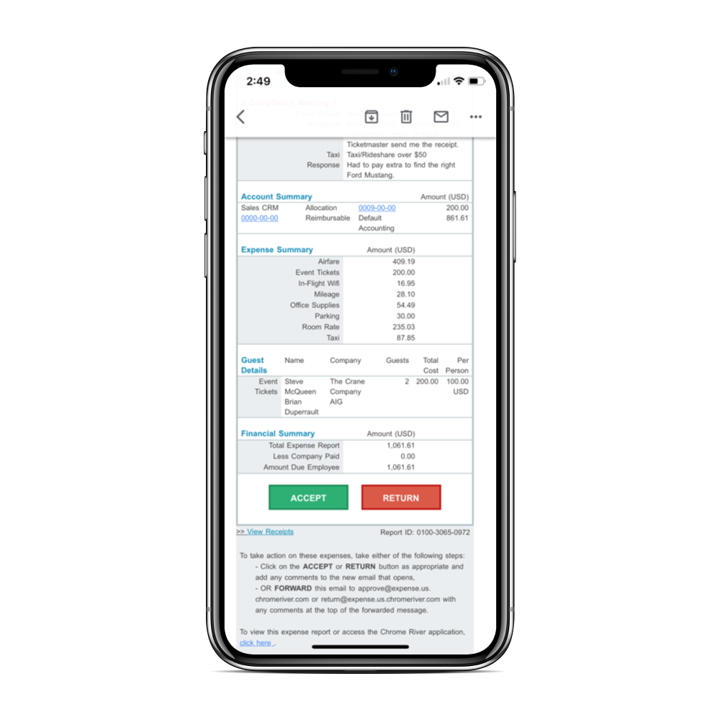 |