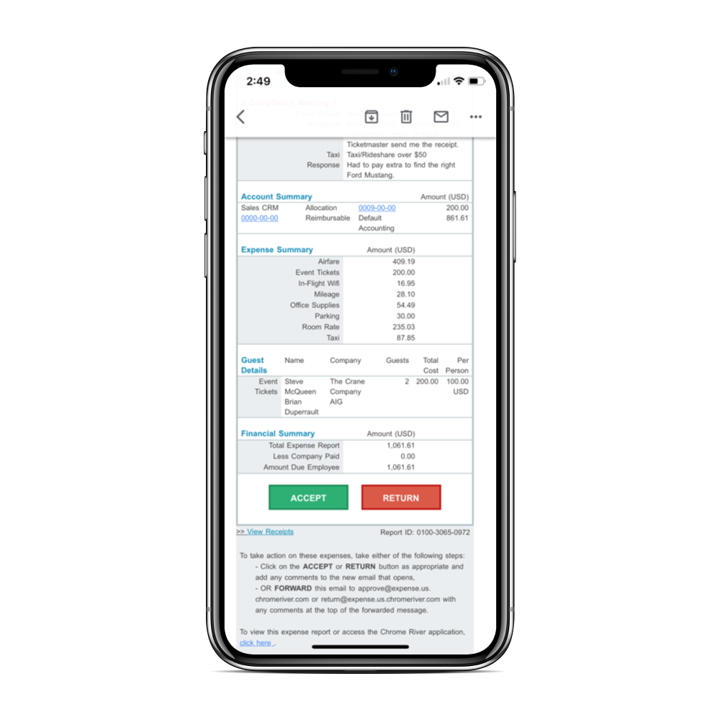
Chrome River EXPENSE is expense management software, from Chrome River Technologies in Los Angeles, California.
N/A
Expensify
Score7.6 out of 10
N/A
Expensify automates the entire spend management process. Scan receipts, track mileage, submit and approve expenses, manage corporate cards, reimburse employees, pay bills, send invoices, and book travel. Built for individuals and companies of all sizes, anywhere in the world.
$5
per month per user
Pricing
Emburse Chrome River
Expensify
Editions & Modules
No answers on this topic
Collect
$5
per month per user
Control
$9
per month per user
Offerings
Pricing Offerings
Emburse Chrome River
Expensify
Free Trial
No
Yes
Free/Freemium Version
No
No
Premium Consulting/Integration Services
No
No
Entry-level Setup Fee
No setup fee
No setup fee
Additional Details
We offer three cost-effective, subscription-based pricing models:
A transaction-based model, priced according to expense report volume
A submitter-based model, priced according to an average number of monthly submitters
An enterprise-level model that includes unlimited expense reports. Pricing for this model is based on total employee headcount
Feel free to contact us to discuss the best one for your organization.
—
More Pricing Information
Community Pulse
Emburse Chrome River
Expensify
Considered Both Products
Emburse
Verified User
Chose Emburse Chrome River
Chrome River EXPENSE was the best overall deal. Concur's system was more robust, but it was also much more expensive and as good of a value. Expensify's system was not as clean and easy to navigate as Chrome River's system. Also, the Chrome River presentation was very well …
A de minimis incentive was given to thank the reviewer for their time. The incentive was not used to bias or drive a particular response, nor was the incentive contingent on a positive endorsement. More Info
CFO in Finance and Accounting at CLUBWAKA (Entertainment, 51-200 employees)
Chose Emburse Chrome River
We looked at Expensify at the time (2013). More recently, I looked at Zoho but these don't have the robust approval process nor ability to easily be classed into QuickBooks - we have a very complicated class structure.
A de minimis incentive was given to thank the reviewer for their time. The incentive was not used to bias or drive a particular response, nor was the incentive contingent on a positive endorsement. More Info
Travel Reporting & System Administrator in Finance and Accounting at CACI International Inc (Defense & Space, 10,001+ employees)
Chose Emburse Chrome River
The user interface and features surpass the experience and similar features of other products because of the following. Good customer support to also make the program better. Also, a good interface to navigate the expense creation process.
A de minimis incentive was given to thank the reviewer for their time. The incentive was not used to bias or drive a particular response, nor was the incentive contingent on a positive endorsement. More Info
A de minimis incentive was given to thank the reviewer for their time. The incentive was not used to bias or drive a particular response, nor was the incentive contingent on a positive endorsement. More Info
Verified User
Chose Emburse Chrome River
It's been a long time since we compared expense platforms. Ultimately we decided that Chrome River was the best option for us, and we believe we made the right choice. I don't remember specifics about other platforms unfortunately.
A de minimis incentive was given to thank the reviewer for their time. The incentive was not used to bias or drive a particular response, nor was the incentive contingent on a positive endorsement. More Info
Information Technology Director in Information Technology at Santa Clarita Community College District (Education Management, 1001-5000 employees)
Chose Emburse Chrome River
There are a number of expense request software out there. Many have pros and cons just like Chrome River. We chose Chrome River because it was very straightforward for our team to use. It will have integrations to track budget expenses and managers that are automated and so it …
A de minimis incentive was given to thank the reviewer for their time. The incentive was not used to bias or drive a particular response, nor was the incentive contingent on a positive endorsement. More Info
Renewals Account Manager in Sales at Nutanix (Information Technology & Services, 5001-10,000 employees)
Chose Expensify
Expensify is everything Chrome River was unfortunately was not. The navigation was not intuitive. The workflows were cumbersome. The time spent on adding expended and managing reports was much higher. The general dissatisfaction was significant and a lot of frustration was …
A de minimis incentive was given to thank the reviewer for their time. The incentive was not used to bias or drive a particular response, nor was the incentive contingent on a positive endorsement. TR verified that a representative sample of customers was invited. More Info
The Emburse Chrome River is well suited for tracking expenses and reimbursement. The compliance part of the software makes the task very easy to ensure all the reports that are being used within the company are updated and easy to verify. The Automating invoice processing makes some redundant task easy to execute.
A de minimis incentive was given to thank the reviewer for their time. The incentive was not used to bias or drive a particular response, nor was the incentive contingent on a positive endorsement. TR verified that a representative sample of customers was invited. More Info
I think it's really good for small businesses. At least in the way we use it. It's very good for keeping an eye on employee spending in nearly real time. I'm not sure how it works for larger companies when there is a larger number of people to keep track of.
A de minimis incentive was given to thank the reviewer for their time. The incentive was not used to bias or drive a particular response, nor was the incentive contingent on a positive endorsement. More Info
[Emburse] Chrome River listens to its customer's needs and does its best to match current products to those needs, or collaborate internally to determine if an enhancement can be made available that will not only benefit that customer, but will be a good use case for all Chrome River customers.
The [Emburse] Chrome River customer service team is great. Unlike most companies, you can speak to a liver person!
[Emburse] Chrome River's training offerings are relevant and pertinent to the day to day operations of the software.
A de minimis incentive was given to thank the reviewer for their time. The incentive was not used to bias or drive a particular response, nor was the incentive contingent on a positive endorsement. More Info
A de minimis incentive was given to thank the reviewer for their time. The incentive was not used to bias or drive a particular response, nor was the incentive contingent on a positive endorsement. More Info
Would be great to have pre-saved templates available to apply to line items at the expense report header level rather than having to go into each line.
Would be nice to have a mass upload functionality for things like cost codes, allocations, and credit card users.
A de minimis incentive was given to thank the reviewer for their time. The incentive was not used to bias or drive a particular response, nor was the incentive contingent on a positive endorsement. More Info
I wish that I could sync accounts on the back end kind of like with banking software, so that Expensify would automatically port over receipts for recurring expenses as soon as they're available
It would be nice to one-click submit an expense all the way through instead of having to attach it to a report
Wackier profile icons? :) Not a big deal. This software is pretty much amazing as it is now, and typically the urge to update and modify very good software leads to poor outcomes!
A de minimis incentive was given to thank the reviewer for their time. The incentive was not used to bias or drive a particular response, nor was the incentive contingent on a positive endorsement. More Info
Chrome River is easy to use. We needed little training for our users and instead pointed them to Chrome River's Help Guides which are clearly written and easy to understand. With tools SNAP and the ability to email receipts means we can be completely remote when submitting reports.
We like using the tool and we receive positive feedback from employees and management who use the tool. It saves time and helps us concentrate on the value adding activities so we are very likely to keep using Expensify in the future
A de minimis incentive was given to thank the reviewer for their time. The incentive was not used to bias or drive a particular response, nor was the incentive contingent on a positive endorsement. More Info
I would rate Chrome River Expense a 10 because, as I mentioned before, it is very simple and easy to use. This is important from an administrative point-of-view as well as for the field employee. Being a general contractor, it makes it all the better for our employees to use a program that is easy to understand and requires little time and effort. It has made tracking expenses very simple and has been well received by the entire company.
A de minimis incentive was given to thank the reviewer for their time. The incentive was not used to bias or drive a particular response, nor was the incentive contingent on a positive endorsement. More Info
My rating of 8 out of 10 for Expensify's overall usability reflects its strong performance in empowering individual users and streamlining core expense processes, while acknowledging that there are specific areas, particularly on the administrative or enterprise side, where the user experience could be further refined. Exceptional End-User Experience (for basic tasks).Automation & Time-Saving Features.Clear Workflow for Approvers. Why it's not a perfect 10 (areas for improvement that dock points): Limited corporate bank to choose from, limited multi-currency to pay to ( for instance, as a foreign corporatio,n i cannot pay with my US account to Israeli employees, or pay to our UK employees)
A de minimis incentive was given to thank the reviewer for their time. The incentive was not used to bias or drive a particular response, nor was the incentive contingent on a positive endorsement. More Info
A de minimis incentive was given to thank the reviewer for their time. The incentive was not used to bias or drive a particular response, nor was the incentive contingent on a positive endorsement. More Info
This has been easy for me because we have a rep that contacts the supporters for this product to correct any issues we may have with the software or changes needed to help out employees use Chrome River easier. This from my understanding has been a hit or miss kind of interaction with our rep and Chrome River.
A de minimis incentive was given to thank the reviewer for their time. The incentive was not used to bias or drive a particular response, nor was the incentive contingent on a positive endorsement. More Info
Our rep has been amazing. He has built custom reports for us that have been very time consuming and difficult. Our reps are also currently looking into new submission solutions for us that we are excited about. They came up with this and recommended it on their own without me complaining about an issue. They are about our success and are very excited about the product they offer.
A de minimis incentive was given to thank the reviewer for their time. The incentive was not used to bias or drive a particular response, nor was the incentive contingent on a positive endorsement. More Info
A de minimis incentive was given to thank the reviewer for their time. The incentive was not used to bias or drive a particular response, nor was the incentive contingent on a positive endorsement. More Info
Before implementation begins, make sure you have a plan on how you would like your workflow and platform setup for a system like Chrome River. It will speed the process and eliminate the need to make changes when you go live.
A de minimis incentive was given to thank the reviewer for their time. The incentive was not used to bias or drive a particular response, nor was the incentive contingent on a positive endorsement. More Info
The implementation process went rather smoothly, linking it to the bank and cards was handled easily. without too many unnecessary steps. Getting the accounts setup did take some time, but that would be true with any organization. All in all things went smoothly and I was very pleased with the setup and implementation process
It's the [industry-leading] software for Enterprise level organizations with [large-scale] teams and financial responsibilities. The software has the most robust set of tools and pays for itself with the amount of time it saves. Many newer alternatives have sprouted up but I don't know that we would ever trust another software to do our Expense Tracking and Management.
A de minimis incentive was given to thank the reviewer for their time. The incentive was not used to bias or drive a particular response, nor was the incentive contingent on a positive endorsement. More Info
It is definitely 10 times better than using an Excel spreadsheet. We are talking a digitized with AI type capabilities to do the work for you. It’s honestly a lifesaver. This beats manual calculations and data entry any day. Scanning 100 receipts and saving them to pdf files not only takes space on your storage but it is an extra unnecessary step
A de minimis incentive was given to thank the reviewer for their time. The incentive was not used to bias or drive a particular response, nor was the incentive contingent on a positive endorsement. More Info
A de minimis incentive was given to thank the reviewer for their time. The incentive was not used to bias or drive a particular response, nor was the incentive contingent on a positive endorsement. More Info
A de minimis incentive was given to thank the reviewer for their time. The incentive was not used to bias or drive a particular response, nor was the incentive contingent on a positive endorsement. More Info
We went from paying credit card fees with no approval process to a no fees and complex approval processes.
I personally save time in not having to develop a spend report I just have my admin assistent fill in the details of the auto generated report and it is done. Went from an hour long process to 5- 10 minutes max to prepare a high quality audit ready report.
A de minimis incentive was given to thank the reviewer for their time. The incentive was not used to bias or drive a particular response, nor was the incentive contingent on a positive endorsement. More Info