Emburse Chrome River vs. Emburse SpringAhead

Overview
ProductRatingMost Used ByProduct SummaryStarting Price
Emburse Chrome River
Score 9.2 out of 10
N/A
Chrome River EXPENSE is expense management software, from Chrome River Technologies in Los Angeles, California.N/A
Emburse SpringAhead
Score 10.0 out of 10
N/A
SpringAhead is an expense reporting, billing, and time tracking platform that was owned and supported by Certify Travel and Expense created from the 2017 merger of Certify, Nexonia, and other companies, and now from Emburse, the company formed from the merger of Certify and Chrome River Technologies in March 2019.N/A
Pricing
Emburse Chrome RiverEmburse SpringAhead
Editions & Modules
No answers on this topic
Offerings
Pricing Offerings
Emburse Chrome RiverEmburse SpringAhead
Free Trial
NoNo
Free/Freemium Version
NoNo
Premium Consulting/Integration Services
NoNo
Entry-level Setup FeeNo setup feeNo setup fee
Additional DetailsWe offer three cost-effective, subscription-based pricing models: A transaction-based model, priced according to expense report volume A submitter-based model, priced according to an average number of monthly submitters An enterprise-level model that includes unlimited expense reports. Pricing for this model is based on total employee headcount Feel free to contact us to discuss the best one for your organization.
More Pricing Information
Community Pulse
Emburse Chrome RiverEmburse SpringAhead
Features
Emburse Chrome RiverEmburse SpringAhead
Expense Management
Comparison of Expense Management features of Product A and Product B
Emburse Chrome River
8.8
Ratings
3% above category average
Emburse SpringAhead
-
Ratings
Employee Expense Reporting8.70 Ratings00 Ratings
Corporate Card Reconciliation9.00 Ratings00 Ratings
Payment Management
Comparison of Payment Management features of Product A and Product B
Emburse Chrome River
8.0
Ratings
2% below category average
Emburse SpringAhead
-
Ratings
Customizable Approval Policies8.30 Ratings00 Ratings
Financial Document Management5.00 Ratings00 Ratings
Payment Status Tracking9.00 Ratings00 Ratings
Payment Audit Trail9.00 Ratings00 Ratings
Duplicate Bill Detection8.30 Ratings00 Ratings
Advanced OCR8.50 Ratings00 Ratings
Electronic Funds Transfer8.00 Ratings00 Ratings
User Ratings
Emburse Chrome RiverEmburse SpringAhead
Likelihood to Recommend
9.9
(0 ratings)
6.5
(0 ratings)
Likelihood to Renew
9.8
(0 ratings)
-
(0 ratings)
Usability
9.0
(0 ratings)
-
(0 ratings)
Availability
10.0
(0 ratings)
-
(0 ratings)
Performance
9.0
(0 ratings)
-
(0 ratings)
Support Rating
9.0
(0 ratings)
-
(0 ratings)
Online Training
9.0
(0 ratings)
-
(0 ratings)
Implementation Rating
9.8
(0 ratings)
-
(0 ratings)
Configurability
8.0
(0 ratings)
-
(0 ratings)
Ease of integration
6.0
(0 ratings)
-
(0 ratings)
Product Scalability
8.0
(0 ratings)
-
(0 ratings)
Vendor post-sale
10.0
(0 ratings)
-
(0 ratings)
Vendor pre-sale
10.0
(0 ratings)
-
(0 ratings)
User Testimonials
Emburse Chrome RiverEmburse SpringAhead
Likelihood to Recommend
Chrome River in my experience is suited to the employees being more independent when completing their reports, due to the extensive questions and steps. This allows us (the reviewers) to come in and assist the employees more efficiently. I think it fits well with out needs and easy to help our employees
Read full review
It's definitely well suited for all organizations with knowledge workers who use computers to do their work and are able to log in and enter their time on a regular basis. I've always had access to it as part of my job and love using SpringAhead. It may be less appropriate in a role where the worker does not have regular access to a computer to enter their hours digitally.
Read full review
Pros
  • [Emburse] Chrome River listens to its customer's needs and does its best to match current products to those needs, or collaborate internally to determine if an enhancement can be made available that will not only benefit that customer, but will be a good use case for all Chrome River customers.
  • The [Emburse] Chrome River customer service team is great. Unlike most companies, you can speak to a liver person!
  • [Emburse] Chrome River's training offerings are relevant and pertinent to the day to day operations of the software.
Read full review
  • Tracking Time Across Projects
  • Tracking Time Across Pay Periods
  • Dashboard view of time tracked weekly
  • Easy Reporting Over Extended Timeperiod
Read full review
Cons
  • Would be great to have pre-saved templates available to apply to line items at the expense report header level rather than having to go into each line.
  • Would be nice to have a mass upload functionality for things like cost codes, allocations, and credit card users.
Read full review
  • The reporting is not perfect. When I am trying to find history for one person it is very cumbersome to get the info you need.
  • At the current use there is no integration with an expense tracking tool. We had a separate app to track expenses vs. time.
  • Only resources on the project can view time. External customers could not log in to see users' time against the project. Instead they waited for invoices or status reports.
Read full review
Likelihood to Renew
Chrome River is easy to use. We needed little training for our users and instead pointed them to Chrome River's Help Guides which are clearly written and easy to understand. With tools SNAP and the ability to email receipts means we can be completely remote when submitting reports.
Read full review
No answers on this topic
Usability
I would rate Chrome River Expense a 10 because, as I mentioned before, it is very simple and easy to use. This is important from an administrative point-of-view as well as for the field employee. Being a general contractor, it makes it all the better for our employees to use a program that is easy to understand and requires little time and effort. It has made tracking expenses very simple and has been well received by the entire company.
Read full review
No answers on this topic
Reliability and Availability
The software is always running effectively. I use many Cloud based systems and never had issues with Chrome River
Read full review
No answers on this topic
Performance
System runs normal pretty much all the time. Does not slow any other systems down.
Read full review
No answers on this topic
Support Rating
I cannot tell you how relieved we were when utilizing Chrome River support in comparison to other Enterprise level software support centers. Tickets were quick and representatives were swift in [their callbacks] and resolutions to our common and most difficult problems. The team there is professional and makes each new support ticket a breeze.
Read full review
No answers on this topic
Online Training
The software is very user friendly, so the online training was easy to pickup for everyone.
Read full review
No answers on this topic
Implementation Rating
Before implementation begins, make sure you have a plan on how you would like your workflow and platform setup for a system like Chrome River. It will speed the process and eliminate the need to make changes when you go live.
Read full review
No answers on this topic
Alternatives Considered
The overall user interface was easy to use and it made the task of the reporting very easy. Compliance rules are guiding the users to correctly upload and enter receipts, which are already uploaded and recognized via OCR during the business trip. Uploading can easily done via APP, mail or receipt gallery. There is no need for storing paper. Chrome River is supporting digital archiving
Read full review
We selected SpringAhead because of price and usability. This tool is easy to set up and configure. It is a cloud application allowing access from anywhere. There were no training requirements. When you have a small use case this tool is the way to go. We moved off SpringAhead to get more functionality and it has required a lot more training and effort to maintain and utilize
Read full review
Scalability
It's very easy software to design to your needs.
Read full review
No answers on this topic
Return on Investment
  • We have seen a return on approver time of nearly 60% meaning our approvers have tripled their output.
  • We have had feedback from our users that time spent creating expenses has gone from an average of 2 hours to perhaps 20 minutes, tops.
  • We have seen in our dashboards that the Emburse Certify Suite of tools has returned an average savings of over $500K a year.
Read full review
  • They fit the purpose of time keeping and expense reports but it could always be a whole lot better
Read full review
ScreenShots

Emburse Chrome River Screenshots

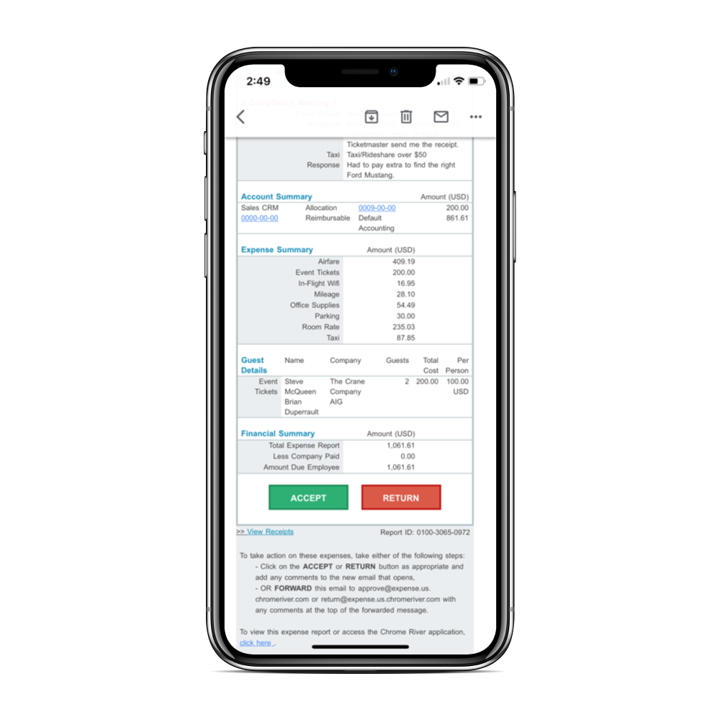
Screenshot of A consistent experience across any screen size or operating systemScreenshot of Simple, customizable tiles for expense entryScreenshot of Approve expenses directly from your inbox with a single click