CallFire vs. Ooma Office

Overview
ProductRatingMost Used ByProduct SummaryStarting Price
CallFire
Score 9.7 out of 10
N/A
CallFire is a VoIP and messaging solution designed for both external B2C interactions and internal company use. It includes features such as text messaging, call tracking, voice broadcasting, and an interactive voice response (IVR) system. Subscription pricing starts at $99 per month.
$99
per month
Ooma Office
Score 9.2 out of 10
N/A
For businesses of all sizes, Ooma provides advanced voice and collaboration features which they describe as flexible and scalable. With plans starting at $19.95 per user per month, Ooma Office is available without contracts or long-term commitments so as to make it easy for a small business to scale its office phone system with Ooma as its business grows. Ooma Office features include: Unlimited Calling in U.S., Canada, Mexico and Puerto Rico Free Local…
$9.95
per month
Pricing
CallFireOoma Office
Editions & Modules
Lite
$99.00
per month
Startup
$199.00
per month
Grow
$299.00
per month
Pro
$599.00
per month
Local Phone Number
$9.95
per month
Toll Free Number
$9.95
per month
Toll Free Calling Plan
$15.00
per month
Base Price
$19.95
per month
User Extension
$19.95
per month
Pro
$24.95
per month
Ooma Linx
$49.99
per month
Ooma Wireless Adapter
$49.99
per month
Ooma DP1 Desk Phone
$89.99
per month
Expansion Base Station
$99.99
per month
Yealink IP Phones
$99.99
per month
Cisco IP Phones
$109.99
per month
Yealink Conference IP Phones
$399.99
per month
Conference Bridge
Free
Ring Groups
Free
Virtual Receptionist
Free
Number Porting
Free
Offerings
Pricing Offerings
CallFireOoma Office
Free Trial
NoNo
Free/Freemium Version
NoNo
Premium Consulting/Integration Services
NoNo
Entry-level Setup FeeNo setup fee$19.95 per user/month
Additional DetailsOoma Office offers plans starting at $19.95 per user/month with no contracts, ever.
More Pricing Information
Community Pulse
CallFireOoma Office
Features
CallFireOoma Office
Cloud PBX
Comparison of Cloud PBX features of Product A and Product B
CallFire
7.6
Ratings
5% below category average
Ooma Office
8.0
Ratings
1% above category average
Hosted PBX6.00 Ratings8.40 Ratings
Multi-level Interactive Voice Response (IVR)9.00 Ratings7.80 Ratings
User templates7.00 Ratings00 Ratings
Call reports7.20 Ratings00 Ratings
Directory of employee names9.00 Ratings8.00 Ratings
Call Management
Comparison of Call Management features of Product A and Product B
CallFire
9.3
Ratings
11% above category average
Ooma Office
8.4
Ratings
0% above category average
Answering rules8.00 Ratings8.50 Ratings
Call recording10.00 Ratings7.50 Ratings
Call park8.50 Ratings9.00 Ratings
Call screening10.00 Ratings9.00 Ratings
Message alerts10.00 Ratings8.00 Ratings
VoIP system collaboration
Comparison of VoIP system collaboration features of Product A and Product B
CallFire
10.0
Ratings
23% above category average
Ooma Office
9.2
Ratings
14% above category average
Video conferencing10.00 Ratings00 Ratings
Audio conferencing10.00 Ratings9.20 Ratings
Mobile apps
Comparison of Mobile apps features of Product A and Product B
CallFire
8.3
Ratings
5% above category average
Ooma Office
7.5
Ratings
5% below category average
Mobile app for iOS8.50 Ratings7.50 Ratings
Mobile app for Android8.00 Ratings7.50 Ratings
Best Alternatives
CallFireOoma Office
Small Businesses
CloudTalk
CloudTalk
Score 7.2 out of 10
CloudTalk
CloudTalk
Score 7.2 out of 10
Medium-sized Companies
CloudTalk
CloudTalk
Score 7.2 out of 10
CloudTalk
CloudTalk
Score 7.2 out of 10
Enterprises
Cisco Unified Communications Manager (Call Manager)
Score 8.7 out of 10
Cisco Unified Communications Manager (Call Manager)
Score 8.7 out of 10
All AlternativesView all alternativesView all alternatives
User Ratings
CallFireOoma Office
Likelihood to Recommend
9.4
(0 ratings)
9.0
(0 ratings)
Likelihood to Renew
9.0
(0 ratings)
9.1
(0 ratings)
Usability
-
(0 ratings)
8.8
(0 ratings)
Support Rating
-
(0 ratings)
8.1
(0 ratings)
Implementation Rating
-
(0 ratings)
8.0
(0 ratings)
User Testimonials
CallFireOoma Office
Likelihood to Recommend
If you need to find a test candidate for your client quickly, this is one of the best ways. Pull yourself a hot list of a couple hundred potential candidates and load them in to CallFire. Then get ready to hit about 50-60 calls per hour. You should have a great test candidate for your client in about 24 hours! It's amazing how quickly you can show your clients the true speed of your company.
Read full review
[Ooma Office has] good customer service: this is important in our business as we have 24/7 phone service and rely on any tech issues being solved quickly. The price point is very good for small businesses. Being able to block robo / spam calls with one click is a huge plus as it saves us time on the phone and cleans up our incoming calls for the future.
Read full review
Pros
  • CallFire has amazing organization as far as categories and campaigns and all aspects go.
  • It is very easy to use and understand! Very user friendly.
  • Customer service and help is awesome! There have been some times when I have needed assistance and they were always so quick to reply.
Read full review
  • Saving money: Ooma Office saves a bundle compared to what we were paying for Verizon business phone services.
  • The mobile app is the most helpful part of Ooma Office for us. We can be "in the office" anywhere, even if we're telephonically.
  • The automated assistant can be invaluable in routing calls and handling frequently asked questions.
Read full review
Cons
  • The services are easy to use and robust, but there is room for improvement. Unfortunately, not much has changed over the last 2 years of use. There haven't been any new features or innovations in that time.
  • API integration and automation is not easy for most folks to jump into and there is very little technical support or documentation to take advantage of such features.
  • The standard reports are generally sufficient, but there isn't any customization or intelligence available.
Read full review
  • Cell phone app could be a little easier to use.
  • Ooma Desktop needs some tweaking to make it more user friendly.
  • I would like my 800 number to be assigned to my personal mailbox vs. having to have its own extension.
Read full review
Likelihood to Renew
There is no reason not to, it has proven effective in the usage
Read full review
We have found it very easy to configure, manage, and expand our phone operations with Ooma Office. We needed a reliable phone network as this is the first means of communication for our customers - Ooma has made it a lot easier for us to manage. Their support is also available 24x7 so that's a huge plus.
Read full review
Usability
No answers on this topic
If I had to rate Ooma Office’s overall usability on a scale from 1 to 10, I’d give it a solid 9 out of 10.From my experience, the setup was incredibly straightforward — honestly one of the easiest systems I’ve ever rolled out for a small business. The dashboard is clean, user-friendly, and doesn’t take a tech-savvy person to navigate. Within a short time, our team was up and running without needing IT support.What I really appreciate is how intuitive the call handling features are — forwarding, voicemail, virtual receptionist — it’s all laid out in a way that just makes sense. Plus, the mobile app makes it super convenient to stay connected when I’m not in the office.
Read full review
Support Rating
No answers on this topic
Ooma Office support is always available. I've never been on the phone with them for longer than 5 minutes. They are knowledgable, have great active listening skills, are able to make recommendations on how to make Ooma Office work even better for you, and wait times to speak with an agent are reasonable and typically less than 1 minute.
Read full review
Implementation Rating
No answers on this topic
Have a plan in place before you start the implementation, open communication with the staff on the changes being made, prepare a reference guide on the system and how to navigate the new setup. Budget and allocate time for helping staff learn the new system. Consolidate and coordinate all the questions internally before reaching out to support.
Read full review
Alternatives Considered
We considered Trello before deciding on CallFire. Trello is a good service that seems to do much of what CallFire does, however we wanted to avoid the labor-hours necessary to get Trello up to speed, as it is very technically involved. We didn't want to hire any additional developers just to get Trello set up and maintained. With CallFire, it was very intuitive and easy to setup quickly.
Read full review
We use Ooma Office for everyone in the company including mobile users. It has allowed us to eliminate the spam callers as well give our mobile and remote users the ability to make business calls - from any device, from anywhere, at any time - without having to worry about any long distance charges, or without giving up their personal telephone numbers (at home or cellular).
Read full review
Return on Investment
  • I sent out a broadcast message pretty deep in our data base, well three years out. I had one customer come in and buy thanking me for contacting her.
  • Our holiday season was up 35% over last year, this year we used CallFire more than we did in the past.
Read full review
  • Nearly 60% reduction in telephone costs; results were almost immediate
  • 10-15% reduction in time spent on the phone or on calls that may not be revenue impacting.
  • I can literally take my office with me anywhere! I can use my Ooma equipment anywhere I have access to HSI!
Read full review
ScreenShots

Ooma Office Screenshots

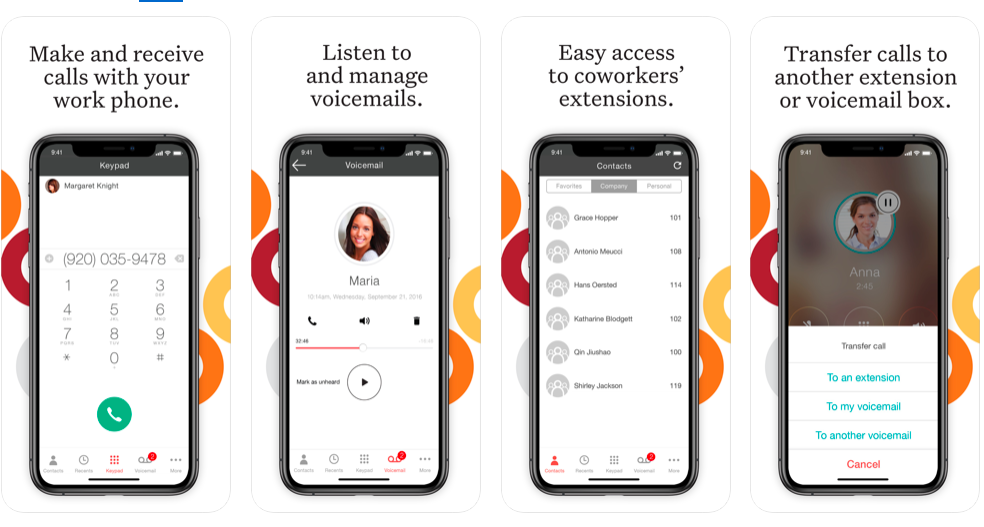
Screenshot of Ooma Business Phone Mobile AppScreenshot of Ooma Office Pro Desktop AppScreenshot of Customizable Virtual ReceptionistScreenshot of Configure System Settings through Ooma Office Manger Online Portal