TrustRadius: an HG Insights company

Buzz Communication & Collaboration Platform vs. Microsoft Teams

Save this comparison

Save this comparison

Add Product

Recommended Comparisons

    Overview
    ProductRatingMost Used ByProduct SummaryStarting Price

    Buzz Communication & Collaboration Platform

    N/A
    Small Businesses (1-50 employees)
    Buzz® from Skyscape® is a platform for healthcare providers, administrators and operation managers, patients, and their families to communicate securely for better care coordination. Buzz streamlines patient care and collaboration and helps users to save on healthcare delivery costs, and bolster Medicare Star Ratings. Buzz is a HIPAA-secure platform, combining document sharing, e-signatures, and Skyscape's clinical library with instant messaging. It is presented as a…

    $0

    Microsoft Teams

    Score7.8 out of 10
    N/AMicrosoft Teams combines video conferencing software with team collaboration tools. The communications platform allows MS Office users to conduct conference calls and share files via SharePoint, and join or initiate a group chat.

    $4.80

    per month per user

    Pricing
    Buzz Communication & Collaboration PlatformMicrosoft Teams
    Editions & Modules
    No answers on this topic
    Microsoft Teams Essentials
    $4.80
    per month per user
    Microsoft Teams Enterprise
    $5.25
    per month (paid yearly) per user
    Microsoft Teams Enterprise
    $5.25
    per month per user
    Microsoft 365 Business Basic
    $7.20
    per month per user
    Microsoft 365 Business Standard
    $15
    per month per user
    Offerings
    Pricing Offerings
    Buzz Communication & Collaboration PlatformMicrosoft Teams
    Free Trial
    YesYes
    Free/Freemium Version
    YesYes
    Premium Consulting/Integration Services
    YesNo
    Entry-level Setup FeeNo setup feeNo setup fee
    Additional DetailsNo long-term contract, pricing for organizations of any size.Discounts are available for non profit organizations.
    More Pricing Information
    Community Pulse
    Buzz Communication & Collaboration PlatformMicrosoft Teams
    Considered Both Products
    Skyscape
    No answer on this topic
    Microsoft
    No answer on this topic
    Key User Insights
    Would buy again
    No answers on this topic
    89%
    Would buy again
    201 Answers
    Delivers good value for the price
    No answers on this topic
    94%
    Delivers good value for the price
    180 Answers
    Happy with the feature set
    No answers on this topic
    90%
    Happy with the feature set
    202 Answers
    Lived up to sales and marketing promises
    No answers on this topic
    91%
    Lived up to sales and marketing promises
    115 Answers
    Implementation went as expected
    No answers on this topic
    92%
    Implementation went as expected
    139 Answers
    Features
    Buzz Communication & Collaboration PlatformMicrosoft Teams
    Project Management
    Comparison of Project Management features of Buzz Communication & Collaboration Platform and Microsoft Teams
    Feature
    Buzz Communication & Collaboration Platform
    -
    Ratings
    Microsoft Teams
    4.6
    192 Ratings
    50% below category average
    Task Management00 Ratings5.3147 Ratings
    Gantt Charts00 Ratings3.576 Ratings
    Scheduling00 Ratings4.2162 Ratings
    Workflow Automation00 Ratings4.2101 Ratings
    Mobile Access00 Ratings5.7184 Ratings
    Search00 Ratings4.6169 Ratings
    Visual planning tools00 Ratings4.5118 Ratings
    Communication
    Comparison of Communication features of Buzz Communication & Collaboration Platform and Microsoft Teams
    Feature
    Buzz Communication & Collaboration Platform
    -
    Ratings
    Microsoft Teams
    6.0
    201 Ratings
    27% below category average
    Chat00 Ratings6.1200 Ratings
    Notifications00 Ratings5.5199 Ratings
    Discussions00 Ratings5.9187 Ratings
    Surveys00 Ratings5.2112 Ratings
    Internal knowledgebase00 Ratings4.5122 Ratings
    Integrates with GoToMeeting00 Ratings6.547 Ratings
    Integrates with Gmail and Google Hangouts00 Ratings5.743 Ratings
    Integrates with Outlook00 Ratings9.1156 Ratings
    File Sharing & Management
    Comparison of File Sharing & Management features of Buzz Communication & Collaboration Platform and Microsoft Teams
    Feature
    Buzz Communication & Collaboration Platform
    -
    Ratings
    Microsoft Teams
    5.1
    186 Ratings
    42% below category average
    Versioning00 Ratings5.2130 Ratings
    Video files00 Ratings4.6158 Ratings
    Audio files00 Ratings5.2160 Ratings
    Document collaboration00 Ratings6.2173 Ratings
    Access control00 Ratings5.5156 Ratings
    Advanced security features00 Ratings4.1117 Ratings
    Integrates with Google Drive00 Ratings5.353 Ratings
    Device sync00 Ratings4.9132 Ratings
    User Ratings
    Buzz Communication & Collaboration PlatformMicrosoft Teams
    Likelihood to Recommend
    -
    (0 ratings)
    5.9
    (278 ratings)
    Likelihood to Renew
    -
    (0 ratings)
    3.7
    (9 ratings)
    Usability
    -
    (0 ratings)
    5.8
    (62 ratings)
    Availability
    -
    (0 ratings)
    9.0
    (1 ratings)
    Performance
    -
    (0 ratings)
    8.0
    (1 ratings)
    Support Rating
    -
    (0 ratings)
    8.3
    (113 ratings)
    Implementation Rating
    -
    (0 ratings)
    10.0
    (1 ratings)
    Contract Terms and Pricing Model
    -
    (0 ratings)
    6.3
    (7 ratings)
    Product Scalability
    -
    (0 ratings)
    10.0
    (1 ratings)
    Professional Services
    -
    (0 ratings)
    7.0
    (7 ratings)
    User Testimonials
    Buzz Communication & Collaboration PlatformMicrosoft Teams
    Likelihood to Recommend
    Skyscape
    No answers on this topic
    Microsoft
    Positive: The virtual workspace created for a work team within the same company, for the resemblance of information and communications in one place.Negative: The access for members of a non-profit organization who have external emails from the host but need the same access as an internal person since their volunteer work is part of the very core of the federation.
    Incentivized
    Read full review
    Pros
    Skyscape
    No answers on this topic
    Microsoft
    • Virtual meetings - ease of set up and execution
    • File sharing! We build channels for projects, and being able to invite only project members is huge!
    • Peer-to-peer communications - being able to "ping" one of my colleagues, either text, video or call-only, on-demand, is what runs our business.
    Incentivized
    Read full review
    Cons
    Skyscape
    No answers on this topic
    Microsoft
    • The feature of notifications in the mobile application could be improved. Sometimes notifications of different teams are not visible and are only visible when the application is opened.
    • It uses lots of computational resources while running and thus, slows down the system sometimes.
    • It allows a few channels per team. The number of channels could be increased for better productivity.
    Incentivized
    Read full review
    Likelihood to Renew
    Skyscape
    No answers on this topic
    Microsoft
    Microsoft Teams is included with our Office 365 subscription and we have no intention of migrating off of Office 365 and Microsoft products. Since Microsoft Teams is included for free with our Office 365 subscription, and since we enjoy all the features, benefits, and functionality, there is no question that our team will continue to use the product
    Incentivized
    Read full review
    Usability
    Skyscape
    No answers on this topic
    Microsoft
    User experience has been much better than the previous Skype for Business app. It has an easy-to-use interface with persistent chats. The search feature is very fast and useful. MS Teams has mostly focused on Collaboration and team building features which are very useful for organizational communications. Since Teams is accessible from multiple platforms like Laptop, Desktop, Mobile phones, etc it has been very convenient from a Mobility perspective.
    Incentivized
    Read full review
    Reliability and Availability
    Skyscape
    No answers on this topic
    Microsoft
    Rare, but outages do happen
    Incentivized
    Read full review
    Performance
    Skyscape
    No answers on this topic
    Microsoft
    Sometimes about once a week I get a message that says "Sorry, there seems to be something wrong". But it goes away in a few minutes.
    Incentivized
    Read full review
    Support Rating
    Skyscape
    No answers on this topic
    Microsoft
    Using Microsoft Teams has resulted in much faster business communications with both co-workers and consultants. There has been little need for support with this software as the interface is very intuitive and the product is overall very well designed. We did encounter an issue with the built-in phone service, however, this was quickly resolved by the support team.
    Read full review
    Implementation Rating
    Skyscape
    No answers on this topic
    Microsoft
    I find everything I need for my day-to-day work.
    Incentivized
    Read full review
    Alternatives Considered
    Skyscape
    No answers on this topic
    Microsoft
    Our company and IT department previously used Skype for our communication needs. Skype was not dependable in my opinion, because it seems each time I used it during a call and/or a meeting, I and several other team members would get disconnected more than once. This caused a great interruption of our meeting, caused team members to have to ask others to repeat themselves and caused a general lack of interest in employee attendance during meetings.
    Read full review
    Contract Terms and Pricing Model
    Skyscape
    No answers on this topic
    Microsoft
    Honestly, this tool is worth every penny. Yes, it's not free and you pay for the quality of services and the license. But the ROI and the benefits are all there. Also, the renewal, negotiation, and contract terms are all very well explained by our Microsoft account manager, and she's a charm.
    Read full review
    Scalability
    Skyscape
    No answers on this topic
    Microsoft
    It does not appear to have a limit to how many teams and employees we can have using it
    Incentivized
    Read full review
    Professional Services
    Skyscape
    No answers on this topic
    Microsoft
    I used Skype for Business to take calls, hold conferences, and provide remote assistance to users. Microsoft Teams, on the other hand, is superior to Skype for Business in my opinion. My job entails a lot of screen sharing.
    Read full review
    Return on Investment
    Skyscape
    No answers on this topic
    Microsoft
    • I'm not sure I can point to a specific ROI, but it has improved our ability to communicate and work more effectively together.
    • It's also nice to have records of every interaction, photo, and document that has been shared. Less chance of something completely disappearing.
    Incentivized
    Read full review
    ScreenShots

    Buzz Communication & Collaboration Platform Screenshots

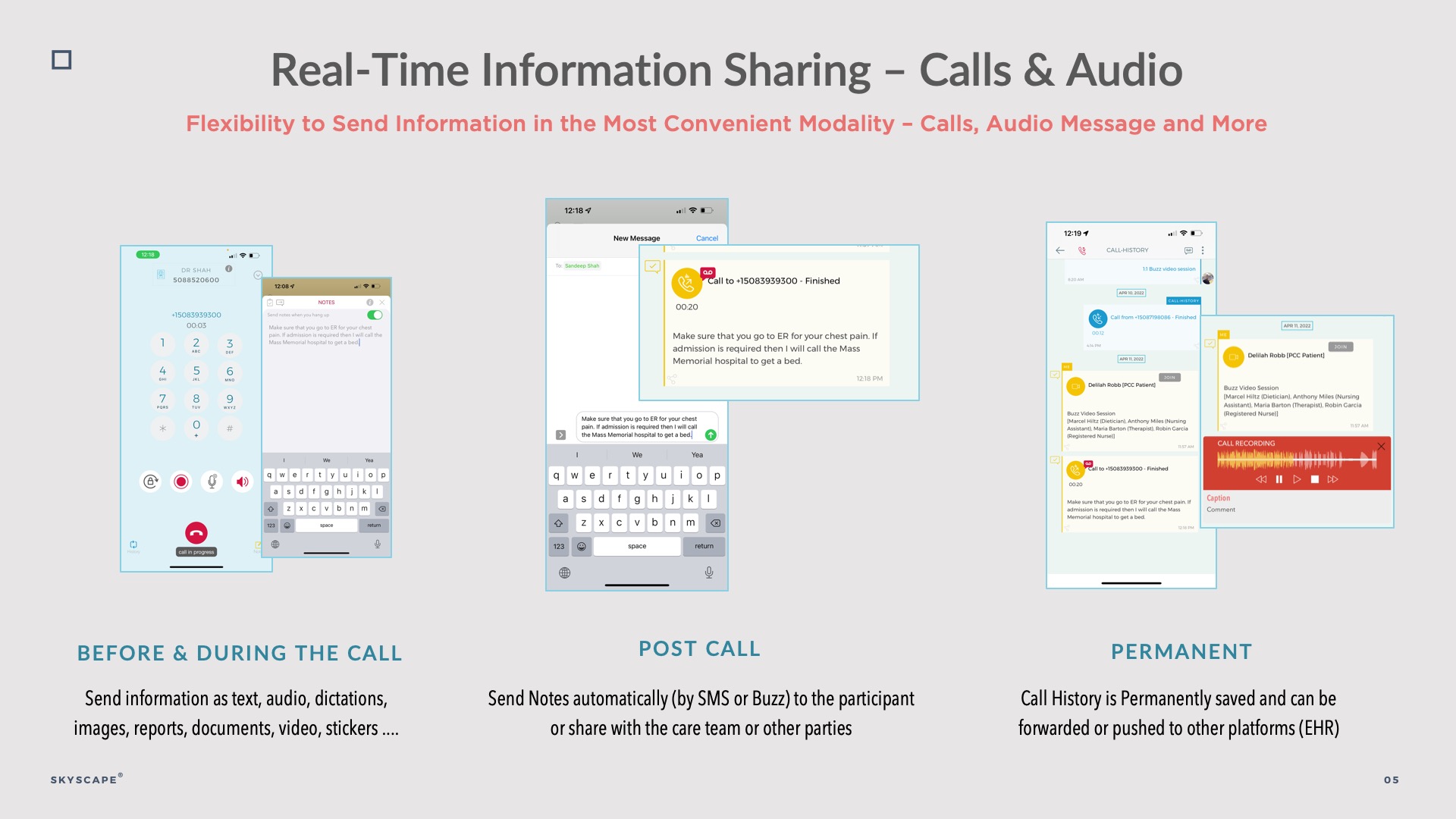
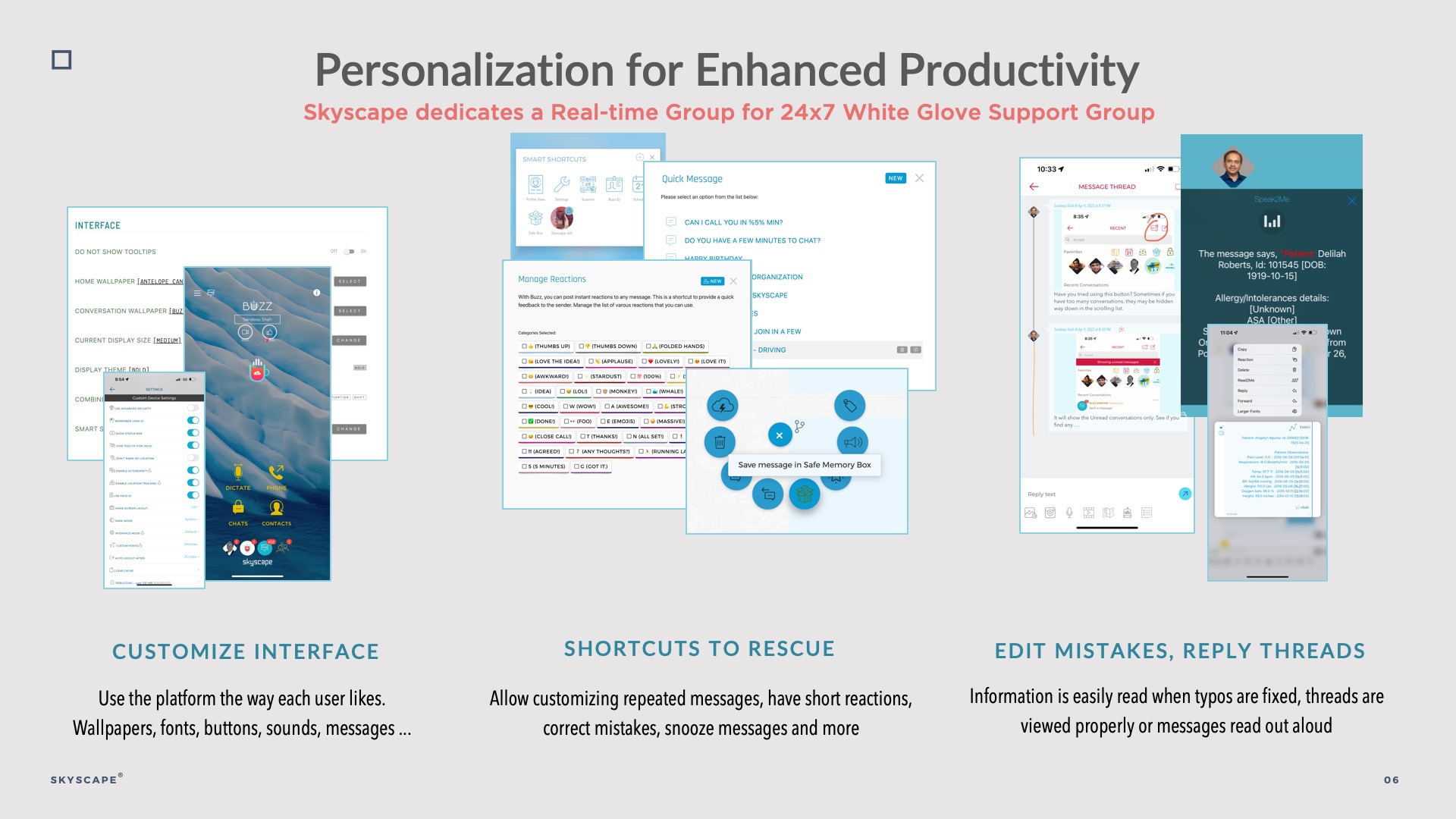
    Screenshot of Buzz Platform on iPhone, iPad, Android Phones, Tablets & Desktop browsersScreenshot of Buzz Platform FeaturesScreenshot of Buzz's Trusted Circle of Providers & Patients (1:1 and Groups)Screenshot of Real-time sharing of Information with text, multimedia attachments, documents, polls, calendar, canned messagesScreenshot of Virtual Phone capability with Unique Numbers, caller IDsScreenshot of Personalization for Efficient Coordination