Broadcom Application Delivery Analysis vs. SolarWinds Server & Application Monitor

Overview
ProductRatingMost Used ByProduct SummaryStarting Price
Broadcom Application Delivery Analysis
Score 10.0 out of 10
N/A
Broadcom Application Delivery Analysis is an application performance management tool designed to prove how well a network delivers applications to users with application delivery analysis of performance and availability of SLA measurements.N/A
SolarWinds Server & Application Monitor
Score 7.1 out of 10
N/A
SolarWinds Server & Application Monitor (SAM) delivers application and server monitoring capabilities. SAM allows for self-service for easy setup, 1200+ monitoring templates, and customization options, as well as integrate with other SolarWinds products.N/A
Pricing
Broadcom Application Delivery AnalysisSolarWinds Server & Application Monitor
Editions & Modules
No answers on this topic
Offerings
Pricing Offerings
Broadcom Application Delivery AnalysisSolarWinds Server & Application Monitor
Free Trial
NoYes
Free/Freemium Version
NoNo
Premium Consulting/Integration Services
NoNo
Entry-level Setup FeeNo setup feeNo setup fee
Additional DetailsSAM pricing starts at $2,995.
More Pricing Information
Community Pulse
Broadcom Application Delivery AnalysisSolarWinds Server & Application Monitor
Features
Broadcom Application Delivery AnalysisSolarWinds Server & Application Monitor
Application Performance Management
Comparison of Application Performance Management features of Product A and Product B
Broadcom Application Delivery Analysis
9.6
Ratings
23% above category average
SolarWinds Server & Application Monitor
8.6
Ratings
12% above category average
Application monitoring9.00 Ratings8.90 Ratings
Database monitoring9.00 Ratings8.40 Ratings
Threshold alerts10.00 Ratings8.90 Ratings
Predictive capabilities10.00 Ratings8.20 Ratings
Application performance management console10.00 Ratings8.20 Ratings
Collaboration tools9.00 Ratings7.70 Ratings
Out-of-the box templates to monitor applications9.00 Ratings7.80 Ratings
Application dependency mapping and thresholding10.00 Ratings8.50 Ratings
Virtualization monitoring10.00 Ratings8.80 Ratings
Server availability and performance monitoring10.00 Ratings9.80 Ratings
Server usage monitoring and capacity forecasting9.00 Ratings9.10 Ratings
IT Asset Discovery10.00 Ratings9.00 Ratings
Best Alternatives
Broadcom Application Delivery AnalysisSolarWinds Server & Application Monitor
Small Businesses
GitLab
GitLab
Score 8.7 out of 10
GitLab
GitLab
Score 8.7 out of 10
Medium-sized Companies
ManageEngine Site24x7
Score 9.8 out of 10
ManageEngine Site24x7
Score 9.8 out of 10
Enterprises
ManageEngine Site24x7
Score 9.8 out of 10
ManageEngine Site24x7
Score 9.8 out of 10
All AlternativesView all alternativesView all alternatives
User Ratings
Broadcom Application Delivery AnalysisSolarWinds Server & Application Monitor
Likelihood to Recommend
10.0
(0 ratings)
8.8
(0 ratings)
Likelihood to Renew
-
(0 ratings)
8.9
(0 ratings)
Usability
-
(0 ratings)
8.6
(0 ratings)
Availability
-
(0 ratings)
9.9
(0 ratings)
Performance
-
(0 ratings)
6.0
(0 ratings)
Support Rating
-
(0 ratings)
9.0
(0 ratings)
Online Training
-
(0 ratings)
4.5
(0 ratings)
Implementation Rating
-
(0 ratings)
4.5
(0 ratings)
Configurability
-
(0 ratings)
1.0
(0 ratings)
Ease of integration
-
(0 ratings)
4.5
(0 ratings)
Product Scalability
-
(0 ratings)
9.9
(0 ratings)
Vendor post-sale
-
(0 ratings)
4.5
(0 ratings)
Vendor pre-sale
-
(0 ratings)
4.5
(0 ratings)
User Testimonials
Broadcom Application Delivery AnalysisSolarWinds Server & Application Monitor
Likelihood to Recommend
Look no farther than this tool if you need an API testing solution that also includes service virtualization. This technology also forces you to move your testing lifecycle to earlier stages of development, which improves the overall SDLC.
Read full review
If you have a large number of users and computers and need a reliable database that will aggregate all of the computers and users into a single database. This allows us to keep track of who has logged into a computer, and log where that computer is located. SolarWinds is a fantastic resource that lets us keep better track of all the devices we have. Even after the device is disposed of we still have a record that this device was once ours so if there is an inventory question we can confirm that the device was ours but it has been disposed of.
Read full review
Pros
  • This is an excellent tool for implementing Service virtualization in your own and/or third-party web services. This ensures that our automation and performance test environments are always available and consistent.
  • This application also aids in the setup and maintenance of test data, which is an important component of test automation.
Read full review
  • Monitor Azure Cloud Severs- We use SolarWinds SAM to monitor Active Directory and DNS on Several DCs published on Azure Cloud.
  • Monitor Hyper V and VMware - SolarWinds SAM monitors applications on both Hyper V and VMware, while also monitoring the physical host machines.
  • It also helps us monitor Warranty expiration for physical servers.
Read full review
Cons
  • This tool has a license fee and is not free. Many open-source tools provide free API testing solutions, therefore turning some of this tool's features open-source might be beneficial.
  • The tool's load testing component is not integrated and instead relies on the free Blaze meter.
Read full review
  • The get the best out of it requires a decent amount of knowledge of the product. In saying that, you could absolutely get the basics up and running using their how-to's and built in wizards, and with continual use find your way around and customise it further to your environment to best serve your organisation/objectives.
Read full review
Likelihood to Renew
No answers on this topic
We are heavily invested in Solarwinds products for a reason. They are generally easy to setup and run with, requiring only some interfacing with support or help articles on rare occasions. They do what we bought them to do and we can't ask for more.
Read full review
Usability
No answers on this topic
SolarWinds Server & Application Monitor is quite easy to use and super versatile. It allows you to do just about anything you can through premade templates or through scripting. You can use an agent on the servers if you want to, or you can monitor through WMI or SNMP credentials. You can customize thresholds for alerting quickly, and you can configure alerts to be as complex or as simple as you want.
Read full review
Reliability and Availability
No answers on this topic
The tool works and monitors items 24x7, it only requires maintenance a little more frequently due to security fixes in the Windows operating system.
Read full review
Performance
No answers on this topic
The graphical interface and the performance of the database leave a little to be desired, they could be better explored.Some functionality and screens do not work well depending on the browser used. The integrations never had any problems or caused crashes in other systems.
Read full review
Support Rating
No answers on this topic
The SolarWinds support team is very well educated [on] their product and is very helpful and [patient]. We used the product, SolarWinds [Server and Application Monitor], and twice we encountered serious problems where the support team was very cooperative to help and resolve our issue in [a] timely fashion. Also, the extended support after hours [are] amazing.
Read full review
Online Training
No answers on this topic
It was sufficient to read their documentation and watch videos.
Read full review
Implementation Rating
No answers on this topic
I am unfamiliar with other ways to configure it
Read full review
Alternatives Considered
Along with the Parasoft SOA tool, it is unquestionably among the top leaders in API testing and virtualization. Many open-source API testing libraries are free, including Rest Assured, Karate, and even Postman and SOAP UI, which goes against CA.
Read full review
Nagios requires far more manual work to configure than SolarWinds does, though that also encourages customization and perfect-fit solutions. Nagios also requires far, far fewer resources to run than SolarWinds: SolarWinds wants great gobs of memory and disk, while Nagios is refreshingly humble. Nagios starts working from the first minute, too, whereas SolarWinds needs lots of set-up time.
Read full review
Scalability
No answers on this topic
It is hard to find the recommended SQL setup and convince others that is the way you should configure the server when you set it up
Read full review
Return on Investment
  • In our group, this instrument produced a high return on investment. We saw a considerable reduction in downtime in our test environments thanks to service virtualization.
  • In addition, service virtualization reduces the expenses of interacting with third-party services, which is common in low-cost contexts.
Read full review
  • Ability to sunset multiple legacy monitoring platforms.
  • A single pane of glass across global locations (Enterprise Operations Console) simplifies monitoring for junior staff.
  • A single toolset allows staff from across the global environment to share knowledge and quickly set up/modify monitoring.
Read full review
ScreenShots

SolarWinds Server & Application Monitor Screenshots
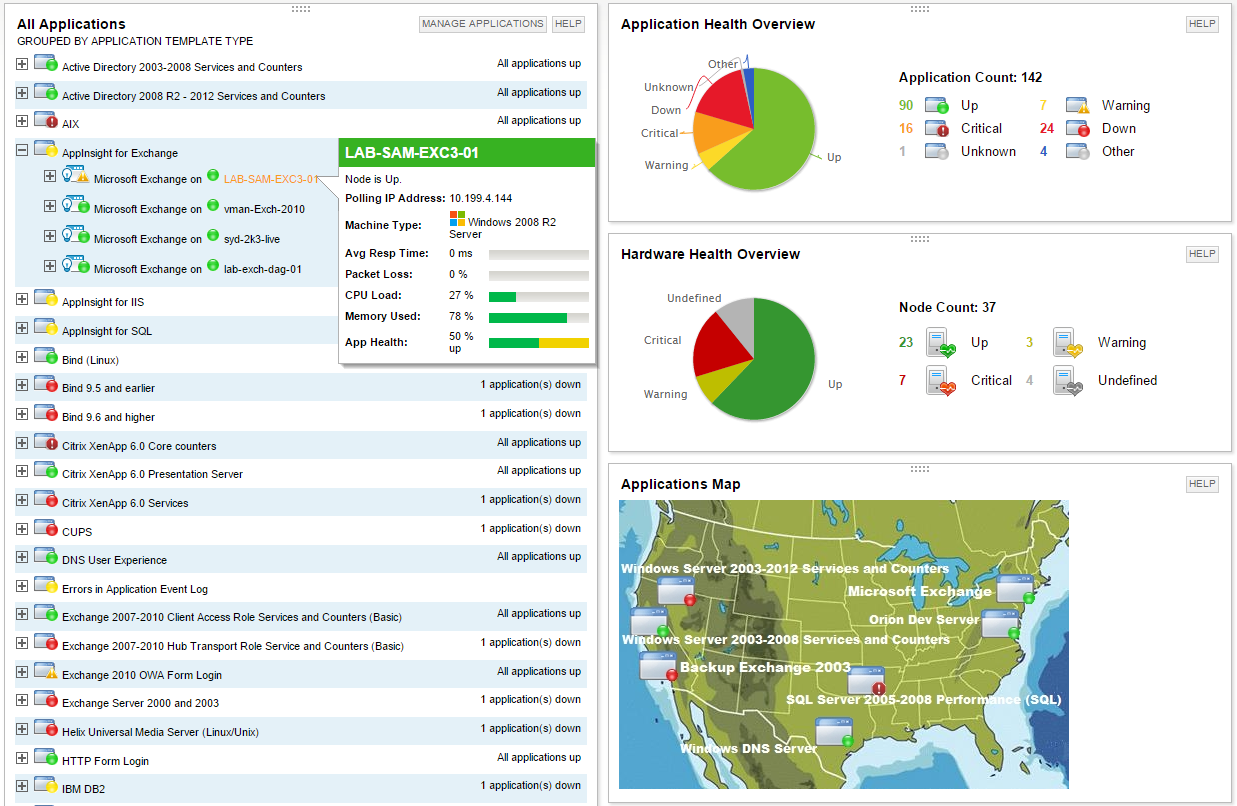
Screenshot of Multi-vendor application performance monitoringScreenshot of Multi-vendor server monitoringScreenshot of Application dependency mapping with AppStack™ dashboardScreenshot of Microsoft Exchange performance monitoring with AppInsight™ templateScreenshot of Microsoft IIS performance monitoring with AppInsight™ templateScreenshot of Server hardware health monitoring