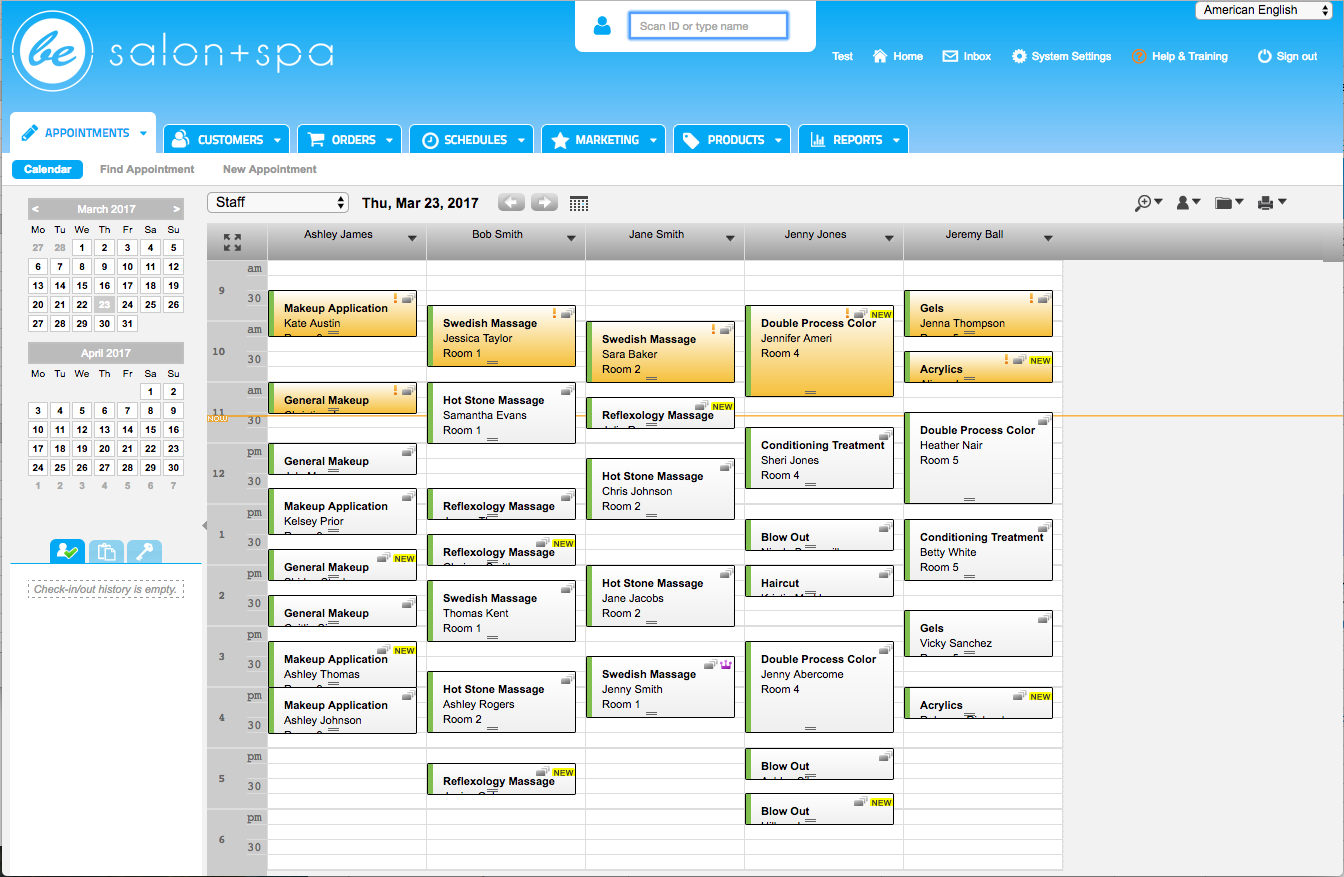
Booker is a leading appointment scheduling, point-of-sale, and business management software that powers thousands of spas and salons worldwide. The software includes a complete suite of management tools, and provides integrated online booking, marketing, and more. Booker is completely web-based, which makes it available from any computer with a browser and internet connection, anywhere at any time. It can also be used via a smartphone or iPad.
$129
per month
Zoom Workplace
Score 8.4 out of 10
N/A
Zoom Workplace, Zoom’s open collaboration platform with an AI Companion, empowers teams to be more productive, and strengthen customer relationships throughout the customer lifecycle with Zoom’s Business Services for sales, marketing, and customer experience teams, including Zoom Contact Center.
$5
per month per license
Pricing
Booker
Zoom Workplace
Editions & Modules
Starter
$129
per month
Accelerate
$269
per month
Ultimate
$429
per month
Add-On Zoom Translated Captions
$5
per month per license
Add-On - Zoom Whiteboard
$24.90
per year
Pro
$149.90
per year per user
Business
$199.90
per year per user
Business Plus
$250.00
per year per user
Add-On - Conference Room Connector
$499
per year
Basic
Free
Enterprise
Custom
Add-On - Large Meetings
starting at $600
per year
Add-On - Cloud Storage
starting at $120
per year
Add-On Audio Conferencing
starting at $1200
per year
Add-On Zoom Phone Power Pack
Starting at $300
per year per user
Add-On - Zoom IQ for Sales
Contact Sales
Add-On - Quality of Service Subscription
Contact Sales
Offerings
Pricing Offerings
Booker
Zoom Workplace
Free Trial
No
Yes
Free/Freemium Version
No
Yes
Premium Consulting/Integration Services
No
No
Entry-level Setup Fee
$250
No setup fee
Additional Details
—
—
More Pricing Information
Community Pulse
Booker
Zoom Workplace
Features
Booker
Zoom Workplace
Performance & Compatibility of Online Events Software
Comparison of Performance & Compatibility of Online Events Software features of Product A and Product B
Booker
-
Ratings
Zoom Workplace
8.4
Ratings
2% above category average
High quality audio
00 Ratings
8.70 Ratings
High quality video
00 Ratings
8.70 Ratings
Screen Sharing
Comparison of Screen Sharing features of Product A and Product B
Booker
-
Ratings
Zoom Workplace
8.6
Ratings
7% above category average
Desktop sharing
00 Ratings
9.10 Ratings
Online Meetings / Events
Comparison of Online Meetings / Events features of Product A and Product B
Booker
-
Ratings
Zoom Workplace
8.6
Ratings
5% above category average
Calendar integration
00 Ratings
8.30 Ratings
Meeting initiation
00 Ratings
9.50 Ratings
Record meetings / events
00 Ratings
9.40 Ratings
Online Events Collaboration
Comparison of Online Events Collaboration features of Product A and Product B
Booker
-
Ratings
Zoom Workplace
8.2
Ratings
2% above category average
Live chat
00 Ratings
8.30 Ratings
Online Events Security
Comparison of Online Events Security features of Product A and Product B
Booker
-
Ratings
Zoom Workplace
9.1
Ratings
17% above category average
User authentication
00 Ratings
9.10 Ratings
Participant roles & permissions
00 Ratings
9.20 Ratings
Cloud PBX
Comparison of Cloud PBX features of Product A and Product B
Booker
-
Ratings
Zoom Workplace
8.7
Ratings
4% above category average
Hosted PBX
00 Ratings
8.00 Ratings
Multi-level Interactive Voice Response (IVR)
00 Ratings
8.90 Ratings
Directory of employee names
00 Ratings
9.00 Ratings
Call Management
Comparison of Call Management features of Product A and Product B
Booker
-
Ratings
Zoom Workplace
8.8
Ratings
4% above category average
Answering rules
00 Ratings
8.40 Ratings
Call recording
00 Ratings
9.10 Ratings
Call park
00 Ratings
9.00 Ratings
Call screening
00 Ratings
8.80 Ratings
Message alerts
00 Ratings
9.10 Ratings
Business SMS/External Messaging
00 Ratings
9.00 Ratings
Voicemail Transcription
00 Ratings
8.30 Ratings
Mobile apps
Comparison of Mobile apps features of Product A and Product B
Booker
-
Ratings
Zoom Workplace
9.2
Ratings
8% above category average
Mobile app for iOS
00 Ratings
9.20 Ratings
Mobile app for Android
00 Ratings
9.10 Ratings
Unified Communications Platform and Collaboration
Comparison of Unified Communications Platform and Collaboration features of Product A and Product B
Booker is very user friendly with videos to help our staff who are setting up schedules. It has very robust features that our school district didn't really need when we piloted it. It has a great option for widgets to be added to websites, whether district or school site. We find that the more widgets are available, the more appreciative our parents are. This is definitely a product that is used in the business world and not in the school district world so it doesn't really have the personalization we need as a school district or a school sites. Should the site change its potential customers, it would be a great fit for us because scheduling is very challenging in a large school district, be it at the district level or at individual school sites
* Onboarding new employees - adaptation is quick and easy for new employees - for phone and meeting use. * Administration is quick and easy as well as finding answers to the 'what ifs' * Delegation for scheduling and creating scheduler links - what an awesome process - delegation allows for ease of on-boarding new employees - pre-emptively setting up their meetings and orientations in advance of start date *AI summary - our development teams uses them for ALL meetings creating a great history and follow up process for the entire team
Booker is great for customer management. You can easily add customers with numerous areas to put additional information for them. With the addition of Frederick, sending out Birthday emails and contacting them via email is a breeze.
I have found Booker to be extremely easy to teach new hires how to use. Because it is so visual, I find that anyone can pick up the basics of how to use this software very quickly.
Booker makes it extremely easy for a company with multiple locations to be able to toggle between those locations.
You need an app to make the calls and meetings, but it would be perfect if it had a web-based option.
Sometimes when internet speed drops, the audio quality also drops; I would understand the video quality dropping, but the audio doesn't consume much bandwidth, so it would be nice to have a consistent audio even on low internet speeds.
Zoom is made for the non tech office. It has features that can be made to do what you need to run things on a day to day basis. Immediately we we able to get meetings going with remote employees. The ability to be able to add smartphone connected people was a big plus. Zoom met our needs at the time.
There have been less than a handful of outages during our two years with Zoom, and whenever there was one, an email informing us of the outage went out immediately, and they had the issue resolved shortly thereafter.
Zoom has among the best performance of any video conference platform, as I've mentioned several times. Besides that, their Chat platform works great, and their back end always runs smooth. It's unfortunate that reporting can now only be done by one month at a time, but nonetheless, it only takes a second to run any kind of Zoom report, whether it's an attendee report, Poll results, a user report, a list of meetings from the past month, etc.
There is usually a long wait when calling customer service but I now use the messaging option and my questions are answered very quickly. Booker has helped me with situations I thought were out of their range. If it wasn't for Booker support I would be very lost and confused.
Because I got a response right away, and was assigned one specific individual to work with me from the beginning to the resolution. I had an actual email address and direct contact with this person without having to start over and over every time I contacted Zoom - this singular individual remained attentive and was well informed on the subject matter and quite able to resolve my needs.
If you receive any pushback from higher ups, point to any of the various positive reviews like this one. Or show Zoom's excellent Gartner report, or articles describing Zoom's partnership with Sequoia capital. It's not difficult to show how Zoom is a trustworthy industry leader with best-in-class technology.
AccuPOS did not have a scheduling module or gift certificate management module when we switched and those were critical needs at the time. For such a small module, AccuPOS did a fantastic job directly and concisely bridging daily activity to QuickBooks.
Zoom Workplace is typically on the more expensive end against other options, but it's the industry leader for a reason. It has the most brand credibility by far, but that doesn't mean it's perfect. There are limitations when it comes to technical performance, customization and video/audio quality. I prefer Slack myself for communication apps, but Zoom Workplace is a good alternative.
Because the Basic licenses are completely free, and because it's very easy to configure and install Zoom, and because anyone can join Zoom from a link without needing an account, scaling is a Breeze. There are absolutely no roadblocks. My company keeps adding more Zoom Pro license every week since it's so in demand. We were able to convert users from several different platforms onto Zoom with no trouble at all.
We have not lost much productivity in our teamwork during the pandemic because of the ability to have Zoom video calls and keep everyone in touch. This is definitely a positive.
We are able to have more people participate in coaching sessions (described earlier) because we don't have room space limitations. This is a big positive.
Being able to start a meeting instantly is great when we are doing support and/or training with a client over the phone and need to be able to share a visible