Bonterra Salsa is a donor and constituent management system that helps
nonprofits build donor profiles, track every interaction, cultivate major
gifts, and report on all development activities. The platform includes mobile-ready digital marketing tools for email, social, and online
donation forms.
Additional features
include donor cultivation, donation processing of all gift types, direct mail,
built in word processing, mail merge,
powerful query tool, event/auction…
N/A
Neon CRM
Score8.9 out of 10
Small Businesses (1-50 employees)
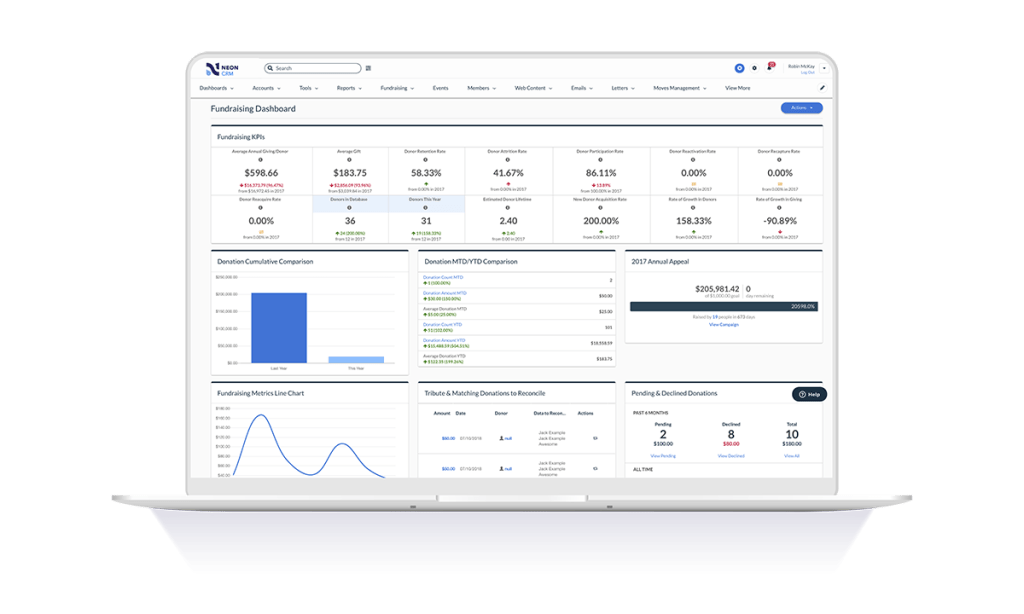
Neon CRM is a constituent management platform designed for nonprofits and membership associations. Its relationship-focused system offers a comprehensive view of supporters and members, to enable more engagement and revenue. It can be used to manage fundraising campaigns, events, communications, and it offers reporting tools to give stronger insights into the user's organization. It automates processes like email marketing, workflows, volunteer management, and payment processing so that users…
$99
per month
Pricing
Bonterra Salsa
Neon CRM
Editions & Modules
No answers on this topic
Essentials
$99
per month
Impact
$199
per month
Empower
$399
per month
Offerings
Pricing Offerings
Bonterra Salsa
Neon CRM
Free Trial
Yes
No
Free/Freemium Version
No
No
Premium Consulting/Integration Services
No
Yes
Entry-level Setup Fee
Optional
Optional
Additional Details
—
All plans include unlimited system users, unlimited records, unlimited online forms, and unlimited ticket support. Essentials is a streamlined version of Neon CRM designed for smaller nonprofits. Premium support options are included with Empower. All pricing is based on the organization's revenue.
Executive Director in Professional Services at The PMD Foundation (Nonprofit Organization Management, 11-50 employees)
Chose Bonterra Salsa
It boiled down to Bloomerang and Salsa CRM. The only winning factor that Bloomerang had over Salsa was that it was cheaper, as in free, but would only for a short period of time as we have increased our donor base. Salsa CRM is actually very cost effective for our nonprofit.
A de minimis incentive was given to thank the reviewer for their time. The incentive was not used to bias or drive a particular response, nor was the incentive contingent on a positive endorsement. More Info
We previously used Salsa CRM to store our donation information. NeonCRM is much more user friendly and has better options to store the data we need. Customer service is also much better.
A de minimis incentive was given to thank the reviewer for their time. The incentive was not used to bias or drive a particular response, nor was the incentive contingent on a positive endorsement. More Info
Verified User
Chose Neon CRM
It works. It's easy to customize for nonprofit and industry-specific categories. It does what it does well, and integrates with platforms that specialize in those areas rather than trying to be everything to all users.
A de minimis incentive was given to thank the reviewer for their time. The incentive was not used to bias or drive a particular response, nor was the incentive contingent on a positive endorsement. More Info
Well suited for sending mass emails or emails to certain groups, sending automated emails, collecting donations, and peer-to-peer communication. They have a good support team. I'm still figuring out how to best manage supporters, it's not as intuitive as I would like. I used to just manage all donor information on Google Sheets, and I still prefer Google Sheets.
A de minimis incentive was given to thank the reviewer for their time. The incentive was not used to bias or drive a particular response, nor was the incentive contingent on a positive endorsement. More Info
If you are looking for a quick and easy database option, which integrates breezily with email clients like MailChimp and Constant Contact, and has built-in credit/debit card processing capabilities, NeonCRM is a very good option. An affordable alternative to Salesforce or Raiser's Edge, it does lack some of their "bells and whistles" but gets the job done. On the one hand, Neon features a shallow learning curve and solid user interface, and is web based and mobile friendly. On the other hand, Neon might not be totally appropriate for large or national level organizations because some of the reporting seems less "robust" than pricier alternatives...
A de minimis incentive was given to thank the reviewer for their time. The incentive was not used to bias or drive a particular response, nor was the incentive contingent on a positive endorsement. More Info
User-Friendly. As a user, it is an intuitive product. When you are working, it is easy to navigate.
Fundraising Pages: Salsa Engage allows you to easily and quickly make fundraising pages that can be pushed out to your community of donors.
CRM: Easy to manage the constituents. When someone signs up for our fundraising pages, the software captures the demographics and either matches up to the existing donor or creates a new constituent.
Salsa CRM listens to their customers and works well with the user base. Most ideas are listened to and can see that requests are pushed out in updates.
A de minimis incentive was given to thank the reviewer for their time. The incentive was not used to bias or drive a particular response, nor was the incentive contingent on a positive endorsement. More Info
NeonCRM allows you to build events, take registrations, and customize those events. Customizations include different ticketing options, add-ons, promotions, etc.
NeonCRM does a good job helping you track donors' activities/engagements.
It also provides a variety of reporting mechanisms - from dashboard snapshots to graphical reports - that allow you to review programs at a glance or in-depth.
A de minimis incentive was given to thank the reviewer for their time. The incentive was not used to bias or drive a particular response, nor was the incentive contingent on a positive endorsement. More Info
When we started with Salsa, not every option was available online, some were desktop specific. As it has been some time since I worked with Salsa these have probably been resolved.
The ability to communicate between Salsa CRM and other Salsa software options. Sometimes the crossover was not as efficient as was needed.
Tagging and setting up rules for particular donors was somewhat confusing - meaning, therefore, that the amount of training needed to implement the software was somewhat intensive.
A de minimis incentive was given to thank the reviewer for their time. The incentive was not used to bias or drive a particular response, nor was the incentive contingent on a positive endorsement. More Info
Learning the ropes is largely accomplished by reading manuals and watching videos. I don't learn that way. I'd much prefer to be shown. I guess I'm old school.
They can be stingy with the customer support. We bought the big package and I still wind up going back to my salesperson to help me cut through any red tape to get what I need.
A de minimis incentive was given to thank the reviewer for their time. The incentive was not used to bias or drive a particular response, nor was the incentive contingent on a positive endorsement. More Info
A de minimis incentive was given to thank the reviewer for their time. The incentive was not used to bias or drive a particular response, nor was the incentive contingent on a positive endorsement. More Info
Neon CRM was difficult and frustrating to use without IT experience, and way to costly for the a small to mid-sized nonprofit. We believe that we lost donors due to the inaccurate report system in Neon CRM
A de minimis incentive was given to thank the reviewer for their time. The incentive was not used to bias or drive a particular response, nor was the incentive contingent on a positive endorsement. More Info
The Neon CRM system is confusing (we had to watch video tutorials and html code to understand many of the features, many of which we did not need). Around 2022, Neon started to go downhill. Bells and whistles were added that were of no benefit (to our nonprofit) and the system became even harder to use
Their tech support is very good and I am very pleased with it. They speak in non-techie lingo for my non-techie staff just as easily as they speak techie to me (a techie). I appreciate their quick turn around in time to answer our questions and the follow up to make sure their answer(s) helped.
A de minimis incentive was given to thank the reviewer for their time. The incentive was not used to bias or drive a particular response, nor was the incentive contingent on a positive endorsement. More Info
As stated before, they push you to read the manual or watch the video when what I want is a human being to walk/talk me through it. Like I said, maybe I am old school but that's how I learn. It's been a challenge.
A de minimis incentive was given to thank the reviewer for their time. The incentive was not used to bias or drive a particular response, nor was the incentive contingent on a positive endorsement. More Info
I have reviewed Salsa Engage and perhaps after our transition has taken place it might be a viable option versus using Constant Contact for internal and external correspondence.
A de minimis incentive was given to thank the reviewer for their time. The incentive was not used to bias or drive a particular response, nor was the incentive contingent on a positive endorsement. More Info
It works. It's easy to customize for nonprofit and industry-specific categories. It does what it does well, and integrates with platforms that specialize in those areas rather than trying to be everything to all users.
A de minimis incentive was given to thank the reviewer for their time. The incentive was not used to bias or drive a particular response, nor was the incentive contingent on a positive endorsement. More Info
A de minimis incentive was given to thank the reviewer for their time. The incentive was not used to bias or drive a particular response, nor was the incentive contingent on a positive endorsement. More Info
A de minimis incentive was given to thank the reviewer for their time. The incentive was not used to bias or drive a particular response, nor was the incentive contingent on a positive endorsement. More Info