Bonterra EveryAction enables nonprofits to increase efficiency, optimize supporter and prospect interactions, and raise more money by providing expansive fundraising, digital, and organizing tools on a unified CRM.
N/A
Neon CRM
Score9 out of 10
Small Businesses (1-50 employees)
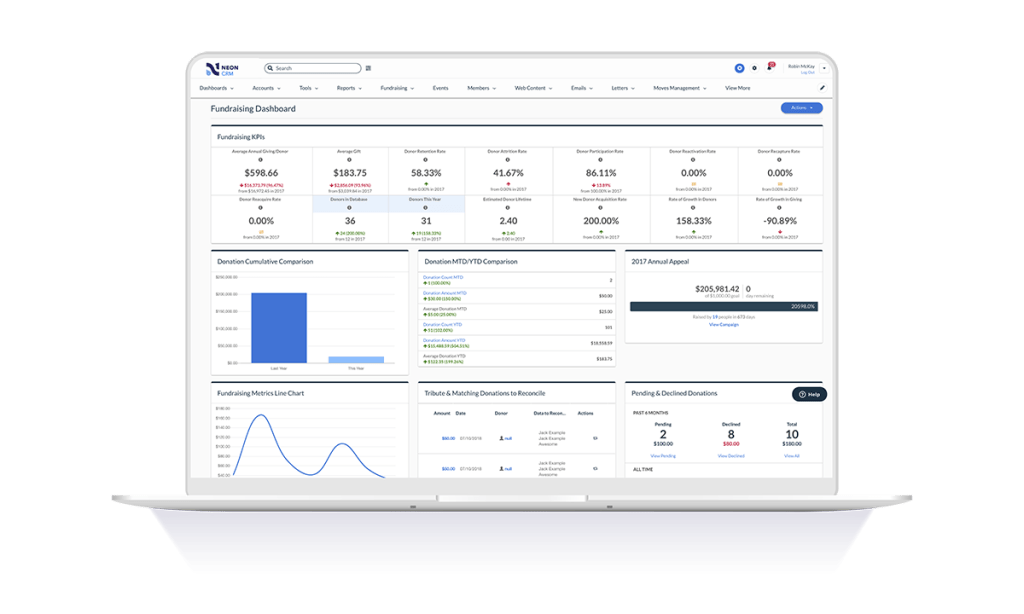
Neon CRM is a constituent management platform designed for nonprofits and membership associations. Its relationship-focused system offers a comprehensive view of supporters and members, to enable more engagement and revenue. It can be used to manage fundraising campaigns, events, communications, and it offers reporting tools to give stronger insights into the user's organization. It automates processes like email marketing, workflows, volunteer management, and payment processing so that users…
$99
per month
Pricing
Bonterra EveryAction
Neon CRM
Editions & Modules
No answers on this topic
Essentials
$99
per month
Impact
$199
per month
Empower
$399
per month
Offerings
Pricing Offerings
Bonterra EveryAction
Neon CRM
Free Trial
No
No
Free/Freemium Version
No
No
Premium Consulting/Integration Services
Yes
Yes
Entry-level Setup Fee
Optional
Optional
Additional Details
—
All plans include unlimited system users, unlimited records, unlimited online forms, and unlimited ticket support. Essentials is a streamlined version of Neon CRM designed for smaller nonprofits. Premium support options are included with Empower. All pricing is based on the organization's revenue.
More Pricing Information
Community Pulse
Bonterra EveryAction
Neon CRM
Considered Both Products
Bonterra
Verified User
Chose Bonterra EveryAction
Enormously better than neon. Classy is great but does not have CRM and email functionality.
A de minimis incentive was given to thank the reviewer for their time. The incentive was not used to bias or drive a particular response, nor was the incentive contingent on a positive endorsement. More Info
A de minimis incentive was given to thank the reviewer for their time. The incentive was not used to bias or drive a particular response, nor was the incentive contingent on a positive endorsement. TR verified that a representative sample of customers was invited. More Info
A de minimis incentive was given to thank the reviewer for their time. The incentive was not used to bias or drive a particular response, nor was the incentive contingent on a positive endorsement. More Info
Bonterra EveryAction is a good CRM to use if your company has institutional fundraisers, grants, and individual fundraising, as it is suited to manage the processes that go along with all of those. I've heard that SalesForce has more functionality than Bonterra EveryAction, but I think that Bonterra EveryAction has plenty to learn and is extremely useful.
A de minimis incentive was given to thank the reviewer for their time. The incentive was not used to bias or drive a particular response, nor was the incentive contingent on a positive endorsement. More Info
If you are looking for a quick and easy database option, which integrates breezily with email clients like MailChimp and Constant Contact, and has built-in credit/debit card processing capabilities, NeonCRM is a very good option. An affordable alternative to Salesforce or Raiser's Edge, it does lack some of their "bells and whistles" but gets the job done. On the one hand, Neon features a shallow learning curve and solid user interface, and is web based and mobile friendly. On the other hand, Neon might not be totally appropriate for large or national level organizations because some of the reporting seems less "robust" than pricier alternatives...
A de minimis incentive was given to thank the reviewer for their time. The incentive was not used to bias or drive a particular response, nor was the incentive contingent on a positive endorsement. More Info
One stop shop for creating newsletters, sending them out to mailing lists, and tracking analytics (including donations).
Grants management (we are able to track funds received, reports due, and all points of contact associated with a given donor organization).
Contact records (the new contact record feature makes it easy to find past donation history, demographic information, survey responses, communication preferences, etc. for a given contact. We are also able to import information from our donor prospect software into the contact record so everything is in one place).
A de minimis incentive was given to thank the reviewer for their time. The incentive was not used to bias or drive a particular response, nor was the incentive contingent on a positive endorsement. TR verified that a representative sample of customers was invited. More Info
NeonCRM allows you to build events, take registrations, and customize those events. Customizations include different ticketing options, add-ons, promotions, etc.
NeonCRM does a good job helping you track donors' activities/engagements.
It also provides a variety of reporting mechanisms - from dashboard snapshots to graphical reports - that allow you to review programs at a glance or in-depth.
A de minimis incentive was given to thank the reviewer for their time. The incentive was not used to bias or drive a particular response, nor was the incentive contingent on a positive endorsement. More Info
A de minimis incentive was given to thank the reviewer for their time. The incentive was not used to bias or drive a particular response, nor was the incentive contingent on a positive endorsement. More Info
Learning the ropes is largely accomplished by reading manuals and watching videos. I don't learn that way. I'd much prefer to be shown. I guess I'm old school.
They can be stingy with the customer support. We bought the big package and I still wind up going back to my salesperson to help me cut through any red tape to get what I need.
A de minimis incentive was given to thank the reviewer for their time. The incentive was not used to bias or drive a particular response, nor was the incentive contingent on a positive endorsement. More Info
We will never us EA, nor recommend them to another org, simply based on their failed promises to deliver training, on-boarding and then charging our account during our free 3 month period, then after cancelling the contract their legal department tried to force us to sign a cancellation agreement that barred us from writing reviews, making comments, etc!
A de minimis incentive was given to thank the reviewer for their time. The incentive was not used to bias or drive a particular response, nor was the incentive contingent on a positive endorsement. More Info
Neon CRM was difficult and frustrating to use without IT experience, and way to costly for the a small to mid-sized nonprofit. We believe that we lost donors due to the inaccurate report system in Neon CRM
It's just so easy--there isn't a lot of techy lingo or graphics, so a regular person can log in and have a sense of what does what. There might be a few terms you need to learn, but everything is in common English so you can almost always find what you're looking for.
A de minimis incentive was given to thank the reviewer for their time. The incentive was not used to bias or drive a particular response, nor was the incentive contingent on a positive endorsement. TR verified that a representative sample of customers was invited. More Info
The Neon CRM system is confusing (we had to watch video tutorials and html code to understand many of the features, many of which we did not need). Around 2022, Neon started to go downhill. Bells and whistles were added that were of no benefit (to our nonprofit) and the system became even harder to use
The only issue I have had with availability is when I don't have my work phone with me, which prevents me from providing a multi-factor authentication code to access the portal. Other than that, I have not had an issue with availability or outages.
A de minimis incentive was given to thank the reviewer for their time. The incentive was not used to bias or drive a particular response, nor was the incentive contingent on a positive endorsement. TR verified that a representative sample of customers was invited. More Info
A de minimis incentive was given to thank the reviewer for their time. The incentive was not used to bias or drive a particular response, nor was the incentive contingent on a positive endorsement. TR verified that a representative sample of customers was invited. More Info
I feel like product support and training should go hand in hand. Having to pay $5k to learn how to use a database is absolutely ridiculous and should be offered with the cost of your database, as it is with every other database I've ever used in the last 10 years of my career. With that being said, once I took the training, I found that the support was much more available. Having training and support behind a paywall is bad business in my opinion
A de minimis incentive was given to thank the reviewer for their time. The incentive was not used to bias or drive a particular response, nor was the incentive contingent on a positive endorsement. More Info
As stated before, they push you to read the manual or watch the video when what I want is a human being to walk/talk me through it. Like I said, maybe I am old school but that's how I learn. It's been a challenge.
A de minimis incentive was given to thank the reviewer for their time. The incentive was not used to bias or drive a particular response, nor was the incentive contingent on a positive endorsement. More Info
They went through all the features and explained in easy-to-digest details what features the system had. They were also responsive to questions we had. We were able to check in with the support team after training and received prompt followups that helped supplement the training after we had real-world experience using the system.
A de minimis incentive was given to thank the reviewer for their time. The incentive was not used to bias or drive a particular response, nor was the incentive contingent on a positive endorsement. TR verified that a representative sample of customers was invited. More Info
It natively integrated with NGP Van extremely well. it also integrated very well with our zoom platform and our use of the Mobilize platform. The bulk upload feature allowed us to move large amounts of initial data into the platform easily. The removal of duplicates was also a fairly easy task.
A de minimis incentive was given to thank the reviewer for their time. The incentive was not used to bias or drive a particular response, nor was the incentive contingent on a positive endorsement. More Info
Nation Builder—I would say this is a very pared-down version of VAN that requires extensions and outside software to do about 80% of what VAN can do natively. NB does have a better geocoding system that can geocode a location with just the address and does not require coordinates.
A de minimis incentive was given to thank the reviewer for their time. The incentive was not used to bias or drive a particular response, nor was the incentive contingent on a positive endorsement. TR verified that a representative sample of customers was invited. More Info
It works. It's easy to customize for nonprofit and industry-specific categories. It does what it does well, and integrates with platforms that specialize in those areas rather than trying to be everything to all users.
A de minimis incentive was given to thank the reviewer for their time. The incentive was not used to bias or drive a particular response, nor was the incentive contingent on a positive endorsement. More Info
A de minimis incentive was given to thank the reviewer for their time. The incentive was not used to bias or drive a particular response, nor was the incentive contingent on a positive endorsement. TR verified that a representative sample of customers was invited. More Info
Communicating with your audiences at a regular pace is a good thing, and Bonterra Development + Digital makes that easy enough to do. We see lower-than-normal open rates for our industry (per one study I read), but our overall reach is better than had we nothing. It's hard to give the credit for that to Bonterra Development + Digital.
A de minimis incentive was given to thank the reviewer for their time. The incentive was not used to bias or drive a particular response, nor was the incentive contingent on a positive endorsement. TR verified that a representative sample of customers was invited. More Info
A de minimis incentive was given to thank the reviewer for their time. The incentive was not used to bias or drive a particular response, nor was the incentive contingent on a positive endorsement. More Info