BigChange in Leeds offers a paperless software solution to plan, manage, schedule and track a mobile workforce. All plans include real–time tracking via mobile phone or plug-in OBD, timesheets, driver behavior tracking, messaging as well as health and safety alerts, and on higher tier plans the ability to plan, schedule and dispatch a workforce.
$14.95
per month
Onfleet
Score9.6 out of 10
N/A
Onfleet in San Francisco offers a fleet management platform containing route optimization and planning, GPS, in-app driver communication (e.g. messaging), task sequencing and linking, and other features.
In terms of accounting, our current accounting software Exchequer does not talk to BigChange, therefore there should be customized reports created to support it. The most complicated option is testing the report and understanding what is needed. The best job BigChange does is job related as described in previous questions.
A de minimis incentive was given to thank the reviewer for their time. The incentive was not used to bias or drive a particular response, nor was the incentive contingent on a positive endorsement. More Info
Where this really saved us is that we have a piece of software that is cutting edge when it comes to building and supply. This tracker was point point to the second accurate as to where our driver was when the the gps on our software said it was missing, this made the decision to keep this product in perpetuity.
A de minimis incentive was given to thank the reviewer for their time. The incentive was not used to bias or drive a particular response, nor was the incentive contingent on a positive endorsement. More Info
When looking at warehouses, consider not only the rent but also how close you are to your consumers. In the long term, the latter may save you a lot more money by reducing delivery times, costs, and fuel consumption.
To cover more land and be closer to more customers, your warehouses and fulfillment facilities should be widely distributed. Many businesses maintain an East and West warehouse, at the very least, to allow them to deliver items to customers on opposite ends of the coast more quickly.
Route design can significantly reduce delivery times.
Onfleet recommends the most effective delivery routes by automatically factoring for time, location, truck capacity, and traffic. Any real-time traffic updates that may affect these routes are given to drivers through SMS, reducing travel time and empowering drivers.
Onfleet makes this easy by automatically assigning deliveries to your drivers. It works by looking at all of your drivers who are now "on the clock" or "active." It then selects an available driver in close proximity to the delivery.
It essentially means that you can't unintentionally assign the same item to many drivers, or assign too much or too little to any single driver. You can set limits, such as two tasks per driver, which will force them to leave.
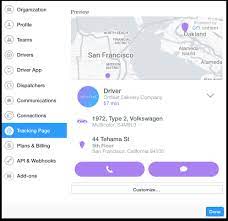
Keep consumers updated with regular updates throughout the delivery process to keep them up to date on their package's progress.
This benefits both the consumer and the driver because it ensures that the customer will be present at the time and location of delivery.
A de minimis incentive was given to thank the reviewer for their time. The incentive was not used to bias or drive a particular response, nor was the incentive contingent on a positive endorsement. More Info
Onfleet is amazing. What I love the most is that after the 2 years that I've been working on this software, I had no problems or issues. It was easy to edit information to drivers' routes, add on, etc. Good overall software, easy to use.
The software's least appealing feature was that it indicated that an order would be late when, in fact, all we needed to do was refresh the drivers profile so that times could be altered.
Onfleet is usable and provides sufficient training material, however it's very complex and the software has some nuances that can only be learned with time. Operating with multiple regions or areas can become cluttered and hard to navigate. More customization of appearance, features, etc. would help usability and prevent irrelevant information or features from being shown.
A de minimis incentive was given to thank the reviewer for their time. The incentive was not used to bias or drive a particular response, nor was the incentive contingent on a positive endorsement. More Info
Onfleet has given great support and worked with our organization when we're trying to figure out a solution or work through a glitch. Their team seems small, personable, and laid-back. Sometimes there is a delay/wait after contacting support, but the answers are always thorough and the problems are usually solved.
A de minimis incentive was given to thank the reviewer for their time. The incentive was not used to bias or drive a particular response, nor was the incentive contingent on a positive endorsement. More Info
With, Onfleet assists Automated SMS notifications may be used to let customers know when a delivery has started, when they can expect it, and when it will arrive. Use Onfleet's integrated feedback form to find out firsthand how each client felt after receiving their order. Onfleet easily connects with your existing tools, making it simple to establish or shift a delivery business. Connect to hundreds of third-party apps, such as Shopify and Google Sheets, using Zapier without writing a single line of code, or importing CSV or Excel files. For complete control, integrate with our developer-friendly API.
A de minimis incentive was given to thank the reviewer for their time. The incentive was not used to bias or drive a particular response, nor was the incentive contingent on a positive endorsement. More Info
A de minimis incentive was given to thank the reviewer for their time. The incentive was not used to bias or drive a particular response, nor was the incentive contingent on a positive endorsement. More Info
A de minimis incentive was given to thank the reviewer for their time. The incentive was not used to bias or drive a particular response, nor was the incentive contingent on a positive endorsement. More Info