Azurepath vs. Zendesk Sell

Overview
ProductRatingMost Used ByProduct SummaryStarting Price
Azurepath
Score 7.3 out of 10
Small Businesses (1-50 employees)
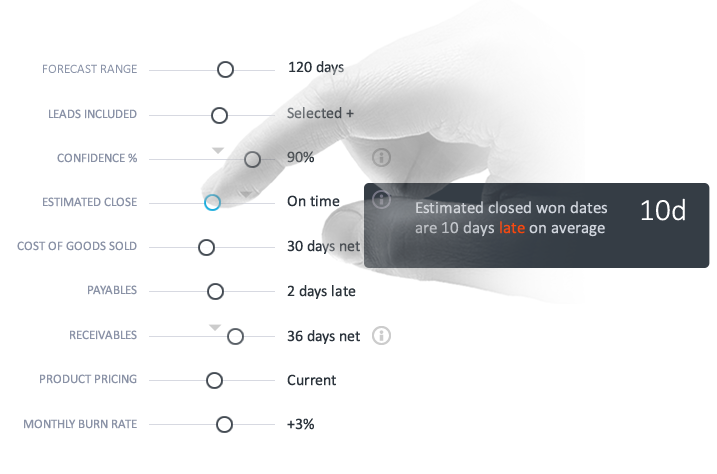
Azurepath is designed to automate lead management and performance tracking for insightful business growth. According to the vendor, Azurepath is remarkably easy to use and suitable for any sized business selling any kind of product or service. Visual lead queues for individuals and teams eliminate tasks and calendars. Automated trend charts with built-in insights eliminate manual reporting. The vendor’s value proposition is that seamless integrated sales and cash forecasting allow for…N/A
Zendesk Sell
Score 8.9 out of 10
N/A
Zendesk Sell (formerly Base CRM) is a CRM that aims to give reps access to integrated tools that provide the full context of a customer account. This keeps them in the loop and allows them to capitalize on opportunities. Zendesk Sell can be extended with Reach, a lead generation and engagement tool that automates the process of finding and keeping leads interested, so reps can focus more on building relationships and crushing their quotas. Base CRM was founded in 2009, and acquired by Zendesk…
$19
per seat/month billed annually
Pricing
AzurepathZendesk Sell
Editions & Modules
No answers on this topic
Sell Team
$19.00
per seat/month billed annually
Reach prospecting enrichment add-on (requires a Sell Subscription)
$27.00
Per User Per Month (billed annually)
Sell Professional
$49.00
per seat/month billed annually
Sell Enterprise
$99.00
per seat/month billed annually
Sell Elite
$199.00
per seat/month billed annually
Offerings
Pricing Offerings
AzurepathZendesk Sell
Free Trial
YesYes
Free/Freemium Version
NoNo
Premium Consulting/Integration Services
NoNo
Entry-level Setup FeeNo setup feeNo setup fee
Additional DetailsFree 30 day trial with no credit card required. $14.95 per user, per month thereafter. Unlimited usage.
More Pricing Information
Community Pulse
AzurepathZendesk Sell
Features
AzurepathZendesk Sell
Sales Force Automation
Comparison of Sales Force Automation features of Product A and Product B
Azurepath
-
Ratings
Zendesk Sell
6.6
Ratings
15% below category average
Customer data management / contact management00 Ratings8.90 Ratings
Workflow management00 Ratings6.10 Ratings
Territory management00 Ratings4.90 Ratings
Opportunity management00 Ratings7.90 Ratings
Integration with email client (e.g., Outlook or Gmail)00 Ratings6.90 Ratings
Contract management00 Ratings5.40 Ratings
Quote & order management00 Ratings3.90 Ratings
Interaction tracking00 Ratings7.90 Ratings
Channel / partner relationship management00 Ratings7.80 Ratings
Customer Service & Support
Comparison of Customer Service & Support features of Product A and Product B
Azurepath
-
Ratings
Zendesk Sell
9.0
Ratings
18% above category average
Case management00 Ratings9.00 Ratings
Call center management00 Ratings9.00 Ratings
Help desk management00 Ratings9.00 Ratings
Marketing Automation
Comparison of Marketing Automation features of Product A and Product B
Azurepath
-
Ratings
Zendesk Sell
6.9
Ratings
9% below category average
Lead management00 Ratings6.00 Ratings
Email marketing00 Ratings7.80 Ratings
CRM Project Management
Comparison of CRM Project Management features of Product A and Product B
Azurepath
-
Ratings
Zendesk Sell
5.3
Ratings
36% below category average
Task management00 Ratings8.00 Ratings
Billing and invoicing management00 Ratings1.00 Ratings
Reporting00 Ratings7.00 Ratings
CRM Reporting & Analytics
Comparison of CRM Reporting & Analytics features of Product A and Product B
Azurepath
-
Ratings
Zendesk Sell
8.2
Ratings
8% above category average
Forecasting00 Ratings7.80 Ratings
Pipeline visualization00 Ratings7.90 Ratings
Customizable reports00 Ratings9.00 Ratings
Customization
Comparison of Customization features of Product A and Product B
Azurepath
-
Ratings
Zendesk Sell
4.2
Ratings
56% below category average
Custom fields00 Ratings7.80 Ratings
Custom objects00 Ratings4.90 Ratings
Scripting environment00 Ratings1.10 Ratings
API for custom integration00 Ratings3.00 Ratings
Security
Comparison of Security features of Product A and Product B
Azurepath
-
Ratings
Zendesk Sell
9.5
Ratings
13% above category average
Single sign-on capability00 Ratings9.90 Ratings
Role-based user permissions00 Ratings9.00 Ratings
Social CRM
Comparison of Social CRM features of Product A and Product B
Azurepath
-
Ratings
Zendesk Sell
4.0
Ratings
59% below category average
Social data00 Ratings1.00 Ratings
Social engagement00 Ratings6.90 Ratings
Integrations with 3rd-party Software
Comparison of Integrations with 3rd-party Software features of Product A and Product B
Azurepath
-
Ratings
Zendesk Sell
5.4
Ratings
30% below category average
Marketing automation00 Ratings9.80 Ratings
Compensation management00 Ratings1.00 Ratings
Platform
Comparison of Platform features of Product A and Product B
Azurepath
-
Ratings
Zendesk Sell
8.0
Ratings
9% above category average
Mobile access00 Ratings8.00 Ratings
User Ratings
AzurepathZendesk Sell
Likelihood to Recommend
6.0
(0 ratings)
10.0
(0 ratings)
Likelihood to Renew
-
(0 ratings)
9.0
(0 ratings)
Usability
-
(0 ratings)
8.9
(0 ratings)
Availability
-
(0 ratings)
10.0
(0 ratings)
Performance
-
(0 ratings)
10.0
(0 ratings)
Support Rating
-
(0 ratings)
8.8
(0 ratings)
Online Training
-
(0 ratings)
7.0
(0 ratings)
Implementation Rating
-
(0 ratings)
8.0
(0 ratings)
Configurability
-
(0 ratings)
10.0
(0 ratings)
Ease of integration
-
(0 ratings)
10.0
(0 ratings)
Product Scalability
-
(0 ratings)
10.0
(0 ratings)
Vendor post-sale
-
(0 ratings)
10.0
(0 ratings)
Vendor pre-sale
-
(0 ratings)
10.0
(0 ratings)
User Testimonials
AzurepathZendesk Sell
Likelihood to Recommend
Like stated previously, Azurepath is well suited to automate sales performance reporting, as this is essential for the business sector in which myself and my company operates in. Furthermore, it is also very useful in terms of the user interface and GUI which are very easy to understand and process - even if you lack significant knowledge on how to do so. My only 'issue' is very minor and this is to do with customer service, however it could have been an off day.
Read full review
I think that for a company that creates any sales and needs to house their client information, the Base is perfect. The price of the program makes it completely worth the investment. And to be able to use customizations makes it possible for any business that does sales use Base for their orders. I would say for companies that use legal contracts or binding contracts for their business, Base may be too simple for their needs. We work in tandem with a company that always has contracts going back and forth, and the build out of the customizations here weren't really going to work for them.
Read full review
Pros
  • Insight into sales performance
  • Cash forecasting
  • Automation
Read full review
  • Integrates well with FullContact, Slack via Zapier, and Gmail and google calendar.
  • Excellent mobile app for iPhone lets salespeople have data at their fingertips and enter notes at conferences, in elevators, wherever.
  • Does all the basic things a salesperson needs to be productive, contacts capture, deal capture, documents, smart linking of contacts to deals, and nice reminder features.
Read full review
Cons
  • Accessibility to all
  • Communication with the company
Read full review
  • There was no ability to add prospects from a company domain or email to auto-fill any data.
  • You had to type in all of the data you gathered about that prospect.
  • The default only gave you two phone numbers for the company, too few.
Read full review
Likelihood to Renew
No answers on this topic
The integration with the other Zendesk products is key. Allows other people in the company, such as support, to be involved in the sales process.
Read full review
Usability
No answers on this topic
I received about two hours worth of training on Zendesk Sell (formerly Base CRM). I will say it's a clean look and the ability to change views is extremely helpful. I do wish there were other features that allowed the views to be more simplistic. Some views can be overwhelming to look at. Nevertheless with the minimum training, I am still able to navigate through Zendesk Sell (formerly Base CRM) successfully due to the ease of usability.
Read full review
Reliability and Availability
No answers on this topic
Always available and easy connection from Zendesk Support
Read full review
Performance
No answers on this topic
Never any latency issues
Read full review
Support Rating
No answers on this topic
Due to the ease of the product, I have not had the chance to reach out to support yet. I’ve had no reason. The resources provided to clients are extremely helpful and detailed. So far my questions have been pretty basic and I generally just ask my colleague or teammate. They're able to assist with the answer.
Read full review
Online Training
No answers on this topic
This product has a great backing of users, but needs more options direct from Base CRM on all operations of the software. YouTube videos do a great job of helping implement, and the back end support is a great help as well. The CRM is a great free option, and should be treated as such.
Read full review
Implementation Rating
No answers on this topic
Simple, and straight forward.
Read full review
Alternatives Considered
They are both strong CRMs which are effective at their job of automation to generate data regarding sales. However I would say Azurepath is simply better in terms of it's price as the features offered in my opinion far exceed the low costs which come with the package, hence making it exceptional value for money for potential suitors
Read full review
Zendesk Sell is not as robust as other leading CRM tools I have used in the past like Salesforce. Salesforce is the market leader and is always leading the way in innovation. Salesforce objects management is better simpler and allows the user to customize different screens and have different dashboards for reporting reasons. This is definitely a good alternative to Salesforce especially if you are currently using any other Zendesk products like Zendesk support.
Read full review
Scalability
No answers on this topic
Always on, always available.
Read full review
Return on Investment
  • Automation as it saves time
  • Productivity of workers as they do not need to waste time doing themselves
  • Sharing data throughout the company
Read full review
  • Increased efficiency with a central hub for all of our customer data.
  • Workflows are easy to set up and beneficial for us.
  • Received minimum training, therefore it's easy to navigate.
  • Reduced employee costs. Employees can spend more time completing other important tasks.
Read full review
ScreenShots

Azurepath Screenshots

Screenshot of Visual lead queue eliminates task and calendarsScreenshot of Guided sales forecasting for incredibly simple and accurate projectionsScreenshot of Batch import and edits via Excel makes it simple to get startedScreenshot of Modern and fully responsive on tablets and phones. No stripped own application with a different user interface to learn