Atlassian Jira is a project management tool, featuring an interactive timeline for mapping work items, dependencies, and releases, Scrum boards for agile teams, and out-of-the-box reports and dashboards.
$9
per month per user
ZilicusPM
Score 7.0 out of 10
Enterprise companies (1,001+ employees)
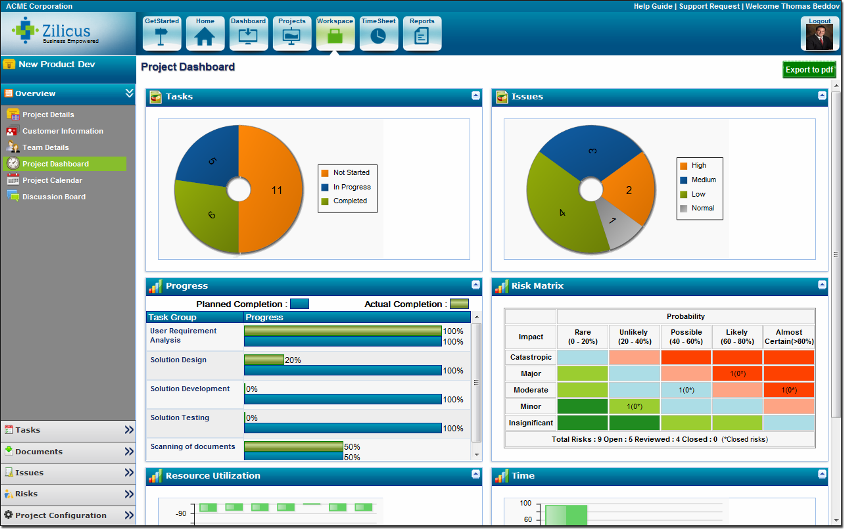
Zilicus is an enterprise-level project management solution with capabilities such as meeting management, risk management, and collaboration.
$15
per user
Pricing
Atlassian Jira
ZilicusPM
Editions & Modules
Standard
$9
per month per user
Premium
$17
per month per user
Enterprise
Contact Sales
per year
Yearly Subscription
$15
per user
Monthly Subscription
$20
per user
Offerings
Pricing Offerings
Atlassian Jira
ZilicusPM
Free Trial
Yes
Yes
Free/Freemium Version
Yes
No
Premium Consulting/Integration Services
No
No
Entry-level Setup Fee
No setup fee
No setup fee
Additional Details
Higher volume teams may qualify buyers for a discount.
The pricing per subscription reduces as number of subscriptions increases; it is also dependent on the duration of subscription.
More Pricing Information
Community Pulse
Atlassian Jira
ZilicusPM
Features
Atlassian Jira
ZilicusPM
Project Management
Comparison of Project Management features of Product A and Product B
Atlassian Jira
9.5
Ratings
22% above category average
ZilicusPM
9.0
Ratings
16% above category average
Task Management
9.70 Ratings
10.00 Ratings
Resource Management
9.40 Ratings
10.00 Ratings
Gantt Charts
9.30 Ratings
10.00 Ratings
Scheduling
10.00 Ratings
8.00 Ratings
Workflow Automation
10.00 Ratings
8.00 Ratings
Team Collaboration
10.00 Ratings
8.00 Ratings
Support for Agile Methodology
8.80 Ratings
7.00 Ratings
Support for Waterfall Methodology
9.00 Ratings
8.00 Ratings
Document Management
8.90 Ratings
00 Ratings
Email integration
9.60 Ratings
10.00 Ratings
Mobile Access
9.10 Ratings
9.00 Ratings
Timesheet Tracking
10.00 Ratings
9.00 Ratings
Change request and Case Management
10.00 Ratings
10.00 Ratings
Budget and Expense Management
9.30 Ratings
10.00 Ratings
Professional Services Automation
Comparison of Professional Services Automation features of Product A and Product B
Jira facilitates software development, bug tracking, and sprints. It's ideal for structured workflows, issue management, and customer communication. However, more straightforward tools might be more efficient for highly creative, unstructured tasks or tiny, agile teams with quick visual overviews. Jira's complexity can be overkill for basic task lists.
ZilicusPM is suited for any business that has difficulty managing and keeping track of office related work as well as project management. Its an efficient way to manage just about anything necessary. It is well-suited for our office, as structural/civil engineers - we are able to keep track of our projects as well as office/human resources related work.
ZilicusPM is great for an office regarding meetings and site visits. It's hard to keep track manually of where everyone is at. By sharing our calendars through ZilicusPM, we are able to access where someone is within a few seconds!! It is very convenient and less of a hassle.
This a great tool to use to manage all documents that enter in and out of our office for certain projects. It is hard to keep track of everything through our office, so this programs helps us manage things very efficiently.
This is great for prioritizing! I know many people in our office have an issue to do so. With the Project Issue Management feature, we are able to do this more effectively without causing any stress to our employees!
The only thing I would suggest that needs room for improvement is that you should break down Zilicus PM into different sectors. What I mean by this is that you branch off this program into different areas of expertise like accounting, engineering, etc. Every business is managed differently, so other options should be provided to accommodate each field.
Other than that, I am very pleased with this program. It was WELL worth the investment. Saving a lot of time and money spent per worker by using this!
JIRA is highly integrated into our organization. Nearly every department uses it, and many have multiple JIRA projects set up to track different types of work. We rolled out JIRA in a staged manner, but it continued to be adopted by more and more people and departments because it continues to show results. I expect we will continue to renew our JIRA license for years to come
Atlassian Jira is relatively easy to use, but there are several ways to configure it, which can make it more complicated if you configure it incorrectly. Keeping the customizations and complexity limited to being the project would be suggested to ensure you don't lose in-built Atlassian Jira features, then change the configuration as you find things aren't meeting your exact needs.
Did not face any issues and whenever they plan maintanance they update all of us very well in advance also so in that view we are good with the product stability.
Performance is really good though it holds lot of data it loads quickly especially search operation also get the results very quickly as needed hence its good
I have not had a chance to contact JIRA's customer support. It does offer extensive documentation, although it often feels too technical for me. There is also a JIRA training app that lets you take little lessons and quizzes on different areas (e.g., JIRA basics, agile). I did find it a helpful way to teach myself.
Had received training from our own internal user so it was good and also very easy to understand topics and many tasks in the UI are self explanatory and we can do by our own
One of their strong points i stheir documentation. Almost all of the basic set up needed within JIRA is available online through atlassian and its easy to find and very precise. The more critical issues need to be addressed as well and hence the rating of 8 instead of a 9.
Take your time implementing Jira. Make sure you understand how you want to handle your projects and workflows. Investing more time in the implementation can pay off in a long run. It basically took us 5 days to define and implement correctly, but that meant smooth sailing later on.
Jira is more feature-rich than Trello and also has better integration with other tools. Trello is a lot more focused on work tracking, while Jira can do a lot more than that. Both can also be combined, although they're often considered mutually exclusive alternatives—I've seen cases where companies choose to use either one or the other, but I haven't met an actual case of a company using both.
We have used Microsoft Project for years. We loved it until we found ZilicusPM. ZilicusPM is more efficient and directive in our field. Microsoft Project does not provide as many features as ZilicusPM does. I am extremely grateful for having found ZilicusPM. It was recommended to us by an architectural firm that swore by this software.
JIRA has increased the teams' productivity and efficiency; the sprint timelines have improved by 15-20%.
JIRA's integration with tools like Bitbucket and Confluence has improved functional collaboration, leading to faster decision-making and issue resolution by approximately 10-15%.
Additional functionality requires additional third-party plugins, which require additional costs; the requirements of these plugins increase the costs by approximately 15%.
A positive impact that ZilicusPM has made is we are able to work more efficiently and prioritize what needs to be sent out, what invoices need to be sent out to clients, where are project engineers at certain time of day, etc.
We also have a higher ROI. I am able to manage what invoices need to be sent out without having to track people down for a summary of the work , which is extremely time consuming. I am able to get more invoices out while returning a higher investment for the company.
A negative impact it has made is we had to hire someone to manage this software entirely. It is very time-consuming for myself to manage and make sure everything is entered in correctly. We hired someone who is familiar with ZilicusPM and is able to certify all work.