TrustRadius: an HG Insights company

Save this comparison

Save this comparison

Add Product

Recommended Comparisons

    Overview
    ProductRatingMost Used ByProduct SummaryStarting Price

    Amplenote

    N/AN/AAmplenote is a productivity app combining note-taking, task management, and calendar planning. It is used to capture ideas, organize them with tags and folders, and turn them into actionable plans using its "Task Score" system to prioritize tasks by importance.

    $70.08

    per year per user

    Microsoft Lists

    Score8.5 out of 10
    N/ALists is an information tracking app in Microsoft 365 that enables users to work with anyone, anywhere. Users can configure lists to better organize events, issues, and assets.N/A
    Pricing
    AmplenoteMicrosoft Lists
    Editions & Modules
    Pro
    $5.84
    per month, billed annually per user
    Unlimited
    $10
    per month, billed annually per user
    Founder
    $20
    per month, billed annually per user
    No answers on this topic
    Offerings
    Pricing Offerings
    AmplenoteMicrosoft Lists
    Free Trial
    YesNo
    Free/Freemium Version
    YesNo
    Premium Consulting/Integration Services
    NoNo
    Entry-level Setup FeeNo setup feeNo setup fee
    Additional Details——
    More Pricing Information
    Best Alternatives
    AmplenoteMicrosoft Lists
    Small Businesses
    Todoist
    Score9 out of 10
    Todoist
    Score9 out of 10
    Medium-sized Companies
    Todoist
    Score9 out of 10
    Todoist
    Score9 out of 10
    Enterprises
    Google Tasks
    Score9.3 out of 10
    Google Tasks
    Score9.3 out of 10
    All AlternativesView all alternativesView all alternatives
    User Ratings
    AmplenoteMicrosoft Lists
    Likelihood to Recommend
    -
    (0 ratings)
    9.0
    (1 ratings)
    User Testimonials
    AmplenoteMicrosoft Lists
    Likelihood to Recommend
    Amplenote
    No answers on this topic
    Microsoft
    It's great for anything that needs to hold data and process it into automation. It's a bit limiting if you like multi-line text fields or rich text fields. They lose a bit of their capability to filter.
    Incentivized
    Read full review
    Pros
    Amplenote
    No answers on this topic
    Microsoft
    • great for capturing loads of data
    • great for manipulating and viewing the data many ways
    • strong integration with other M365 products and Power Automate
    Incentivized
    Read full review
    Cons
    Amplenote
    No answers on this topic
    Microsoft
    • It's definitely getting better but for the average user, there is still a fairly big learning curve if you want to do anything beyond the basics
    • It would be cool to get Microsoft List addons that could further enhance the capabilities within Lists itself
    Incentivized
    Read full review
    Alternatives Considered
    Amplenote
    No answers on this topic
    Microsoft
    They are all different but can be used for the same things. They all have different benefits, and I use them except Airtable. Trello has the best automation capabilities natively built into the product of any product I've ever used. (I've personally built over 1,000 automations or more for clients on Trello.) ClickUp has the best flexibility to view data in very different ways and from different organisation levels (i.e. High level data through to detailed specific data across multiple departments or projetcs. Microsoft Lists is an excellent choice if you work in M365 already and you want a deeply integrated way to hold data and use it within M365
    Incentivized
    Read full review
    Return on Investment
    Amplenote
    No answers on this topic
    Microsoft
    • Massively positive, we have build a business that can scale with ease
    Incentivized
    Read full review
    ScreenShots

    Amplenote Screenshots

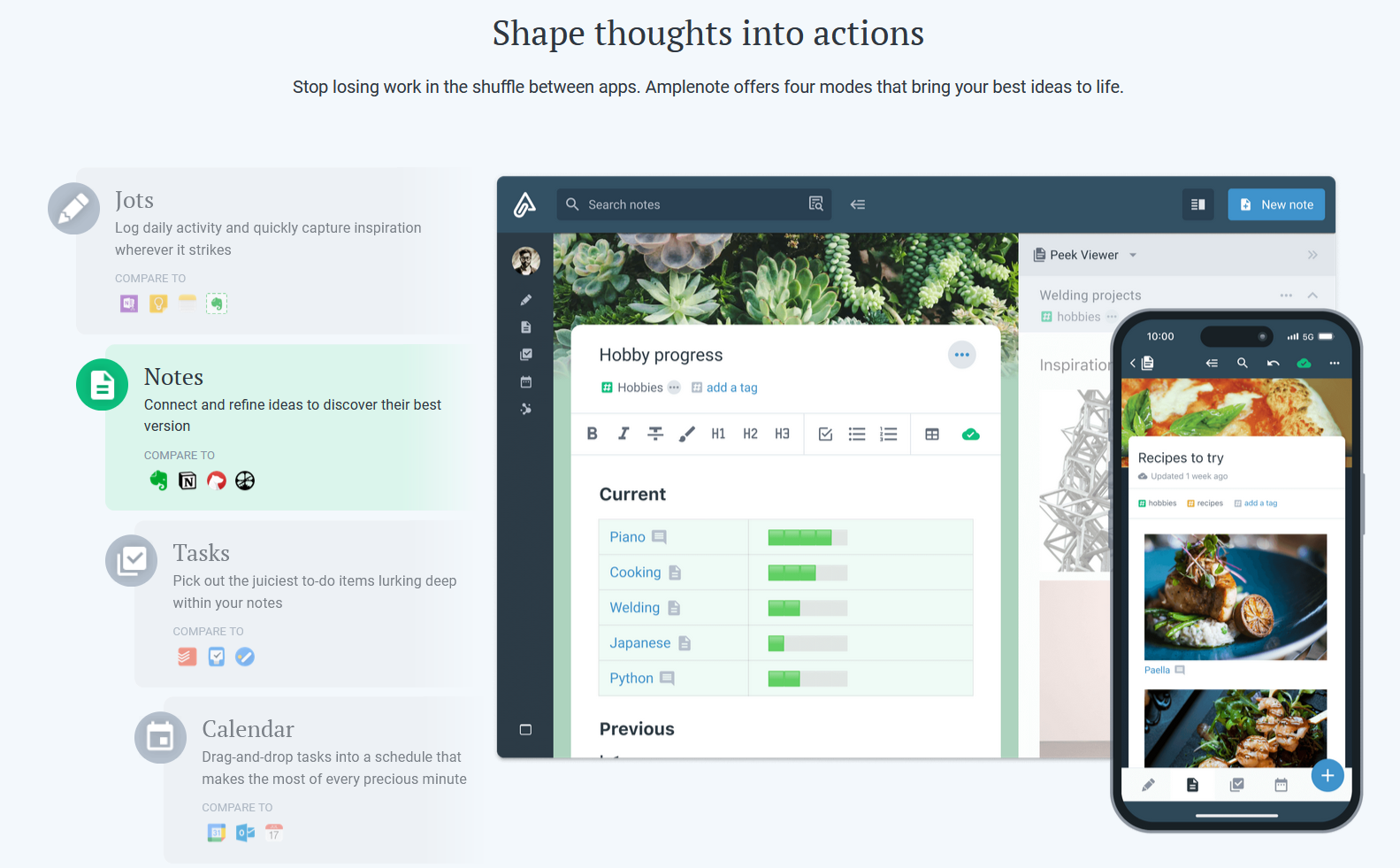
    Screenshot of Jots Mode, a tool to capture ideas. Jots mode can be used for daily notes and capture ideas into a centralized, distraction-free place.Screenshot of Notes Mode, consolidates ideas. Notes can be shared for collaboration or published to the web in under 3 clicks.Screenshot of Tasks Mode turns ideas into actions. The task scoring algorithm suggests what to work on next. The task widget visualizes these tasks.Screenshot of the calendar mode, with task details.Screenshot of the graph view. This visualize linked notes and their relationships with one another.Screenshot of Notes Mode, where the user can categorize notes using hierarchical tagging.