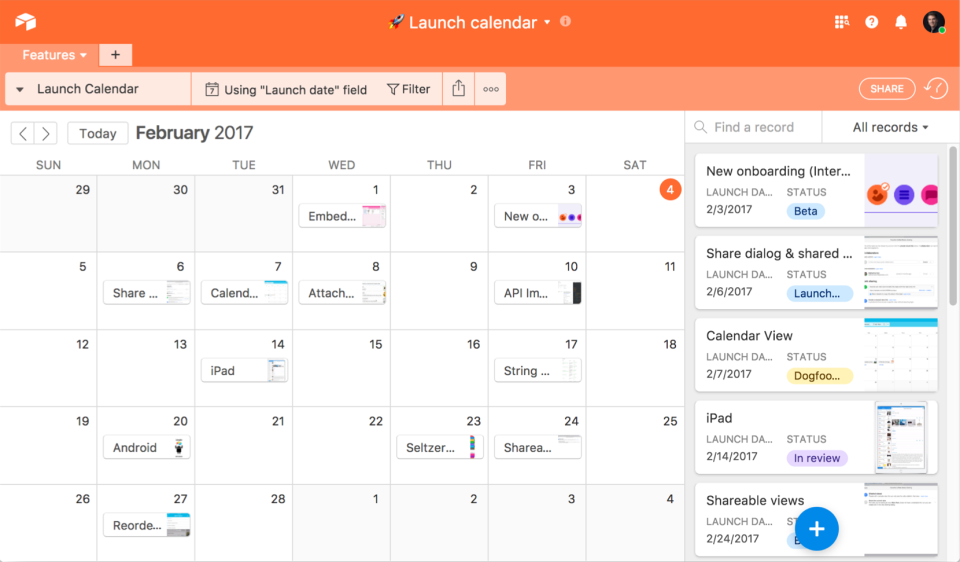
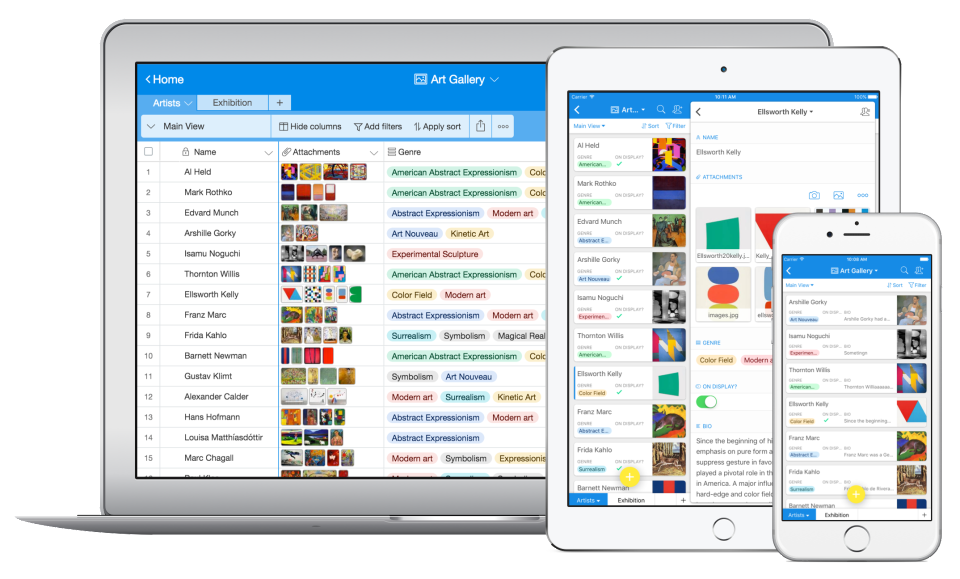
Airtable is a project management and collaboration platform designed to enable content pipelines, product management, events planning, user research, and more. It combines spreadsheet,database, calendar, and kanban functionality within one platform.
$24
per month per seat
monday.com
Score8.6 out of 10
Mid-Size Companies (51-1,000 employees)
monday.com Work OS is an open platform designed so that anyone can create the tools they need to run all aspects of their work. It includes ready-made templates or the ability to customize any work solution ranging from sales pipelines to marketing campaigns, CRMs, and project tracking.
$36
per month (3 seats)
Pricing
Airtable
monday.com
Editions & Modules
Team
$24
per month per user
Business
$54
per month per user
Enterprise
Custom Pricing
Basic
$12
per month per user
Standard
$14
per month per user
Pro
$24
per month per user
Enterprise
Contact Sales
Contact us
Offerings
Pricing Offerings
Airtable
monday.com
Free Trial
Yes
Yes
Free/Freemium Version
Yes
Yes
Premium Consulting/Integration Services
No
Yes
Entry-level Setup Fee
No setup fee
No setup fee
Additional Details
—
Yearly plan: Save 18%
Monthly plan also available
More Pricing Information
Community Pulse
Airtable
monday.com
Considered Both Products
Airtable
Verified User
Chose Airtable
Most comparable to monday.com. Great, easy-to-use tool.
A de minimis incentive was given to thank the reviewer for their time. The incentive was not used to bias or drive a particular response, nor was the incentive contingent on a positive endorsement. More Info
Verified User
Chose Airtable
I have tried Trello, monday.com, Meister Task, and even Google Sheets. They are all great and solid applications. Some even have really nice user interfaces. However, none of them have met my primary need of being able to view my current projects and associated deadlines at a …
A de minimis incentive was given to thank the reviewer for their time. The incentive was not used to bias or drive a particular response, nor was the incentive contingent on a positive endorsement. More Info
Verified User
Chose Airtable
I find that Airtable is a ton more flexible and more intuitive in nature. If you're looking for a tool that is mainly focused in time-tracking, monday.com might be marginally better there, but in terms of customization and permissioning, Airtable seems to be a lot better on …
A de minimis incentive was given to thank the reviewer for their time. The incentive was not used to bias or drive a particular response, nor was the incentive contingent on a positive endorsement. More Info
Co-Founder, Business Director in Marketing at Alabaster Co (Religious Institutions, 1001-5000 employees)
Chose Airtable
Airtable is better because it has a free version. Free is always good for me. The others require payment. I don't like monday at all. Basecamp and Teamwork have been fair comparisons, but there isn't a free version that we can use. Overall, Airtable is still pretty good for the …
A de minimis incentive was given to thank the reviewer for their time. The incentive was not used to bias or drive a particular response, nor was the incentive contingent on a positive endorsement. More Info
Verified User
Chose Airtable
Airtable is the most user-friendly and adaptive. It's UX/UI is the most aesthetically pleasing (which matters a lot if its what you're staring at every day), and the customizability of having different views and perspectives of the same record is extremely helpful.
A de minimis incentive was given to thank the reviewer for their time. The incentive was not used to bias or drive a particular response, nor was the incentive contingent on a positive endorsement. More Info
Verified User
Chose Airtable
AirTable does a great job at Project Management. You can easily create tasks and set up reminders, including automated reminder emails, when deadlines draw near. You can group the tasks and can also group tasks in a variety of ways (not started, pending, completed or …
A de minimis incentive was given to thank the reviewer for their time. The incentive was not used to bias or drive a particular response, nor was the incentive contingent on a positive endorsement. More Info
Creative Director at Iconic Arts Inc. (Entertainment, 1-10 employees)
Chose Airtable
While a very capable tool, Smartsheet ultimately didn't provide the ease of use we required for our scenario. Monday was a great tool that felt very similar to Airtable, except its mobile app actually lead to some mismatched information and difficult use in time-sensitive …
A de minimis incentive was given to thank the reviewer for their time. The incentive was not used to bias or drive a particular response, nor was the incentive contingent on a positive endorsement. More Info
A de minimis incentive was given to thank the reviewer for their time. The incentive was not used to bias or drive a particular response, nor was the incentive contingent on a positive endorsement. More Info
Software Developer in Information Technology at Techno Codelabs (Computer Software, 11-50 employees)
Chose Airtable
Airtable stack up against major market competitor tools as it provides a unique way of representing data in the form of spreadsheets, which is very easy to understand, and anyone can efficiently work on it. Also, its hybrid cloud provides enough data security. The unique …
A de minimis incentive was given to thank the reviewer for their time. The incentive was not used to bias or drive a particular response, nor was the incentive contingent on a positive endorsement. More Info
Founder at Tigris Content Marketing (Marketing and Advertising, 1-10 employees)
Chose Airtable
I actually use both Airtable and Monday for different purposes. I've found Monday to be the better collaboration/project management/dashboarding tool, while Airtable is better as a database.
A de minimis incentive was given to thank the reviewer for their time. The incentive was not used to bias or drive a particular response, nor was the incentive contingent on a positive endorsement. More Info
Corporate Director Of Human Resources in Corporate at Duke Hospitality (Hospitality, 201-500 employees)
Chose Airtable
As a whole, we elected to fully implement Airtable because of the vast amount of features and access controls for each user. Also, each user can create their own base and tie each one to the main Airtable base so teams can take an even deeper look into each project (with …
A de minimis incentive was given to thank the reviewer for their time. The incentive was not used to bias or drive a particular response, nor was the incentive contingent on a positive endorsement. More Info
Marketing, Communications & Events Manager in Marketing at Parkinson Society British Columbia (Non-Profit Organization Management, 1-10 employees)
Chose Airtable
Monday.com was a great product, but it was quite expensive. While Monday.com may have been more visually appealing and user-friendly, it lacks the flexibility and functionality of Airtable.
A de minimis incentive was given to thank the reviewer for their time. The incentive was not used to bias or drive a particular response, nor was the incentive contingent on a positive endorsement. More Info
A de minimis incentive was given to thank the reviewer for their time. The incentive was not used to bias or drive a particular response, nor was the incentive contingent on a positive endorsement. More Info
Program Manager in Marketing at The Seed Company (Non-profit Organization Management, 201-500 employees)
Chose monday.com
Airtable served us well for data management. However, our senior management told us Project Managers we would no longer be using Airtable. monday.com serves us well with project management AND light-weight database usage.
Workfront served we Project Managers very well. However, …
A de minimis incentive was given to thank the reviewer for their time. The incentive was not used to bias or drive a particular response, nor was the incentive contingent on a positive endorsement. More Info
Co-Founder in Marketing at Alabaster Co (Retail, 1-10 employees)
Chose monday.com
Monday.com is definitely a good platform—it has the things you need if someone is looking for a project management software, but we found Airtable and Google Sheets as fine alternatives to what we wanted at a lower price. Teamwork was also good and they had a free version for …
A de minimis incentive was given to thank the reviewer for their time. The incentive was not used to bias or drive a particular response, nor was the incentive contingent on a positive endorsement. More Info
Founder at Tigris Content Marketing (Marketing and Advertising, 1-10 employees)
Chose monday.com
I moved away from Airtable and into mondaycom because I needed something more like a collaboration tool and less like a database/spreadsheet. I do miss some of the column and sorting options in Airtable (it was very flexible and customizable), but the messaging/commenting …
A de minimis incentive was given to thank the reviewer for their time. The incentive was not used to bias or drive a particular response, nor was the incentive contingent on a positive endorsement. More Info
Executive Director at Kabod House International (Non-profit Organization Management, 1-10 employees)
Chose monday.com
We decided to go with monday.com because they offered a free tier for nonprofits and because they are easier to use and offered additional features that we could not find on the other choices. Hands down, there was no better choice for us than monday.com.
A de minimis incentive was given to thank the reviewer for their time. The incentive was not used to bias or drive a particular response, nor was the incentive contingent on a positive endorsement. TR verified that a representative sample of customers was invited. More Info
A de minimis incentive was given to thank the reviewer for their time. The incentive was not used to bias or drive a particular response, nor was the incentive contingent on a positive endorsement. TR verified that a representative sample of customers was invited. More Info
Solution Engineer in Customer Service at Msquare Automation Solutions (Information Technology & Services, 11-50 employees)
Chose monday.com
As a developer, I have utilized the mentioned apps to integrate processes for clients, and I have found monday.com to be superior due to its abundance of features compared to others. Choosing monday.com provides enough capabilities for teams and managers to handle work in one …
A de minimis incentive was given to thank the reviewer for their time. The incentive was not used to bias or drive a particular response, nor was the incentive contingent on a positive endorsement. More Info
Energy Efficiency Consultant in Engineering at SEMCO (Renewables & Environment, 51-200 employees)
Chose monday.com
Basecamp has some very nice project management features but Monday.com really focuses on task management and keeping teams accountable/organized. We fell in love with the visual task boards that Monday.com offers and that's why we chose to go with it. We also really enjoyed …
A de minimis incentive was given to thank the reviewer for their time. The incentive was not used to bias or drive a particular response, nor was the incentive contingent on a positive endorsement. More Info
Web designer in Information Technology at EstrenarVivienda.com (Information Technology and Services, 1-10 employees)
Chose monday.com
monday.com includes the basic features from most project management apps: task management, collaboration, boards, messaging and so on. Also, the app excels in making multiple technical tools available in a single app, like Gantt, Kanban, and task management. Where you cannot …
A de minimis incentive was given to thank the reviewer for their time. The incentive was not used to bias or drive a particular response, nor was the incentive contingent on a positive endorsement. More Info
Airtable is an ideal platform for small and growing businesses to keep track of just about EVERYTHING they need to keep things running smoothly. It's a great way to keep tasks organized, and keep everyone on the same page with progress on all things. Our company finds the kanban particularly useful, as products go through a lifecycle from ideation to retirement, it's good to keep a database of what is in production, what's working, and what we've tried before. I can see the platform being challenging with much larger businesses, but for the small to medium businesses I've used the platform with, it is ideal.
A de minimis incentive was given to thank the reviewer for their time. The incentive was not used to bias or drive a particular response, nor was the incentive contingent on a positive endorsement. More Info
The platform is very well suited for our nonprofit programs that serve low-income clients who need diapers, wipes, and period products. It has helped us run our programs, capturing information and allowing us to view the data for reporting purposes. The ability to filter data is very helpful by allowing us to categorize information to get a better picture of the progress of our programs.
A de minimis incentive was given to thank the reviewer for their time. The incentive was not used to bias or drive a particular response, nor was the incentive contingent on a positive endorsement. TR verified that a representative sample of customers was invited. More Info
Airtable has capabilities commonly found in spreadsheet applications, but also has some of the features found in databases.
The ability to filter fields. I set up a filter on the status field, so when a project is marked, complete, on hold, or canceled, that record is hidden from my current projects table view. If it is marked complete, the record is moved to the completed projects table view. In this way I can easily access a record of past projects
Being able to duplicate tables and create alternate views
Collapse and expand records. When I collapse the rows, I can easily scan current projects, next steps, project status, and due dates. When I expand the row, or field, I can see more detailed information about that field or record very easily. I can also expand or open the entire record. This is is helpful, when I am entering a lot of information to multiple fields in that record.
A de minimis incentive was given to thank the reviewer for their time. The incentive was not used to bias or drive a particular response, nor was the incentive contingent on a positive endorsement. More Info
I like summary of subitems, especially with subitasks as subitems and add item tracking for each subtask it can show total tracked in parent item. Similar with other columns, like numbers, status, date.
Dashboard features, Many kinds of dashboard view available, we can utilize on the basis of requirements.
monday.com workform is very powerful, easily share form link when submitted it will create line item in board with provided data.
monday.com automation is very helpful in order to automate steps with specific rules and easy setup.
monday.com also provides integrations in order to automate processes if need to integrate multiple app together. or need to transfer data between multiple apps.
A de minimis incentive was given to thank the reviewer for their time. The incentive was not used to bias or drive a particular response, nor was the incentive contingent on a positive endorsement. More Info
A de minimis incentive was given to thank the reviewer for their time. The incentive was not used to bias or drive a particular response, nor was the incentive contingent on a positive endorsement. More Info
The desktop app for Mac seems to have a few issues with visual glitches appearing on screen, it only seems to go away when I close the tool and reopen it
Subtasks don't show on the individual users to-do list, only main level tasks
A de minimis incentive was given to thank the reviewer for their time. The incentive was not used to bias or drive a particular response, nor was the incentive contingent on a positive endorsement. TR verified that a representative sample of customers was invited. More Info
We will 10/10 renew the use of Airtable because it has brought great value to our team. Not only is Airtable affordable, but it's also user-friendly and helps our team be efficient. We no longer need to rely on Excel spreadsheets being passed from person to person via email. Furthermore, we aren't dealing with corrupt Excel spreadsheets and the need to salvage data when a file is accidentally altered.
Teams involved in content creation, such as marketing or editorial teams, could use monday.com to manage the entire content lifecycle. Boards might track content ideas, assignments, drafts, reviews, approvals, and publication schedules, helping teams collaborate and keep content production on track.
A de minimis incentive was given to thank the reviewer for their time. The incentive was not used to bias or drive a particular response, nor was the incentive contingent on a positive endorsement. More Info
IMO the usability of this product is its greatest asset. The UI is clean and the menus are intuitive to the point where I'd feel confident having a non-spreadsheety colleague take on building an Airtable for the first time with next to no training. I can't say that about every table-like software product that I've used such as Notion.
A de minimis incentive was given to thank the reviewer for their time. The incentive was not used to bias or drive a particular response, nor was the incentive contingent on a positive endorsement. More Info
I give monday.com a 10/10 because I almost never encounter any lag or connectivity issues despite all of the many templates, boards, and automations we have. As a matter of fact, I feel like the last issue I encountered was over a year ago... and I'm in monday.com every single work day. Not only is monday trustworthy, it is easy to find what I'm looking for... making the overall usability extremely hard to beat.
A de minimis incentive was given to thank the reviewer for their time. The incentive was not used to bias or drive a particular response, nor was the incentive contingent on a positive endorsement. TR verified that a representative sample of customers was invited. More Info
I have rarely experience downtime, compared to other tools, and given how much time we spend on the tool. Even if there were to be, their updates on it are very timely, and our support team are able to provide any questions regarding
A de minimis incentive was given to thank the reviewer for their time. The incentive was not used to bias or drive a particular response, nor was the incentive contingent on a positive endorsement. More Info
A de minimis incentive was given to thank the reviewer for their time. The incentive was not used to bias or drive a particular response, nor was the incentive contingent on a positive endorsement. More Info
I never had any issues with load time, even with the integrations that we use today (google sheets) However, I'm curious if adding additional layers of integrations would slow down performance. We do carry quite a bit of data in Airtable, but, again, no impact on overall performance
A de minimis incentive was given to thank the reviewer for their time. The incentive was not used to bias or drive a particular response, nor was the incentive contingent on a positive endorsement. More Info
Everything performs fairly well. Every now and then there are user errors where an employee will not click "ok" on a note they've created and simply exit out (I do wish that something was in place to prevent this, such as a pop "are you finished?")
A de minimis incentive was given to thank the reviewer for their time. The incentive was not used to bias or drive a particular response, nor was the incentive contingent on a positive endorsement. More Info
Airtable has great support. They have a variety of support features to answer any questions. They have great self teaching instructions for templates and product tours. They also have support for teams and project management. They also have a fantastic customer help line. They are able and willing to answer customer questions and never have customers waiting long
A de minimis incentive was given to thank the reviewer for their time. The incentive was not used to bias or drive a particular response, nor was the incentive contingent on a positive endorsement. More Info
monday.com only really care about accounts that have 20 seats or more. While this is great for monday.com, it pushes smaller organisations to evaluate alternatives. We rate monday.com highly in our organisation because key staff have already got good experience with the application and we know we will get to 20+ seats one day. But, till then the billing model and lack of permanent enterprise features is a dread.
A de minimis incentive was given to thank the reviewer for their time. The incentive was not used to bias or drive a particular response, nor was the incentive contingent on a positive endorsement. More Info
A de minimis incentive was given to thank the reviewer for their time. The incentive was not used to bias or drive a particular response, nor was the incentive contingent on a positive endorsement. More Info
Recorded trainings were provided by the Airtable team. Great as an evergreen resources to new team members and for anyone that wants to refresh their Airtable knowledge
A de minimis incentive was given to thank the reviewer for their time. The incentive was not used to bias or drive a particular response, nor was the incentive contingent on a positive endorsement. More Info
To have someone walk you thru the features and capabilities of Monday.com is priceless. Someone also coming along later in the contract to see if you are maximizing the program to suit your company needs is beyond helpful. The staff that have provided this training are fun, creative and very patient.
A de minimis incentive was given to thank the reviewer for their time. The incentive was not used to bias or drive a particular response, nor was the incentive contingent on a positive endorsement. More Info
Training all users was an important part of the implementation, which did take considerable time and effort. At first glance without training, the content calendar can be overwhelming because of the amount of data. The features within Airtable seem to be endless but our team was able to identify the most important to be successful.
We signed up for the accounts. Created the accounts. Ran the trial version and tested it live while we were running multiple projects and found that it was fitting our needs perfectly. When the trial ended and we were asked to purchase the full version, we did. We have found other ways to use it and it's a breeze.
A de minimis incentive was given to thank the reviewer for their time. The incentive was not used to bias or drive a particular response, nor was the incentive contingent on a positive endorsement. More Info
Airtable was a really good fit for this specific use case as it provided a huge number of collaboration features in an intuitive and pleasant-to-use interface. The free tier worked initially with our work, and the upgrade pathway was fair and made sense for us.
A de minimis incentive was given to thank the reviewer for their time. The incentive was not used to bias or drive a particular response, nor was the incentive contingent on a positive endorsement. More Info
monday.com is simpler and easier to grasp, apply and navigate than ClickUp, but the ClickUp free version has so much more functionality available than the monday.com free / low-cost options (sorry, but it's true!). Google Tasks is really simple and I shouldn't really compare them - it's just really nice to be able to see my tasks right next to my Google Calendar or Gmail (widget) - the "all on one" view on the screen is really nice ease of access, but the power of monday.com outweighs the nice-to-have of an all-in-one screen layout - it feels clumsy to bring in all my Calendar items from Google to monday.com, so an integration app to the Google screen where you can see monday.com tasks would be amazing.
A de minimis incentive was given to thank the reviewer for their time. The incentive was not used to bias or drive a particular response, nor was the incentive contingent on a positive endorsement. More Info
A de minimis incentive was given to thank the reviewer for their time. The incentive was not used to bias or drive a particular response, nor was the incentive contingent on a positive endorsement. More Info
There are TONS of opportunity to scale, but I think it's a matter if you have the time and resources to do so because the initial setup can be fairly time consuming and prioritized dedication
A de minimis incentive was given to thank the reviewer for their time. The incentive was not used to bias or drive a particular response, nor was the incentive contingent on a positive endorsement. More Info
For it to work across multiple departments and sites, I would like to see improvements made with integrations and automation. For this question, I am acknowledging not only the addition of internal triggers/automation, but also an expansion on external ones.
A de minimis incentive was given to thank the reviewer for their time. The incentive was not used to bias or drive a particular response, nor was the incentive contingent on a positive endorsement. More Info
Through this platform, I always have the idea bout which of my team member is working on which particular part of the project, I can easily track their progress, and also I can easily correct them where it is required by adding sticky notes, by sending the attachments and URLs.
A de minimis incentive was given to thank the reviewer for their time. The incentive was not used to bias or drive a particular response, nor was the incentive contingent on a positive endorsement. More Info
A de minimis incentive was given to thank the reviewer for their time. The incentive was not used to bias or drive a particular response, nor was the incentive contingent on a positive endorsement. More Info