Ahsay Cloud Backup Suite vs. Axcient x360Recover

Overview
ProductRatingMost Used ByProduct SummaryStarting Price
Ahsay Cloud Backup Suite
Score 7.9 out of 10
Small Businesses (1-50 employees)
Ahsay Backup Software is specifically designed for Managed Service Providers, System Integrators and IT Consulting Companies. It aims to empower users to offer secure managed, cloud hosted, and on-premises backup service to business end customers and earn recurring income. The whole solution is with server-client architecture. The server-side centralized management console (AhsayCBS) can be installed either on one's own backup server hosted in a datacenter, or on a cloud platform such as…
$18
Per Device Per Year
Axcient x360Recover
Score 8.0 out of 10
N/A
Axcient x360Recover (formerly BRC) can not only recover a single server or desktop, but can automate the recovery of an entire customer site through its Virtual Office and automated Runbook features. In a disaster event, authorized users can log into the web application or Remote Management Console and create a virtual private cloud called a Virtual Office. The Virtual Office ensures security, privacy and reliability for every organization needing to run one or more failover virtual machines in…N/A
Pricing
Ahsay Cloud Backup SuiteAxcient x360Recover
Editions & Modules
AhsayACB client for workstation backup
$18.00
Per Device Per Year
AhsayACB client for workstation backup
$18.00
Per Device Per Year
AhsayOBM client for server backup
$48.00
Per Device Per Year
AhsayOBM client for server backup
$48.00
Per Device Per Year
AhsayCBS central management software
$60.00
Per Installation Per Year
AhsayCBS central management software
$60.00
Per Installation Per Year
No answers on this topic
Offerings
Pricing Offerings
Ahsay Cloud Backup SuiteAxcient x360Recover
Free Trial
YesYes
Free/Freemium Version
NoNo
Premium Consulting/Integration Services
NoNo
Entry-level Setup Fee$500 Per CBS ServerNo setup fee
Additional DetailsAhsayOBM client agent includes free File, Microsoft Exchange Server Database, Microsoft SQL Server, MySQL Database, Windows System, Windows Systems State backup modules. If you need to backup VMware/Hyper-V guest VMs, Office 365, Exchange individual mailboxes, Synology/QNAP NAS, then corresponding add-on paid modules need to be added to AhsayOBM. See the modules pricing in Ahsay's website. AhsayACB client agent includes free File and Windows System backup modules.
More Pricing Information
Community Pulse
Ahsay Cloud Backup SuiteAxcient x360Recover
Features
Ahsay Cloud Backup SuiteAxcient x360Recover
Data Center Backup
Comparison of Data Center Backup features of Product A and Product B
Ahsay Cloud Backup Suite
-
Ratings
Axcient x360Recover
8.7
Ratings
7% above category average
Universal recovery00 Ratings8.90 Ratings
Instant recovery00 Ratings8.90 Ratings
Recovery verification00 Ratings9.00 Ratings
Business application protection00 Ratings9.00 Ratings
Multiple backup destinations00 Ratings7.20 Ratings
Incremental backup identification00 Ratings9.00 Ratings
Backup to the cloud00 Ratings8.80 Ratings
Deduplication and file compression00 Ratings8.70 Ratings
Snapshots00 Ratings8.80 Ratings
Flexible deployment00 Ratings9.20 Ratings
Management dashboard00 Ratings8.30 Ratings
Platform support00 Ratings8.60 Ratings
Retention options00 Ratings8.80 Ratings
Encryption00 Ratings9.00 Ratings
Enterprise Backup
Comparison of Enterprise Backup features of Product A and Product B
Ahsay Cloud Backup Suite
-
Ratings
Axcient x360Recover
8.8
Ratings
4% above category average
Continuous data protection00 Ratings8.90 Ratings
Replication00 Ratings9.10 Ratings
Operational reporting and analytics00 Ratings8.50 Ratings
Malware protection00 Ratings8.30 Ratings
Multi-location capabilities00 Ratings9.00 Ratings
Ransomware Recovery00 Ratings8.70 Ratings
Disaster Recovery
Comparison of Disaster Recovery features of Product A and Product B
Ahsay Cloud Backup Suite
-
Ratings
Axcient x360Recover
9.0
Ratings
11% above category average
Disaster Recovery Planning00 Ratings8.80 Ratings
Hot Sites00 Ratings9.10 Ratings
Disaster Recovery Testing00 Ratings9.10 Ratings
Automated Disaster Recovery00 Ratings8.80 Ratings
User Ratings
Ahsay Cloud Backup SuiteAxcient x360Recover
Likelihood to Recommend
8.0
(0 ratings)
10.0
(0 ratings)
Likelihood to Renew
-
(0 ratings)
9.1
(0 ratings)
Usability
-
(0 ratings)
7.3
(0 ratings)
Performance
-
(0 ratings)
1.0
(0 ratings)
Support Rating
-
(0 ratings)
1.0
(0 ratings)
Implementation Rating
-
(0 ratings)
2.0
(0 ratings)
User Testimonials
Ahsay Cloud Backup SuiteAxcient x360Recover
Likelihood to Recommend
Being able to back up critical data in real time gives us a better edge in service delivery. Ahsay has sufficiently delivered in terms of secure storage for files and data. Ahsay version 9.1.4.0 is scheduled to be released soon (just received the notification earlier) and they claim it will have higher storage usage so the future with Ahsay is promising. Ahsay has incredible encryption source retention policies and will be suitable for all your confidential files.
Read full review
This is well suited for the backup of different appliances, i.e., Windows, VMware, and other SAAS and IAAS products. We use Axcient x360Cloud to backup the server and workstations, and it makes it very easy to find and recover deleted data in case it is needed. It is less appropriate when we are trying to open the virtual machines of the backup storepoints and the speed is very slow.
Read full review
Pros
  • It supports both local storage and public cloud FTP servers
  • By supporting offsite storage, data protection is improved
  • Troubleshooting never goes wrong as most of the time we perfectly pinpoint the issues.
Read full review
  • Axcient x360Recover allows for backup of virtual servers as well as mobile user equipment.
  • Scheduling for backups using Axcient x360Recover during non-business hour time-frames is very helpful
  • Adjustment of the Axcient x360Recover service for both internet and internal bandwidth usage based on time-frames.
Read full review
Cons
  • Administrators have to control the back ups remotely, would be better to have this done automatically
Read full review
  • The only thing missing is the ability to cancel a backup as they appear to just continue to try to run even after rebooting the BDR and endpoint until a failure finally occurs.
  • The only other ask would be to expand support to Linux operating systems.
Read full review
Likelihood to Renew
No answers on this topic
We've been using Axcient over the years and have worked with their development team to suggest new features, something that you would not normally be able to do with other companies. They listen to what we have to say and understand that we are a business, just like them. It's great to know that someone will always be there for you when you need them.
Read full review
Usability
No answers on this topic
It is overall very easy to install and get working. Install the application, select the drives you want to backup or leave blank and backup all drives. It starts to run immediately. You configure all the backup retention and how often to run in the portal so once you deploy the agent it is very easy to get started. After the backup completes. The portal will perform a test boot and auto verification of the image.
Read full review
Support Rating
No answers on this topic
Issues with failing backups drag out for months at a time. Axcient hardware replacements are quick to be suggested by support but as the issues are most often with the software architecture this almost never helps. Support often uses their access to the appliance as a back door into customer environments without our consent and despite our repeated complaints, accessing our customers servers and executing disruptive diagnostics like chkdsk in the middle of production hours for that customer environment. More recently they've been blaming their frequent off-site transfer failures on our customer's firewalls (of all makes and models) and insisting that the only possible resolution is to increase the TCP session timeout dangerously high (multiple hours), putting every client environment at substantial disk of even accidental Denial of Service attacks. Talking to any two support individuals, even when escalated all the way to their development team, often yields entirely different and contradictory answers regardless of the problem.
Read full review
Implementation Rating
No answers on this topic
I had the miss fortune to go back to this device. Alot has changed since the first time I had used it. Now instead a full deployable network appliance, you have to download a preconfigured virtual machine that will only run on an ESXi server. What about Hyper-V? I have many clients that are Hyper-V only. I setup a test lab to get this thing up and running and it has been a nightmare to say the least. Will be looking at other options.
Read full review
Alternatives Considered
No answers on this topic
Reliable, Faster and Cheaper then the competition. Datto gave us a bad taste in our mouth on our very first client. We purchased their recommended hardware, setup and our initial install at a trial clients office with the engineer and one of our techs and when the time came, the engineer was unable to get their own product to work as expected. Luckily for us, we already explained to the client that this was a trial so we were not held accountable but if this was a live instance, it would of been embarrassing
Read full review
Return on Investment
  • We are shielded from ransomware attacks by backing up data to multiple offsite destinations.
  • Securely backing up critical data.
Read full review
  • The few customers I have I feel confident and comfortable that a disaster will make recovery easy and fast for my clients.
  • I can set it up and forget about it with reports and alerts
  • I recommend it to any client that requires a good solid backup solution;
Read full review
ScreenShots

Ahsay Cloud Backup Suite Screenshots

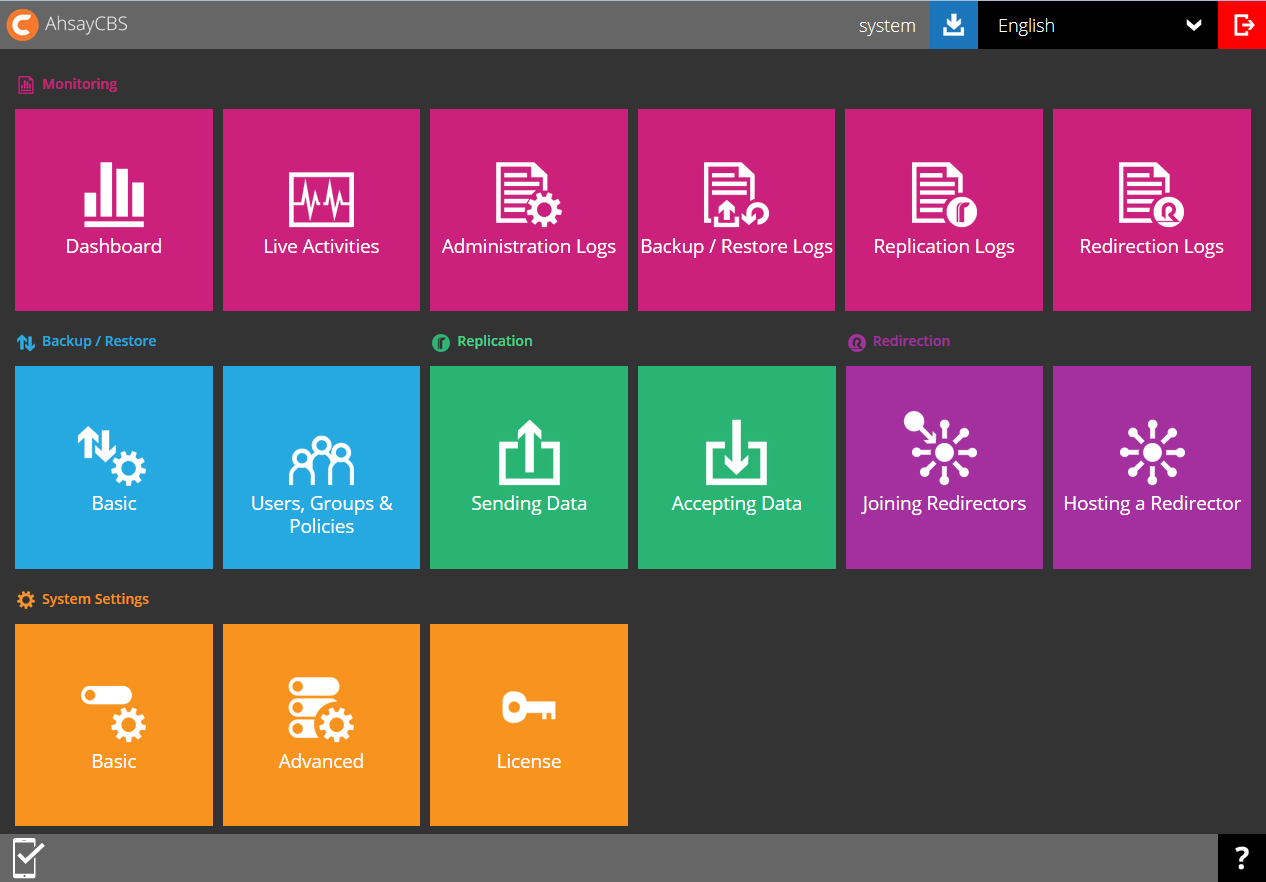
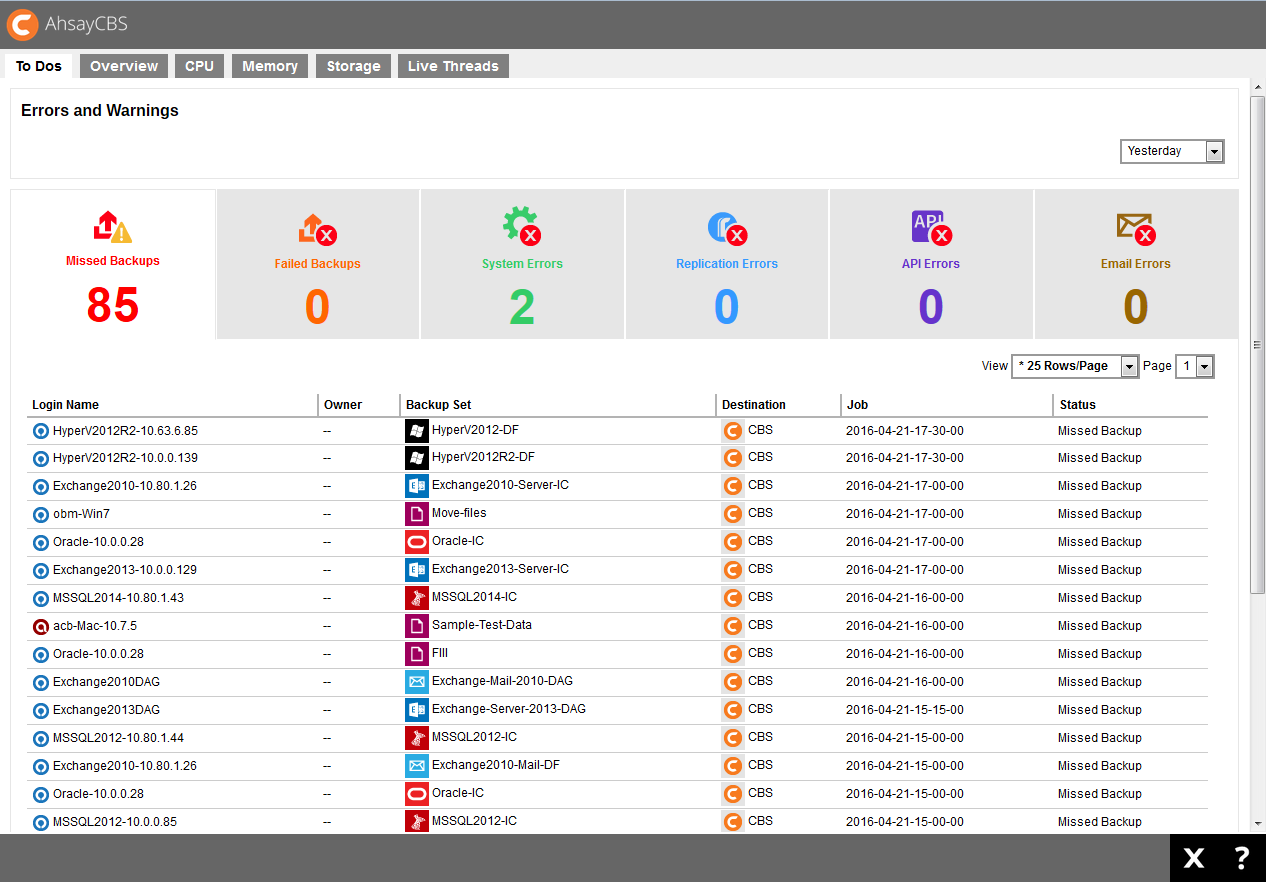
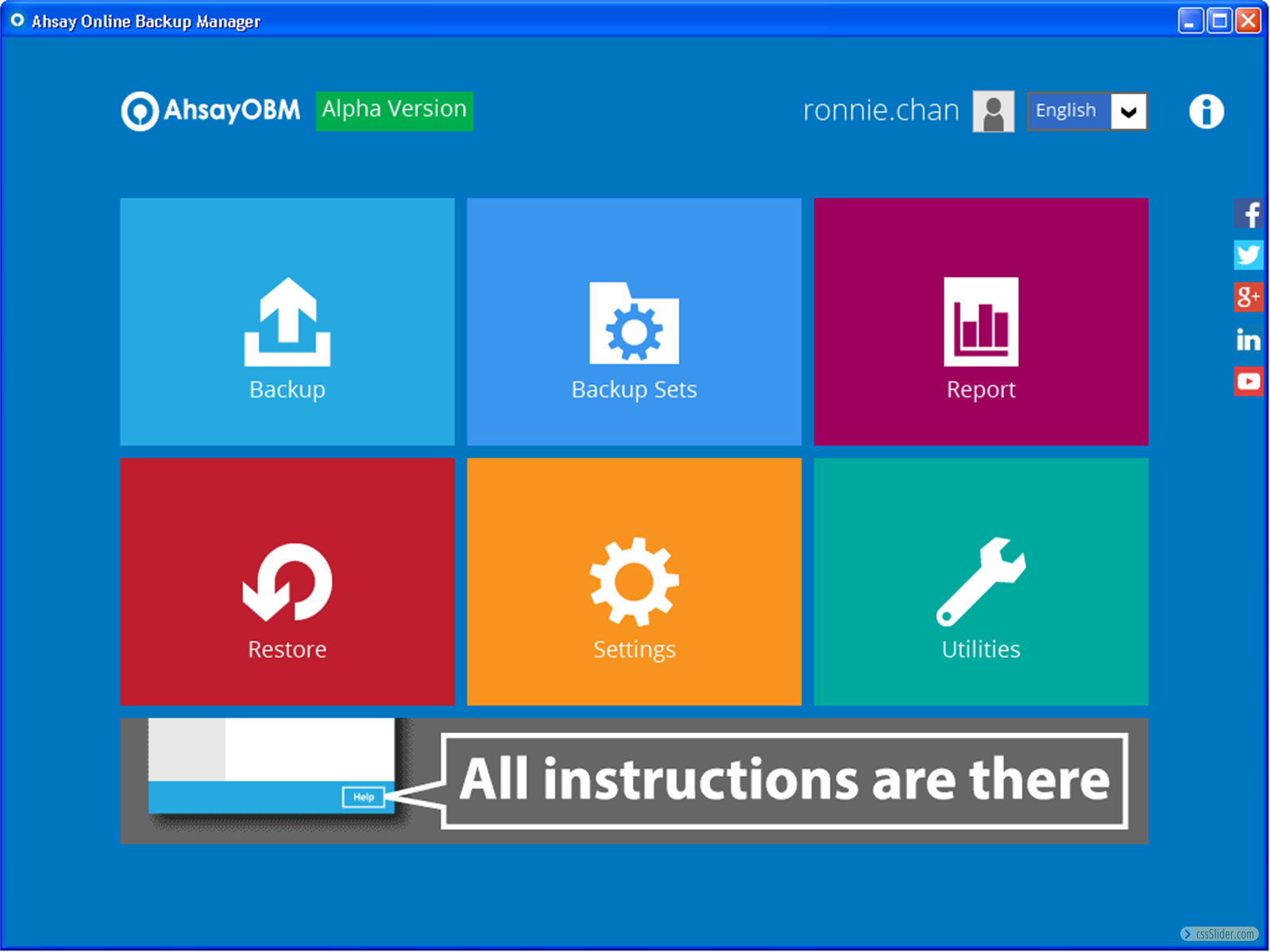
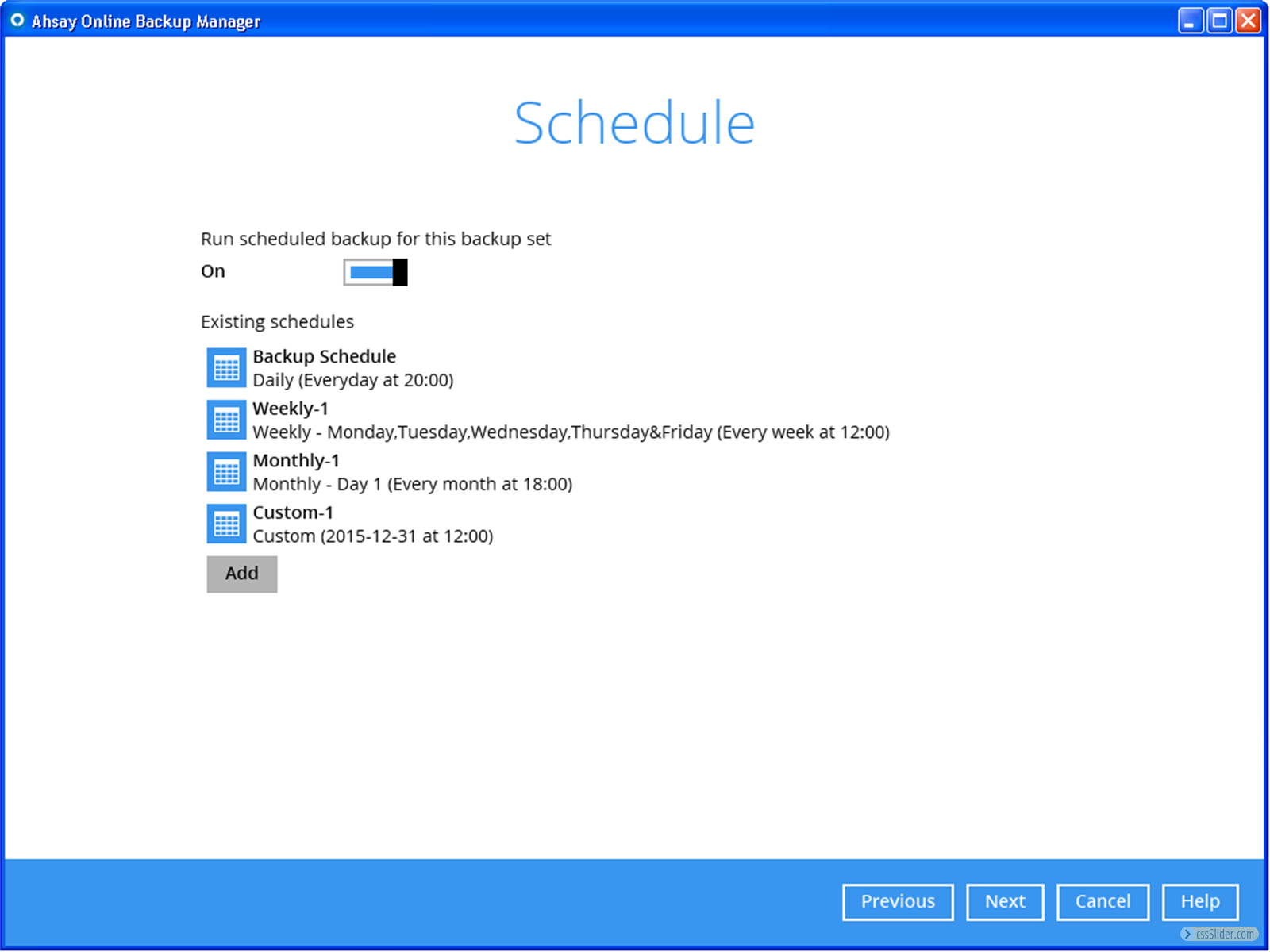
Screenshot of AhsayCBS central management home screenScreenshot of Dashboard in AhsayCBS central management software for administrator to monitor and locate issues to fixScreenshot of System resources monitoring screen in AhsayCBS central management softwareScreenshot of Backup users management screen in AhsayCBS central management softwareScreenshot of AhsayOBM client backup software home screen. User can select to create new backup set, editing existing backup sets, trigger backup and restore, view reports from this screen.Screenshot of Backup schedule creation screen in AhsayOBM client backup software