Advanced Time Management headquartered in Grand Rapids, Michigan offers Attendance on Demand, their cloud-based time and attendance option.
N/A
QuickBooks Time
Score 8.5 out of 10
N/A
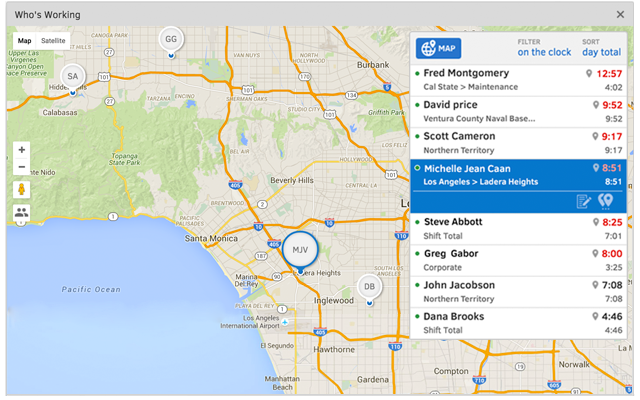
QuickBooks Time (formerly TSheets) is a cloud-based time tracking and scheduling app that allows employees to clock in and out from the job site with the devices they’ve already got in their pockets. The vendor aims to help companies replace paper timesheets with accurate, electronic time data as well as make payroll and invoicing faster and less costly. QuickBooks Time also accurately tracks time and GPS points (even without cell or internet service) then automatically syncs when back…
$0
1 user, unlimited projects
Pricing
Advanced Time Management Attendance on Demand
QuickBooks Time
Editions & Modules
No answers on this topic
Free
$0
1 user, unlimited projects
Premium
$8
per user/month + $20 base fee/month (paid annually)
Elite
$10
per user/month + $40 base fee/month (paid annually)
Advanced Time Management Attendance on Demand is so easy to use to track time worked, and categories time was worked in. It is not cumbersome as an employee and can be easily filled out in a snap while seeing totals. It is 100 times easier than any other time management tracking tool I've ever used.
It would be very useful for certain remote jobs that require a high level of presence, as in the case of web development, or remote maintenance sessions, so that when reviewing the work data it is possible to ensure that there will be no failures. By being able to include files in the management, from the equipment tab, it is possible to fully control the hours in which each change in these files were made.
We have had some difficulty in using Advanced Time Management Attendance on Demand on mobile devices, ie. sometimes employees will hit the 'punch' button to clock in/out, but it doesn't recognize it, and the time has to be put in manually (corrected) by the administration.
There are some aspects of Advanced Time Management Attendance on Demand that our company doesn't utilize, so those items are superfluous for us (ie. extra items on the screen that clutter up the view, items/tabs that we don't use or aren't needed). Would like to be able to customize our view.
No other cons - really love the program and fairly simple to use/learn.
TSheets tech support people, like Shawn Sommer, from Tsheets. She has been instrumental, after terminating the person in charge of TSheets I was left with a learning curve too high to climb but after 10 mins of her instructions I was able to make payroll in no time. She cleared all errors that nobody had fixed before. TSheets is not a vendor for me, TSheets is my partner in business. Thank you TSheets.
Overall good product. I think some integration issues that are probably on the way would give it a higher score. Easy to use, easy to see how well it connects to current book keeping software we use, and would be easy to adopt by someone who is a QuickBook user that has billable clients or just wants that metric to see how their time is allocated.
I have never failed to have an issue resolved within minutes of contacting Support. Jen D recently assisted my with an export issue and I was back on track in less the 10 minutes. She was knowledgable and thought about the current and future contexts of the issue and assured there would be no recurrence next payroll.
I've heavily used BST Global and ProWorkflow, both of which are cumbersome in selecting where time was spent and adding it up correctly. It took hours each week to track my time. Now, it takes maybe 5 minutes with Advanced Time Management Attendance on Demand.
We used to do all of our scheduling manually or in archaic software that wasn't user-friendly. We researched other software and found that this was going to meet our needs most comprehensively. Staff used to track their hours on a notepad on their phone or on an excel spreadsheet. There was really nothing else available to us that did what TSheets could do and the price fit in our budget. We have been very happy with our decision!
Employees shouldn't have to spend hours every week logging their time - this makes it happen in minutes, reducing the time spent on this overhead activity.
It's easy for employees to see PTO right in the time tracking system.
Helps to ensure that employees are being held accountable for their clocked in time and allows us to clock them out if we see they're not where they say they are, saving us money.
Decreases time our staffing coordinator has to spend on inputting times after events - when managers can clock staff in and out during the event, it allows our staffing coordinator to use their office time more effectively.