AdNativia vs. Constant Contact

Overview
ProductRatingMost Used ByProduct SummaryStarting Price
AdNativia
Score 0.0 out of 10
N/A
AdNativia is a platform for native advertising headquartered in the United Kingdom, specializing in the dissemination of ads through "recommended" content across a wide spectrum of popular media portals. This approach ensures that advertisements integrated into the user experience are less intrusive and more engaging for the audience. The vendor states that geographically, the platform is most popular in Europe, with a particular focus on the markets of Germany,…N/A
Constant Contact
Score 7.7 out of 10
N/A
Constant Contact is a full-featured email marketing solution with capabilities such as social media integration, drag-and-drop editing, and real-time reporting. It is a bulk email tool designed for SMB customers. Since 2019, Constant Contact also offers marketing automation features, a website and landing page builder, and other tools to support midsize businesses.
$12
per month
Pricing
AdNativiaConstant Contact
Editions & Modules
No answers on this topic
Lite
Starting at $12.00
per month
Standard
Starting at $35.00
per month
Premium
Starting at $80.00
per month
Offerings
Pricing Offerings
AdNativiaConstant Contact
Free Trial
NoYes
Free/Freemium Version
NoNo
Premium Consulting/Integration Services
NoNo
Entry-level Setup FeeNo setup feeNo setup fee
Additional DetailsThe SMS Marketing tool can be added to any Standard or Premium Constant Contact account. SMS is only available in the US for Standard and Premium paid plans. SMS can be added when logged in to an account after purchase. Plans start at $10/month for up to 500 messages.
More Pricing Information
Community Pulse
AdNativiaConstant Contact
Features
AdNativiaConstant Contact
Email & Online Marketing
Comparison of Email & Online Marketing features of Product A and Product B
AdNativia
-
Ratings
Constant Contact
8.0
Ratings
WYSIWYG email editor00 Ratings8.40 Ratings
Dynamic content00 Ratings7.70 Ratings
Ability to test dynamic content00 Ratings8.50 Ratings
Landing pages00 Ratings7.80 Ratings
A/B testing00 Ratings7.10 Ratings
Mobile optimization00 Ratings8.60 Ratings
Email deliverability reporting00 Ratings9.00 Ratings
List management00 Ratings8.30 Ratings
Triggered drip sequences00 Ratings7.20 Ratings
Reporting & Analytics
Comparison of Reporting & Analytics features of Product A and Product B
AdNativia
-
Ratings
Constant Contact
8.0
Ratings
Dashboards00 Ratings8.40 Ratings
Standard reports00 Ratings8.30 Ratings
Custom reports00 Ratings7.50 Ratings
Pre-Send Testing
Comparison of Pre-Send Testing features of Product A and Product B
AdNativia
-
Ratings
Constant Contact
8.1
Ratings
URL Validation00 Ratings8.20 Ratings
Link Tracking00 Ratings7.90 Ratings
Image Validation00 Ratings8.90 Ratings
Inbox Display00 Ratings8.60 Ratings
Email Accessibility Tools00 Ratings7.90 Ratings
Spelling and Grammar Check00 Ratings8.20 Ratings
Spam Testing00 Ratings6.00 Ratings
Email Previews00 Ratings9.30 Ratings
Best Alternatives
AdNativiaConstant Contact
Small Businesses
Amazon Advertising Sponsored Products
Score 7.7 out of 10
Vbout
Vbout
Score 9.9 out of 10
Medium-sized Companies
Amazon Advertising Sponsored Products
Score 7.7 out of 10
VerticalResponse
VerticalResponse
Score 10.0 out of 10
Enterprises
LinkedIn Marketing Solutions
Score 9.0 out of 10
Emma by Marigold
Emma by Marigold
Score 9.4 out of 10
All AlternativesView all alternativesView all alternatives
User Ratings
AdNativiaConstant Contact
Likelihood to Recommend
-
(0 ratings)
8.3
(0 ratings)
Likelihood to Renew
-
(0 ratings)
9.9
(0 ratings)
Usability
-
(0 ratings)
9.0
(0 ratings)
Availability
-
(0 ratings)
9.0
(0 ratings)
Performance
-
(0 ratings)
10.0
(0 ratings)
Support Rating
-
(0 ratings)
10.0
(0 ratings)
Online Training
-
(0 ratings)
10.0
(0 ratings)
Implementation Rating
-
(0 ratings)
10.0
(0 ratings)
Configurability
-
(0 ratings)
10.0
(0 ratings)
Product Scalability
-
(0 ratings)
10.0
(0 ratings)
User Testimonials
AdNativiaConstant Contact
Likelihood to Recommend
No answers on this topic
Constant Contact is great when trying to target specific market segments. We typically like to segment our master list by region, but also have product segments, as well. They do provide pre-made segments to start you off too. We don't usually use their email builder, we find others to be more flexible, intuitive, and have more variety. We do prefer emailing from Constant Contact, however.
Read full review
Pros
No answers on this topic
  • Constant Contact allows the users to send unlimited emails and just pay per list size.
  • The software does welcome emails pretty well and allows you to set up all sorts of automation.
  • The branded templates and starter templates are very useful and look good.
Read full review
Cons
No answers on this topic
  • Sometimes some software provides outdated and useless features and functions, but this email marketing tool gives advanced kinds of functionalities with modern features.
  • I like the ease of use of this platform also appreciate its professional customer support team.
  • I am no longer desperate after getting this tool at my work.
Read full review
Likelihood to Renew
No answers on this topic
There is no doubt that we are going to renew Constant Contact. We have not just invested a lot of time in learning and creating a great looking product but we have developed a strong database of information that allows us to track how we are doing for each newsletter. This supports our goals of creating products that residents desire and are excited to receive.
Read full review
Usability
No answers on this topic
There is always room for improvement. I don't know how they test their systems, but they should invite not-so computer savvy people to test it. If I, as an expert have problems, they need to think like the technophobe. Since I've used Constant Contact in the past as part of my former employment, I have not viewed any of the tutorials and just jumped in to work on my client's newsletter. With that said, I found some areas easy and some a bit cumbersome
Read full review
Reliability and Availability
No answers on this topic
No major problems in sending out the email campaigns and accessing the analytics
Read full review
Performance
No answers on this topic
The system seemed quite slow sometimes. Specifically, there was sometimes a delay in sends if it was during a high traffic period. There were time-outs when uploading new code for an email, and a lag in reporting analytics which was sometimes as long as 72 hours
Read full review
Support Rating
No answers on this topic
I think the overall support for Constant Contact has always been incredible; I have nothing negative to say. Our customer support representative was attentive, easy to understand, and very knowledgeable. I never felt like I wasn't a priority of his and my issues, while very small, were fixed in a very short time frame.
Read full review
Implementation Rating
No answers on this topic
Implementation is very easy for someone who wants to send out the “batch and blast” type newsletters. If you want to use their templates with no customizations, the product works fine. However, the more customizations you get into involving link color, etc, that’s where things can get tricky for someone who may not be familiar with coding
Read full review
Alternatives Considered
No answers on this topic
We selected Constant Contact due to pricing constraints. However, if the pricing were to increase, we may look at alternative products that offer more features. We are looking for a product that will allow us to stand out from other organizations like ours that are appealing to the same customers—a product that will set our company apart from the others.
Read full review
Scalability
No answers on this topic
Very reliable in sending email campaigns and controlling the recipients so that no contact is sent the same email more than once, even if they are on a resent list
Read full review
Return on Investment
No answers on this topic
  • I can't report hard numbers, however, being able to execute sales and marketing campaigns led to a noticeable increase in brand awareness in our industry.
  • We were able to offer white-labeled email communication services to clients, which is not something that other administrators typically offer. This helped us win and retain business.
Read full review
ScreenShots

AdNativia Screenshots

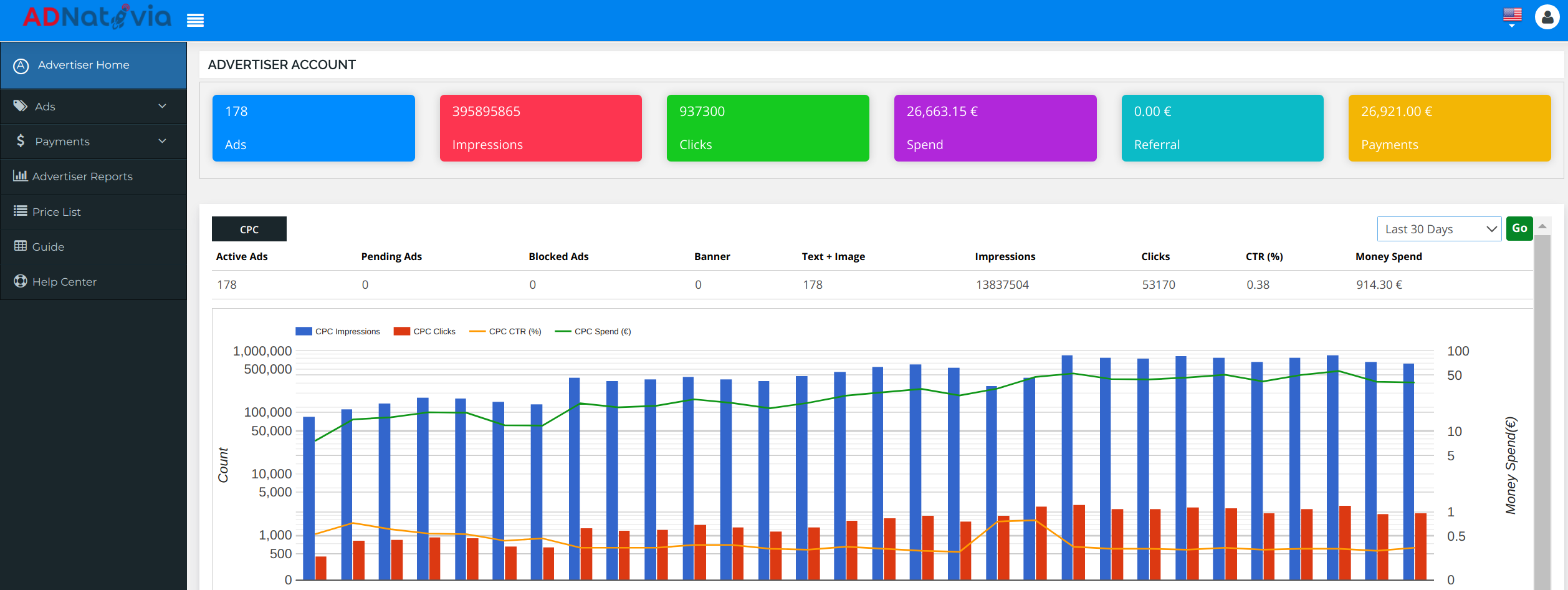
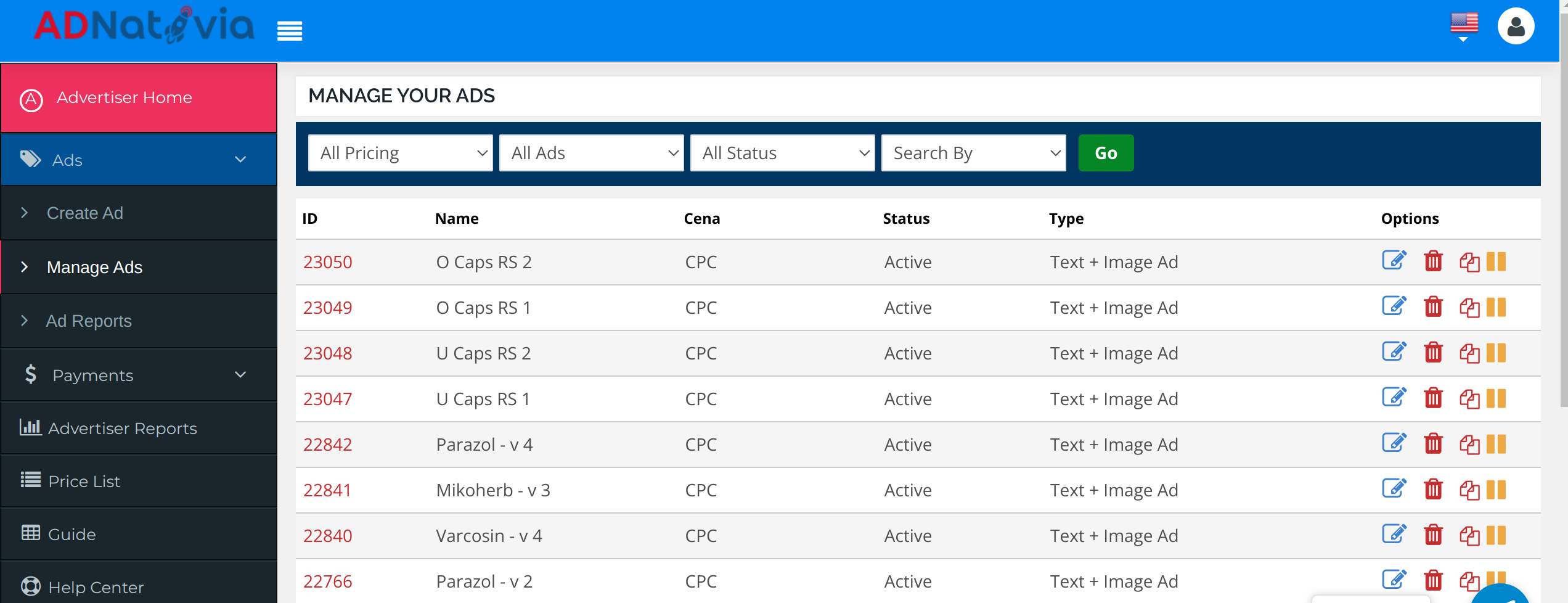
Screenshot of a dashboard screenshot from AdNativia that provides an overview of an advertiser’s account performance. The interface displays key metrics such as the total number of ads running, impressions, clicks, and overall spend, allowing for tracking and analysis of advertising campaigns. With a glance, one can appreciate the volume of traffic generated and the efficacy of the ads, highlighted by the number of clicks versus impressions. The graph at the bottom illustrates the trends over the last 30 days, presenting a comparative view of CPC impressions, clicks, and click-through rate (CTR) against the budget spent. This visual representation is an example of AdNativia’s approach to data transparency and its commitment to enabling advertisers to monitor and optimize their campaigns.Screenshot of a screenshot from the AdNativia platform that showcases the 'Manage Your Ads' section, which provides a user-friendly and efficient management system for advertisers' campaigns. The interface reveals various options for each ad campaign, such as the ability to edit, pause, or even clone an ad, giving advertisers the flexibility to quickly duplicate successful campaigns without starting from scratch. Each ad is listed with an ID, name, pricing model (CPC - Cost Per Click), current status (e.g., Active), and type (Text + Image Ad).Screenshot of a screenshot that displays the 'Create Ad' interface of the AdNativia platform, highlighting the initial step in crafting an advertisement. Here, advertisers can begin the ad creation process by entering essential details such as the ad's name, title, and the click-through URL that leads potential customers to their designated webpage. 

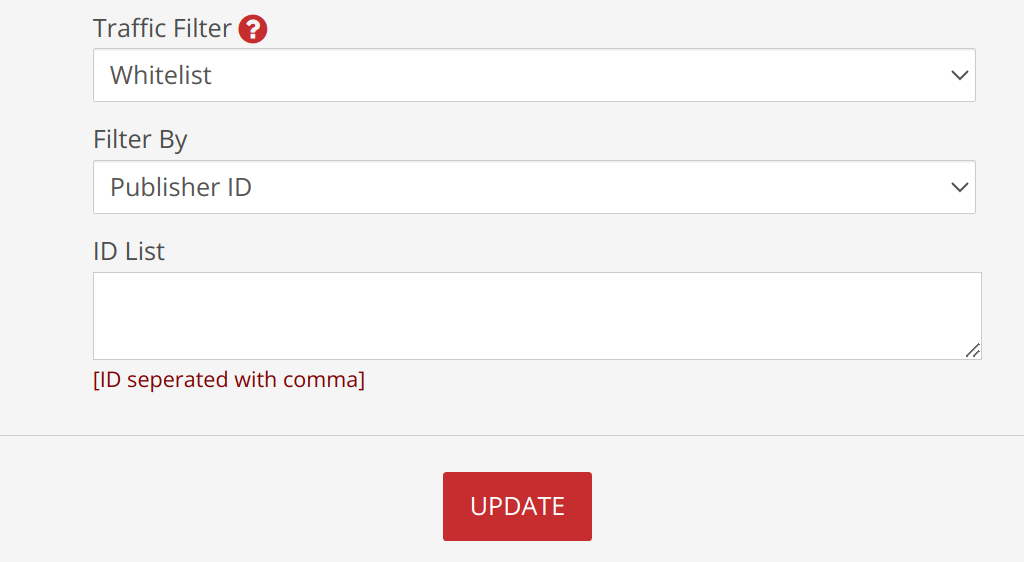
The process's step-by-step progression marked at the top, guides users from ad information to pricing, to ensure a seamless creation experience.Screenshot of a screenshot that presents the 'Traffic Filter' feature within the AdNativia platform, a tool that enables advertisers to curate the flow of traffic towards their ads. With options such as "Whitelist" or "Blacklist," advertisers can specify whether to exclusively allow or block traffic from certain sources. The "Filter By" dropdown menu is set to "Publisher ID," suggesting that advertisers can target or exclude specific publishers from displaying their ads.

Below this, the "ID List" textbox awaits a list of Publisher IDs, separated by commas, which provides a straightforward method for advertisers to fine-tune where their ads will appear. This specificity allows for greater control over the ad spend and enhances the ability to target ads more effectively to the desired audience.

The addition of macro commands offers advanced customization for tracking and optimizing ad performance. Macros like `{CAMPAIGN_ID}`, `{USER_IP}`, `{COUNTRY}`, `{DOMAIN_ID}`, `{DOMAIN_ENC}`, `{PUBLISHER_ID}`, `{PLACEMENT_ID}`, `{CLICK_ID}`, and `{CLICK_COST}` can dynamically insert relevant data points into the ad URLs, allowing for granular tracking of user interaction with the ads. These tools are essential for advertisers who want to analyze data and optimize their campaigns based on user behavior and ad placement performance.Screenshot of The screenshot highlights the 'Budget Settings' section of the AdNativia platform, where advertisers can fine-tune their campaign costs according to the quality of traffic they desire. With options to select from Top Level, Middle, and Low traffic quality, each with corresponding Cost Per Click (CPC) rates, advertisers have the flexibility to allocate their budget efficiently. 

For precise budget management, the platform allows setting different CPC rates for each traffic quality tier—Top Level CPC, Middle Level CPC, and Low Level CPC—with minimum rate thresholds to maintain competitive pricing.

Constant Contact Screenshots

Screenshot of the AI Content Generator that can be used to create content for emails, social posts, or SMS.Screenshot of Curate Advanced Automation workflows to make sure your marketing is always on - even when you're not.Screenshot of Edit one of our hundreds of pre-built email templates or start from scratch with our simple to use drag-and-drop email editor.Screenshot of Plan and post your social media messaging across platforms with our Social Posting tool.Screenshot of Reach your customers wherever they are with SMS Marketing.Screenshot of Integrate with powerful  tools to grow more using Constant Contact.