ActivTrak vs. MonitUp

Overview
ProductRatingMost Used ByProduct SummaryStarting Price
ActivTrak
Score 8.8 out of 10
N/A
ActivTrak is a cloud-native workforce intelligence platform that transforms work activity data into actionable insights for employee monitoring, productivity and performance management, and workforce planning capabilities. Deployment enables organizations to start collecting data in minutes.
$0
per year (maximum of 3 users)
MonitUp
Score 0.0 out of 10
N/A
Employee monitoring platform designed to help businesses with monitoring employee website access, computer performance, and time tracking. Features of the platform include an activity dashboard with an overview of all employees' activity, login and logout tracking, visibility into which websites employees are accessing, a list of all online and offline computers, customization, and user-specific data.
$2
per month per user
Pricing
ActivTrakMonitUp
Editions & Modules
Free
$0
3 max users
Essentials
$10 (pricing based on annual billing)
per month per user
Essentials Plus
$15 (pricing based on annual billing)
per month per user
Professional
$19 (pricing based on annual billing)
per month per user
No answers on this topic
Offerings
Pricing Offerings
ActivTrakMonitUp
Free Trial
YesYes
Free/Freemium Version
YesNo
Premium Consulting/Integration Services
YesNo
Entry-level Setup FeeNo setup feeOptional
Additional Details
More Pricing Information
Features
ActivTrakMonitUp
Workforce Analytics
Comparison of Workforce Analytics features of Product A and Product B
ActivTrak
8.0
171 Ratings
6% below category average
MonitUp
-
Ratings
Automated data collection8.6168 Ratings00 Ratings
Data analysis8.0167 Ratings00 Ratings
Data integration7.827 Ratings00 Ratings
Benchmarking7.9121 Ratings00 Ratings
Report designer7.828 Ratings00 Ratings
Pre-built content7.8150 Ratings00 Ratings
Data management8.1155 Ratings00 Ratings
Self-service insights7.8148 Ratings00 Ratings
Best Alternatives
ActivTrakMonitUp
Small Businesses
Rippling
Rippling
Score 9.0 out of 10
Traqq
Traqq
Score 9.1 out of 10
Medium-sized Companies
Predictive Index Behavioral Assessment
Score 6.4 out of 10
ManageEngine ADAudit Plus
Score 9.3 out of 10
Enterprises
Predictive Index Behavioral Assessment
Score 6.4 out of 10
ManageEngine ADAudit Plus
Score 9.3 out of 10
All AlternativesView all alternativesView all alternatives
User Ratings
ActivTrakMonitUp
Likelihood to Recommend
8.6
(174 ratings)
-
(0 ratings)
Likelihood to Renew
9.4
(8 ratings)
-
(0 ratings)
Usability
6.0
(31 ratings)
-
(0 ratings)
Availability
10.0
(2 ratings)
-
(0 ratings)
Performance
10.0
(2 ratings)
-
(0 ratings)
Support Rating
9.0
(29 ratings)
-
(0 ratings)
Implementation Rating
5.0
(2 ratings)
-
(0 ratings)
Configurability
8.0
(2 ratings)
-
(0 ratings)
Ease of integration
1.0
(1 ratings)
-
(0 ratings)
Product Scalability
7.0
(1 ratings)
-
(0 ratings)
Vendor post-sale
10.0
(2 ratings)
-
(0 ratings)
Vendor pre-sale
10.0
(2 ratings)
-
(0 ratings)
User Testimonials
ActivTrakMonitUp
Likelihood to Recommend
ActivTrak
ActivTrak is useful to help keep track of your employees, and set up flags where they may occasionally go awry. I find the number of features to be adequate for monitoring our business, but would be better served if I spent time tailoring it for our unique needs. I don't think ActivTrak is great for live-views.
Read full review
MonitUp
No answers on this topic
Pros
ActivTrak
  • ActivTrak gives me a breakdown of hours during which my employees were actively working, when they were active online but unproductive, when they were inactive, and when they were not online.
  • ActivTrak gives me a detailed breakdown of the software, platforms, and programs my employees worked on/in during each block of the day.
  • ActivTrak provides a detailed breakdown of how I spend my time each day to help me improve my productivity.
Read full review
MonitUp
No answers on this topic
Cons
ActivTrak
  • A more detailed explanation is required when updating specific titles within the system. For instance, total time has recently become "screen time". An email notification of this change and its implications would have gone a long way.
  • Easier to read the Activity Log in reporting. Sometimes, when downloading large amounts of reports, it can be cumbersome and challenging to navigate through them.
  • Customized reports feature.
Read full review
MonitUp
No answers on this topic
Likelihood to Renew
ActivTrak
We have been using it for several years and find the benefits are quite excellent for the cost so we will renew again next year.
Read full review
MonitUp
No answers on this topic
Usability
ActivTrak
ActivTrak is a great product that just keeps growing. Having used it for quite some time, we have been able to see ActivTrak grow and evolve as a product. The ActivTrak webinars are also helpful to get to know and learn the product. ActivTrak really just works with little effort needed after the initial installation
Read full review
MonitUp
No answers on this topic
Reliability and Availability
ActivTrak
It's never been down.
Read full review
MonitUp
No answers on this topic
Performance
ActivTrak
Have not received any issues with Activtrak's performance in regard to loading pages, reports, or other systems.
Read full review
MonitUp
No answers on this topic
Support Rating
ActivTrak
Support is always fast and the agents are ready at all times to help when an issue arises, if the tier 1 agent isn't able to provide a solution to the issue they're asked about they quickly escalate the issue to tier 2 or 3 to ensure that the appropriate support is given to the issue at hand to have it quickly solved. No issue we've had so far has taken more than two days to be solved.
Read full review
MonitUp
No answers on this topic
Implementation Rating
ActivTrak
There should be a way to automatically implement the system without giving users the opportunity to accept or deny the program on their computers.
Read full review
MonitUp
No answers on this topic
Alternatives Considered
ActivTrak
I am unsure, to be honest. I have not had much exposure to different productivity software. I lucked out by using Active Trak first. I do not feel the need to investigate or review other productivity software. I would recommend ActiveTrak to other companies, users, or those searching for productivity software.
Read full review
MonitUp
No answers on this topic
Scalability
ActivTrak
The product's overall scalability is good as our team grows. We would like to see updates to meet market demands.
Read full review
MonitUp
No answers on this topic
Return on Investment
ActivTrak
  • Real-time productivity metrics and detailed workforce analytics have allowed us to better understand our workforce and make adjustments for better productivity.
  • Because we were able to curb bad habits, team behavior is at an optimal level.
  • Since our productivity level has gone up, the return on our investment in staffing has risen.
Read full review
MonitUp
No answers on this topic
ScreenShots

ActivTrak Screenshots

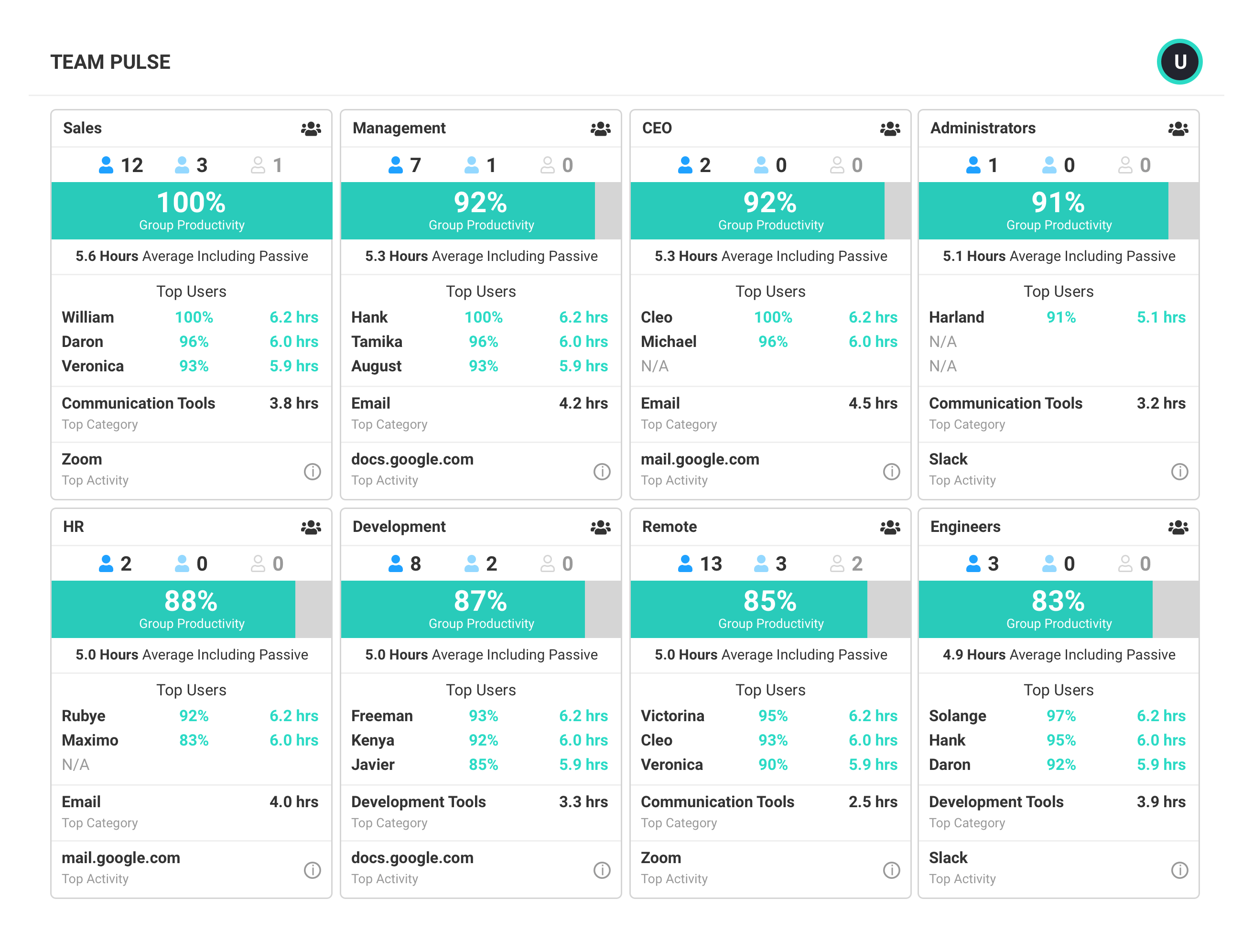
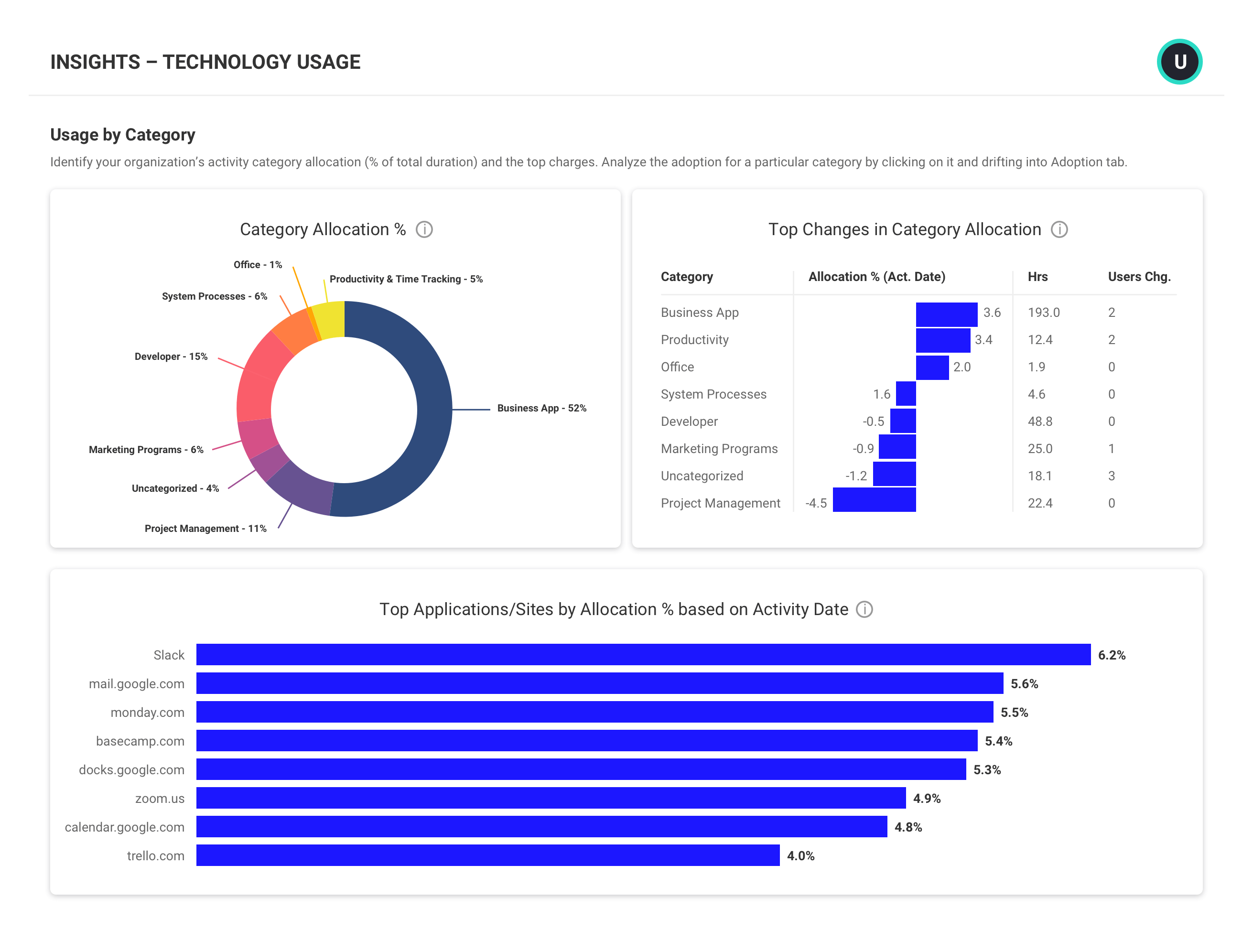
Screenshot of DashboardScreenshot of Team PulseScreenshot of Benchmarks & GoalsScreenshot of Executive SummaryScreenshot of Team ComparisonScreenshot of Technology Usage

MonitUp Screenshots

Screenshot of User Dashboard
It gives you information about users, when he turned on his computer, how long he was away from his computer, when he shut down his computer in the evening. You can see the pie chart of the most used applications. The list at the bottom will show you the details of all the transactions of the user in the date range you have specified. In this way, you can have an idea about the efficiency of the user.Screenshot of Dashboard
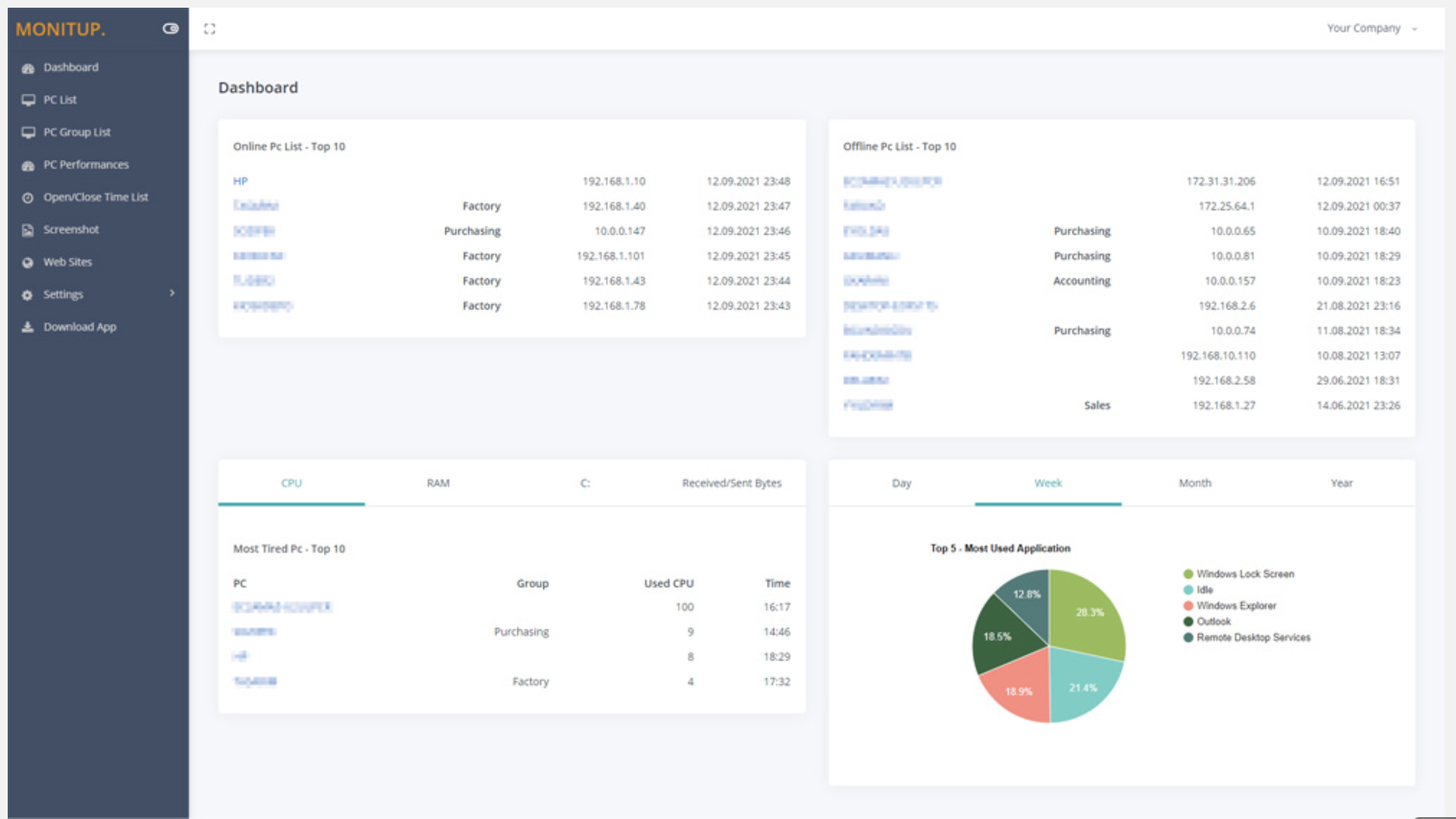
You can see the summary of the movements of the company employees on this screen. Online Computers, Offline Computers, IP Addresses, latest trading hours and pie chart of the most used programs in your company.Screenshot of Employee entrance and exit control
You can see when all employees turned on and off their computers. It helps you to distinguish missing or overwork easily.Screenshot of Websites are under control
You can see which websites employees browse and keep them under control. It is important information to increase employee productivity.Screenshot of Screenshot
Screenshots of the users you specify are taken every 5 minutes. In this way, you will have more data at hand to increase efficiency.Screenshot of Application Categories
All applications are divided into 3 categories. You can set the desired application as Productive, Unproductive Neutral. Thus, you can see the transactions on the graph and instantly analyze the efficiency of the user.