TrustRadius: an HG Insights company

Zenhub

Score8 out of 10

17 Reviews and Ratings

What is Zenhub?

ZenHub is a project management solution that runs native within GitHub with collaboration boards, file sharing, and pipeline selection.

Media

Zenhub boards are similar to Kanban boards but more powerful as it's powered by data and objects from GitHub. You can also add multiple repos and automate issues across multiple boards.
Get real-time updates on a teams performance with Zenhub reports
See and share work in flight with Zenhub roadmaps
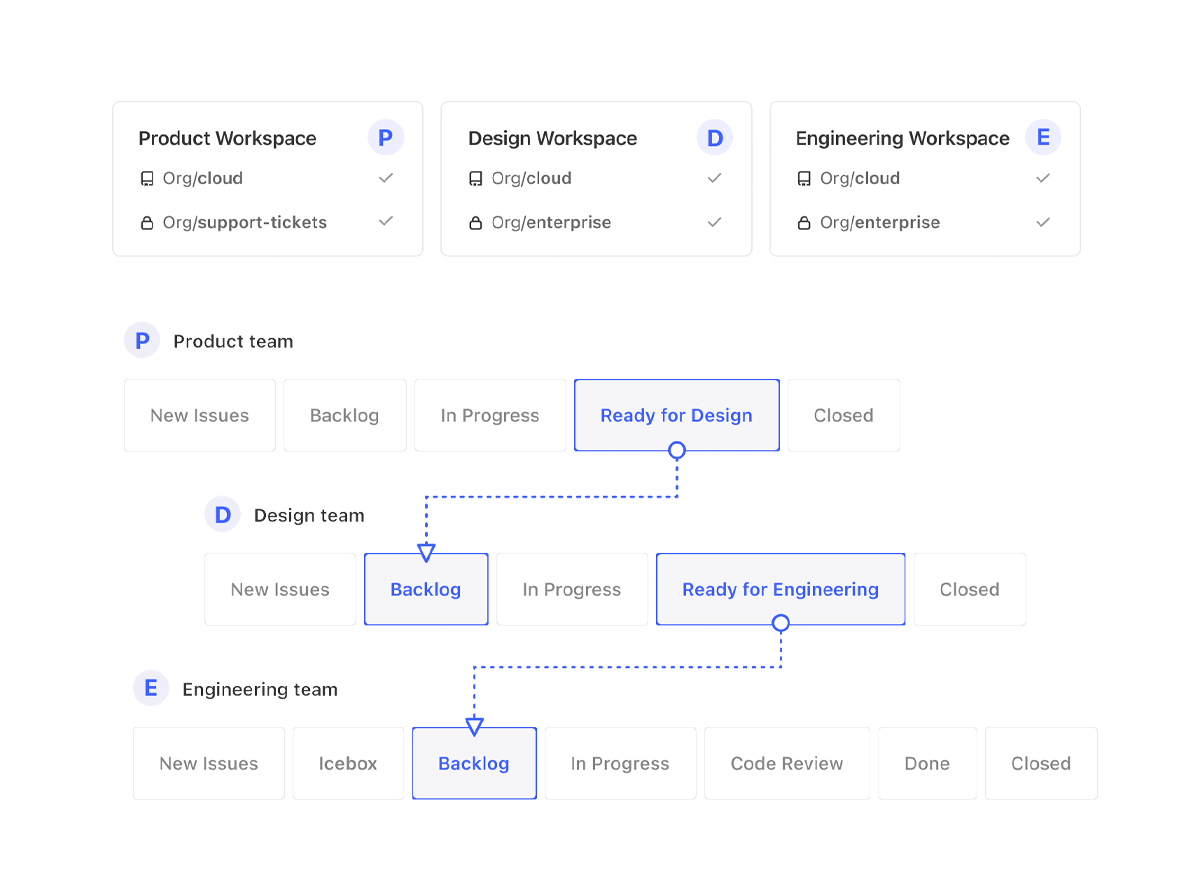
Automate hand offs between teams with workflow automation
Get a snapshot of a team's productivity from Zenhub board
Request, provide and review story point estimates right on the issue. Reduce time spent in meetings by allowing team members to estimate on their own time right in Zenhub

1 / 6

Top Performing Features

  • Timesheet Tracking

    Timesheet tracking is the ability to track all billable and non-billable hours for each project.

    Category average: 8.3

  • Quotes/estimates

    Ability to create, manage and send project fee proposals to customers

    Category average: 8.6

  • Change request and Case Management

    Change request and change management enables tracking of all customer requests including priority and timeframe.

    Category average: 8.8

Areas for Improvement

  • Gantt Charts

    Gantt charts are charts that show tasks or events along the y-axis displayed against time along the x-axis.

    Category average: 8.3

  • Workflow Automation

    Workflow automation is the ability to route work requests along an approval process automatically.

    Category average: 8.6

  • Support for Waterfall Methodology

    Waterfall methodology is a tradition development method that is linear and sequential.

    Category average: 7.9

Great for teams which use GitHub.

Use Cases and Deployment Scope

Zenhub is our planning and resource management tool of choice, helping keep projects and technical work on track and monitoring longer-term velocity. We use it to make sure that different teams aren't pulling in different directions and can collaborate on projects by having clearly written out goals, acceptance criteria, etc.

Pros

  • Task management.
  • Estimation
  • Acceptance criteria.

Cons

  • Non-technical work sometimes doesn't fit well with Zenhub/Github.

Return on Investment

  • Being so integrated with GitHub has reduced the feedback loop time.
  • It required less setup time than a non-GitHub alternative when applied to GitHub tasks.

Usability

Alternatives Considered

ClickUp, Trello and monday.com

Other Software Used

ClickUp, Google Meet

Happy user.

Use Cases and Deployment Scope

We use Zenhub to plan, detail, and review work. It's the central tool for our agile way of working.

Pros

  • Integration with Github.
  • Label & template flexibility.
  • Stable & reliable.
  • The integration of AI is providing some interesting insights.

Cons

  • Reporting is often unclear on what it can be used for.
  • Linking many GitHub repos into a board causes performance issues.
  • AI add-ons.

Return on Investment

  • No official review done.
  • Saves developer time knowing what needs to be done next.
  • Saves leadership time to easily plan sprints and review work done.

Usability

Other Software Used

Miro, Aha! Roadmaps, Microsoft 365

Updated Zenhub Review

Use Cases and Deployment Scope

Zenhub would assist us with development tasks for our software programs, additionally we would use it to help track implementation progress and project management. Business problems the product solved included coordinating team members, even customers for tasks that are required to successful capture customer revenue. Ultimately this software helped improve our bottom line leading to positive results.

Pros

  • organize complex projects
  • customize workflows
  • coordinate and communicate with customers around project updates

Cons

  • Additional communication/collaboration inside the platform would be helpful
  • Integration with additional systems like Slack would be a plus
  • sometimes web pages load slowly, but for the most part things are alright

Most Important Features

  • Product Roadmapping
  • Implementation Issue prioritizing
  • Long Term Project Planning Views

Return on Investment

  • End result is the ability to continuously improve team productivity
  • Increased bottom line revenue by saving on manual tasks
  • Acts as an organized space to reduce the amount of team spent solving simple problems all in 1 area

Alternatives Considered

GitHub

Other Software Used

Salesforce CPQ, 6sense, CaptivateIQ

A great collaboration tool!

Use Cases and Deployment Scope

I'm a big fan of this project planning tool. It's not too complicated, but it still offers all the features I need to get my projects organized and on track. It's easy to use, and it makes me feel like I have control over my projects. I don't know how I got by without it!

Pros

  • - project scheduling and management features
  • - organizing with teams
  • - task/project management

Cons

  • Sometimes, updates to a GitHub project can get lost if they're made through ZenHub. You do need to open the GitHub project occasionally, as you don't have exactly the same ability to modify issues and milestones from within ZenHub.
  • It's great to be able to see your projects from within ZenHub, but sometimes you'll need to check in on the GitHub project itself, as well.
  • I've run into some problems with updates getting lost on occasion. I think this happens when you do the update from within ZenHub instead of from GitHub itself. I also don't have quite as much control over my issues or milestones from within ZenHub.

Most Important Features

  • Task management
  • Team cooirdination
  • API connect

Return on Investment

  • Helps coordination and hence time spent on projects
  • has made api processes simples with integrations
  • has helped meet deadlines better

Alternatives Considered

Jira Software

Other Software Used

HubSpot CRM, Trello, Asana

Great GitHub integration, easy set-up and usability

Pros

  • Integration with GitHub.
  • Great Kanban board functionality.

Cons

  • A way to display a read-only Kanban/Scrum board for corporate use. Currently, you must have an account to view a board.
  • While the reporting features are good, it would be great to have some updated Scrum sprint tools to assist with estimating and the like.

Return on Investment

  • Ease of use for development teams to update progress.
  • Perfect integration with GitHub.