TrustRadius: an HG Insights company

Webtrends Analytics

Score4.4 out of 10

67 Reviews and Ratings

What is Webtrends Analytics?

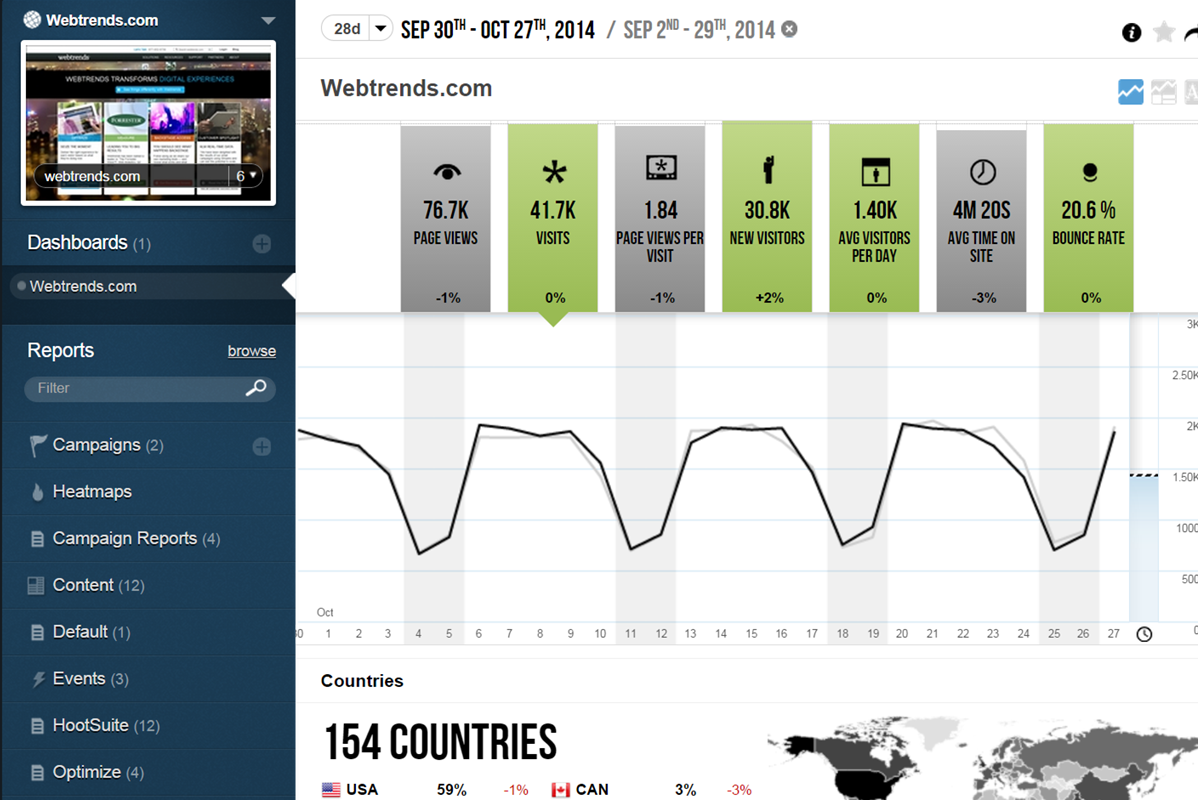
WebTrends provides an enterprise web analytics platform and, according to Forrester, has a strong focus on support for mobile and social channels and a very open platform. Webtrends competes directly with Adobe Site Catalyst, IBM Coremetrics. and comScore DigitalAnalytix.

Media

450+ out-of-box reports
Unlimited custom reports
Roll-up reports across domains
Out-of-box channel and market-specific reports
Unlimited dimensions
No processing time
Dynamic, on-the-fly segmentation
Create, save and share custom views, measures and segments
Unlimited custom dashboards
Key metrics, trends, demographics, geo maps, word clouds and more
Drill-throughs to connected reports

1 / 3

WebTrends Analytics On Premises - A Workhorse, Not a Ferrari

Pros

  • Custom Reports
  • Reanalysis of old data
  • Can analyze raw log files

Cons

  • Complexity
  • Cost of ownership
  • Adding new report parameters requires full reanalysis

Return on Investment

  • WebTrends on-premise has a heavy initial investment for licensing, maintenance, and hardware. But once it is running, it just keeps going. Annual maintenance renewals have been our only cost for several years now.
  • Up until the last year, WebTrends gave us a good return for our costs -- it allowed us to create the reports that our users requested, and allowed us to reanalyze old data for new information.
  • WebTrends suffers in comparison to Google Analytics simply because it is not "free". But I But the experience I have in WebTrends allows it to produce many more benefits for our company.

Alternatives Considered

Google Analytics

Wishing I could go back to Webtrends

Pros

  • Having used two competitors, the company I am with now uses Omniture, I can honestly say that Webtrends is the best web analytics software I have used. Its UI is very intuitive and easily customized.
  • The back-end data is fairly easy to get to, and it's no hassle getting IP or log level data, unlike competitors. I work with a team of web analysts now and talk about Webtrends to them like the munchkins talked about the Wizard of Oz. It's just a more superior software than most to data mine.
  • Webtrends has great customer service support. They were able to allow us to build out custom reporting and dumps for our specific industry without price gouging us.

Cons

  • I would like to see stronger SQL integration into the UI program and software.
  • Better tutorials for people
  • More user groups in our area.

Return on Investment

  • We provided analysis that increased our sales 10 percent for our web-based products. We were able to create better products dependent on customer searches.
  • We managed vendor participation better. We had a few companies referring people to us, and we were able to track their results and cut the ones that weren't performing.
  • We were able to do stronger forecasting by looking into where and how people engaged with our site.

Alternatives Considered

Omniture and Google analytics

Other Software Used

Domo, Microsoft SQL Server, Microsoft BI

Webtrends Analytics Reviews

Pros

  • Powerful creation of reports. Different categories, globally seen by all platforms, platform specific and personal seen by only me
  • Intuitive drag and drop interface
  • Action center allows for events to trigger near real-time activities

Cons

  • API interface could be more intuitive

Return on Investment

  • It has had a positive impact, scale yet to be determined

Alternatives Considered

Google Analytics, Kissmetrics and ClickTale

Other Software Used

Microsoft Power BI, Alteryx Analytics, Qlik Sense

Webtrends Streams to Success for your Organization

Pros

  • The javascript tagging of our website provides better metrics over traditional weblogs in tracking unique visits and visitor
  • The pushing of reporting to mobile devices like iPhone and iPad has been useful to the user community
  • By adding scheduled tasks I was able to get web logs from SDC to run metrics hourly. Which comes in hand on heavy traffic days to demographics and for capacity planning for load balancing and adding additional servers into the server farm.
  • Path analysis helps to track are visitors to the site going to the pages you want to direct them to. It also shows conversion rates and where the visitor left or abandoned the site before converting
  • Metrics can be extracted easily to pass to web services to support other services. For example, passing website metrics to the CIO dashboard.
  • Webtrends comes with a compliment of reports with the feature of creating custom reports for a particular client's needs, and to track particular metrics for a specific incident or interest
  • The addition in Insight of social media tracking was a huge help to my Facebook and Twitter metric tracking

Cons

  • No complaints it had all of the functionality that I needed.

Return on Investment

  • The biggest return on investment is the fact of being able to get almost real time website analytics from SDC and my scripting strategy.
  • We don't have to wait overnight to get statistics for a particular office or event.
  • The tagging code is easy to implement through content management.

Webtrends Review from long experience

Pros

  • More than some of its competitors, most Webtrends' configurations (reports, dimensions, filters, content groups, measures) can be done in the admin UI, rather than in the tagging and site code. The tag itself is smart - it can sense offsite links, clicks on pdf downloads, form button clicks, and so on, which eliminates a lot of extra coding or tag modification that has to be done with other products.
  • There are so many levers and buttons in the configuration that nearly anything can be turned into a report, or a report dimension, filter, or measure.
  • It allows re-analysis of past data as far back as 90 days. Usually, you do this if you have created new custom reports, content groups, change the filters, and so on.
  • There is a software version, called On Premises. (The SaaS version is called On Demand.)
  • It has real path analysis ... it does not daisy-chain individual steps as others do. The paths it displays are what happens in actual visits, up to 20 steps long. It has forward and backward paths (one visit can appear several times depending on how many times the node was hit), paths-from-entry (one visit, one path), content group paths as well as page paths. Its one lack (that I care about) is SiteCatalyst's Pathfinder report which allows you to identify wildcard pages in a 3-step hypothetical path.
  • This isn't going to ring a bell for a lot of people, but it handles list variables much better than its competitors (basically, parameters that hold multiple values such as "choose as many as apply" kinds of variables.
  • It handles the tabulations of parameters really well. It deals with three kinds of parameters: those in the pages' URL, those placed in the WT.meta's (I don't think any competitors use this approach and it is fantastic for easily keeping URLs clean for SEO purposes), and those collected automatically by the standard tag. When tabulating parameters, its competitors require more up-front work, lots more configuration time, or severe limits on the quantity.
  • Having recently tried out Google Analytics' new Content Groups feature, I was reminded of how powerful it is in Webtrends. There's really no comparison. Furthermore, the content groups can be configured p in the UI as well as hard-coded into the page. Content Group paths can be up to 20 steps long, and are not daisy-chained.

Cons

  • The big downside, the elephant in the room, is that it does not (as of right now) have on-demand segmenting, drilldowns, etc. You have to think of what you want in advance and create those reports then analyze some data. This is huge. You can, of course, re-analyze old data after creating new reports but you still have to wait. (This deficiency may become obsolete with the release of Webtrends Explore later this month (May 2014).)
  • It has fewer mature integrations with other products and databases than competitors do, although I'm told it works with SharePoint better than anything else does.
  • Its attribution modeling capability is behind Google Analytics'. In my humble opinion, this could be changed quickly if Webtrends would make some tweaks to its standard visitor history files (i.e. preserve the order in which past visits were sourced beyond the single most recent one, rather than storing all those past sources as a randomized list).
  • It doesn't incorporate statistical tests, confidence intervals, or statistical associations. However, this same criticism can be applied to its competitors (other than A/B Testing products). It's a tabulation program, as they all are. In this respect, web analytics tools as a group are relatively primitive. Sorry to bring this up as a criticism of Webtrends but it's my pet peeve about the whole industry and I just have to say it. (p.s. take advantage of the heavy-duty Webtrends Scheduled Export functionality to get really granular data that you can feed to a stats program to get significances.)
  • Although the documentation, help screens, phone support and the knowledge base have improved tremendously in recent years, there is still a pretty steep learning curve because it is different from the tools that entry-level users may have already been exposed to. This can be a shock and many users are alienated at first because they just don't get some of the fundamentals at first. I'd like to see much better help screens that are thoroughly interlinked with the KB and documentation. Having superb online support would make a world of difference with the adoption of this basically powerful tool.

Return on Investment

  • Any analytics product can affect ROI if used well. The impact depends on the analyst far more than the product. Having said that, I've seen companies go from data frustration to data addiction (and big ROI) once Webtrends is working properly for their situation.