TrustRadius: an HG Insights company

Swiftify

Score9 out of 10

33 Reviews and Ratings

What is Swiftify?

When Apple rolled out Swift back in 2014, Objective-C was set to be replaced. Even nowadays, however, there are plenty of apps and projects that still use Objective-C, and developers are faced with the prospect of either starting again from scratch or attempting to convert them to Swift.

Swiftify for Xcode is designed to automate much of the conversion process, handling the task of replacing syntax while letting you focus on other aspects of migrating your project to Swift.

As the name suggests, the service can be accessed directly from Xcode. You can access it from the Editor menu, where you have the option of converting a selection of code or a whole file. You can also copy Objective-C code and paste it as Swift.

It's also possible to convert files directly from Finder without booting up Xcode. The user simply selects one or more files and start the conversion from the context menu.

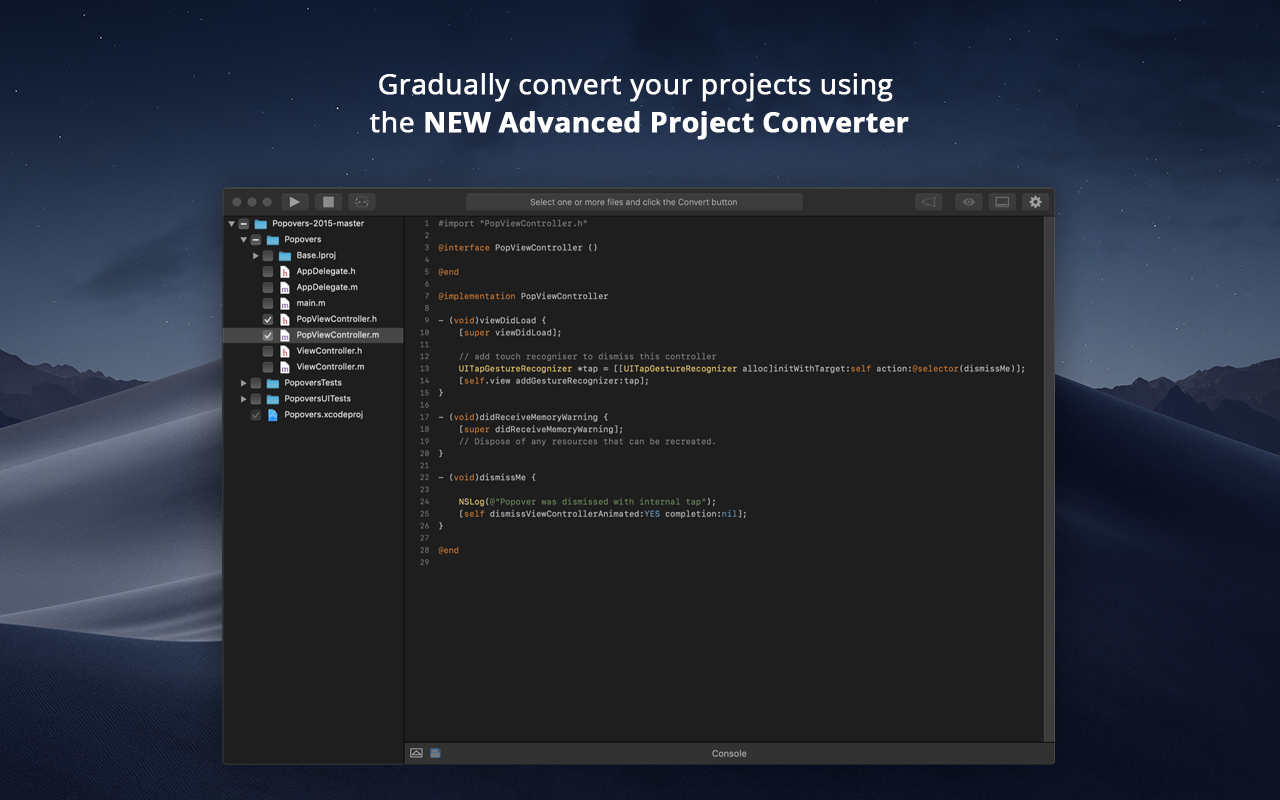
Finally, the Advanced Project Converter app is designed to help manage an entire project. It lets users explore it from a dedicated UI and select files to be converted. Processed items are automatically added to the project file. The app is included in Swiftify for Xcode, but it can only be used with a Cloud subscription or Swiftify Pay As You Go credits.

Media

1 / 6

A good translator

Pros

  • Helps to prevent redoing the whole code.
  • Sometimes it is hard to find the exact command of Obj-C in swift.
  • It helped me to learn more :)

Cons

  • The price is a bit high and not very affordable for small companies.

Most Important Features

  • Be updated and fast

Return on Investment

  • It could be useful if you do not want to hire a Swift developer and helps to learn your existing team a new language.

Other Software Used

Zeplin, Sourcetree, Slack

Just works! Convert anything to Swift.

Pros

  • Put in your Objective-C code, select the version of Swift language to convert, click convert. That's all!
  • Swiftify is now creating a platform to convert Objective C to #C, something that can help for different development projects platforms.
  • Swiftify offers a few free converts to try to show you the power of it. Their price for a subscription plan is really good for big projects.

Cons

  • New conversion languages, like Python or C++ would be great.
  • Some more free tries would help to know how important/helpful it would be for iOS projects.

Return on Investment

  • Time saved is the best part of it. Last year, we lost a lot of time finding conversions from our actual Objective-C code. Now it's just two clicks and everything works.
  • We are going to release our app as soon as possible, and without Swiftify this will not be possible. Seriously, this platform is necessary.

Other Software Used

Atom, Apple iCloud, GitHub

Swiftify is good, but not great.

Pros

  • Good at Objective-C to Swift project conversion
  • Helps with Objective-C code refactoring
  • Has a decent app with automated conversion

Cons

  • It lacks general performance and availability
  • It doesn't handle Objective-C macro well
  • Overall conversion speed expected to be much better

Return on Investment

  • Helped to reduce churn and to improve our delivery cycle a bit.
  • Refactoring took some time because it isn't really suited for complex projects.

Swiftify as another team mate

Pros

  • Implemented on XCode as an editor option
  • Fast and precise, compared to competitors
  • Helps you in your development

Cons

  • It converts from Objective-C to Swift but not from Swift to Objective-C.
  • The conversion is not perfect, does not always work right.
  • The conversion should provide suggestions, as the code could be converted in many different ways.

Return on Investment

  • For now the impact has been small, considering that I used the trial version, it was helpful for small conversions. Summarising: Saving time on researching process

Great product, highly recommend for any level developer. Saves a tremendous amount of time.

Pros

  • It's especially good for people that know Swift, but have very little experience with Objective-C. It gives you a first cut of code translation. Then you can go from there.

Cons

  • Sometimes the conversion doesn't make much sense. The Swift conversion doesn't compile, or is not optimized.

Return on Investment

  • good ROI, saves a lot of time.