TrustRadius: an HG Insights company

Spreadsheet Server

Score9.4 out of 10

20 Reviews and Ratings

What is Spreadsheet Server?

The Spreadsheet Server platform is designed to work as a Microsoft add-in to provide live reporting data and analysis from the user’s ERP solution into Excel. The vendor aims to help users eliminate the hassle of re-keying or downloading any data into spreadsheets make that spreadsheet an integral part of their business environment.

Categories & Use Cases

Media

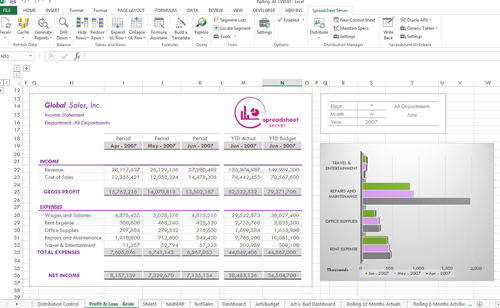
Income Statement with Spreadsheet Server
Sales Dashboard with Spreadsheet Server

1 / 2

Top Performing Features

  • Standard reports

    The software offers pre-built reports with metrics standard to the category.

    Category average: 8.5

  • Role-based user permissions

    Permissions to perform actions or access or modify data are assigned to roles, which are then assigned to users, reducing complexity of administration.

    Category average: 8.8

  • Plug-ins

    A number of third-party plug-ins are available to expand the core functionality of the software.

    Category average: 7.9

Areas for Improvement

  • Dashboards

    Users can create, customize and share dashboards, which provide an overview of the most important metrics.

    Category average: 8.1

  • Custom reports

    Users can create custom reports.

    Category average: 8

All about the time savings!

Pros

  • It saves time
  • It is more accurate than hand keying
  • It allows for more complex, intricate calculations

Cons

  • Perhaps simplifying the coding would help.

Return on Investment

  • It has saved many man-hours in producing financial statements and variance analyses.

Automate Reports with Spreadsheet Server

Pros

  • It's easy to use and learn how to create new spreadsheets.
  • Spreadsheet Server makes it easy to create custom financial statements for your company. It is a great tool to use with Vista by Viewpoint.
  • We can create custom graphs and KPI's in Spreadsheet Server.

Cons

  • There is room for error in financial reporting if the accounts are updated on a regular basis.
  • It can be complicated to determine what changes were made if the user does not update the GL accounts.

Return on Investment

  • The ability to make customizations to our financials without requiring an IT superuser has been a benefit.
  • As a fairly new user, it was easy to learn and customize without a lot of training from IT.
  • It eliminates running multiple reports that are needed to be sent to management. We can run one file that includes all reports.

Alternatives Considered

Vista

Other Software Used

Vista by Viewpoint, NetSuite, Sage 100 ERP

The two free user licenses make using Spreadsheet Server worth while

Pros

  • Realtime data directly from our Viewpoint database
  • Ability to modify financial statements
  • Automate reports

Cons

  • A better user interface
  • Easier way of joining tables
  • More templates

Return on Investment

  • Allows us quick access to cash flow statements which assist in decision making
  • Provides accurate reporting for our banking needs
  • Provides accurate information to our insurance and bonding vendors

Alternatives Considered

SAP Crystal and Microsoft Exchange

Other Software Used

Procore, Vista by Viewpoint, ProEst Estimating Software

Spreadsheet Server User

Pros

  • Very easy to use once the format is set up.
  • Allows for flexibility in formatting.
  • Easy to add columns and rows to financial statements.

Cons

  • It is difficult to initially set up reports - determining the links to the software system.

Return on Investment

  • Simplified the financial reporting.

Other Software Used

Vista by Viewpoint

Usability

If you like Excel, you will love this product

Pros

  • I love that you can create the reports in Excel so that these static fields automatically update when you open. This allows you to update other reports and graphs from this data.
  • They have great support, and response time has always been great.
  • Super easy to start off. You can have setup and reports created on your first day. They give you templates to start off with.

Cons

  • The only issue that we came across, is that not all of our companies have the same financial structure as each other. So the GLs we use for one report, would not necessarily work for all the other companies. We did not want to create separate reports for each company either. We did find a workaround in that we created a lookup tab with GLs to use for each category for each company, then used v-lookup to pull those GLs over. This workaround worked great, but it would have been nice to have something built in to cover this.

Return on Investment

  • The time saved with setup alone is worth the investment in this product.
  • Not having to export reports from our accounting software to update reports, has been a real game changer and time saver.

Other Software Used

SAP Crystal, Adobe Acrobat DC