TrustRadius: an HG Insights company

airSlate SignNow

Score9 out of 10

164 Reviews and Ratings

What is airSlate SignNow?

signNow is an eSignature solution with mobile apps for iOS and Android. signNow can be integrated into popular platforms and offers SaaS, public cloud, and private cloud deployment options with the same underlying API. This enables customers to leverage the power and usability of the signNow eSignature platform, while meeting their particular security and compliance requirements.

Media

dashboard
teams and their folders
integrations available
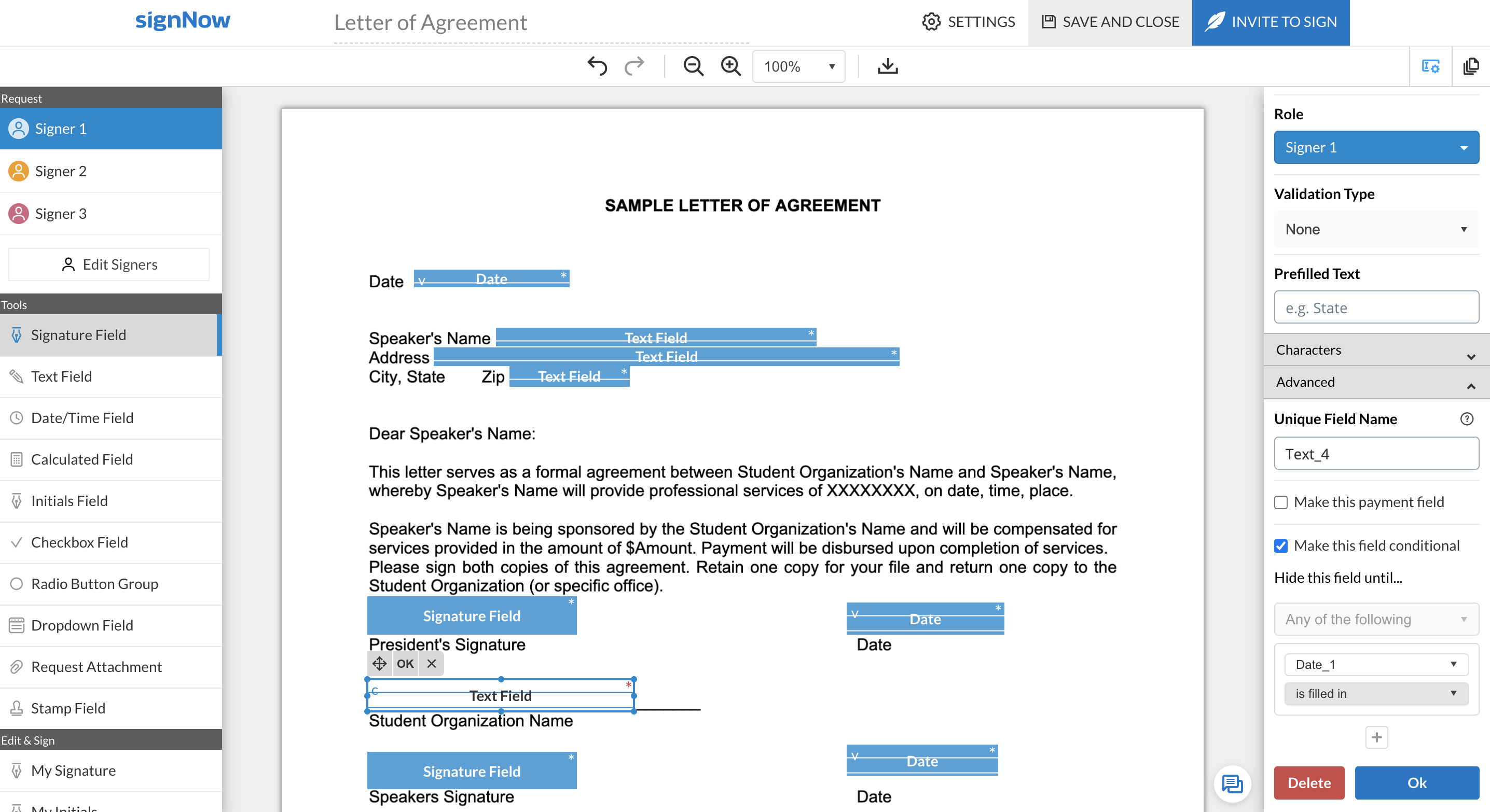
fillable fields in signNow editor

1 / 4

How SignNow made our document management easier Como o SignNow facilitou nossa gesto de documentos

Use Cases and Deployment Scope

We use SignNow here mainly to sign internal documents and contracts with suppliers. Before, everything was done by email; you had to print, sign, scan, and send it back... now it's much faster. It helps a lot with the problem of delays in closing agreements and with organization because everything is saved in the system. We're still expanding it to use in some sectors, such as purchasing and HR, but the idea is to expand to other areas over time. A gente usa o SignNow aqui mais pra assinar documentos internos e contratos com fornecedores. Antes era tudo por e-mail, tinha que imprimir, assinar, escanear e mandar de volta... agora ficou bem mais rápido. Ele ajuda bastante no problema da demora pra fechar acordos, e também na questão de organização, pq tudo fica salvo em sistema. A gente ainda expadindo para usar em alguns setores só, tipo compras e RH, mas a ideia é expandir pra outras áreas com o tempo.

Pros

  • Abertura de documentos
  • Validação de documentos
  • Assinaturas
  • Opening documents
  • Document validation
  • Subscriptions

Cons

  • Automação
  • Segurança
  • Integração
  • Internacionalização
  • Padronização
  • Automation
  • Security
  • Integration
  • Internationalization
  • Standardization

Return on Investment

  • Eficiência operacional
  • Tempo
  • Carga de trabalho
  • Padronizações
  • Otimização de processos
  • Segurança Operacional
  • Imprevistos
  • Dinâmico

Usability

Alternatives Considered

DocuSign, Adobe Acrobat Sign and Dropbox Sign

Other Software Used

SAP Access Control, Canva, Google Analytics, Google AdSense, Trello, Canvas Planner, Adobe Acrobat Reader, Adobe After Effects, SteamVR, Gemography, DocASAP, Avast CloudCare, Amazon Alexa for Business, WhatsApp Business

Use in an educational setting

Use Cases and Deployment Scope

We use SignNow for communication with parents of students where their signature is required. We used to send paper permission slips home and had difficulty getting them back, or they were probably forgeries by students just seeking a quicker time to turn the form in. With SignNow we're able to directly email just parents. Some of our trips require a financial commitment, and having their electronic signature on a document has helped prevent many from late withdrawal from a trip.

Pros

  • Invitation link open to anyone to sign.
  • Easily add fields to documents.
  • Intuitive interface

Cons

  • Integration with Google Sheets for collecting response data.
  • Easier sorting of completed docs.
  • Choices about emails from SignNow when a form is completed.

Return on Investment

  • Replaced paper forms.
  • Automated systems.

Other Software Used

Zapier

SignNow Review

Use Cases and Deployment Scope

We use SignNow for remote signing employees, client onboarding, and other documents and paperwork. The business isn't and cannot go completely paperless, but facilitating quick transmission of documents for signature and counter-signature for people outside of the organization is essential. SignNow currently integrates with PDFFiller which allows uploading and modifying of documentation that's already been drafted and creation of templates. Editing a template and migrating it over to SignNow for sending out and signing is a frequent step when taking on new staff and clients. It's important to note we've only used competitors as end-user, so there may be aspects that other products do better. SignNow doesn't have the same footprint as far as recognizability as Docusign, in my opinion. I don't know if that means Docusign is better.

Pros

  • Modifying signature request and order of signing.
  • Tracking signings and downloading completed documents.
  • Integrating with PDFfiller.

Cons

  • Uploading draft documents for editing.
  • Multiple fields with different signatories for each.
  • Standard reminders for people who haven't signed.
  • Template emails.

Return on Investment

  • Improved collaboration with stakeholders outside the building.
  • Time saved on document execution processes.
  • Essential in conducting remote business.

Other Software Used

PDFfiller, Mailchimp, QuickBooks Online

SignNow is cost-effective and easy to use

Use Cases and Deployment Scope

I use SignNow to digitally sign all of my paperwork that requires a signature, and the same with clients. Whenever we need a document signed, we'll prepare it externally (or add the text within SignNow) and then send the document(s) off through SignNow. It means we don't need to print, it means clients don't need to print, and it means clients can sign documents wherever they are as long as they have an internet connection, and on any device.

Pros

  • Extremely easy to use
  • Includes audit trail
  • Can add text boxes, bullet points / check marks, etc. which are required by the client
  • Can add text manually into the document if needed
  • Has an app for signing (if you want an app) or clients can sign online without the app
  • Much more cost-effective than the big players at only $8 USD p/m (if you pay yearly)
  • Legally binding
  • Can set regular reminders to sign

Cons

  • I don't think you can remove the option to use the app - it's the prominent option when you open the document. The 'open with browser' option is more subtle, at the bottom
  • More advanced features (like redirect upon signing, personal branding, etc.) cost more
  • The platform was updated in Oct / Nov 2022 (this is written in Nov 2022), changing the drag & drop options. There's no option, or there's no clear option, to add a text box where you can add your own text, only a text box for the signer to fill.

Return on Investment

  • SignNow has saved me time chasing clients to get paperwork signed
  • We've gotten our own documentation signed more easily

Other Software Used

Nitro Productivity Suite

Usability

Alternatives Considered

Secured Signing

Great and Cheaper Alternative to DocuSign

Use Cases and Deployment Scope

From legal documents, like NDAs to service agreements, my organization utliizes SignNow and has helped simplify our processes.

Pros

  • provides audit trails
  • Can add texts to PDF documents so you don't need to re-upload
  • integrations with Zapier
  • Cheaper than Docusign

Cons

  • SIgnNow API is extremely expensive (However still cheaper than Docusign)
  • The "text" feature to invite a recipient is not good at all. Text cannot be adjusted as of now
  • Wish you could reorganize pages within a document. Currently you can only delete the page when editing templates/documents

Return on Investment

  • Easy way to send and store signed documents
  • Easy way to send applicants authorization forms and agreements