TrustRadius: an HG Insights company

Revv

Score9 out of 10

1 Reviews and Ratings

What is Revv?

Revv, an eSignature solution, supports document automation and workflows.

Revv enables users to create documents from a template library or upload and send external WORD/PDF documents for electronic signatures. Additionally, it offers various signature types to meet every eSignature scenario.

Whether for generating bulk documents for electronic signatures or obtaining signatures on fillable web forms, Revv supports the case. It provides notifications, document analytics, and audit trails.

Revv protects the eSigning process with email and SMS authentication. Revv offers proof of eSignature with evidence management. It also offers video authentication for clickwrap signatures.

Revv is a no-code eSignature platform that can be used anywhere, anytime, and from any device. Revv provides protection and operates in a secure environment with multiple levels of encryption and compliance with local laws.

Benefits -

GOVERNANCE AND COMPLIANCE -

Revv complies with ESIGN Act, UETA, and eIDAS regulation, which makes all eSigned documents legally binding.

  • Intent to sign - Revv confirms the signers’ intent by requesting signers to submit the electronic signatures.

  • Consent to do business electronically - Revv meets the consent requirement by asking signers to confirm their signatures before submitting the document. Revv also gives recipients an option to decline the signature request.

  • Signature attribution - Build document control with a full audit trail of each transaction. Revv satisfies signature attribution by capturing and storing all actions with the date and time stamps, signers' details, and IP addresses.

  • Record retention - Revv automatically creates a copy of signed records and sends it to both the sender and the recipient to maintain their transaction proofs.

FEATURES-

  • Create dynamic fields as form fields in the template to speed up document creation process. Use the chosen template, add custom details in the form fields, and send it to customers to fill in the required information, and eSign the documents.

  • Flexibility to upload & send PDF or DOCX files, edit them, and send for electronic signatures.

  • Gather crucial data from the signers in the form of text or image using the ‘Fill and Sign’ feature.

  • Ready-to-use templates and editor to create and customize business documents designed to improve conversion rate.

  • Automate sending a document to multiple recipients using the Bulk Send feature.

  • Configure eSignature workflows by integrating everyday business apps through Zapier, Retool, and Native APIs, and save more time, money, and resources.

  • Liberty to choose the signature type - click-to-sign, draw a signature, or click-to-initial.

  • Real-time tracking and analytics to intervene and engage customers at the right time.

  • Multiple choices to get documents signed online via email, shareable links, fillable web forms, or API integrations.

SECURITY -

  • Compliance with global and local eSignature laws and the latest industry standards.

  • Two-factor (SMS and email) authentication to guarantee the identity of the signers.

  • High-level security with AWS global cloud certification (CSA, SOC 1, SOC2, and ISO 27001) to protect your data at every step.

  • PCI DSS compliant payment gateways

LIFE-TIME STORAGE -

Revv provides cloud-based storage that keeps records safe, organized, and accessible - forever.

CUSTOMER EXPERIENCE -

  • Send documents to mobile devices via SMS, and reduce customer drop-out rates.

  • Collaboration features to interact with customers and team members within the documents and accelerate the signing process.

A DIY PLATFORM THAT REQUIRES NO CODING SKILLS -

Revv is presented as simple to use and easy to navigate. Its interface requires no external help or special skills.

SUPPORT SYSTEM -

  • A customer support team of experts

  • 24/7 chat support

  • Multi-language support for documents

  • Support for designing and creating templates

  • Help center, support articles, and videos to guide users throughout the process

Media

Screenshot of ELECTRONIC SIGNATURES - Add signature blocks and signer details to request eSignatures on your documents. Recipients get notified via email to fill and sign documents from their mobile or desktop.
Screenshot of FASTER & EASY COLLABORATION - Have threaded conversations with all stakeholders on the document itself. Annotate text and add private comments for teammates. Switch to public notes to share with recipients. You can even add attachments with every note.
Screenshot of TRACK DOCUMENT ACTIVITY - All actions taken on the document get recorded along with a timestamp. Keep a track of how recipients are interacting with your documents - who opened the email, who viewed the document, and who signed it.
Screenshot of EASY SHARING - Multiple choices to share documents online via email, magic links (for live view of documents), snap links, and web forms.
Screenshot of READY-TO-USE TEMPLATES - Get access to thousands of legally vetted, pre-formatted, and beautiful templates for every business need.
Screenshot of RICH EDITOR - Creating professional-looking documents is easy with the drag & drop editor. Add text, images, tables, page breaks, signature blocks, and more. Personalize further with rich formatting options, customizable cover page themes, & backgrounds.
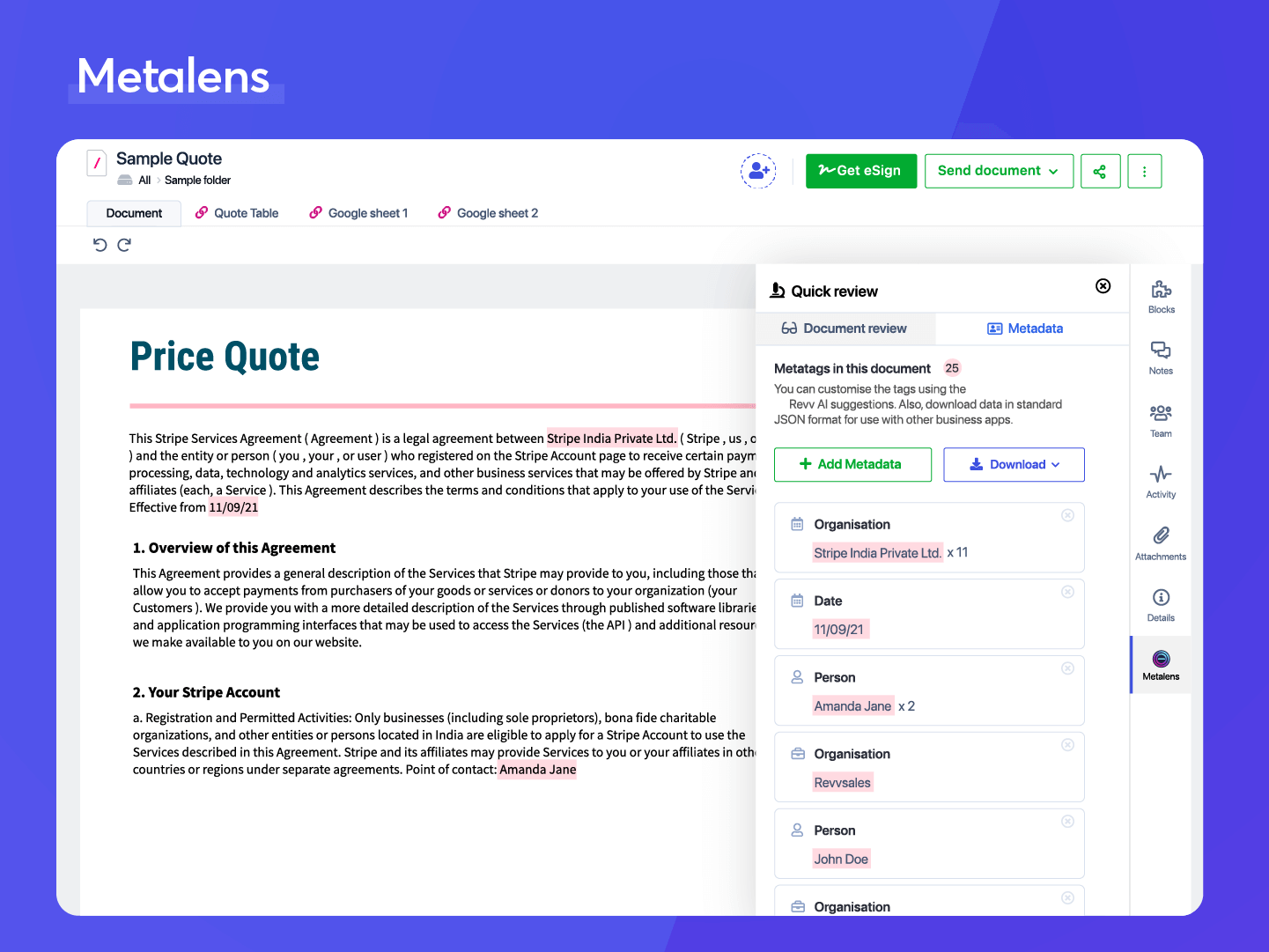
Screenshot of METALENS - Extract insights from legacy contracts using Metalens feature and leverage the structured data to close negotiation faster and meet business objectives.

1 / 7

Screenshot of ELECTRONIC SIGNATURES - Add signature blocks and signer details to request eSignatures on your documents. Recipients get notified via email to fill and sign documents from their mobile or desktop.

Revv - excellent tool for sales team documents

Pros

  • Creating templates for sales documents
  • Allows ability to see when client has opened up document
  • Ability to give client access to document through several methods

Cons

  • It is not intuitive as far as creating a new document from a previously created template

Return on Investment

  • It has saved the sales team time from having to create a proposal for each client.

Alternatives Considered

Google Workspace Essentials (formerly G Suite Essentials)

Other Software Used

Pipedrive, UberConference, by Dialpad