TrustRadius: an HG Insights company

Qlik Replicate

Score8.4 out of 10

48 Reviews and Ratings

What is Qlik Replicate?

Qlik Replicate enables organizations to accelerate data real-time replication, ingestion and streaming via change data capture, across a wide range of heterogeneous databases, data warehouses and data lake platforms.

Categories & Use Cases

Media

1 / 6

Data Replication easily with a few clicks

Use Cases and Deployment Scope

Qlik Replicate is used to data integration allows organization to replicate, synchronize, and integrate data across multiple databases, data warehouses, and other data storage systems.

The main use case for Qlik Replicate is to ensure that data is accurate and up-to-date across my organization's various data storage systems. This is particularly important for organizations that rely on real-time data analysis to inform business decisions, as Qlik Replicate ensures that all relevant data is available for analysis in a timely manner. Some common ways that Qlik Replicate is used include:Data Warehousing: Qlik Replicate can be used to replicate data from operational databases to data warehouses for analysis.Disaster Recovery: Qlik Replicate can be used to replicate data in real-time to a secondary location for disaster recovery purposes.Cloud Migration: Qlik Replicate can be used to move data from on-premises systems to cloud-based systems.Analytics: Qlik Replicate can be used to move data from various sources into a single location for analysis.Overall, Qlik Replicate is a versatile tool that can be used to ensure that data is accurate and up-to-date across an organization's various data storage systems.

Pros

  • Data Warehousing: Qlik Replicate can be used to replicate data from operational databases to data warehouses for analysis.
  • Disaster Recovery: Qlik Replicate can be used to replicate data in real-time to a secondary location for disaster recovery purposes.
  • Cloud Migration: Qlik Replicate can be used to move data from on-premises systems to cloud-based systems.
  • Analytics: Qlik Replicate can be used to move data from various sources into a single location for analysis.

Cons

  • More detailed documentation with errors that occurred in the tool.
  • More agile and efficient support.
  • It works best if you also use other Qlik products.
  • Few APi integrations are not compatible

Most Important Features

  • real-time with no agents at the source
  • No Code
  • Usability
  • Friendly

Return on Investment

  • Logging
  • Alerts
  • No documentation errors

Other Software Used

Qlik Sense, Qlik Compose, Qlik Catalog

Replication Master.

Use Cases and Deployment Scope

Our essential data integration procedures, including data replication, transformation, and ingestion, have been reduced and are now more efficient and cost-effective than before. Our data integration process was simplified, and both its ease of use and the manner in which it transfers data from one place to another had a good influence on our performance.

Pros

  • It is really easy to scale up the big data integrated projects which helps a lot financially.
  • Sometimes for data replication it's really handy.
  • It can take and capture a large data.

Cons

  • It requires a stable and proper internet connection.
  • Sometimes it's harder to duplicate the environments.
  • Some more documentation could be provided.

Return on Investment

  • Helped a lot for changing the scale.
  • Helped in manual ETL coding to accomplish data integration.
  • It is simple to maintain data consistency from one source to another.

Usability

Other Software Used

Slack, Google Meet, Microsoft Teams

Qlik Replicate is a fantastic tool for replicating data between databases.

Use Cases and Deployment Scope

I have been studying the tool together with my company's pre-sales team.

It is a fantastic tool for implementation in customers of different segments and sizes.

Pros

  • Full load of transactional databases
  • Very fast CDC incremental loads
  • Replication from one source to multiple targets
  • Database synchronization

Cons

  • I have not identified any new needs in my uses

Most Important Features

  • Data replication between transactional databases
  • Low impact on production bases

Return on Investment

  • I don't have precise numbers, but the company I work for has successfully implemented it on several clients.

Other Software Used

Qlik Sense, QlikView

Data Engineer and Application Developer Review

Use Cases and Deployment Scope

Most of business case data pipelines are implemented and used with this application.

Previously, we had lots issue regarding replication of our realtime stream of business sales data and e-commerce data. Using this data warehousing is made easier and helpful. Even batch processing the streaming data is more convenient using this software.

Pros

  • Datawarehousing
  • Data Encoding
  • Batch Processing streaming data
  • Handle transactional Metadata
  • Bigdata complications are solved

Cons

  • Few local databases are not compatible
  • Spark processing to be needed
  • Few APi integrations are not compatible

Return on Investment

  • Faster in data replication
  • Faster in data pipeline construction
  • Scalable across all platforms
  • Affordable and ease to use
  • Faster in handling streaming data

Alternatives Considered

Oracle GoldenGate, Fivetran, Acronis Cyber Cloud for Enterprise (discontinued), Cleo Integration Cloud, Supermetrics, DigitalOcean and HVR

Usability

Other Software Used

DigitalOcean, Oracle GoldenGate, Fivetran

Oracle and Salesforce replication to MS SQL Server made easy

Use Cases and Deployment Scope

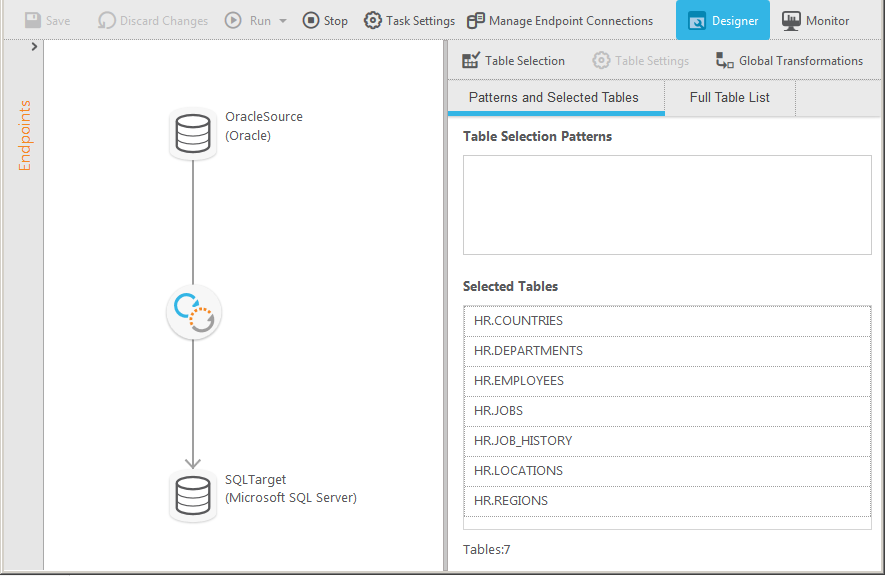
We first used Qlik Replicate to replicate data from the Oracle ERP system to a Microsoft SQL Server BI system. We have also started using Qlik Replicate to replicate from Salesforce to the Microsoft SQL Server BI system.

Pros

  • Flexibility for creating multiple tasks for grouping related tables
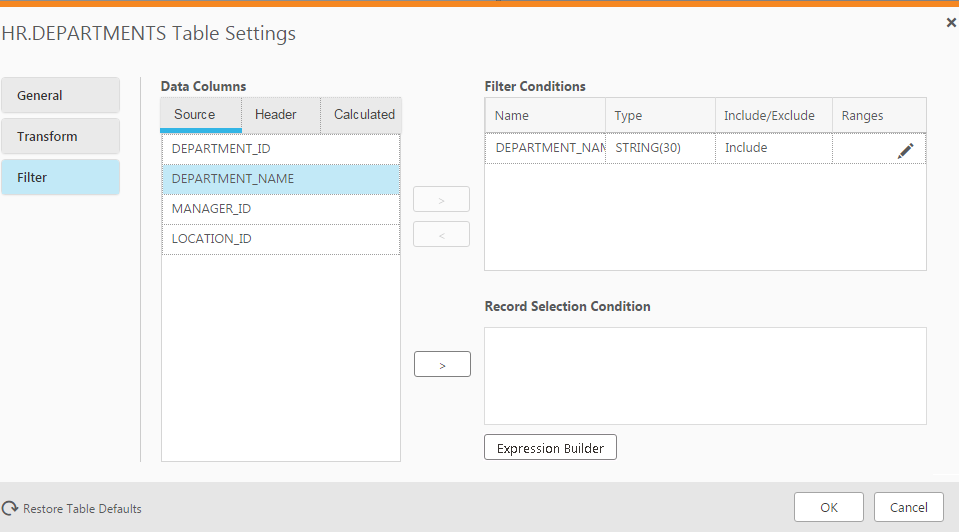
  • Table level filters
  • The scheduler feature has been very useful

Cons

  • The scheduler, while useful, has issues when trying to create or adjust a schedule more recent than the current time UTC. That is the one thing I would really like to see improved.

Return on Investment

  • Prior to using Qlik Replicate, we used an ETL solution to copy data from the Oracle ERP system to the Microsoft SQL Server BI system at a 15-minute interval. It was very tedious to maintain. Qlik Replicate is much easier to use and we replicate data near real-time now.

Usability
