TrustRadius: an HG Insights company

Planview ProjectPlace

Score8.3 out of 10

422 Reviews and Ratings

What is Planview ProjectPlace?

Projectplace is a collaborative work management solution. The vendor says the product is built with teams of all sizes and complexity in mind, from virtual teams of five to entire global enterprises with tens of thousands of active users. It is also designed to incorporate waterfall and agile workflows.

Media

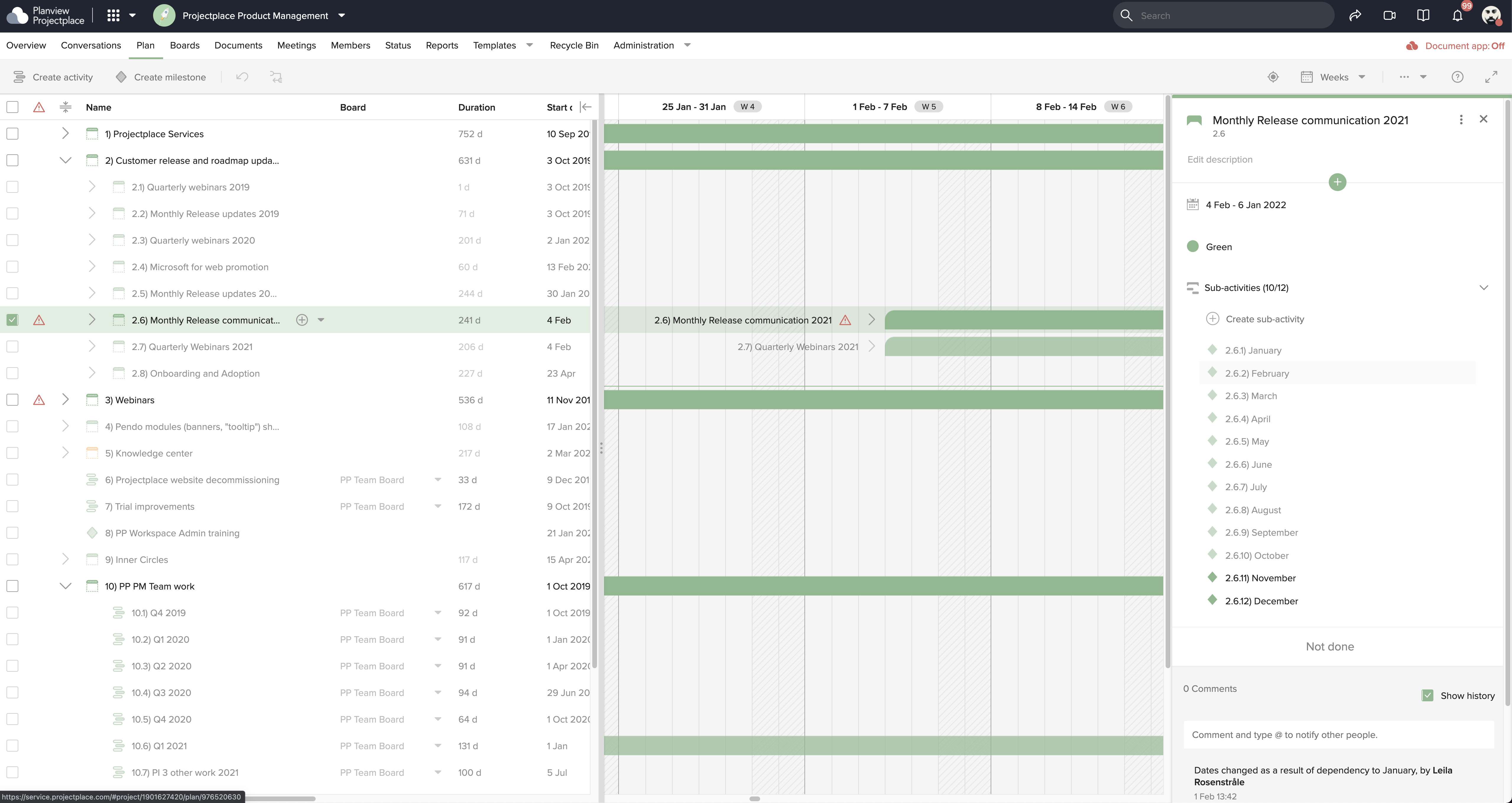
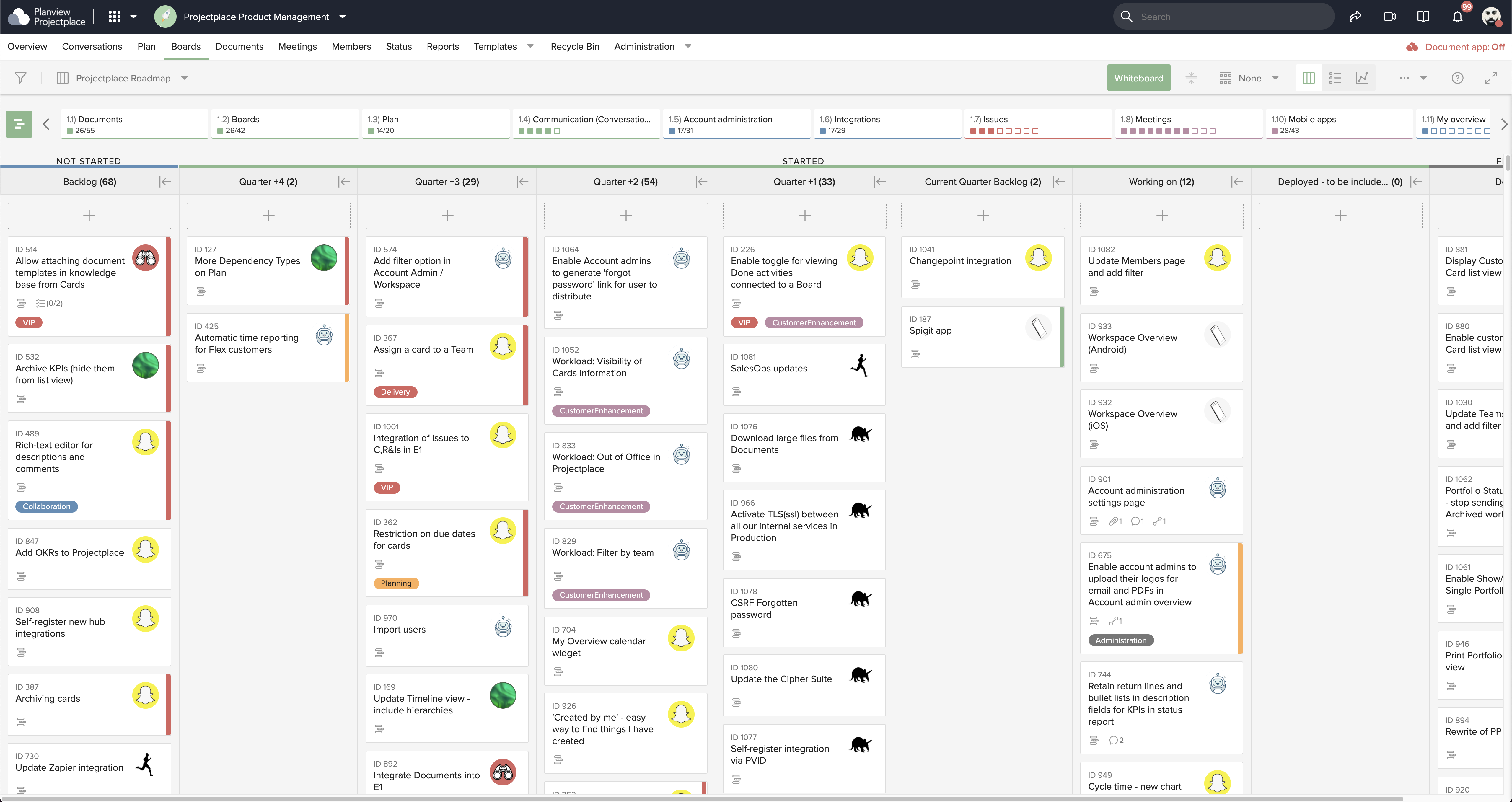
Collaborative Workstream: Streamlined interaction between activities, boards and cards. Users can plan and follow up in the Gantt while their teams execute and collaborate for optimum productivity on the Kanban boards.
Document Management: This helps to ensure changes to documents are visible in real-time. Version control ensures that team members see the latest document versions with access to document history.
Gantt Charts: These support planning and visualizing every step of enterprise work and projects with Projectplace Gantt Charts. Track progress to make sure you'll meet your deadlines and know when things are not happening on time.
Kanban Boards: This enables teams to execute and collaborate for optimum productivity, and includes activity notifications, messaging and visualizations of progress of day-to-day tasks.
Workload View: A visualization of the workload of members in all workspaces, used to determine whether a team member is overloaded with work, or has room to do more.
Workspace Overview: This offers an overview of all work and tasks that have been assigned across all workspaces. Personal tasks can be added that help offer a more complete picture of what's left to do.

1 / 6

Top Performing Features

  • Document Management

    Document management provides for centralized management of all project documents.

    Category average: 7.9

  • Team Collaboration

    Team collaboration capabilities let team members work directly with each other and provide team updates.

    Category average: 9

  • Support for Agile Methodology

    Agile is a time boxed, iterative approach to development that builds software incrementally instead of trying to deliver it all at once near the end.

    Category average: 8.1

Areas for Improvement

  • Resource Management

    Resource management is workload planning to maximize resources.

    Category average: 8.6

  • Email integration

    Email integration allows work requests to be made directly from email.

    Category average: 8.3

  • Timesheet Tracking

    Timesheet tracking is the ability to track all billable and non-billable hours for each project.

    Category average: 8.4

Planview ProjectPlace improves the visibility of project progress & increases collaboration

Use Cases and Deployment Scope

Planview ProjectPlace has allowed us to improve our software upgrade process as it makes all of the steps/tasks visual and allows for collaboration. We were able to reduce our process by 3 weeks.

Pros

  • Project management
  • Manage tasks via kanban board
  • Allows flexibility for teams to work
  • Document Management

Cons

  • The project plan can be a little finicky to work with
  • Love they have a checklist for cards on the board, however the text field can be hard to work with

Return on Investment

  • We were able to reduce our upgrade process form 12 weeks to 7 weeks
  • We have been able to make the project management process plus task management more visible.
  • We were able to reduce the number of status meetings by 50% due to the collaboration & updates available in the tool.

Planview ProjectPlace great for your daily project work

Use Cases and Deployment Scope

We use Planview ProjectPlace for: Project management - Assign tasks, set milestones, and track the progress of the project in real-time.

Team collaboration - Discuss/communicate via the platform also with external partners. External partners sometimes only temporarily while the project is running.

Document management - In the context of projects and team collaboration, especially with external partners

Pros

  • Assign tasks, set milestones, and track the progress of the project
  • Communicate via the platform

Cons

  • Document management could be improved

Return on Investment

  • Fast, effective work even across company boundaries

Usability

Alternatives Considered

Microsoft 365 and Microsoft Planner

Other Software Used

Planview Portfolios

ProjectPlace is an easy tool to keep your project on track

Use Cases and Deployment Scope

I have been in my current role for 6 months. Over my career I have used many CRMs and Project Management tools, but this was my first experience with Planview ProjectPlace. I was shocked how easily I was able to get up and running. This tool is quite intuitive and easily facilitates collaboration with my team. We use it to manage all of our projects within one Kanban, as our document repository, and we use the white board for quick and easy brainstorming. I think an area for opportunity for this tool is around automation. It is quite restrictive and for some applications this could be limiting.

Pros

  • Collaboration
  • Card creation from an outlook email
  • Simple to use
  • Integrated with other more comprehensive tools, for us, Planview Portfolios

Cons

  • Allow for custom automations
  • A community forum that isn't behind a password wall

Return on Investment

  • This has made our team significantly more efficient.

Alternatives Considered

Trello, Notion, Microsoft Planner, Microsoft Project and Jira Software

Other Software Used

Planview Portfolios, Microsoft SharePoint, Microsoft Power BI

ProjectPlace for collaboration.

Use Cases and Deployment Scope

We are using ProjectPlace both as a stand-alone platform and also connected to Portfolios. There are teams of accidental project managers who only need to track their work in simple ways. We use Kanban boards for these users/document repositories and other modules. Our project managers can use this as their project hub while managing their projects in Portfolios.

Pros

  • Easy of use. Modules are well define.
  • Navigation: Users can use the tool's search functionality to find what they are looking for easily. The home page is configurable to the users' needs.
  • The knowledge center is a key function to understand the tool capabilities.

Cons

  • As portfolios are connected to ProjectPlace, we would like users to be able to report time in the cards and upload this time to the user's Portfolios timesheet for the associated task they are assigned to. This will help with adoption.
  • Financial data needs to be improved.
  • Is there an opportunity to add Roadmaps within this platform?

Return on Investment

  • One of the negative is that is license base.
  • Positive, ProjectPlace is great to use with your team for collaboration.
  • Great document application, but is it easy to understand how to turn it on?
  • Easy way to share documents.

Other Software Used

Planview Portfolios

Best tool for Project Management

Use Cases and Deployment Scope

We use Planview ProjectPlace to create and manage Projects schedules & milestones, align tasks/sub-tasks to the inbuilt Kanban board and manage the respective Project documentation in one place. Planview ProjectPlace being intuitive and easy to use, is happily adopted by the users and helps us bring POAP (Project on a Page) relatively fast. Tool has made it easy for everyone to track what/when each resource is working on.

Pros

  • Project Scheduling
  • Connecting all your work to Kanban board for agile ways of working
  • Supports a wide array of document management and ability to connect to your SharePoint and OneDrive for ease of access.

Cons

  • There's a calendar feature that does not support Teams, it we can feed in teams calendar to a Workspace, that'll be great.
  • Better flexibility to manage a Workspace layout on the overview screen

Return on Investment

  • Great enabler of Agile Project delivery

Usability

Alternatives Considered

monday.com

Other Software Used

Planview AgilePlace, Planview Portfolios