TrustRadius: an HG Insights company

Planview ChangePoint

Score7.5 out of 10

21 Reviews and Ratings

What is Planview ChangePoint?

Planview Changepoint is a platform that marries professional services automation (PSA), project portfolio management (PPM) and business analytics to provide managers broad operational visibility and control over their strategic business portfolios.

Media

End-to-end view to drive financially successful customer-facing projects.
A flexible approach to tracking elaborate contractual terms and conditions.
Quote-to-cash success with structured processes.
Build project rigor and standardization for services delivery.
Improve resource utilization on the work that best meets the needs of customers.
Ensure process adherence to drive financial success.
Improving cash-flow at every step.
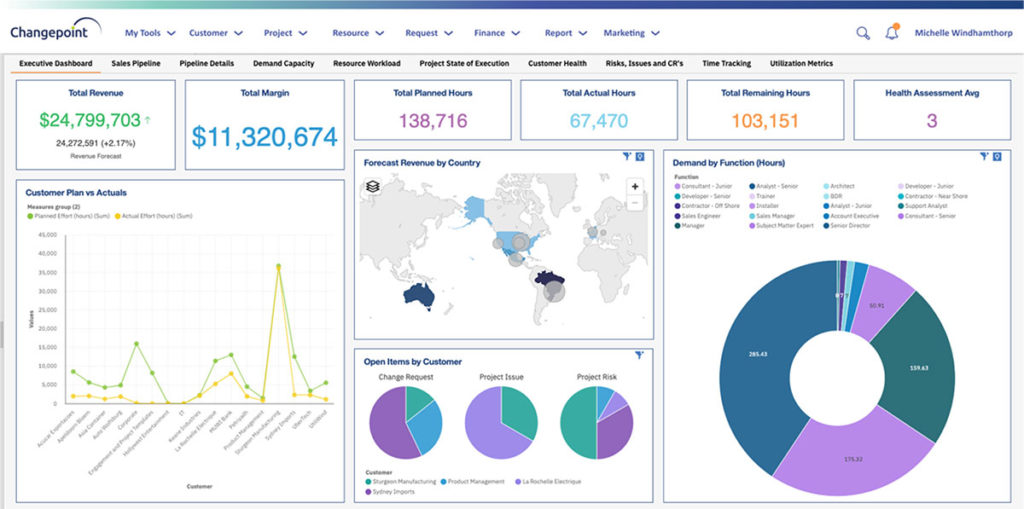
Greater visibility across portfolios with embedded business analytics.

1 / 8

End-to-end customer lifecycle management and the best tools for opportunity and contract management

Use Cases and Deployment Scope

Planview Changepoint's capabilities effectively make us discover every aspect of the customer lifecycle, capitalizing on every financial opportunity for greater profitability. It enables helps us manage our active customer projects lifecycle end-to-end and also it helps to understand forecasted projects and resource demand for successful downstream execution and timely delivery.

Pros

  • Helps us to knowing our key customers.
  • Excellent opportunity management tool.
  • Best resource management and analytic tool.

Cons

  • Nothing Missing. Complete product with contract management capabilities.
  • Easy financial management functionalities.
  • Excellent dashboard that monitors multiple operations.

Most Important Features

  • Customer lifecycle management.
  • Opportunity and resource management.
  • Contract management and financial management.

Return on Investment

  • Manage Key customers for greater profitability.
  • Forecasting and budgeting.
  • Robust resource management capabilities.

Alternatives Considered

Planview Clarizen and Workday Professional Services Automation

Other Software Used

IBM Process Mining, Planview LeanKit, Pantheon

Changepoint software review

Use Cases and Deployment Scope

Used for financials, to track resource allocation by project and reporting. The business problem it addresses is primarily time tracking/expenses to distribute expenses across employees. The process/flow of the software is also very good.

Pros

  • Resource allocation.
  • Reporting on time / expenses.
  • Scalable across different projects.

Cons

  • Some non user friendly features.
  • Can be slow at times.
  • Not all project management related processes are available.

Most Important Features

  • Security of information.
  • Easy to understand format.
  • User friendly.

Return on Investment

  • Effective communication.
  • More efficient processes.

Changepoint - Software with a Purpose

Pros

  • It handles resource time reporting very efficiently.
  • It handles expense reporting in a very fluid manner.
  • Overall, easy to work with.

Cons

  • Changepoint will time out every now and then. You may not realize it, but your data entry has not been saved and then you close out of the application and come back in and your work is gone.
  • Changepoint will remember / store previous projects that have been billed to. Once the project closes, it still brings back the project so over time, your screen gets crowded.
  • Changepoint requires a VPN from remote locations which can pose a problem for frequent travelers. Few, if any, hotels offer a secure wifi and thus connecting to Changepoint can have its challenges

Return on Investment

  • I am a PM, so I do not know, nor can I speak to ROI.

Other Software Used

Microsoft Project, JIRA Software, MS SharePoint

Changepoint needs a facelift

Pros

  • When Changepoint was created, it was a good comprehensive tool. It has not aged well

Cons

  • The user interface is clunky, not intuitive and confusing. Memorization is the only way to learn the tools as the clues on the screen are not helpful. Trial and error is a common step in learning how to enter time and expenses.
  • There is no mobile app nor a mobile-optimized experience.
  • The data model and reporting process is extremely confusing.

Return on Investment

  • Since we put it in, we have grown, so the return is from using a product that has been paid for and the cost to switch is prohibitive.
  • The system takes a large team of operators to manage data changes because the UI is so confusing. So the human cost of operating is higher than we would like.
  • We needed to rewrite APIs that support the system so that we could easily integrate with our financial and CRM systems. This also cost extra manpower and makes it hard to read and write to the system.

Not great!

Pros

  • Changepoint provides flexibility in terms of the workflow process, allowing a good degree of customization
  • The actions are time-stamped, and whilst Changepoint does not alert the users when things are about to expire, it does provide a timeline
  • It is flexible in regards to the type of information we look to capture on each request

Cons

  • Changepoint can be rather buggy and 'clunky'
  • If the system is idle, it logs out the users far too quickly, resulting in wasted time as well as duplication of efforts
  • It is not the most intuitive or user-friendly solution

Return on Investment

  • The system time-stamps actions which is useful
  • It is expensive for the quality of experience it provides
  • It is *relatively* reliable in terms of the information management and archiving
  • Regular re-typing and other similar duplication of efforts on a large scale can become rather costly to the organization

Other Software Used

HubSpot