TrustRadius: an HG Insights company

pCloud

Score9.3 out of 10

31 Reviews and Ratings

What is pCloud?

pCloud is a cloud- based digital asset management platform that provides access to all digital content including images,video, audio, documents, and more, anytime, anywhere, on any device. Users can keep important files safe and centralized in one place, and share with team members, clients, etc. across the globe with controlled access and permissions to the digital library.

The vendor says that the product has a user-friendly interface that clearly shows where everything is located and what it does. The software is available for multiple platforms – iOS and Android devices, Mac, Windows, and Linux.

Installing pCloud through its desktop application, pCloud Drive, creates a secure virtual drive which expands local storage space. Every change made in the pCloud can be seen immediately on the user's computer, phone or tablet. All devices are instantly synchronized, giving users direct file access to any updates they make.

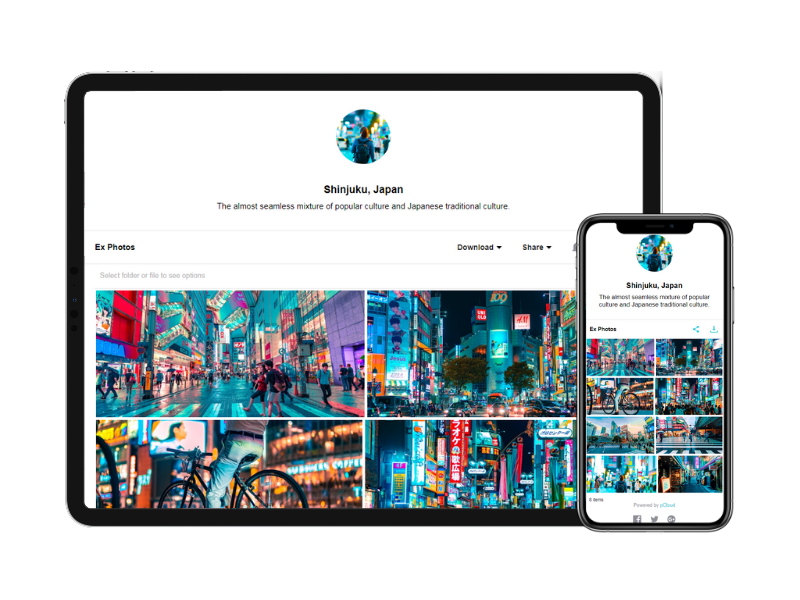
pCloud's latest feature, Branded links, allows users to customize download links with their brand's style and logo.

Users can also save sensitive information and private documents in the cloud, and have them available on any device. Nobody has access to these files, including the administrators of pCloud. With client-side encryption, files are encrypted locally on the user's computer and only the encrypted information is uploaded in the cloud.

Media

1 / 3

Top Performing Features

  • Dashboards

    Users can create, customize and share dashboards, which provide an overview of the most important metrics.

    Category average: 7.4

  • Uploading assets

    Ingestion of digital assets into a DAM platform can typically be made individually or in bulk and can occur through a native browser interface. Drag-and-drop features can streamline file ingestion.

    Category average: 7.9

  • Asset storage

    Centralized storage capacity and accessibility for centralized storage of marketing and brand assets. These can be anything from documents, audio files, videos, images, creative files (Adobe, etc.), etc. Outdated assets can be archived.

    Category average: 8.6

Areas for Improvement

  • Standard reports

    The software offers pre-built reports with metrics standard to the category.

    Category average: 5.8

  • Custom reports

    Users can create custom reports.

    Category average: 5.7

  • Data exportability

    Data can be exported via a CSV or Excel file for further reporting and analysis outside of the tool.

    Category average: 8.1

Disappointing experience for us with product and support after years without problems

Use Cases and Deployment Scope

We use pCloud as a cloud storage. We also use the synchronization feature for two-way synchronization between cloud and local machine, and shared folders.

Pros

  • pCloud Drive works well

Cons

  • In my experience, Synchronization on macOS is flawed
  • In my experience, the support is unresponsive

Return on Investment

  • As long as it worked, it was great.
  • Once we ran into issues, it became a nightmare for us, and we had no other option but to find a new provider.

Usability

Alternatives Considered

Dropbox

Perfect solution for cloud storage

Use Cases and Deployment Scope

As a digital agency we use pCloud to collect customer files and we use it to back up our managed Wordpress Sites. Also we use it to send bigger files to our customers in case needed.

Pros

  • Provide Cloud Storage
  • Reliability
  • Cost Efficient

Cons

  • The customizable branding could be improved

Return on Investment

  • Given that I have a lifetime deal and the company still exists the ROI is huge.
  • Fast way to share and collect files
  • Big Storage.

Usability

Alternatives Considered

Dropbox

Other Software Used

Book Like A Boss

pCloud, a great cloud storage solution for all your needs

Use Cases and Deployment Scope

I have been storing business documents, brand assets and personal data on pCloud for the past few years. Their service has been reliable during that whole time. I can request files or share files very easy. I upload my audiobooks and can listen to them everywhere with pCloud. I am happy with pCloud for both my personal and business use cases.

Pros

  • Store files
  • access files across platforms
  • share files to others
  • request files from others

Cons

  • happy with the service
  • works for me
  • works for me

Return on Investment

  • cost effective - cheaper than alternatives
  • stable cloud storage
  • Easy to use

Usability

Alternatives Considered

Google Drive and Dropbox

Other Software Used

HighLevel, Switchy.io

Powerful Cloud Storage

Use Cases and Deployment Scope

Simply one of the best cloud storage options available on the web. I've been using pCloud since 2014, so far it works well and helps me to sync all important files and documents across devices. One of the highlights of pCloud is its virtual drive. It doesn't take up space on our PC while syncing files. Yes, the virtual drive is the key here,

Pros

  • sync
  • easy to use
  • file sharing
  • virtaul drive

Cons

  • mobile app
  • passkey support
  • fast download

Return on Investment

  • collaboration
  • file sharing
  • encryption

Alternatives Considered

Google Drive, Dropbox, OneDrive and Icedrive

Other Software Used

Dashlane, Asana, Enpass, 1Password, Proton Pass, Proton Mail, Google Drive, Notion, Evernote, Dropbox

pCloud's Virtual Drive makes it the ideal cloud storage.

Use Cases and Deployment Scope

I have used pCloud's public folder to share files with clients. It's great that pCloud can do more than just share a link, but can set up a landing page where clients can view these links. These pages can be customized with our logo. It looks much more professional than just a simple link. Using pCloud's virtual drive saves hard drive space on my laptop so I can have more files easily accessible.

Pros

  • Public link page sharing.
  • Virtual Drive.
  • Large capacity.

Cons

  • Upload/Download speeds vary.

Most Important Features

  • Sharing link page.
  • Virtual Drive.
  • High Capacity.

Return on Investment

  • Save time from deleting and clearing up hard drive.
  • No longer need to pay for another photo hosting website.

Alternatives Considered

Google Drive

Other Software Used

CoolNew PDF, Navisite Productivity and Collaboration (Microsoft Office 365 and MDM)